

Review: Luminar 2018 version 1.2 Jupiter
Friday 6 July 2018, 14:07 by Michelle Peeters | 7,107 views | 0 commentsThis article was translated from Dutch with the help of AI. Read the original.
Since my first Macphun Luminar review about a year ago, a lot has changed. A Luminar Neptune version with an AI (Artificial Intelligence) filter was released afterwards.
But the most notable change is that 'Mac-only' Macphun released a Windows version of Luminar late last year and was renamed Skylum.
The 2018 version also came with many new features, making it a viable alternative to the monthly subscription-based Adobe Lightroom.
And if you look closely at the latest version of Lightroom, you will often see unique Luminar features, such as direct LUT access, appearing in it. Not bad for a piece of software that is barely three years old.
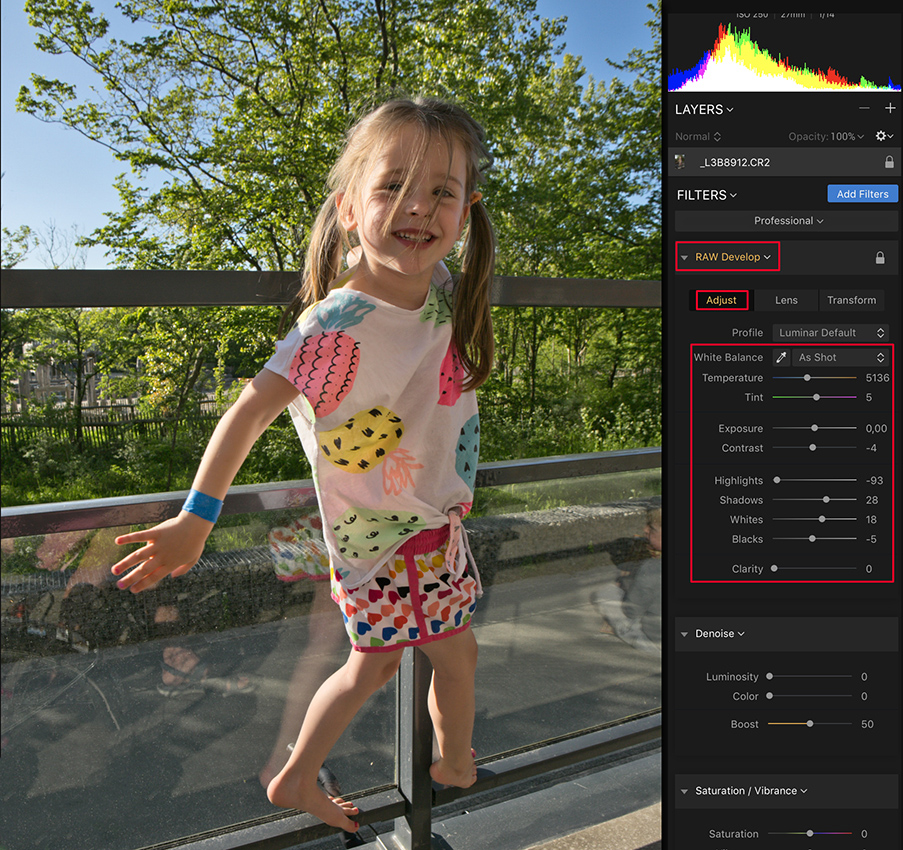
The updated Luminar Jupiter has now been made even faster, with performance improvements of up to 12 times. Several features have also been added to the Windows version of Luminar, which should make the Mac and Windows versions more comparable.
There have been some problems with Windows users who found the first release of Luminar for Windows rather unstable. I use an iMac myself, so I could not assess this.
However, I have read here and there that the latest Luminar Jupiter version now also runs smoothly on Windows.
What's new?
- Speed improvements: 2 to 12x performance improvements;
- Improved RAW conversion, better exposure calculation, smoother gradients, fewer halos and so on;
- Automatic removal of lens distortion;
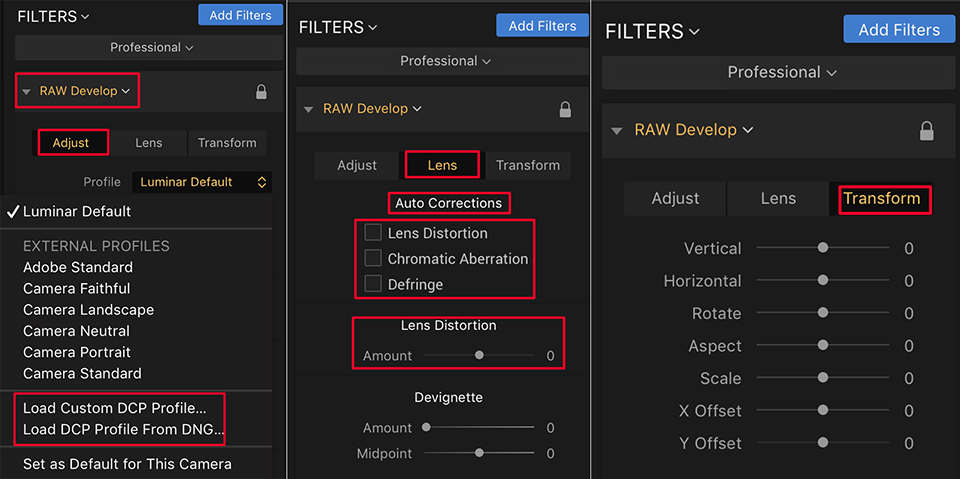
- Advanced support for DCP profiles, Mac only;
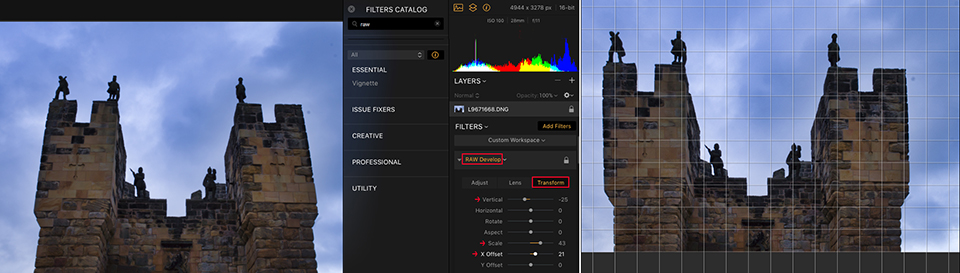
- Essential new features for Windows users, including batch processing, free transformation and flip and rotate functions.
Update automatically and for free
The update 1.2.0 for Luminar 2018 is a free update for all current Luminar 2018 users. As a new user, you pay 69 euros once for the package. It includes batch processing and a free transformation tool for the Windows version.
You also get more than 300 improvements and updates that make the application faster, more responsive and more useful.
Speed
The most obvious change is how quickly images now open and are ready to edit. It is a little difficult to compare absolute times with the previous version, but it seems to be much faster!
Large RAW files of around 30MB open in just a few seconds.
RAW file processing
I loaded a number of full RAW files of around 30MB. Handling clipped highlights and details in shadow areas are elements that you should be able to use to assess good RAW processing software.
I would need to do a lot of testing to be sure, but I think Luminar Jupiter has clearly improved when it comes to processing or recovering fine details.
Automatically removing lens distortion
Lens distortions are what Luminar thinks they are, so you should always check them. It worked well with some of my Canon lenses, but it can also fool you.
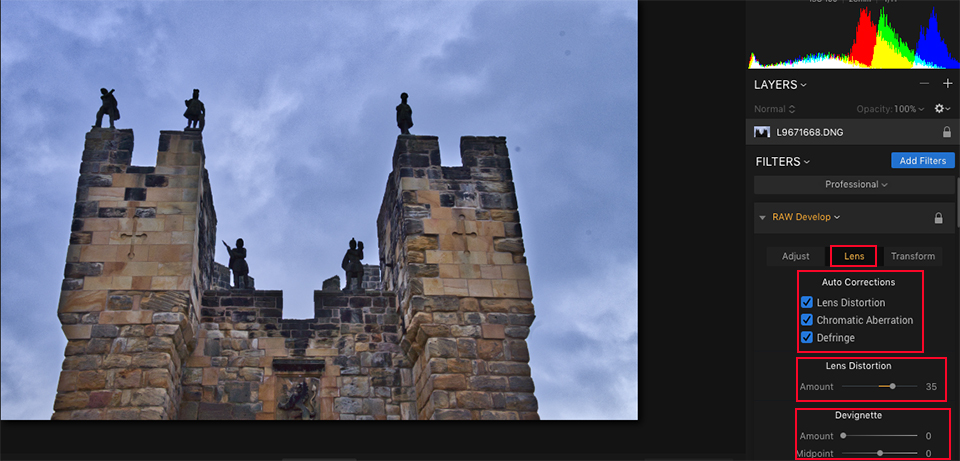
I have a number of Canon lenses that suffer almost no chromatic aberration. It sometimes seems that checking the CA option actually introduces it... But that may be my imagination. In most cases, including with Leica lenses, it does the image good!
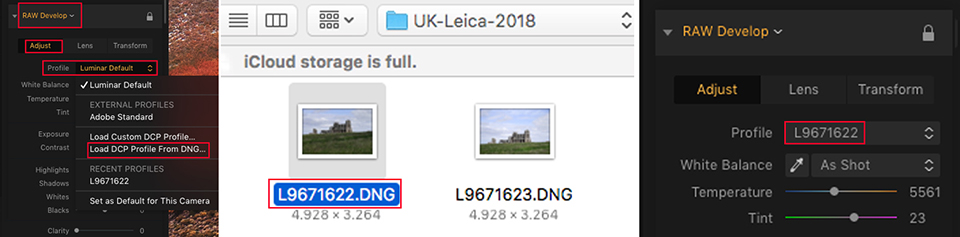
DCP profile support
Luminar can now work with colour profiles, including existing profiles or profiles obtained from Photoshop. These are the types of profiles you could create with an X-Rite ColorChecker passport.
It does show that Luminar's developers are serious about making RAW processing more capable.
Adobe and DxO have worked on this for years to get it right. So things are going well for Skylum! As with the removal of lens distortion, this option also works perfectly!
Conclusion
Luminar is getting better and better. They have taken the complaints seriously and have actually done something about them.
The image catalogue functionality is coming later this year. Although batch processing options are now available, this is clearly still in the 'in development' category.
Don't forget that a free trial version is available if you want to try it out on your own photos.
About the author
Michelle Peeters is fotografe en oprichter van DeuxBleus Fotografie. Michelle herkent het bijzondere in het gewone en het gewone in het bijzondere. Ze heeft zich nooit willen specialiseren en is daardoor van alle markten thuis.
You might also like
-
 Review: Luminar 3 with library feature
by Michelle Peeters
-
 Review: Luminar 4 Golden Master version
by Michelle Peeters
-
 Review: DesignCap (latest version)
by Michelle Peeters
-
 Luminar NEO gets a new update
by Nando Harmsen
-
 Review: Skylum's AI Sky Enhancer filter
by Michelle Peeters
-
 Review: Sony A7R V mirrorless camera
by Nando Harmsen
0 comments
Be the first to share what you think!
Have your say
Please note: Articles older than a week can only be commented on by signed-in visitors.Would you still like to comment? sign in or create a free account.
Become a better photographer every week
A practical photography tip in your inbox every week.
38,886 photography enthusiasts already receive the tips! More about the weekly mail. Or keep up to date via  Facebook.

Elja Trum
Photofacts; everything to do with photography!
Would you like to take better photos and keep up with what is happening in photography? Photofacts publishes articles that teach you something about photography — from a product announcement to a practical shooting tip or a look at a website. Photofacts covers photography every day and is a hobby project of Elja Trum's that got out of hand. The articles are written by a team of volunteer authors. If you would enjoy writing one or more articles for Photofacts, do get in touch.More about PhotofactsPhotofacts is made possible in part by
