

Macphun Luminar for Windows announced
Saturday 22 July 2017, 14:14 by Michelle Peeters | 6,966 views | 13 commentsThis article was translated from Dutch with the help of AI. Read the original.
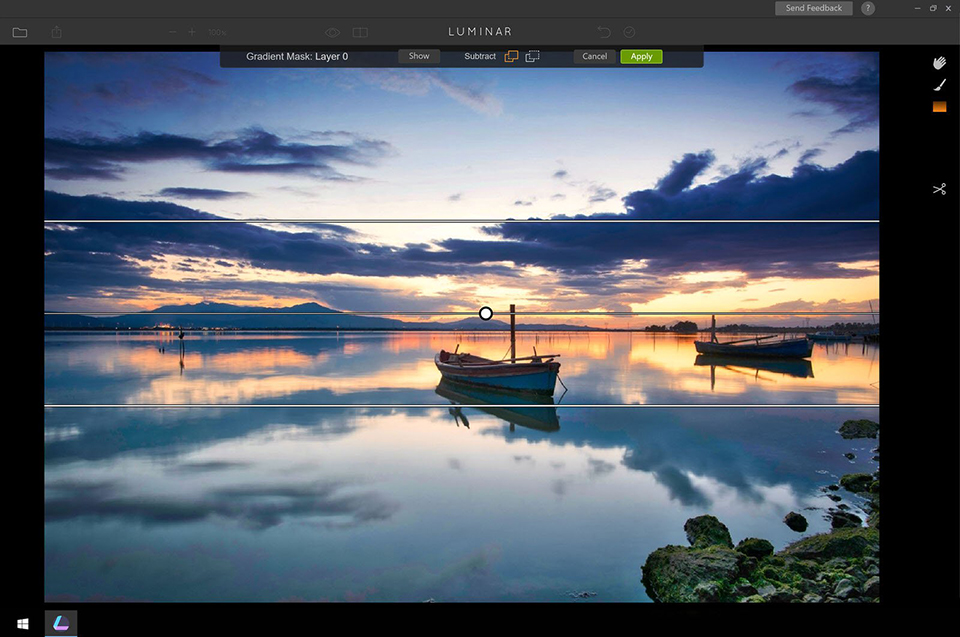
Macphun Luminar was a 'Mac Only' photo-editing package that was very easy to use and offered highly advanced features. As there was also a need for a Windows version, they have now developed one.
See the article about the latest version for Mac here: Luminar Neptune.
The beta version of Luminar for Windows can be downloaded from the Macphun website. This public beta version of Luminar for Windows includes the most important features of the Mac version.
The main features are: adaptive user interface, one-click presets (more than 50 predefined styles for every photo style), photo filters, RAW conversion (the latest file libraries), non-destructive workflow.
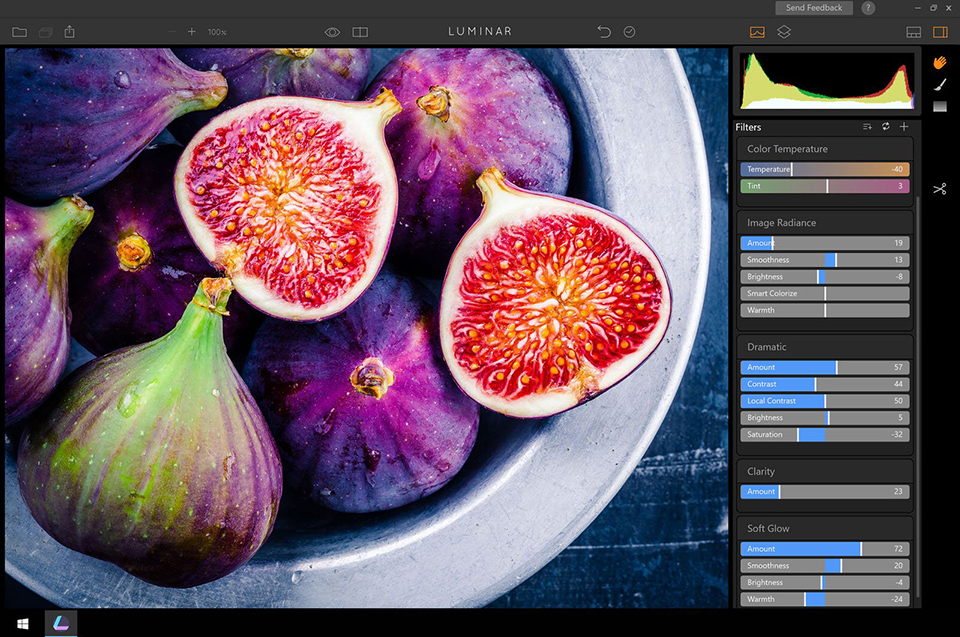
The plug-in functionality for Photoshop and Lightroom will be added in November 2017.
Not all Mac functionality is currently available in the Windows version of Luminar, but they will all have been added by the end of 2017, so the programmes will then be fully equivalent.
All in all, it sounds promising. I was unable to test the beta version myself because I do not have a Windows computer.
About the author
Michelle Peeters is fotografe en oprichter van DeuxBleus Fotografie. Michelle herkent het bijzondere in het gewone en het gewone in het bijzondere. Ze heeft zich nooit willen specialiseren en is daardoor van alle markten thuis.
You might also like
-
 Macphun Becomes Skylum
by Michelle Peeters
-
 Review: Luminar 2018
by Michelle Peeters
-
 Review: Macphun Noiseless 2016
by Michelle Peeters
-
 Review: Luminar 3 with library feature
by Michelle Peeters
-
 Review: Luminar 4 Golden Master version
by Michelle Peeters
-
 Review: Macphun Snapheal CK
by Michelle Peeters
13 comments
-

 martinphili wrote on Sunday 23 July 2017 at 10:11
| reply
Ik heb die beta versie ook niet kunnen testen omdat ik het programma niet aan de praat kon krijgen. Men stuurt keurig via de mail een code toe maar tijdens de installatie werd daar niet naar gevraagd.
This comment was written in another language and has not been translated yet.
Er ligt hier nog wat werk voor de ontwikkelaars
-
 Michelle Peeters wrote on Sunday 23 July 2017 at 13:10
| reply
@Martin: dat is raar... Kun je daar een melding van maken bij Macphun?
This comment was written in another language and has not been translated yet. -
martinphili wrote on Sunday 23 July 2017 at 16:07
| reply
Zou kunnen maar ik vind het wel goed zo. Ik heb niet de ervaring dat zulke meldingen mij nuttig zijn.
This comment was written in another language and has not been translated yet. -
 Lijan wrote on Monday 24 July 2017 at 14:12
| reply
Ik heb onlangs Luminar van Macphun aangeschaft. Bestaat er ergens een handleiding voor? Voorheen werkte ik met PS voor Windows en zit nu dus op Apple.
This comment was written in another language and has not been translated yet.
Hartelijk dank voor de reacties. -
Michelle Peeters wrote on Monday 24 July 2017 at 19:04
| reply
@Lijan: een handleiding heb ik zelf nooit gevonden. Er staan wel veel filmpjes en tutorials op de Macphun site.
This comment was written in another language and has not been translated yet. -
 Wim Hendriks wrote on Tuesday 25 July 2017 at 10:45 | reply
Dat is het manco bij veel van snel op de markt brengen,wat de andere al schreven ook ik kreeg het niet aan de praat ik heb wel geschreven ,geen antwoord op gekregen,maar ik vind bij het gene wat er is dat het eigenlijk niets toevoegt.
This comment was written in another language and has not been translated yet.
Ik blijf maar bij Lr. -
 guest wrote on Tuesday 25 July 2017 at 13:29 | reply
Bij mij ging de installatie prima, intro skippen code invoeren en email adres en het programma startte direct heel snel op.
This comment was written in another language and has not been translated yet. -

-
Michelle Peeters wrote on Tuesday 25 July 2017 at 14:10
| reply
Dan is het euvel inmiddels waarschijnlijk verholpen door Macphun!
This comment was written in another language and has not been translated yet. -
 bart telling wrote on Tuesday 25 July 2017 at 15:49 | reply
mijn eerste ervaringen zijn positief en ik ben benieuwd naar de plug in die blijkbaar met de rest in november voor Windows beschikbaar komt. Voor een prijs van 49 euro wil ik het wel aanschaffen
This comment was written in another language and has not been translated yet. -
 André Stevens wrote on Tuesday 25 July 2017 at 18:05 | reply
Heb Luminar beta voor Windows nu reeds een paar weken gebruikt. Vind het echt de moeite. Er moet nog aan gesleuteld worden maar het is ook een "beta" testversie. Programma belooft. Ik gebruik enkel Windows en het programma mag zeker naast de nieuwe Topaz Studio staan.
This comment was written in another language and has not been translated yet.
Zeker de reeds ingebouwde AI-filter is te proberen!
Had in het begin ook problemen met het registreren van de software. Maar Macphun heeft het probleem opgelost.
Ook werden reeds verschillende "webinars" gegeven over Windows Beta. Een plus punt vind ik persoonlijk!
Kijk uit naar de volledige versie. -
 Hans Coudyser wrote on Tuesday 25 July 2017 at 21:48 | reply
Heb het probleemloos kunnen downloaden. Versturen blijkt alvast vandaag niet te lukken. Werkt eenvoudig met veel mogelijkheden.
This comment was written in another language and has not been translated yet. -
 Michaël wrote on Wednesday 26 July 2017 at 15:03 | reply
Kreeg het programma niet werkend op pc.
This comment was written in another language and has not been translated yet.
Have your say
Please note: Articles older than a week can only be commented on by signed-in visitors.Would you still like to comment? sign in or create a free account.
Become a better photographer every week
A practical photography tip in your inbox every week.
38,836 photography enthusiasts already receive the tips! More about the weekly mail. Or keep up to date via  Facebook.

Elja Trum
Photofacts; everything to do with photography!
Would you like to take better photos and keep up with what is happening in photography? Photofacts publishes articles that teach you something about photography — from a product announcement to a practical shooting tip or a look at a website. Photofacts covers photography every day and is a hobby project of Elja Trum's that got out of hand. The articles are written by a team of volunteer authors. If you would enjoy writing one or more articles for Photofacts, do get in touch.More about PhotofactsPhotofacts is made possible in part by
