

Review: Sony a7r mark III
Friday 1 June 2018, 14:41 by Elja Trum | 8,533 views | 3 commentsThis article was translated from Dutch with the help of AI. Read the original.
The Sony a7r mark III was announced at the end of last year. An advanced all-rounder in a compact mirrorless camera body. I put the Sony a7r through its paces. Is the end of the DSLR near?
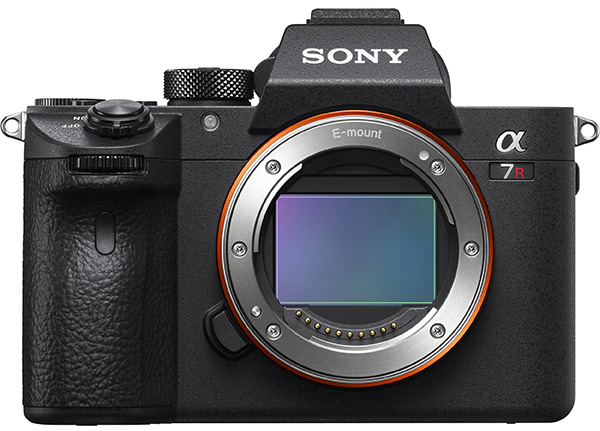
Sony Alpha 7r mark III specifications
- 42.4-megapixel full-frame BSI CMOS sensor
- 10 frames per second (with full autofocus)
- Sensitivity: up to 102,400 ISO
- 399 phase-detection and 425 contrast-detection points
- Improved autofocus and Eye autofocus
- 4K video
- Two SD card slots
- SuperSpeed USB (USB 3.1 Gen 1) and USB Type-C connection
- Batteries with more capacity than other Alpha 7 models
- Weight: 652 grams
» Also read our preview of the Sony a7r mark III.
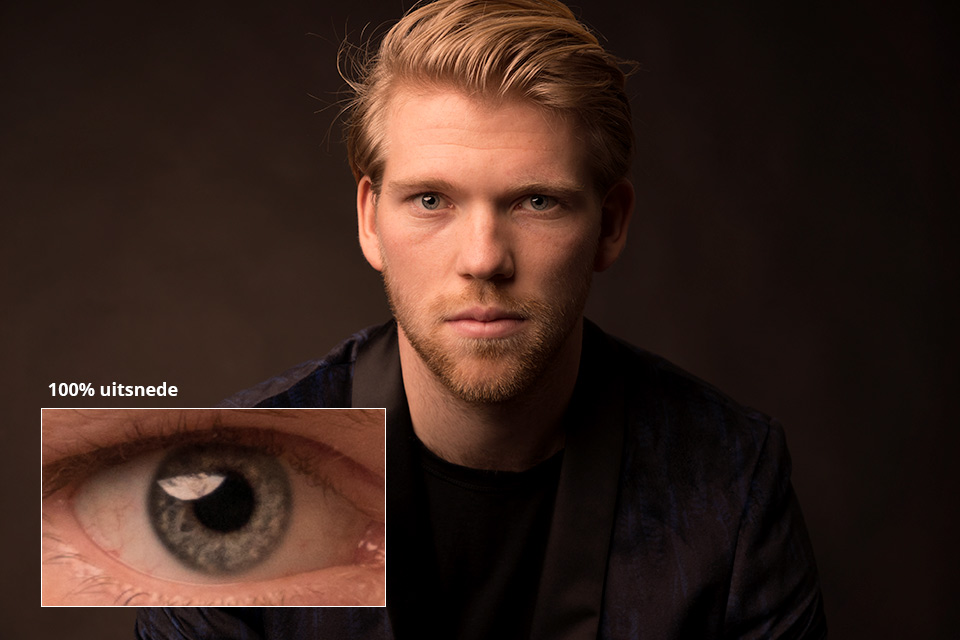
Like its predecessor, the Sony a7r II, this third model also has a 42-megapixel sensor. These are resolutions approaching what we are used to seeing from medium-format cameras. The images from this Sony really do bring medium format to mind.
You could say that around 20 megapixels is more than enough for most purposes, but editing photos from this camera is a real pleasure. The sharpness is fantastic and you can see every detail perfectly in a portrait. I love it.
Improvements
The Sony a7r mark II was already a fine camera, of course. The a7r mark III has quite a few great improvements, though. The dynamic range has been improved, the battery lasts longer, the autofocus has become much better, the image stabilisation has been improved, a second card slot has been added and a number of practical small changes have been made to the body.
All in all, quite a few improvements that make this camera more than a simple upgrade. It has really become a good camera, with little left to wish for.
Electronic viewfinder
If you still use a DSLR, as I do, the electronic viewfinder takes some getting used to.
When Sony introduced its first mirrorless cameras, an electronic viewfinder was not much good. By now they have become so good that it seems to offer only advantages over an optical viewfinder.
The main advantage is that you can already see the photo as you are going to take it before you take it. This makes working really pleasant because you can choose the settings in advance. You then only have to press the button to actually capture the image.
This works perfectly in many situations, but obviously not in all of them. For example, not in studio photography. Since the 'real' light is only there when you take the photo, you cannot judge it beforehand.
You can then set the camera so that the viewfinder image differs from your actual settings. Just put this option in your own menu, or under one of the function buttons on the body, and you can switch quickly and easily.
It is also immediately useful to choose to see your photo after taking it. That way you can check whether the image you have captured matches what you had in mind.
Battery life
An important complaint about the Sony a7r II was that the battery ran out so quickly. The good news is that this third version has a new battery. It is the same battery found in the Sony a9, the Sony NP-FZ100.
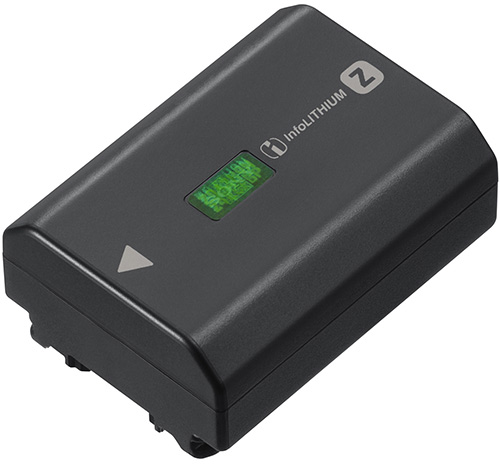
This battery lasts a good long time. During my review, I held a studio shoot where I photographed continuously for more than three and a half hours. During that time I took more than a thousand photos, and afterwards I still had 56 per cent battery remaining.
So you no longer need to carry three spare batteries when you go out for a day with your camera.
10 photos per second
The Sony a7r mark III can shoot at an impressive 10 photos per second. That is extremely fast, especially considering that these are 42-megapixel photos.
This also makes the a7r mark III interesting for people who occasionally do sports photography. For serious sports photographers, Sony also has the a9, which is a big step up with 20 frames per second. The 10 photos per second is already much more than most DSLRs can manage, though.
The a7r mark III can also reach 10 photos per second when using the physical shutter, not just the electronic shutter. The a9 can only manage 5 photos per second mechanically. If your flashes can keep up, you can therefore also reach 10 photos per second in the studio.
Video
For photographers who also want to get seriously into video, the Sony a7r mark III is an interesting choice. The camera can record 4K HDR video.
If you are working professionally, you can use the S-Log3 profile. This gives you a very flat image that you can adjust in editing afterwards to get the most out of the footage. It should be noted that the footage is 8-bit. It would have been nicer if it had been 10-bit.
The 120 frames per second mode is also useful, in full HD format, allowing you to capture beautiful slow-motion footage.
Sony offers a Super 35 mode, approximately APS-C size, which uses only part of the full-frame sensor to record video, including 4K. According to Sony, the image quality in this mode is better than in the mode that uses the full sensor. Although the difference should not be very large.
What is very useful about this mode is that you can effectively zoom in at the press of a button. Assign the Super 35 mode to one of the customisable buttons and you can switch very quickly between, for example, a wide-angle lens and a standard zoom.
With a workflow where the final result is a full HD video, you can zoom in on the image again by cropping. This gives you a huge range with one lens, such as a 35mm, without having to change lenses.
Two memory cards
You can fit two SD memory cards in the Sony a7r III. This is an option many people have been waiting for for some time. Only one of them, slot 1, supports a UHS-II memory card.
Sending photos wirelessly
While shooting, you can wirelessly send photos to a tablet or smartphone app. This lets you view your photos immediately on a larger screen.
During my review, I tried the PlayMemories Mobile app on an iPad. Unfortunately, during a mandatory registration process, the app made me click on traffic signs for minutes to prove that I was human. I eventually gave up, apparently I am not human.
I eventually managed to install the app on my iPhone. What I found useful was the option to send a nice photo to your phone during a quiet moment in a shoot, make a quick edit and send it on straight away. Great!
You can also install the PlayMemories Home application on your desktop computer. You then have to connect your Sony camera to your computer once via a USB cable. After that, you can send your photos wirelessly to your computer via the local Wi-Fi network.
To make this work properly, you do need to disable the connection to your smartphone.
Custom buttons and menu
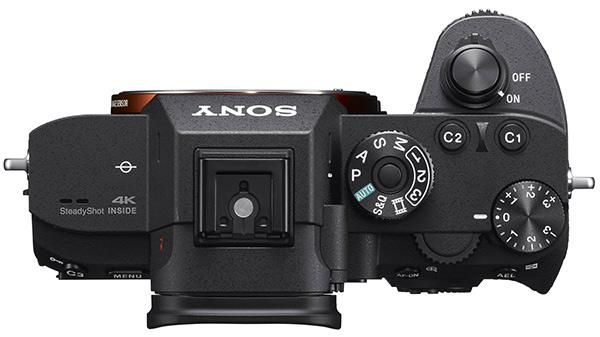
The body of the Sony a7r mark III has a number of buttons to which you can assign functions manually. That is very useful, because Sony's menu, despite quite a few improvements, is still packed and it is often difficult to find a desired setting quickly.
You can therefore assign frequently used functions to these buttons. The buttons can even have a different function in photo, video and playback modes. Handy!
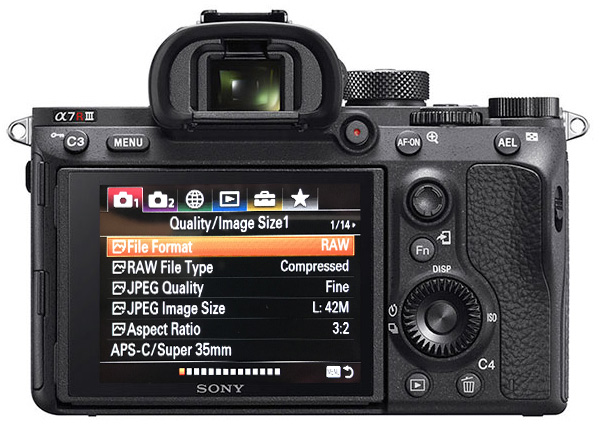
It is also very useful that you can now create your own menu in the last tab of the menu. Here you can place frequently used options that you do not want to assign to a button, but that you do want to be able to find quickly. For example, the option to format your card.
Straight out of the box, working with the Sony is cumbersome, but once you have used it for a while and saved all your frequently used functions in a convenient place, everything works very quickly and smoothly.
Disadvantages
In my view, there are very few disadvantages left to find in this camera. They are usually small things.
For example, I wonder why the battery cover does not close automatically when you push it shut. The memory card slot cover does, but you have to push the battery cover shut manually and then slide a small latch closed to stop the cover from springing open again. Strange.
I consider the menu a more significant drawback, though. There is an enormous amount you can configure on this camera. That is useful, but finding a specific option requires a proper search. The names are often not immediately logical either.
As mentioned above, it is ultimately quite workable once you have set up the camera exactly as you want it. Before you get there, though, you will easily be a few weeks further on.
Conclusion
I'm convinced. Sony, and Fujifilm, have outperformed DSLRs with their mirrorless cameras. Excellent image quality, even at higher sensitivities, fast autofocus and frame rates, and 4K video.
Live view in the viewfinder even makes a mirrorless camera better than a DSLR. You can literally see what you are going to photograph. Ideal.
The Sony a7r III also combines all of this with a 42-megapixel resolution. That makes this camera more than impressive and an absolute recommendation. The only disadvantage may be the high price, although in my view it is appropriate for what you get.
If your budget does not stretch that far, the Sony a7 mark III is an interesting alternative, as are Fujifilm's mirrorless cameras. Fujifilm also has the advantage of cheaper lenses.
As I said, I'm convinced. I bought a Sony a7r mark III. My Canon has not left the house just yet, but I am genuinely very enthusiastic about this little all-rounder.
More information
- Review of the Sony a7r III by DP Review
- Review of the Sony a7r III by Imaging Resource
- Sony a7r III first look by Frank Doorhof
- 15 reasons to upgrade to Sony a7r III
About the author
Elja Trum is the founder of Photofacts and online photography course website Photofacts Academy. He has been writing about photography since 2006. Elja is also the author of (Dutch) books on composition, black-and-white photography, flash photography and portrait photography.
You might also like
-
 Review: Sony A7R V mirrorless camera
by Nando Harmsen
-
 Sony announces successor to the Sony A7R IV, the camera with AI
by Nando Harmsen
-
 Review: Sony A9 mark III
by Nando Harmsen
-
 Review: Sony A1 mirrorless camera
by Nando Harmsen
-
 Sony Alpha a7s Mark III announced
by Elja Trum
-
 Sony Alpha 7C compact mirrorless camera announced
by Elja Trum
3 comments
-
 Dave Zuuring wrote on Tuesday 5 June 2018 at 10:15 | reply
hey Elja, do you still use your L lenses? Which adapter do you use then? What was the deciding factor besides the fact that it is still a substantial investment?
Translated from Dutch. -
 Mario Bentvelsen wrote on Tuesday 5 June 2018 at 12:27 | reply
What do you think of the color rendition, particularly the rendition of skin tones?
Translated from Dutch. -

 Elja Trum
wrote on Friday 8 June 2018 at 11:15
| reply
@Dave; No, I don't use an adapter (yet). I bought a 24-105mm f/4, a 35mm f/2.8 and a 55mm f/1.8 from Sony as well.
Translated from Dutch.
For now, I'm keeping my 5D Mark III alongside it with all its lenses, so I can still choose based on what I think I need.
The deciding factor for me was that at Photofacts (Academy) we also use the camera a lot for video. In addition, 4K is something Canon still doesn't offer (well).
In terms of photography, I find the compactness, the wide dynamic range and the (details in the) 42 megapixels the main reasons to make the switch.
@Mario; I have no complaints about the color rendering. Skin tones are fine too. Perhaps because I came from Canon, I make the skin tones a little redder/yellower (in post-processing) than the camera renders them. I hadn't consciously thought about that yet, by the way.
Have your say
Please note: Articles older than a week can only be commented on by signed-in visitors.Would you still like to comment? sign in or create a free account.
Become a better photographer every week
A practical photography tip in your inbox every week.
38,886 photography enthusiasts already receive the tips! More about the weekly mail. Or keep up to date via  Facebook.

Elja Trum
Photofacts; everything to do with photography!
Would you like to take better photos and keep up with what is happening in photography? Photofacts publishes articles that teach you something about photography — from a product announcement to a practical shooting tip or a look at a website. Photofacts covers photography every day and is a hobby project of Elja Trum's that got out of hand. The articles are written by a team of volunteer authors. If you would enjoy writing one or more articles for Photofacts, do get in touch.More about PhotofactsPhotofacts is made possible in part by
