

7 reasons to choose Capture One instead of Lightroom, plus a bonus for Sony users
Monday 28 April 2025, 15:30 by Antonette de Groot | 8,589 views | 16 commentsThis article was translated from Dutch with the help of AI. Read the original.
When you want to edit your photos, you have quite a wide choice of photo editing programmes.
What may determine your choice is whether you want an editing programme for occasionally editing a photo, or whether you are looking for a programme that contains your entire workflow, from organising to editing to exporting.
There are not that many workflow programmes. If you ask the photographers around you what they use, many will say Adobe Lightroom, but here and there you will also come across people who prefer Capture One.
After using Lightroom for years, I switched completely to Capture One a few years ago, mainly because of the bonus reason at the end of this article, but number 1 also played a big part.
I still use Lightroom regularly, including recently. The reasons I mention here still apply, including to the latest versions of these programmes.
1: RAW conversion
If you open the same photo taken in RAW in Capture One or Lightroom, the result will not be exactly the same. That is because each programme uses its own profiles to interpret and display the information stored in a RAW file.
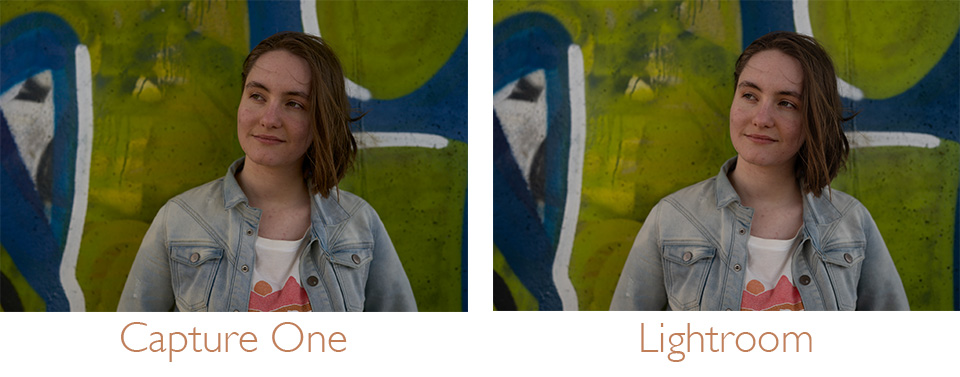
Think of it as ingredients used for different dishes. The same ingredients can still be used to make a completely different dish.
When I open a photo in Capture One, I find the colours a little more vibrant and the image immediately looks more 'finished'. I often spend less time getting the image how I want it in Capture One than in Lightroom.
In the image under the heading, you can see the differences in brightness, skin tone and shades of blue, such as in the jacket.
2: Luma curve
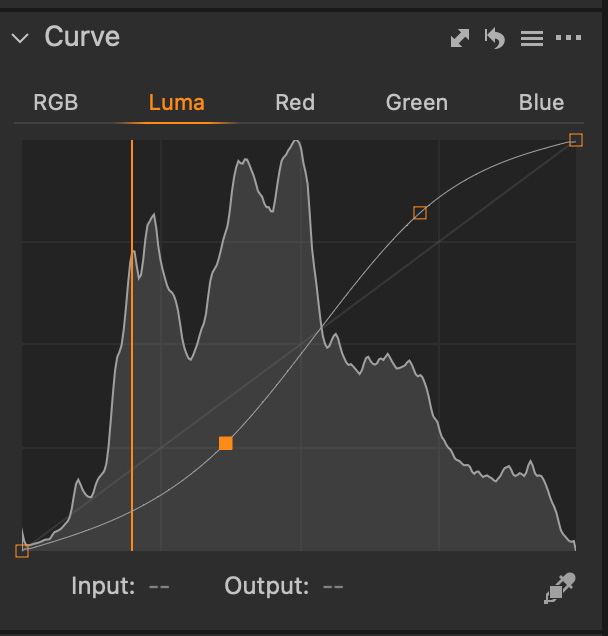
If you want to add contrast to a photo, you can do this with the contrast slider, or by creating an S-curve in your curves panel.
The disadvantage is that this also changes your colours. It will often add more saturation as well, which you would then have to adjust.
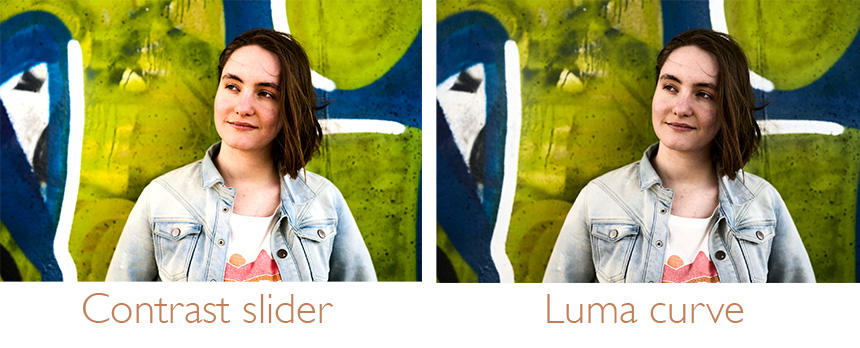
Capture One has a “Luma” curve, where only the brightness gets that S-curve, and not the colours. You can then add contrast without changing the saturation.
3: Apply intelligent masks to multiple photos
If you create a mask using one of the intelligent, or AI, options, subject, background or person, you can apply it to subsequent photos without having to make the selection again.
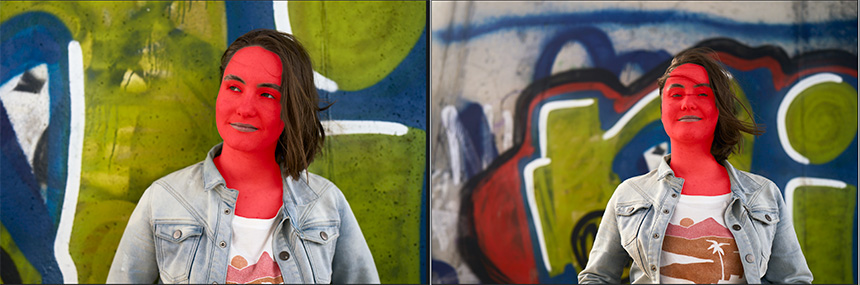
You copy and paste your edits onto the photo you want, and Capture One will then recognise the subject, background or person or people in that new photo and apply the edits there.
4: Layers
If you have ever worked with Photoshop, you will be familiar with layers. You place the edits on top of the photo, as it were, with each edit on its own layer.
The advantage over working directly on the photo is that you can see better what you have changed. You can also make those changes have more or less impact by making the relevant layer more or less visible.
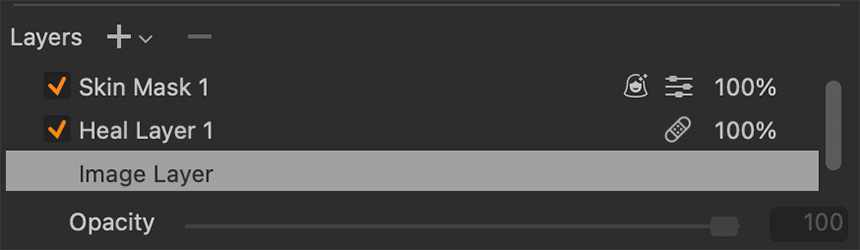
In Lightroom, you can achieve something similar with masks, but I find it much more user-friendly and clearer in Capture One.
5: Match look
A fairly new feature in Capture One is Match Look, or Apply Look. This is not a hard 'copy and paste' function that transfers the edits from one photo to another. Instead, the photos are interpreted and an attempt is made to create consistency between them.
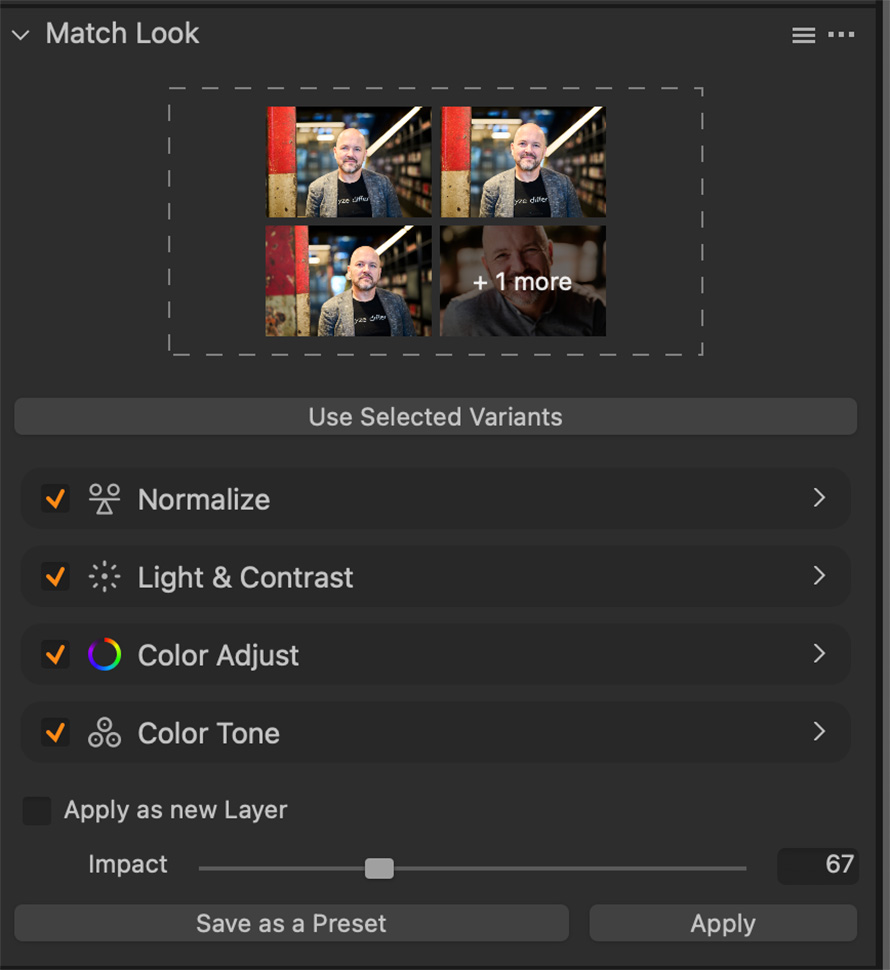
Unlike with a preset, you can see exactly what has been adjusted to create this look. You can therefore easily change an edit if it does not quite fit with the rest of the series.
This feature works best when you give Capture One several photos to base the look on.
I also never use this feature at 100%. 80% or lower often gives a better result, and it also makes a difference whether you edit many photos at once or a smaller number. For me, a smaller number would be 25, for example, while many would be 100 or more.
So if you have edited a photo that you think turned out really well, you can recreate it by applying Match Look. You can use photos from the current catalogue or session for the Look, but also photos stored elsewhere on your computer.
You drag them into the Match Look window and then choose which photos you want to apply it to. Ideal if you have a large series of photos that you want to give a consistent look.
6: Sessions and catalogue
Capture One gives you two ways to organise your photos: the Catalogue and Sessions. You usually collect lots of photos in the catalogue, and can then find them again using keywords, dates or other metadata. I use one catalogue per year for my personal photos.
In a session, you usually put the photos you take on one day or for one particular purpose. I use these for editing client photos, or when I have photographed something special somewhere, such as an event.
Capture One creates folders for you where you can put all your photos, your selection and, something I use a lot, the exports. You then have everything from an event or assignment together, which I find very useful.
At the end of the year, you can merge all those sessions into a catalogue if you find that easier. I do not, because I already save my photos by year, month and session, so I can easily find photos again if necessary.
7: Exporting
Once you have finished editing your photos, Capture One offers you many options for exporting them. For example, you can save to multiple folders in different formats at the same time. And without having to set up much else, there are useful presets for different purposes, such as exporting for the web.
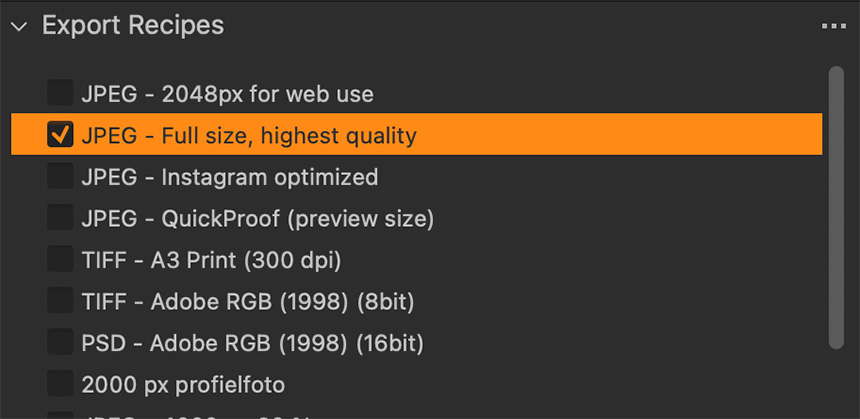
You can adjust these 'recipes' to suit your own needs. For example, I use the option to automatically rename the photos during export to match the folder they are saved in. But the possibilities are almost endless.
Bonus reason for Sony users: You can shoot tethered with all cameras
The newer cameras can also be used with Lightroom, but popular models such as the Alpha7III are not supported by Adobe.
Using a workaround with Imaging Edge Desktop and a hot folder in Lightroom, you can import fairly directly, but the possibilities with Capture One are greater, as it also connects directly to Capture One.
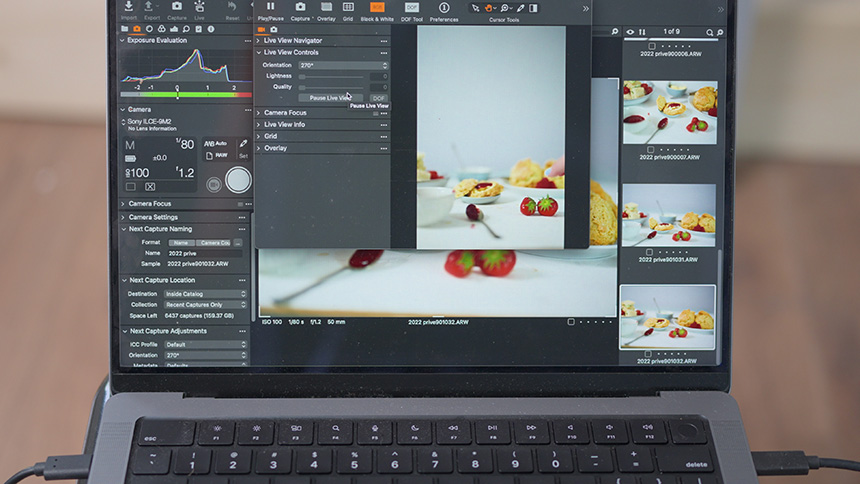
Especially if you use the Studio version of Capture One, you can perform intelligent crops directly during portrait photography, for example. In all versions, you can use an overlay so that you can see exactly where text would appear on a photo, for example, or if you want to recreate another photo precisely.
On Photofacts Academy, you can take both a basic Capture One course and a brand-new course covering more extensive and newer features!
About the author
Antonette vindt veel facetten van fotografie leuk. In haar eigen studio Amfion fotografie maakt ze vooral portretten en geeft ze ook workshops. Getrouwd met Johan en moeder van Ghislaine. Hier op photofacts schrijft ze graag doe-het-zelf artikelen en productreviews.
You might also like
-
 5 tips to work faster in Lightroom Classic
by Thijs Schouten
-
 Spring in pictures - photos from our Photofacts Academy community
by Nando Harmsen
-
 Preview: Sony Alpha 7R IV
by Aäron Nasarany
-
 Improve your workflow with your own Lightroom scripts
by Dick Holtman
-
 Lightroom gets powerful masking capabilities
by Elja Trum
-
 Sony A6600 and Sony A6100 announced
by Aäron Nasarany
16 comments
-

 K.J.Schilstra
wrote on Tuesday 29 April 2025 at 10:40
| reply
K.J.Schilstra
wrote on Tuesday 29 April 2025 at 10:40
| reply
And 2 more very important reasons..
Translated from Dutch.
Capture One is not from the USA!
Capture One does work in the studio with tethering for advanced cameras, and Lightroom hasn't supported that for a year already! -
 Antonette de Groot
wrote on Tuesday 29 April 2025 at 12:26
| reply
Antonette de Groot
wrote on Tuesday 29 April 2025 at 12:26
| reply
Oh I didn't even know that last part. Which cameras, for example, don't?
Translated from Dutch. -
 Klaas wrote on Tuesday 29 April 2025 at 10:56 | reply
Thanks for the info. Still, a few questions:
Translated from Dutch.
Can you also transfer the Lightroom catalog? You must also have a lot of photos in the LR catalog. And having to sort through all those years of photos again...
Typical Dutch question: what about the costs? -
Antonette de Groot
wrote on Tuesday 29 April 2025 at 12:32
| reply
You're welcome! Unfortunately, not one-to-one. When importing my photos, I always renamed them, saved them by year, by month, by day, so I can generally find photos from before my switch that way, but it is indeed a bit hard to swallow. All costs are listed here: https://www.captureone.com/en/pricing/capture-one-pro Capture One still offers a stand-alone version alongside the subscription options. I once upgraded from a Sony Pro version and because of that I still get an annual discount. There is often some advantage to be gained on Black Friday as well, but don't hold me to that!
Translated from Dutch. -
K.J.Schilstra
wrote on Tuesday 29 April 2025 at 13:04
| reply
Canon R5mii
Translated from Dutch. -
Antonette de Groot
wrote on Tuesday 29 April 2025 at 14:01
| reply
Notable! My Sony Alpha 1 II does, for example, but indeed the older and still widely used models like the Alpha7III don't.
Translated from Dutch. -
 T. van Weerd wrote on Tuesday 29 April 2025 at 13:29 | reply
I found a very good alternative in Luminar Neo; excellent support, I often get an answer to a question the same day.. In addition, of course, there is also Silkypics and ACDSee. All considerably cheaper.
Translated from Dutch. -
Antonette de Groot
wrote on Tuesday 29 April 2025 at 13:58
| reply
All perfectly good options indeed, though for my workflow I really do need tethering and that narrows the selection down quite a bit.
Translated from Dutch. -
 guest wrote on Tuesday 29 April 2025 at 14:01 | reply
Standalone version does not support tethering for newer cameras..!
Translated from Dutch. -
 Marcel wrote on Tuesday 29 April 2025 at 15:20 | reply
After having used PhotoShopElements for years...and years... and years..., I have to get quite used to Capture One Pro (I had bought a Fujifilm GFX 50 SII). I still regularly fall back on PSE. It seems as if CO is much more confusing/less logical. It's as if you arrive in a new city where you are constantly lost.
Translated from Dutch.
Sometimes I do a comparison between CO and PSE, but I actually don't see any difference. CO also often asks for a license confirmation again when starting up (for the umpteenth time).
Maybe an extensive Capture One course on Photofacts sometime??
kind regards
Marcel -
Antonette de Groot
wrote on Tuesday 29 April 2025 at 18:10
| reply
Oh I only get that license confirmation with a new version, are you working on Windows or Apple? Yes, it definitely takes some getting used to! In the beginning I made c1 look as much like LR as possible, so the photos in the strip at the bottom and so on. There are now two courses on Photofact Academy. The links are in the article!
Translated from Dutch. -
 Paul eos wrote on Tuesday 29 April 2025 at 16:21 | reply
Why would you use an external program for tethering if you have a Canon? Canon has a great tethering program, maybe one downside, it is completely free if you have a Canon.
Translated from Dutch. -
Antonette de Groot
wrote on Tuesday 29 April 2025 at 18:04
| reply
Well, I don't have a Canon... Sony also has a free program (Imaging Edge Desktop) for Tethering that I can certainly recommend to everyone for occasional use.
Translated from Dutch. -
 Andy eos wrote on Tuesday 29 April 2025 at 18:26 | reply
Capture One is for Sony. Then you might as well use DPP (Digital Photo Professional) for Canon, it’s free for Canon users.
Translated from Dutch. -
Antonette de Groot
wrote on Tuesday 29 April 2025 at 22:57
| reply
Capture One was developed for Phase One cameras and only became available for other brands later. It has profiles for all camera brands. And you can also use, for example, Fuji profiles for Nikon cameras and whatever combination you could think of. In the past, there have been 'Express' (simplified/free/cheaper) versions for Fuji and Sony, but it is not a Sony program.
Translated from Dutch. -
Marcel van den van den Heuvel wrote on Wednesday 30 April 2025 at 07:23 | reply
Windows, Antonette.
Translated from Dutch.
Oh, I apparently read right over the courses
Maybe it would be good to watch the basic course again and then the advanced course.
Thanks for your answer.
N.B. When I switched from Canon to the Fujifilm camera, I also had to get used to the Fujifilm a lot. So many settings. And the manual does explain what is where, but not why! I can also see a good course in that!
Kind regards
Marcel
Have your say
Please note: Articles older than a week can only be commented on by signed-in visitors.Would you still like to comment? sign in or create a free account.
Become a better photographer every week
A practical photography tip in your inbox every week.
38,937 photography enthusiasts already receive the tips! More about the weekly mail. Or keep up to date via  Facebook.

Elja Trum
Photofacts; everything to do with photography!
Would you like to take better photos and keep up with what is happening in photography? Photofacts publishes articles that teach you something about photography — from a product announcement to a practical shooting tip or a look at a website. Photofacts covers photography every day and is a hobby project of Elja Trum's that got out of hand. The articles are written by a team of volunteer authors. If you would enjoy writing one or more articles for Photofacts, do get in touch.More about PhotofactsPhotofacts is made possible in part by
