

Adobe warning: not compatible. What now?
Wednesday 3 December 2025, 16:32 by Nando Harmsen | 2,164 views | 5 commentsThis article was translated from Dutch with the help of AI. Read the original.
New versions of Adobe's software are released every year. At some point, you will get a 'not compatible' message. This certainly applies if you are using an older computer.
Having a new version of the software you use to manage your photos on your computer every year is of course great. That is one of the things you pay those annual costs for. However, these new versions do come with new requirements.
Every new software version of Photoshop, Lightroom and Lightroom Classic demands more from your computer. More memory, more processing power, more storage and better graphics performance. So there will come a point when your computer no longer meets the requirements.
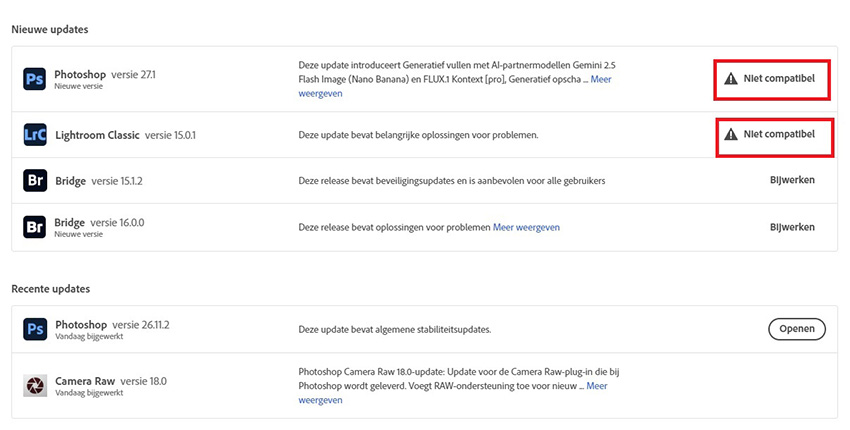
If that is the case, you can no longer install the latest version of the software. Your computer no longer meets the minimum system requirements for the software. To put it bluntly: your computer is too old.
That may indeed be the case if you have been using the same computer for five or ten years. But perhaps you have a more recent computer. In that case, you may not have enough memory, or your graphics card may not be fast enough.
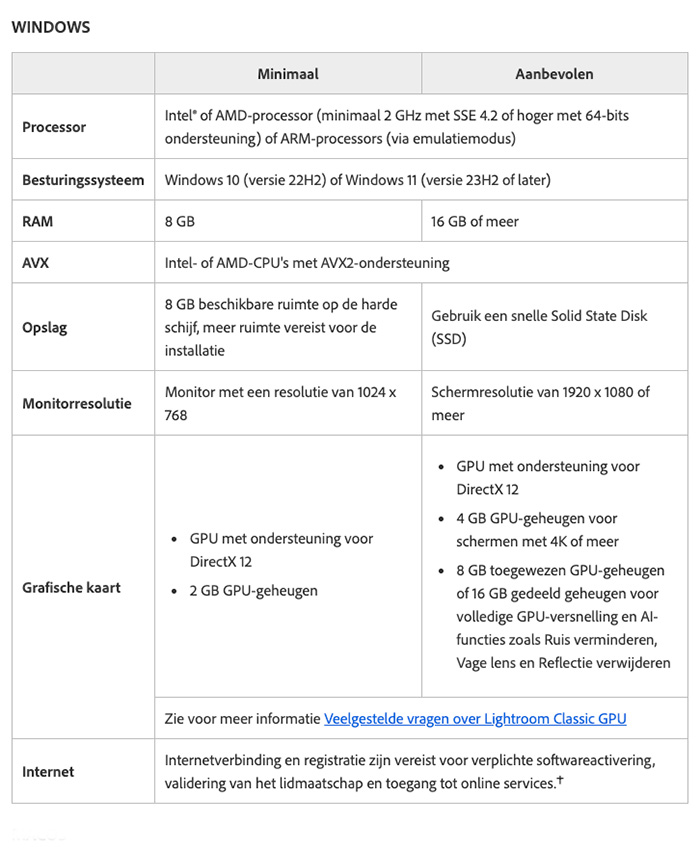
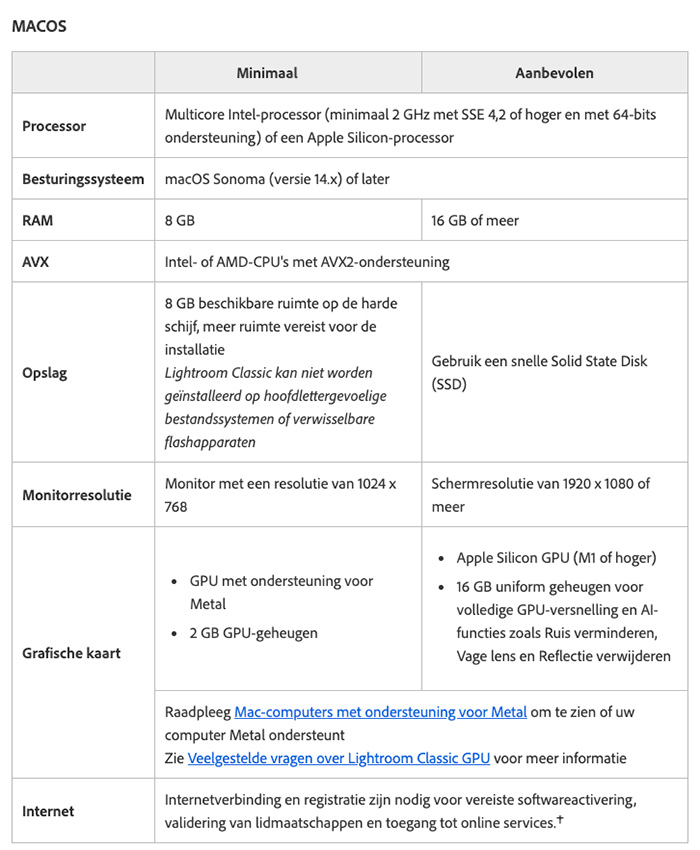
Above are the minimum system requirements for Lightroom Classic version 15. You can find them on Adobe's website. You can find them for Lightroom here.
Once you reach this point, you have no choice but to upgrade your computer, or buy a new one if your computer is indeed very old.
Sometimes an upgrade is enough, such as installing more RAM. Or a larger hard drive. Or a new graphics card. Sometimes you have to upgrade so much that it is cheaper to buy something new.
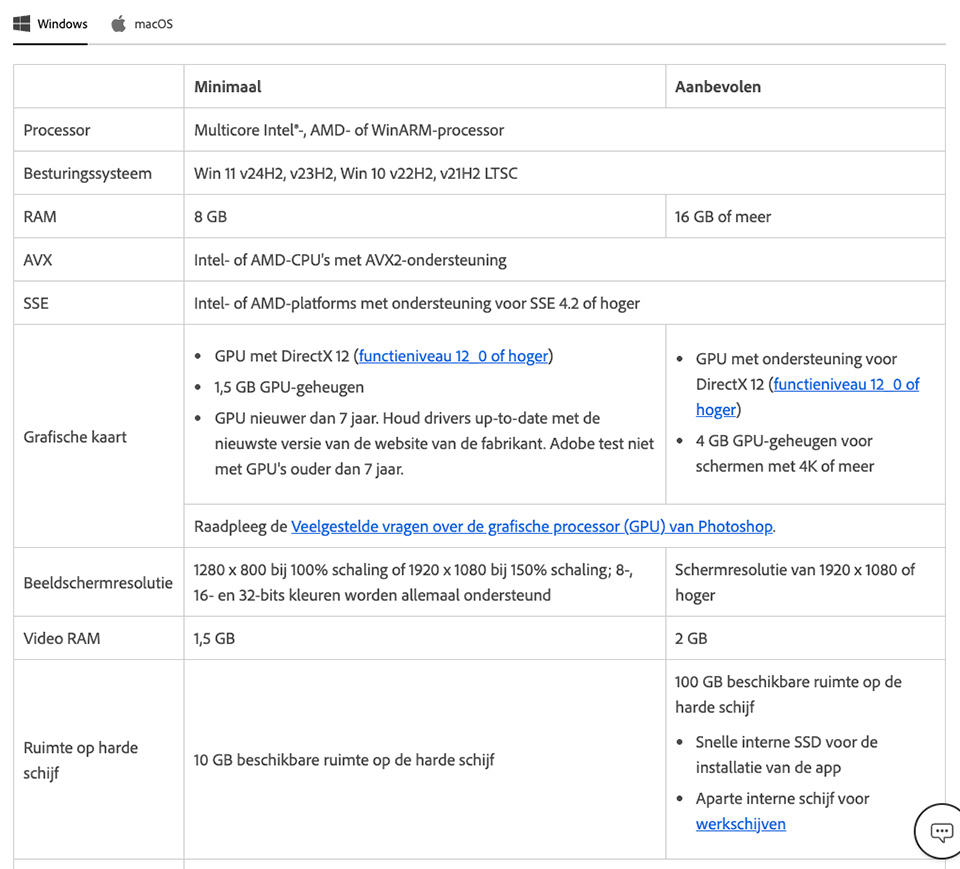
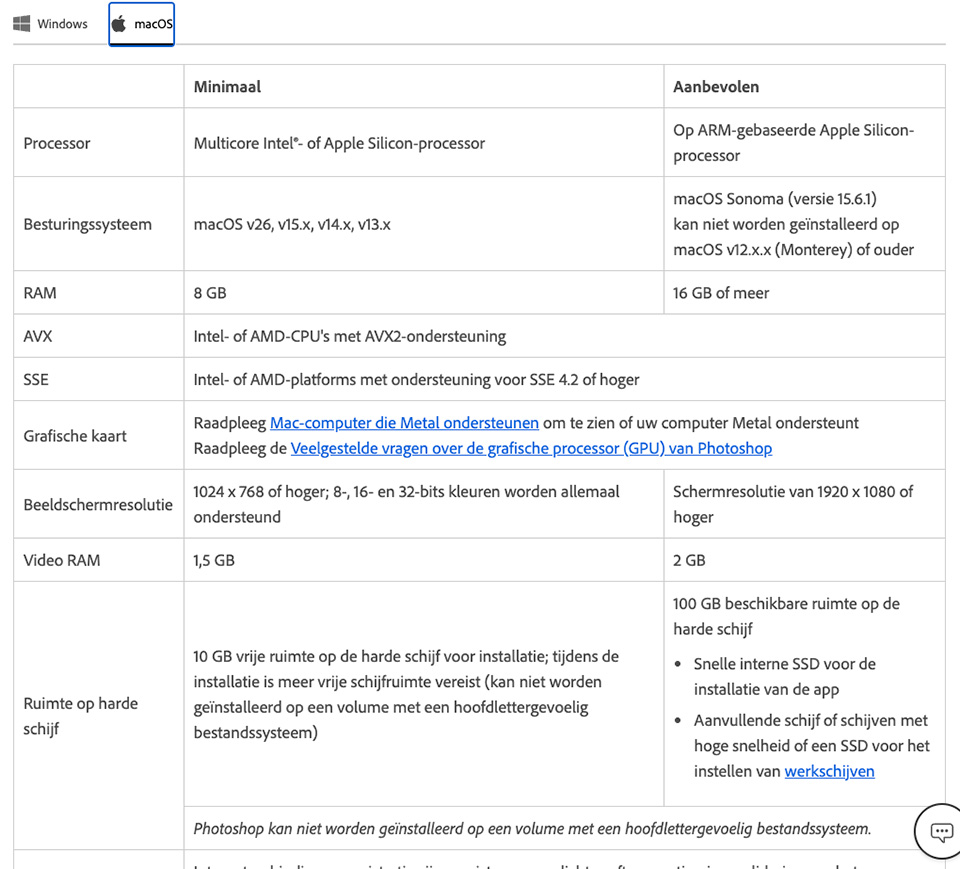
Above are the minimum system requirements for Photoshop version 26. You can find them on Adobe's website.
Having to buy a new computer is of course frustrating, but that is how it works if you want to have the latest software. If you do not want to upgrade or buy a new computer, you will have to stick with the latest software that still works.
However, this does not mean that you can no longer use the software. Thankfully. Older versions of Lightroom, Lightroom Classic and Photoshop still work. And they will continue to do so. In Adobe's case, for a long time yet.
Software is therefore the same as cameras. If your camera is too old, you have to buy a new one if you want to use the latest features. If your computer is too old, you have to buy a new one to be able to use those latest features.
Or you can choose alternatives such as Luminar, Affinity or whatever. But bear in mind that here too, the latest software or upgrades may eventually start showing a 'not compatible' message.
About the author
Nando Harmsen has been photographing for more than 40 years. He specialises in wedding photography and landscape photography. Nando also gives talks, workshops, masterclasses and photo trips, and regularly reviews new and interesting equipment.
You might also like
-
 Adobe updates Lightroom (Classic) with new AI masks
by Elja Trum
-
 The new updates for Adobe Lightroom and Photoshop
by Nando Harmsen
-
 Updates for LrC, LR and ACR
by Nando Harmsen
-
 Lightroom updates 2025, with more useful AI features
by Nando Harmsen
-
 The new Lightroom update now offers super-resolution
by Nando Harmsen
-
 New updates in Adobe Lightroom
by Nando Harmsen
5 comments
-
 Henk de Reus wrote on Tuesday 9 December 2025 at 10:43 | reply
Thanks for the clear explanation, Nando!
Translated from Dutch.
It probably has to do with the AI functions in this context, which require quite a bit of computing power. -
 Paul wrote on Tuesday 9 December 2025 at 14:33 | reply
I can still understand the "not compatible" notification, but I received a notification from Adobe saying that they denied my access because they believed that my Adobe film software was being used by different people in my company. I don't have a company at all and I'm the only one who works with that Adobe film software (Premiere). Contact with Adobe was anything but smooth and that's why I stopped everything with Adobe and looked for and found an alternative.
Translated from Dutch. -
 Marleen wrote on Tuesday 9 December 2025 at 15:20 | reply
We received this notification too, created a new password, and the problem was solved
Translated from Dutch. -
 h.dereus wrote on Saturday 20 December 2025 at 20:22
| reply
h.dereus wrote on Saturday 20 December 2025 at 20:22
| reply
Hello Marleen, what do you mean by 'problem'? The notification 'Not compatible' or does it refer to the problem with Paul (software used by different people).
Translated from Dutch.
If it refers to the first one then I don't understand that I do get the notification 'not compatible' on my PC and not on my somewhat newer laptop, on which the download did succeed. -
Paul wrote on Tuesday 9 December 2025 at 16:43 | reply
Thanks Marleen for your answer, unfortunately I didn't know about that other password. I have now purchased DaVinci Resolve Studio and am very happy with it. There is also a free version of DaVinci Resolve available, but it has somewhat fewer features.
Translated from Dutch.
Have your say
Please note: Articles older than a week can only be commented on by signed-in visitors.Would you still like to comment? sign in or create a free account.
Become a better photographer every week
A practical photography tip in your inbox every week.
38,901 photography enthusiasts already receive the tips! More about the weekly mail. Or keep up to date via  Facebook.

Elja Trum
Photofacts; everything to do with photography!
Would you like to take better photos and keep up with what is happening in photography? Photofacts publishes articles that teach you something about photography — from a product announcement to a practical shooting tip or a look at a website. Photofacts covers photography every day and is a hobby project of Elja Trum's that got out of hand. The articles are written by a team of volunteer authors. If you would enjoy writing one or more articles for Photofacts, do get in touch.More about PhotofactsPhotofacts is made possible in part by
