

Converting a Luminar AI catalogue to Luminar NEO
Wednesday 12 October 2022, 20:20 by Nando Harmsen | 3,610 views | 0 commentsThis article was translated from Dutch with the help of AI. Read the original.
Ever since Luminar NEO became available, there have been complaints that it was not possible to convert a Luminar AI catalogue to the new Luminar NEO.
That would mean that all your work was effectively lost, or limited to an old version of Luminar. Fortunately, that has now changed.
There has been a lot of confusion about converting your (old) Luminar AI catalogue to a version that can be used by Luminar NEO.
Although it was often announced, Skylum employees always said that this option would not be available.
Despite all those earlier messages, Skylum has now created a migration tool to convert your Luminar AI catalogue into a Luminar NEO catalogue.
But that's not all, some of the templates that were limited to Luminar AI can now also be transferred to Luminar NEO.
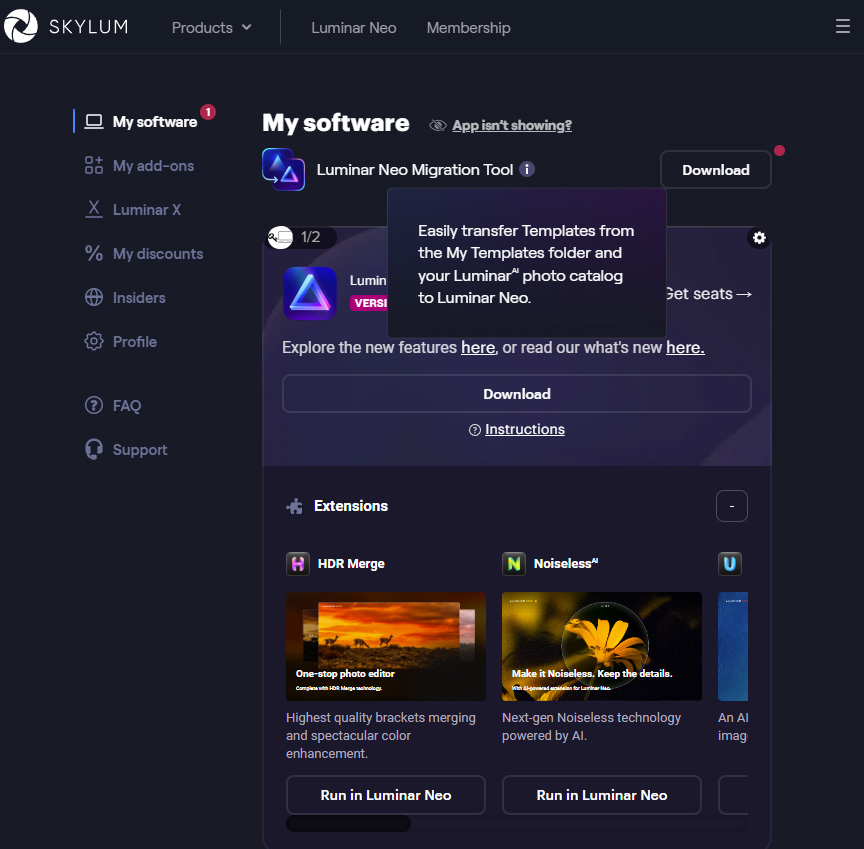
You can download the migration tool after logging in to your Skylum Account. You will find the migration tool under the My Software tab. Please note, it is only available if you own both Luminar AI and Luminar NEO.
Edits you made in Luminar AI that are not available in Luminar NEO will still be transferred to the new catalogue. However, you will no longer be able to change them.
The migration tool only works if you have the latest version of Luminar NEO installed. This is Luminar NEO 1.4.1 or later. So make sure everything is up to date before you start the migration.
Above all, be sensible and make a backup first. Just to be on the safe side.
About the author
Nando Harmsen has been photographing for more than 40 years. He specialises in wedding photography and landscape photography. Nando also gives talks, workshops, masterclasses and photo trips, and regularly reviews new and interesting equipment.
You might also like
-
 Skylum launches Luminar NEO
by Nando Harmsen
-
 The strange differences between Luminar 4 and Luminar AI
by Nando Harmsen
-
The new Luminar AI is now available
by Nando Harmsen
-
 Luminar NEO gets AI-generated content with GenSwap
by Nando Harmsen
-
 Luminar NEO gets a new update
by Nando Harmsen
-
 Aperty for portrait photography by Skylum
by Nando Harmsen
0 comments
Be the first to share what you think!
Have your say
Please note: Articles older than a week can only be commented on by signed-in visitors.Would you still like to comment? sign in or create a free account.
Become a better photographer every week
A practical photography tip in your inbox every week.
39,079 photography enthusiasts already receive the tips! More about the weekly mail. Or keep up to date via  Facebook.

Elja Trum
Photofacts; everything to do with photography!
Would you like to take better photos and keep up with what is happening in photography? Photofacts publishes articles that teach you something about photography — from a product announcement to a practical shooting tip or a look at a website. Photofacts covers photography every day and is a hobby project of Elja Trum's that got out of hand. The articles are written by a team of volunteer authors. If you would enjoy writing one or more articles for Photofacts, do get in touch.More about PhotofactsPhotofacts is made possible in part by
