

The strange differences between Luminar 4 and Luminar AI
Saturday 30 January 2021, 14:28 by Nando Harmsen | 10,547 views | 24 commentsThis article was translated from Dutch with the help of AI. Read the original.
With Luminar AI, another step has been taken towards editing a photo with the press of a button. It does what you want and you barely have to do anything. But to what extent is it a successor to Luminar 4? I compare them to find out.
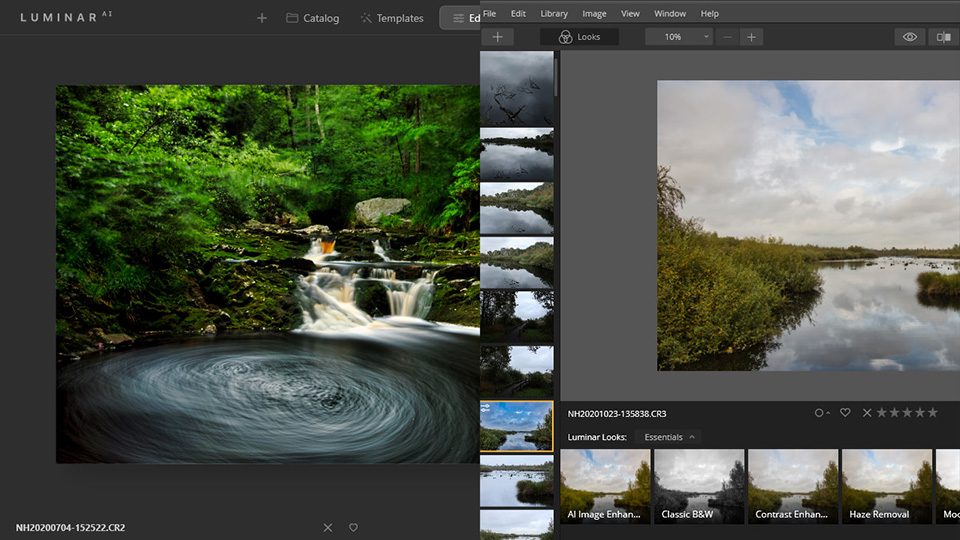
Luminar 4 was a reasonably good alternative to Adobe Lightroom Classic for many people. It gives you the option to edit your raw photos in a very simple way, and to manage them to some extent in a library.
All this without a subscription. You buy the programme once, and you can get started.
As we all know by now, Luminar uses artificial intelligence to carry out some of the edits. Of course, this is not real artificial intelligence. It is simply a piece of clever programming that can carry out certain edits to a greater or lesser extent based on recognition.
This led to Luminar Looks, a collection of presets in Luminar 4 that you could choose from. These were somewhat secondary, as the normal edits took centre stage. But with Luminar AI, the tables have been turned, and the presets have become the most important part of the programme.
The first steps with AI in Luminar 4
When I look back at Luminar 4, for which I recorded a very extensive video course for Photofacts Academy, it stands out that editing a photo offers many possibilities.
Artificial intelligence is used for some of these edits, or at least that is what we will call it. It produces very drastic edits quickly.
» View the Luminar 4 course
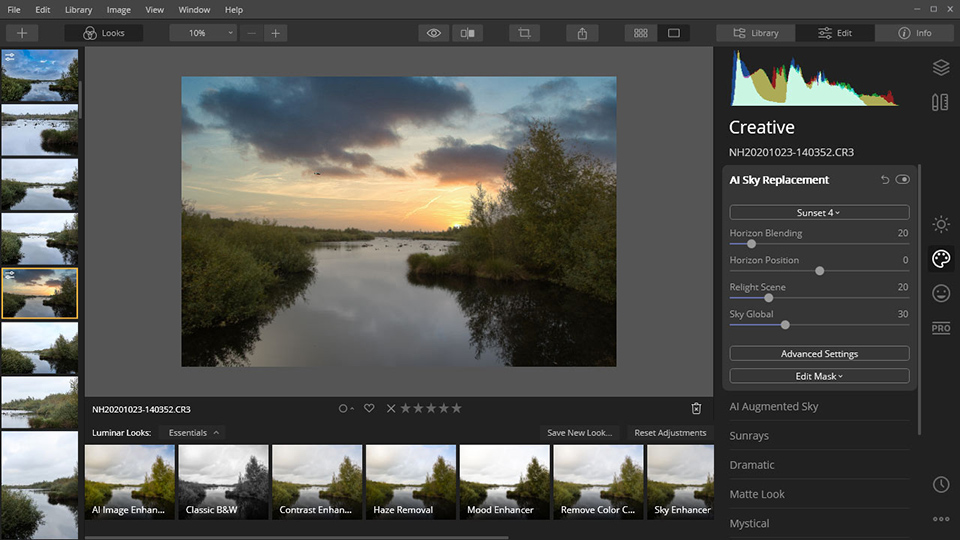
Artificial intelligence also makes it possible to replace a sky in a very simple way. Perhaps this is what Luminar 4 became most popular for. With the press of a button, you could replace that dull sky with something impressive.
Luminar 4 can also carry out complex edits on portraits in a simple way. Smoothing the skin and adjusting the shape of the face. You can go quite far with it, up to the point where the model barely recognises themselves anymore.
What stands out about Luminar 4 is the lack of a good library function. It only uses the folder structure on your hard drive and a few basic album options. You can add flags, stars and colours to your photos to separate the wheat from the chaff.
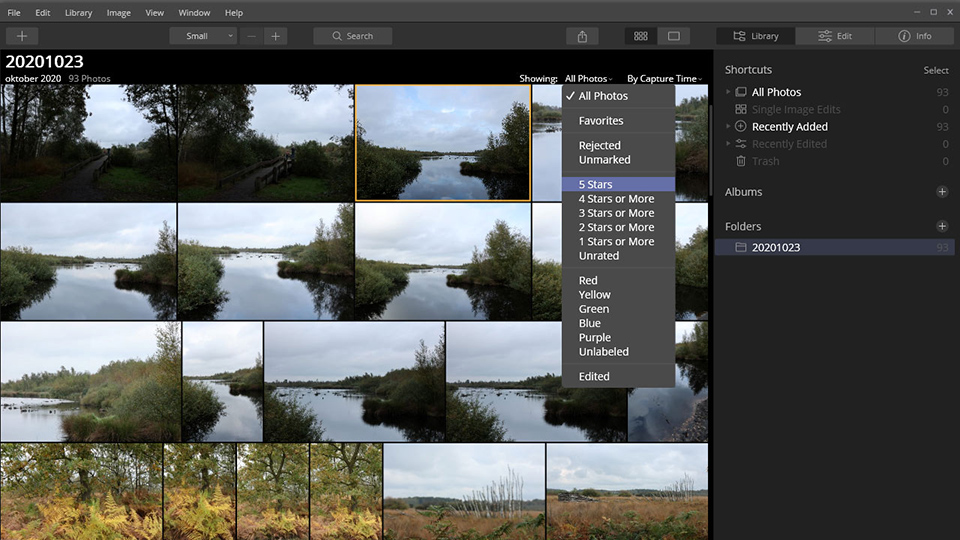
What is missing is the option to use keywords, add metadata, and search for photos properly. This means that Luminar 4 is not suitable for very large photo collections or for managing those collections. It is focused on editing photos.
Wishes for the successor to Luminar 4
I had a wish list for the successor to Luminar 4. After all, you expect to move forward when a new version is released. First of all, you naturally want to take your catalogue with you to the new version, but the options should also be expanded. Switching should offer added value.
My wishes mainly concerned expanding the library functions. Flexibility when creating albums was important, as were the option to add keywords and metadata, and a good search function to find that one photo again.
Further development of the use of layers would also have been welcome, as it expands the possibilities of the programme. A visual selection method for the new skies, or for elements you want to add to the sky, was also desirable. That makes the programme easier to use.
With Luminar AI, I hoped that many of these things would be included, taking Luminar a step closer to becoming a workable replacement for Adobe Lightroom Classic. Especially because you have to buy Luminar AI again. It is not an upgrade to Luminar 4.
The differences between Luminar 4 and Luminar AI
It soon became clear that Luminar AI is not a normal upgrade to Luminar 4. They are two completely different programmes that have absolutely nothing to do with each other. To my surprise, it is not even possible to convert your Luminar 4 catalogue into a catalogue for Luminar AI.
This has a major consequence. If you already have a lot of photos in your Luminar 4 catalogue, you will have to import them all over again into Luminar AI.
In itself, that is not such a problem, since the folder structure on your hard drive is used. Losing all the edits that have ever been made to your photos is a problem, though.
It turns out that you can no longer assign stars and colours to your photos in Luminar AI. You can only assign flags. This means that the library options have been reduced instead of expanded. Moreover, the option to use keywords and metadata is still missing.
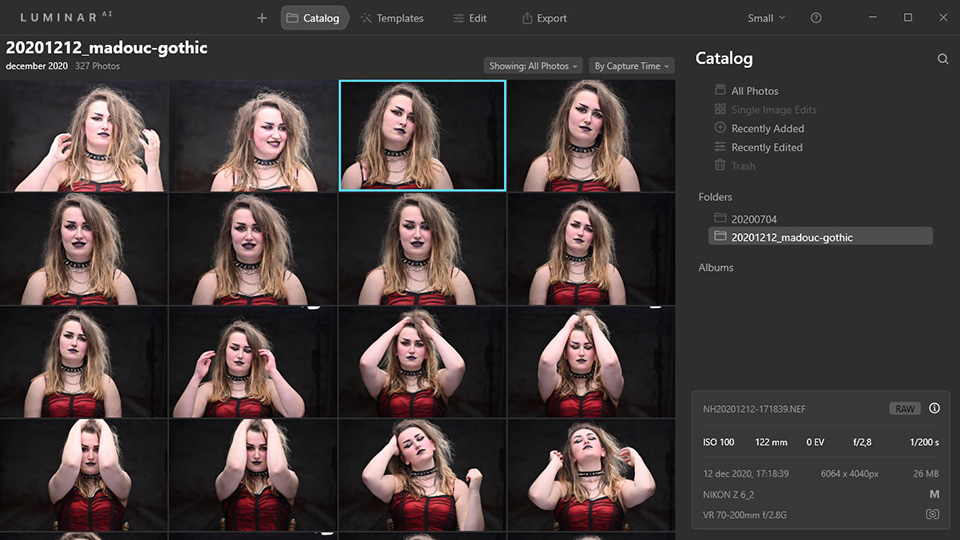
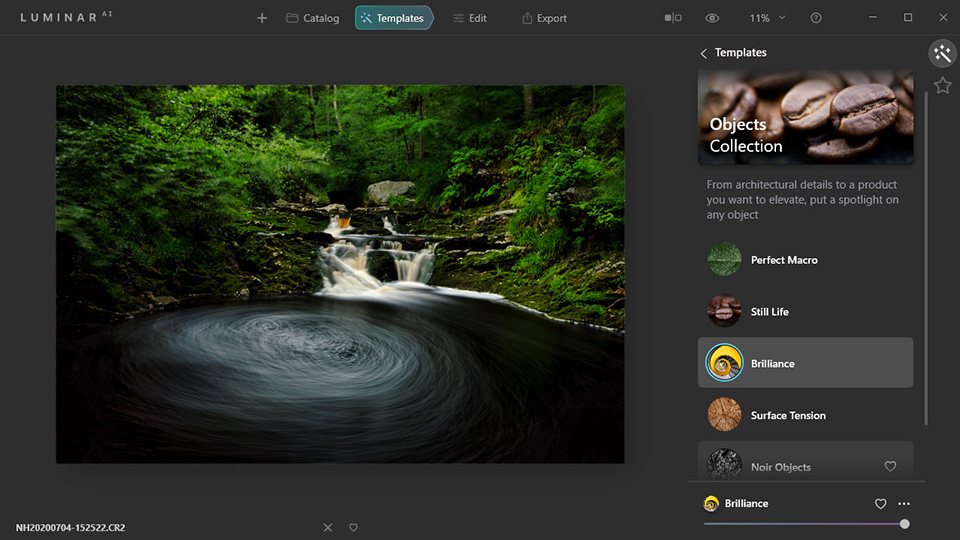
When editing a photo, you are taken straight to the use of Templates. These are the new name for the presets that were still called Looks in Luminar 4. The annoying thing is that if you bought extra Looks, you cannot use them in Luminar AI.
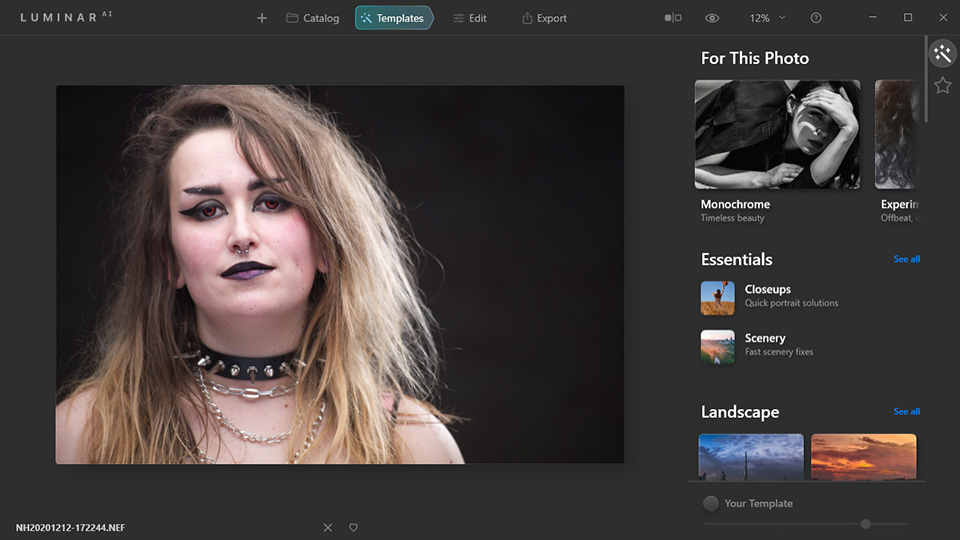
If you use Templates, your photo is turned into an edited photo in no time. Luminar AI selects a number of them for you to choose from. The programme does this based on what it recognises in the photo. If there is no suitable Template, you can buy new sets of Templates on the website, again, as many as you like.
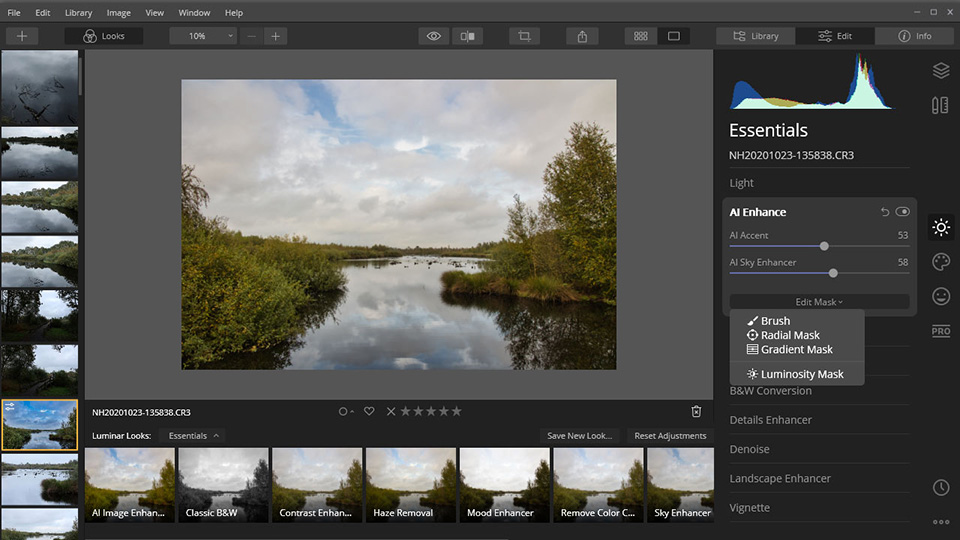
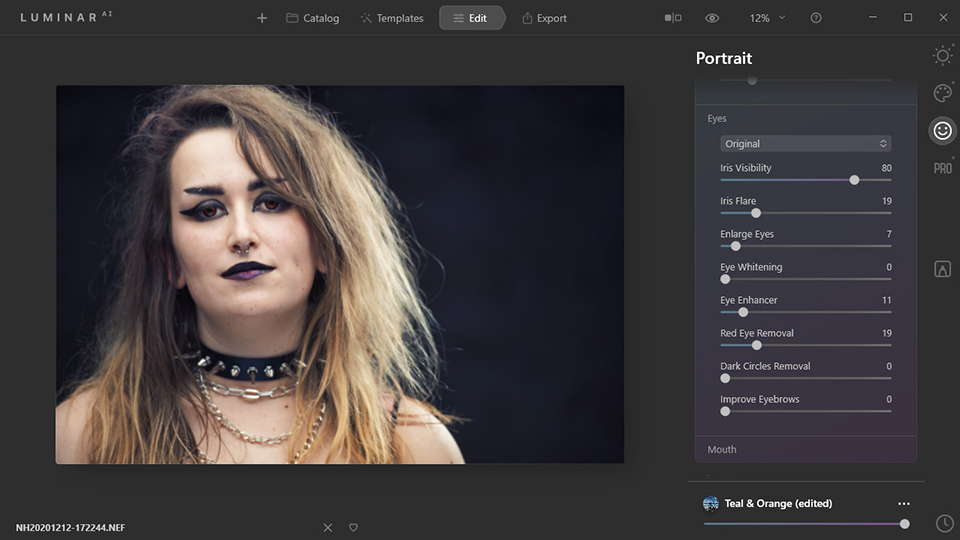
If you prefer to edit the photo yourself, you can use the editing panel. It looks the same as in Luminar 4. But it is noticeable that the nice options are missing. This includes the option to use layers and the "blending options".
All in all, Luminar AI offers far fewer options for manually editing a photo.
A number of options have been added, such as further manipulating your model. You can adjust the colour of the iris or change the shape of the body. There has been little change for the landscape photographer. There is no graphical display of the skies you can choose from, or of the objects that can be placed in the sky. It all looks exactly the same as in Luminar 4.
Conclusion after using Luminar AI
I also recorded a video course about Luminar AI, covering all its options. What stands out is that this course has become shorter. Not because the programme is easier to use, but because there are far fewer options.
» View the complete Luminar AI course
What Luminar AI does is steer you towards using Templates, presets of which you have a number, but of which you can buy many more. Of course, you do not have to do that, but the temptation is there. New skies and new objects to place in the sky are also available to buy.
There are a few new functions on the way. One of them is replacing the sky while taking reflections into account. Another is adding mist to a photo. When these will be added remains to be seen, but presumably that will happen during 2021.
The biggest drawback, in my view, is the lack of an option to transfer the old Luminar 4 catalogue to Luminar AI. Of course, you can use both programmes side by side, but that is far from ideal.
Also bear in mind that support for Luminar 4 will only last another year, until early 2022. After that, the programme will continue to work, but there will be no more updates. We will have to wait and see what happens after that.
All things considered, I can only conclude that Luminar AI is more of a step backwards compared to Luminar 4. If you are a photographer who likes to edit photos manually, with or without the help of artificial intelligence, you are better off sticking with Luminar 4.
If you do not like editing and want to use a simple press of a button to edit your photos, Luminar AI may be suitable for you. If you switch from Luminar 4, you can no longer use the edits and any Looks you bought in Luminar AI.
What do you think of Luminar?
I am curious to know what you think of Luminar. Do you use Luminar 4 and are you planning to switch? Or are you already using Luminar AI alongside Luminar 4? Let us know about your experiences in a comment below this post.
About the author
Nando Harmsen has been photographing for more than 40 years. He specialises in wedding photography and landscape photography. Nando also gives talks, workshops, masterclasses and photo trips, and regularly reviews new and interesting equipment.
You might also like
-
 Converting a Luminar AI catalogue to Luminar NEO
by Nando Harmsen
-
 Luminar NEO gets AI-generated content with GenSwap
by Nando Harmsen
-
 The new Luminar AI is now available
by Nando Harmsen
-
 Skylum's next-generation Accent AI filter for Luminar
by Michelle Peeters
-
 Skylum launches Luminar NEO
by Nando Harmsen
-
Luminar is changing in 2024
by Nando Harmsen
24 comments
-
 John Boutsen wrote on Saturday 30 January 2021 at 18:04 | reply
I use Luminar 4 and have no intention of switching to AI, I like editing my photos myself and creating my own images this way, just the way I want them. With AI you run the risk of all developing the same style, depending on whether you all start using the same (most presentable!) settings. So I’m sticking with Luminar 4
Translated from Dutch.
JOHN -
 Guill. Raemakers wrote on Tuesday 2 February 2021 at 11:15 | reply
When I read your comment, I’m glad I didn’t switch to AI. Also partly because of a number of recent changes in Photoshop. Although Adobe is very commercial, I’m still sticking with my trusted LR and PS. I mainly use no 4 as a plug-in in LR and I’m happy with it. I prefer to edit my photos myself without artificial tricks.
Translated from Dutch.
Guill. -

 Nando
wrote on Tuesday 2 February 2021 at 11:24
| reply
Nando
wrote on Tuesday 2 February 2021 at 11:24
| reply
@Guill:
Translated from Dutch.
You call Adobe commercial, and that's true. But Skylum is actually a notch worse, with their extra Looks, Templates, Skies and other things you can buy and that they constantly hint at.
We shouldn't let that bother us too much either, I think. They are and will remain companies that need to make money. That's just how the economy works
-
 Bram van Maas wrote on Tuesday 2 February 2021 at 11:37 | reply
Honestly, I do regret buying Luminar AI because I do like editing myself and then miss the fun features like layers etc., I do most of it in LR and only then switch over to Luminar 4 or AI.
Translated from Dutch.
Bram -
 Kees Harreman wrote on Tuesday 2 February 2021 at 11:39 | reply
I agree with Guill Raemakers, I think they want to make money quickly which I do understand but we'll stick with the tried and trusted L.R and Photoshop with the various plug-ins as extras.
Translated from Dutch. -
 Gerard wrote on Tuesday 2 February 2021 at 11:49 | reply
From listening to you, I'm also glad I didn't buy Luminar AI. It adds absolutely no value with this switch. So I'll happily stick with LR 6.0, PS and Luminar 4. I only use Luminar 4 for small adjustments that can be made quickly and easily. In all other cases I use LR and PS.
Translated from Dutch. -
 4BYE
wrote on Tuesday 2 February 2021 at 12:10
| reply
4BYE
wrote on Tuesday 2 February 2021 at 12:10
| reply
I have never worked with Luminar and I am quite happy with Luminar AI. Because I use DxO PhotoLab 4 for editing my RAW photos, Luminar AI is simply something extra for when I want to do something different with a photo. For 60.00 I have Luminar X for a year and add some things here and there. What I do notice is that it does not appear in the template structure. I did expect that.
Translated from Dutch.
Although I do not find ACDSEE very professional, including in terms of service, I have been using it for a very long time for viewing, rating, comparing and adding keywords. Although it has now gained all kinds of editing options, I stay away from those. But for the function I use it for, it is still useful and good enough.
I see it as an enhanced plugin with quite a few possibilities for creating something atmospheric. Of course I haven't had it for very long yet, but I have been able to create some pretty nice images. For me, it does become more "digital art" because it no longer has much to do with the original photo. At least, I will not use them to show how beautiful the Grand Canyon is, for example. I do not want to give people a false impression of "reality". The disadvantage of sky replacement is that you keep encountering the same sky. So I am starting to build my own database with skies that I come across and capture along the way. That way it remains more my own. By the way, not everything is optimal yet. (not in PS either) When trying things out, I do see that skies are not always replaced completely correctly, especially with trees with branches and such. It is also quite an art to do something properly without getting incorrect or double light falloffs. And indeed, it is hardly applicable with reflections in bodies of water.
It will always remain a struggle between "purists" and people who like experimenting. After a long time, I now also belong a bit more to the latter group. -
 Hans Alink wrote on Tuesday 2 February 2021 at 12:26 | reply
I let myself be tempted into buying Luminar AI. I occasionally use Luminar 4. For me, Luminar AI is "old wine in new bottles". Not much that’s new. And all those templates lead to "over the top pictures". Lots of HDR look and unrealistic brightness and contrasts. And as far as "look" is concerned, all those portraits start to look alike. Moreover, it’s quite an ordeal to load and handle, for example, 5,000 photos. For me, Lightroom remains the package for editing your photos so that you can keep your own style in hand.
Translated from Dutch. -
guest wrote on Tuesday 2 February 2021 at 12:37 | reply
I use both as plug-ins in Photoshop, but I do miss the adjustable gradient part in AI.
Translated from Dutch.
I found that quite a handy feature, and that is a shortcoming.
For me at least.
That is actually the only thing that bothers me. -
 Chris wrote on Tuesday 2 February 2021 at 12:54 | reply
It wasn't necessary for me. I completely agree with Nando.
Translated from Dutch.
Too bad but a missed opportunity. -
 Noor wrote on Tuesday 2 February 2021 at 13:06 | reply
Difficult subject.
Translated from Dutch.
It offers enough to leave everything up to the program. But do I want that too.
I still enjoy putting my own stamp on a photo.
But honesty compels me to say that I might be surprised by everything that is possible. -
 Jan Spoel wrote on Tuesday 2 February 2021 at 13:24 | reply
Bought Luminar 4 about a year ago to use alongside PS and LR. It was advertised as the future in editing.After barely 9 months they come with something new, Luminar AI, and with the announcement that they will continue supporting Luminar 4 for a little while but will stop doing so. I find this ripping people off and a money grab. This is the business side. Both programs are fun to work with, easy, but do watch out for a lot of the same. Making your own looks is a solution.
Translated from Dutch. -
 Stef wrote on Tuesday 2 February 2021 at 13:24 | reply
I actually do want to cancel my Adobe subscription and I'm looking around for a 'replacement' that could come somewhat close, if I read this here then Luminar is out, I do want to do my edits myself
Translated from Dutch. -
 Liesbeth wrote on Tuesday 2 February 2021 at 13:42 | reply
When I bought Luminar4, Luminar AI appeared soon afterwards. I actually felt seriously taken for a ride at the time and I didn't buy AI. And I'm very glad about that, because even with 4 I don't do much. Just give me Lightroom and Photoshop, then I can edit my photo the way I want and I also don't have any hassle about things I have to buy separately again, which makes Luminar much more expensive than you initially think.
Translated from Dutch. -
 Eduard wrote on Tuesday 2 February 2021 at 13:58 | reply
I had purchased Luminar 4 and at the end of 2020 also Luminar AI.
Translated from Dutch.
Partly because I myself have photographed quite a lot of skies and because it was a completely new program, I asked for my money back for Luminar AI. I had to wait quite a while for it, with a lot of communication, but eventually it was neatly refunded last week. I’ll just keep working with LR, which I can manage reasonably well. -
 Dick wrote on Tuesday 2 February 2021 at 16:44 | reply
I use Silkypix Developer Studio Pro 10E and also Affinity Photo.(before that Photoshop) Those remain my main editing programs. I had Luminar 4 , but rarely used it actually a waste of the purchase (I am not an advocate of fake skies etc.). I now have Luminar AI as an addition in difficult situations and after following 5 webinars I now have a reasonable idea when it is useful to use it. My main programs remain Silkypix 10ProE is really very good but that mainly because I am used to using it. The transition from Photoshop to Affinity was difficult but because of the many videos everything can be figured out.
Translated from Dutch.
Luminar AI is especially useful when, for example, you want to edit portraits quickly etc. For me a nice tool to have as an extra but even then it is necessary to know the program well.
I will not sharpen with it but the noise reduction is for exampleperfect in my opinion. -
 Wouter J wrote on Tuesday 2 February 2021 at 17:24 | reply
I had Luminar 4 and previously Luminar 3 and Luminar Flex only as an extension of Photoshop. I took advantage of Luminar's promotional upgrade offer when that was possible. Once I knew a bit more about Luminar AI, I asked for my money back. I also stopped using On1 PhotoRaw, after all the innovations that add nothing for me as a Photoshop user and expert. Capture One may be (somewhat) better in certain areas for my RAF shots as a FujiFilm-X photographer. For all my earlier Nikon shots, only DxO PhotoLab 4 really adds something, namely the very best Noise-reduction. Luminar has indicated that it will not continue supporting Luminar 4 and will not provide a follow-up either. With the constant improvements and ever-better tools, Photoshop remains the best program for me.
Translated from Dutch. -
 Jan wrote on Tuesday 2 February 2021 at 17:41 | reply
I purchased AI because I thought it would be an improvement, but I feel ripped off, it is not suitable for photographers and for as long as it lasts I will only use 4.
Translated from Dutch.
Jan -
 Louismakers wrote on Tuesday 2 February 2021 at 18:37
| reply
Louismakers wrote on Tuesday 2 February 2021 at 18:37
| reply
When Luminar 4 came out, you were very enthusiastic about it, and I switched from Adobe Lightroom and Photoshop to Luminar 4. Also because I was no longer tied to the monthly costs of LR and PS. When Luminar AI came out, I felt cheated. I’m not going to buy Luminar AI. A hobby should remain fun and affordable. I’m now working with Photoshop Elements and want to continue using Luminar 4. If that becomes unavailable, I’ll see how to proceed when the time comes.
Translated from Dutch. -
4BYE
wrote on Tuesday 2 February 2021 at 21:10
| reply
I don't really see the problem with editing. You can adjust quite a lot with Luminar AI, after all. The templates are merely a guideline. If it's too much, you can also reduce them in the bottom right or go straight to edit. For only 69.00, I can't complain about the price. You pay that for a bit of a plugin too.
Translated from Dutch.
People looking for a good alternative to LR, I would recommend the trial version of DxO PhotoLab 4.0 and give it a try. No subscription.
PS is of course a renowned program, but for stacking Helicon Pro is the better one and for stitching PTGui is a better alternative. -
 Sheila wrote on Tuesday 2 February 2021 at 22:20 | reply
I bought Luminar 4 last year and think it's a nice program to work with. I also have Photoshop elementos 2019. For what I do, I don't need anything more (so no Adobe subscription either).
Translated from Dutch. -
 Soetens Geert wrote on Wednesday 3 February 2021 at 10:06 | reply
I am an ordinary amateur photographer. I found PS and LR difficult and expensive. From the beginning I bought everything from Skylum and Luminar. I found the cost acceptable and above all: I could work very well with the workflow. I found it much easier than PS and LR. But since the introduction of AI I also feel that everything has become much more commercial with Luminar. Lots of tips to buy all sorts of things. But the most important argument why AI has disappointed me: AI is not an extension of Luminar 4. So I fully agree with everything Nando has described above.
Translated from Dutch. -
 Hans den Boer
wrote on Thursday 16 September 2021 at 16:16
| reply
Hans den Boer
wrote on Thursday 16 September 2021 at 16:16
| reply
I stick with Photoshop/Lightroom for the simple reason that the chance of those programs disappearing from the market is not that great, something that is many times more likely with Luminar 4 / Luminar AI. In addition, I personally think that - if you have just a little more than basic knowledge of Photoshop/Lightroom you can give your photos much more of your own style than with the presets of e.g. Luminar 4 (which you still have to adjust to your own style/taste afterwards).
Translated from Dutch.
Of course, a subscription to Photoshop/Lightroom on an annual basis will be slightly more expensive, but at least you have something that works without too many problems. -
4BYE
wrote on Monday 20 September 2021 at 09:41
| reply
@Hans de Boer - I don't know what your assumption is based on. If I had to assume that a program will disappear from the market, I wouldn't be able to buy much. Why would Luminar have a lot of problems? I hardly encounter them and they're very quick with updates and improvements. What's funny is that PS is actually lagging behind when it comes to focus stacking and stitching, for which I bought two better programs. I use a lot of them interchangeably to achieve what I have in mind. Ultimately, that's what matters to me personally. I worked with Corel PhotoPaint for decades because I had the Corel Suite at my business for advertising signs and such. In the end, you paid for changing some icons, but nothing more came out of the "new" versions. The basic program I use for RAW conversion is DxO PhotoLab. When I went with it, it was the better of several programs, including LR. Finally, if you stop using Adobe for whatever reason, you have nothing left. You can normally continue using any other program. That's just how it all is... LOL (After spending more time with Luminar AI, I'm still satisfied)
Translated from Dutch.
Have your say
Please note: Articles older than a week can only be commented on by signed-in visitors.Would you still like to comment? sign in or create a free account.
Become a better photographer every week
A practical photography tip in your inbox every week.
38,938 photography enthusiasts already receive the tips! More about the weekly mail. Or keep up to date via  Facebook.

Elja Trum
Photofacts; everything to do with photography!
Would you like to take better photos and keep up with what is happening in photography? Photofacts publishes articles that teach you something about photography — from a product announcement to a practical shooting tip or a look at a website. Photofacts covers photography every day and is a hobby project of Elja Trum's that got out of hand. The articles are written by a team of volunteer authors. If you would enjoy writing one or more articles for Photofacts, do get in touch.More about PhotofactsPhotofacts is made possible in part by
