

Free Lightroom alternative Darktable now also available for Windows
Thursday 28 December 2017, 15:51 by Elja Trum | 10,379 views | 11 commentsThis article was translated from Dutch with the help of AI. Read the original.
The free programme Darktable is an open-source alternative to Lightroom. You can use it to organise and edit your RAW files. Since update 2.4, the programme can also run on Windows.
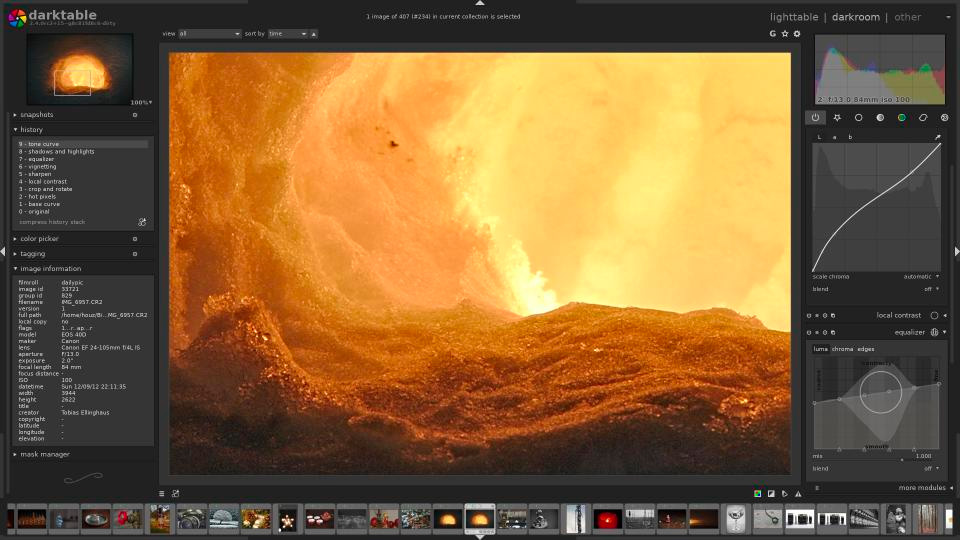
Previously, you could already run the programme on various Linux systems and Mac OS.
» Download the Windows version
About the author
Elja Trum is the founder of Photofacts and online photography course website Photofacts Academy. He has been writing about photography since 2006. Elja is also the author of (Dutch) books on composition, black-and-white photography, flash photography and portrait photography.
You might also like
-
 ACDsee Gemstone as a Photoshop alternative
by Nando Harmsen
-
 Macphun Luminar for Windows announced
by Michelle Peeters
-
 Microsoft releases free RAW Image Viewer extension for Windows 10
by Michelle Peeters
-
 RapidRAW, het gratis Lightroom-alternatief
by Nando Harmsen
-
 File names are not important in Lightroom
by Nando Harmsen
-
 DxO PhotoLab as an alternative to Lightroom
by Nando Harmsen
11 comments
-
 Rias.Photography wrote on Thursday 28 December 2017 at 16:45 | reply
I’m definitely going to test this out but I’ll probably stick with Lightroom.
Translated from Dutch. -
 L. Gaspenhouw wrote on Thursday 28 December 2017 at 19:59 | reply
Don't even start, unless you like doing patches under the hood yourself. There is a lot of criticism of this program on various forums.
Translated from Dutch. -
 Henk Beenen wrote on Friday 29 December 2017 at 17:59 | reply
Do you also know links to the various forums with criticism of this program, as you write. I've been using Darktable in Linux for some time and I really like it!
Translated from Dutch. -
 Guido wrote on Tuesday 2 January 2018 at 13:18 | reply
A hearty thank you for bringing this to our attention.
Translated from Dutch.
Another option to avoid having to subscribe to Lightroom. I work with version 6.14 of perpetual Lightroom. I would have immediately purchased an update to 2017. But Adobe is making a commercial decision that they believe should increase their profits. I have nothing against that. I simply decide for myself, this subscription does not meet my needs.
But whether this DarkTable is an alternative, that will require weighing things up again. Digital Asset Management with all of Lightroom's options is very valuable to me. I systematically use geotagging with Google Maps in Lightroom. Timeshift to bring photos of friends into the same timeline as well.
All my photos get keywords that I can choose from the existing values.
Only then do I get around to developing. The sidecar allows me not to have to save a new format. Just a small file next to the RAW image.
So I will take a look at how far Darktable can help me. -
 bert van herk wrote on Tuesday 2 January 2018 at 13:18 | reply
where is the Mac version
Translated from Dutch. -
 W wrote on Tuesday 2 January 2018 at 15:30 | reply
So far I have been working with PSP as my editing program.
Translated from Dutch.
And I still like it, except that in ZOOM and other magazines they always work with Photoshop or Lightroom and I don't have any "feel" for them.
Question: what advantage does this program have over PSP 18? In other words: would I be better off with it?
(Photoshop is too complicated for me) -
Guido wrote on Tuesday 2 January 2018 at 16:46 | reply
Dear W, If you spell out PSP, I might be able to say something sensible.
Translated from Dutch. -
 Johan wrote on Tuesday 2 January 2018 at 16:54 | reply
I think PSP is the abbreviation for PaintShop Pro.
Translated from Dutch. -
Guido wrote on Tuesday 2 January 2018 at 17:17 | reply
Paintshop Pro, especially the ultimate version, has many editing possibilities. You can best compare it to a possible alternative to Photoshop (Elements). For an "ordinary" user who finds Photoshop too complex, Photoshop Elements is a strong alternative. Also the recent developments at On1 (can ultimately become expensive if you want training), Affinity, DXO, phase one. And I am certainly forgetting other alternatives. You can do some surfing to see what is available.
Translated from Dutch.
Back to your original question: what is it about Lightroom. You can look back at my first response about cataloguing, geotagging, keeping track of and searching for your photos (DAM). I have a medium-sized collection, about 40,000 photos. Recently I had to search for old photos with specific information. Thanks to the cataloguing, I had all 50 necessary photos that were spread over 25 years in a logical collection within a few hours and was able to make copies and prints of all relevant photos without having to make physical duplicates.
Adobe has a powerful editing tool that is included in both Lightroom and Bridge. But in broad terms, most programs work quite similarly.
If you want to edit photos, it is best to work in RAW because you then have many times more room to manoeuvre. Paintshop Pro Ultimate also supports that. But that was not the question. In my experience, Paintshop Pro was slightly less extensive for local corrections. But you can always turn to plug-ins.
In summary, if you have no problem finding your photos again and you can make all the adjustments you want, why would you change.
-
W wrote on Tuesday 2 January 2018 at 21:20 | reply
Hello Guido. I did indeed mean Paint Shop Pro (18). I can manage fairly well with it, but because there are so many different programs around, it wouldn't surprise me if there is something among them that is actually much better and that I didn't know about yet.
Translated from Dutch.
That's why I asked. But with your answer I can carry on again.
My heartfelt thanks. -

 Koen Van de moortel
wrote on Saturday 6 January 2018 at 18:50
| reply
I just tried this, but it was seriously disappointing: veeeery slow, and if you go a millimeter too far with the sliders, everything immediately looks very ugly. Unfortunately, this program really can't hold a candle to Lightroom.
Translated from Dutch.
Something else: I had checked the option to ignore jpg files and only import raw files, but it just imports everything anyway, extremely slowly, without showing any progress at all, so you don't know whether it has crashed, or whether it is still working.
Have your say
Please note: Articles older than a week can only be commented on by signed-in visitors.Would you still like to comment? sign in or create a free account.
Become a better photographer every week
A practical photography tip in your inbox every week.
38,764 photography enthusiasts already receive the tips! More about the weekly mail. Or keep up to date via  Facebook.

Elja Trum
Photofacts; everything to do with photography!
Would you like to take better photos and keep up with what is happening in photography? Photofacts publishes articles that teach you something about photography — from a product announcement to a practical shooting tip or a look at a website. Photofacts covers photography every day and is a hobby project of Elja Trum's that got out of hand. The articles are written by a team of volunteer authors. If you would enjoy writing one or more articles for Photofacts, do get in touch.More about PhotofactsPhotofacts is made possible in part by
