

ImageMagick, photo editing from the command line and Lightroom
Saturday 26 December 2020, 14:14 by Dick Holtman | 5,100 views | 2 commentsThis article was translated from Dutch with the help of AI. Read the original.
Although Photoshop and ImageMagick both first appeared in 1987, everyone knows Photoshop. But who has heard of ImageMagick? In this blog, I want to briefly introduce you to ImageMagick and point out the powerful combination with Lightroom.
Before I explain what ImageMagick is and what it can do, I want to point out that, for me, ImageMagick only becomes really interesting when combined with Lightroom. More on that later.
What is ImageMagick
Wikipedia describes ImageMagick as: ImageMagick is a graphics programme that can be used for digital image editing. The computer programme consists of a number of command-line-based programmes.
They say themselves:
Use ImageMagick® to create, edit, compose, or convert bitmap images. It can read and write images in a variety of formats (over 200) including PNG, JPEG, GIF, HEIC, TIFF, DPX, EXR, WebP, Postscript, PDF, and SVG.
ImageMagick can resize, flip, mirror, rotate, distort, shear and transform images, adjust image colors, apply various special effects, or draw text, lines, polygons, ellipses and Bézier curves.
Translated, this says:
Use ImageMagick® to create, edit, compose or convert bitmap images.
It can read and write images in various formats (more than 200), including PNG, JPEG, GIF, HEIC, TIFF, DPX, EXR, WebP, Postscript, PDF and SVG.
ImageMagick can resize, mirror, rotate, distort, shear and transform images, adjust image colours, apply various special effects or draw text, lines, polygons, ellipses and Bézier curves.
This shows the huge range of possibilities offered by these programmes. And if you are still not convinced, I invite you to visit the website and look at "Features and Capabilities".
It should also be clear why so few people know it, because to use it you have to work from the old DOS box (Windows) or a Unix shell. And who still does that to edit pictures?
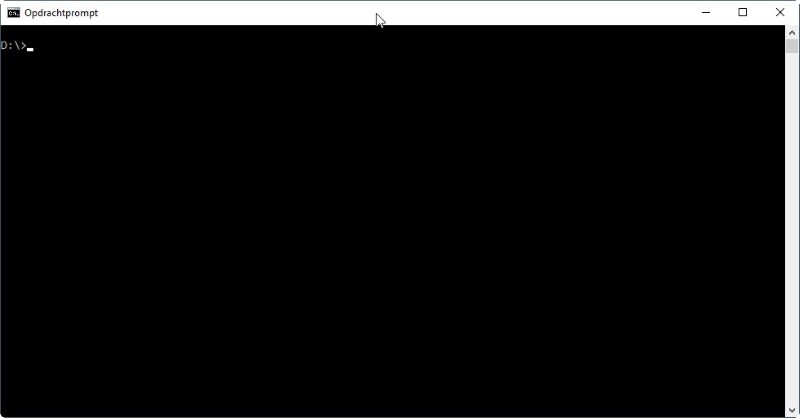
A few examples
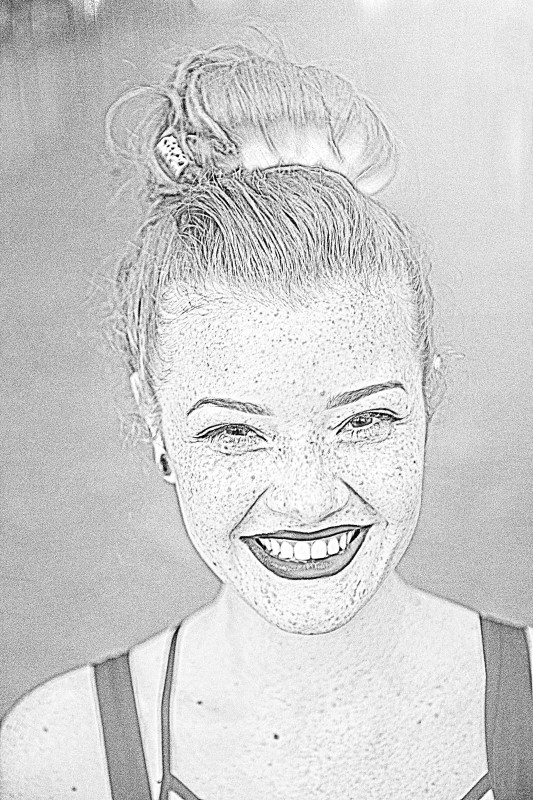
Here are a few less obvious examples of what you can do with ImageMagick. In the first example, we turn a photo into a cartoon drawing.
 <
<
We turn this photo into a sketch drawing

Finally, we combine several photos into one on a black background with a single command.
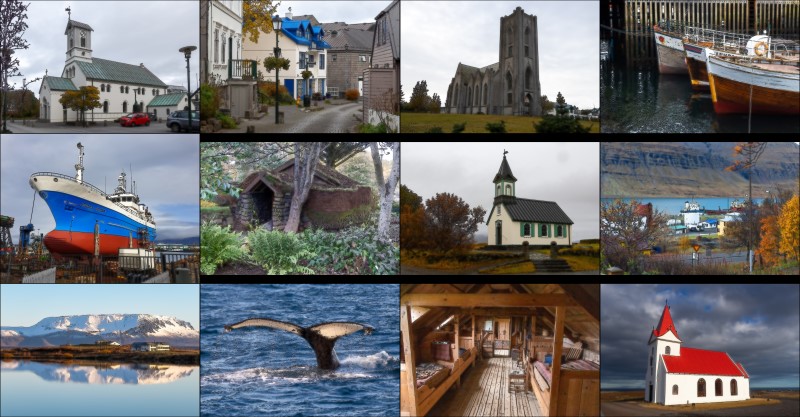
Command used:
magick montage -background black -geometry +4+3 *cartoon.jpg montage.jpgWhat to use it for
If you have excellent programmes such as Photoshop or Gimp, why would you use a programme such as ImageMagick that works with the command line at all?
The most obvious answer lies precisely in the "command line". This allows you to make the programme work based on a batch. For example, adding a watermark or border to all photos in a directory, or changing their size.
You can also control the programme from another programme. This brings us to the final subject of this blog, namely the cooperation between Lightroom and ImageMagick.
ImageMagick and Lightroom
Normally, you use ImageMagick as part of the export process. So, it is a post-processing step.
The ability to perform additional edits in the background during export is precisely what makes ImageMagick so attractive for use with Lightroom.
One of the first plug-ins for Lightroom, LR/Mogrify 2 from 2008, uses ImageMagick in the background to perform additional edits on photos during export. This allows you to add borders, watermarks and text to your exported photos.
I have also created the Transparency exporter plug-in. This plug-in replaces a selected or specified colour with transparency.
There are of course specialist programmes that can probably do this better, but this plug-in allows you to easily make the background of 10, 100 or 1,000 photos transparent from Lightroom during export. And you can do this without any manual work.
The major advantage lies in integrating additional post-processing options into the Lightroom workflow.
The possibilities are huge, waiting to be discovered.
Getting started with ImageMagick and support
For those who want to get started with ImageMagick, the internet is an enormous source of knowledge. There are several videos with examples on YouTube.
Questions are answered well on the forum. The old forum also contains a huge number of questions and answers.
Background information
About the author
Dick Holtman is getrouwd met een enthousiaste fotografe en een ervaren Lightroom post-processing specialist. Hij werkt al ruim 30 jaar in de IT. Uit deze interesses is het bedrijf LightroomStatistics.com ontstaan. Dick maakte al 11 Lightroom plug-ins die te vinden zijn op de Photographers-Toolbox.com. Ook geeft hij IT en workflow adviezen aan fotografen.
You might also like
-
 What are Lightroom plug-ins and what can you do with them?
by Dick Holtman
-
 LUT Export-plug-in, het verhaal erachter
by Dick Holtman
-
 Keyword Exporter Lightroom plug-in, the story behind it
by Dick Holtman
-
Improve your workflow with your own Lightroom scripts
by Dick Holtman
-
Plug-in: Translating keywords, titles and captions in Lightroom
by Dick Holtman
-
 Does Lightroom make Photoshop redundant?
by Nando Harmsen
2 comments
-
 Evert wrote on Tuesday 29 December 2020 at 11:51 | reply
What I find unfortunate is that if you have everything in Dutch, you have to start working with this in English, regardless of the power of the program, which I don't see here yet.
Translated from Dutch.
It takes too much to be able to work with this properly and too much searching to get the hang of the package.
Too bad but I still prefer to stick with Lightroom and Photoshop but that's personal. (but in Dutch) -

 Lightroomstatistics
wrote on Tuesday 29 December 2020 at 14:02
| reply
Lightroomstatistics
wrote on Tuesday 29 December 2020 at 14:02
| reply
ImageMagick is certainly no replacement for Lightroom and Photoshop.
Translated from Dutch.
On the one hand, the article was intended to raise awareness of ImageMagick itself.
However, its strength lies in the possibility of adding extra post-processing functionality to Lightroom.
Have your say
Please note: Articles older than a week can only be commented on by signed-in visitors.Would you still like to comment? sign in or create a free account.
Become a better photographer every week
A practical photography tip in your inbox every week.
38,937 photography enthusiasts already receive the tips! More about the weekly mail. Or keep up to date via  Facebook.

Elja Trum
Photofacts; everything to do with photography!
Would you like to take better photos and keep up with what is happening in photography? Photofacts publishes articles that teach you something about photography — from a product announcement to a practical shooting tip or a look at a website. Photofacts covers photography every day and is a hobby project of Elja Trum's that got out of hand. The articles are written by a team of volunteer authors. If you would enjoy writing one or more articles for Photofacts, do get in touch.More about PhotofactsPhotofacts is made possible in part by
