

Taking your photo catalogue to another application
Sunday 7 March 2021, 14:07 by Nando Harmsen | 3,932 views | 1 commentThis article was translated from Dutch with the help of AI. Read the original.
Have you bought Luminar 4 and put all your photos in it? Then you know that you have to start all over again with Luminar AI, because the catalogue cannot be transferred.
But this is now possible with the help of Avalanche. Convert any catalogue to another one.
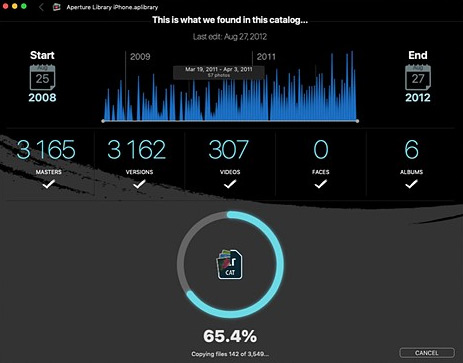
Are you unhappy with your photo editing software? Or perhaps you want to try something else? The lack of an option to convert your photo catalogue can hold you back.
You may have spent years editing your photos and managing your photo library. Switching to other software can then be a hurdle if you lose all those edits, collections, selections and divisions. Years of work can disappear like snow in the sun.
The new Luminar AI is a good example. The manufacturer has not provided an option to take over the photo library from Luminar 4, so switching to the new software means losing all your edits.
That is not too bad for 100 photos, but if you have thousands or tens of thousands of photos in your library, it can be a disaster.
The Avalanche software from CYME now lets you convert all those different catalogues to another one without losing all your work. Avalanche converts your photos to a new catalogue, along with the edits.
Avalanche works with Luminar 4, Luminar AI, Lightroom Classic, Aperture, and soon Capture One. You do not need a working version of Aperture or Lightroom to convert the catalogue.
Unfortunately, the software is only available for Mac OS systems, with a minimum of OS 10.14, and it is not free. Converting Luminar costs 59 dollars with Avalanche. If you want all the options for other catalogues as well, Avalanche costs 199 dollars.
Bear in mind that you will probably only use the software once after buying it. After all, once your catalogue has been converted and you are using your new photo software, there is nothing left to convert. Unless you switch back.
About the author
Nando Harmsen has been photographing for more than 40 years. He specialises in wedding photography and landscape photography. Nando also gives talks, workshops, masterclasses and photo trips, and regularly reviews new and interesting equipment.
You might also like
-
 Converting a Luminar AI catalogue to Luminar NEO
by Nando Harmsen
-
 The strange differences between Luminar 4 and Luminar AI
by Nando Harmsen
-
 Using Lightroom Without a Catalogue
by Nando Harmsen
-
 Review: Luminar 4 Golden Master version
by Michelle Peeters
-
The new Luminar AI is now available
by Nando Harmsen
-
 Lightroom updates 2025, with more useful AI features
by Nando Harmsen
1 comment
-

 Hans den Boer
wrote on Thursday 16 September 2021 at 16:19
| reply
Hans den Boer
wrote on Thursday 16 September 2021 at 16:19
| reply
The mere fact that the manufacturer doesn't even offer the option to transfer a catalog from Luminar 4 to Luminar AI already shows that they don't take themselves seriously. Extremely strange that you have to purchase a fairly expensive extra package for that. I already felt Luminar 4 added little compared to Photoshop/Lightroom, Luminar AI may be fun for some people, but probably wasted money in more cases.
Translated from Dutch.
Have your say
Please note: Articles older than a week can only be commented on by signed-in visitors.Would you still like to comment? sign in or create a free account.
Become a better photographer every week
A practical photography tip in your inbox every week.
39,024 photography enthusiasts already receive the tips! More about the weekly mail. Or keep up to date via  Facebook.

Elja Trum
Photofacts; everything to do with photography!
Would you like to take better photos and keep up with what is happening in photography? Photofacts publishes articles that teach you something about photography — from a product announcement to a practical shooting tip or a look at a website. Photofacts covers photography every day and is a hobby project of Elja Trum's that got out of hand. The articles are written by a team of volunteer authors. If you would enjoy writing one or more articles for Photofacts, do get in touch.More about PhotofactsPhotofacts is made possible in part by
