

Compose your photos like the old masters
Monday 26 November 2018, 20:20 by Huub Keulers | 15,633 views | 6 commentsThis article was translated from Dutch with the help of AI. Read the original.
We probably all know that a good, well-considered composition makes your photo stronger. If you place the most important elements in the right place in your photo, you increase the chance of attracting the viewer's attention. But what is the right place, and how do you determine it?
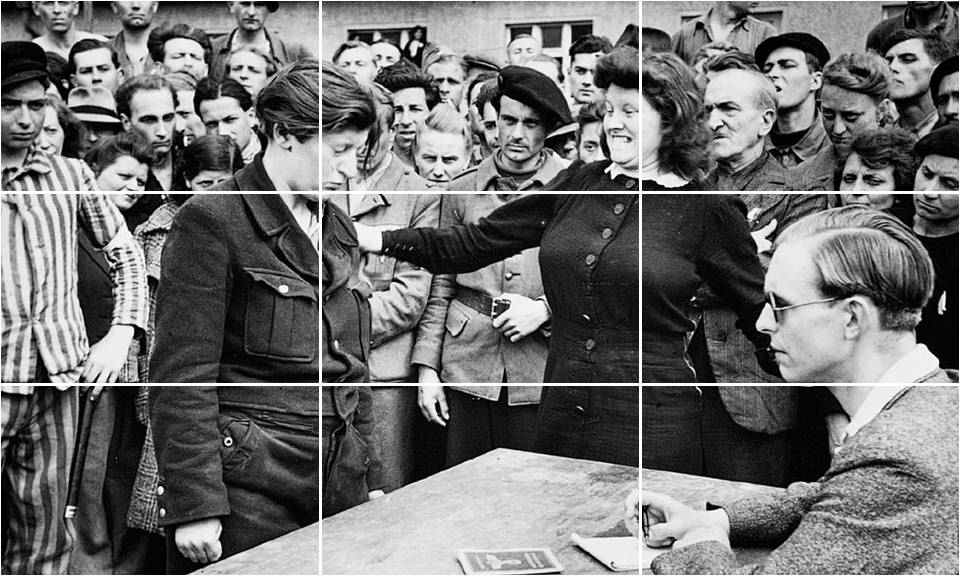
People have an eye for certain proportions and compositions, often without realising it themselves. One of these proportions is the rule of thirds. Divide your photo into nine equal sections and place the elements you consider important on the lines created.
They do this by making these lines visible on their camera display, while others crop their photo afterwards in Photoshop/Lightroom. The most experienced photographers already have an eye for this and do not need any aids. They compose the image by feel.
The master painters and photographers of old were particularly skilled at this. Just look at the photo below by Henri Cartier-Bresson and see how he used the 'Rule of Thirds'. The faces of the two main subjects and the man's hand on the table are positioned exactly where they should be.
The rule of thirds is just one of many proportions you can use to compose your image. However, this method originated from another proportion that was already used in the time of the ancient Greeks and Egyptians. They built, among other things, their temples according to this principle.
Buildings made using these specific proportions were considered more beautiful, but they were also stronger and could withstand greater forces. I am referring to the so-called 'Golden Ratio', or Fibonacci ratio (1: 1.618033988).
In 1611, the astronomer Johannes Kepler discovered what happens when a number from the Fibonacci sequence 0-1-1-2-3-5-8-13 is divided by the preceding number. The quotient is always 1.6. The further along the sequence, the more accurately you arrive at the Golden Number: 1.618033988….
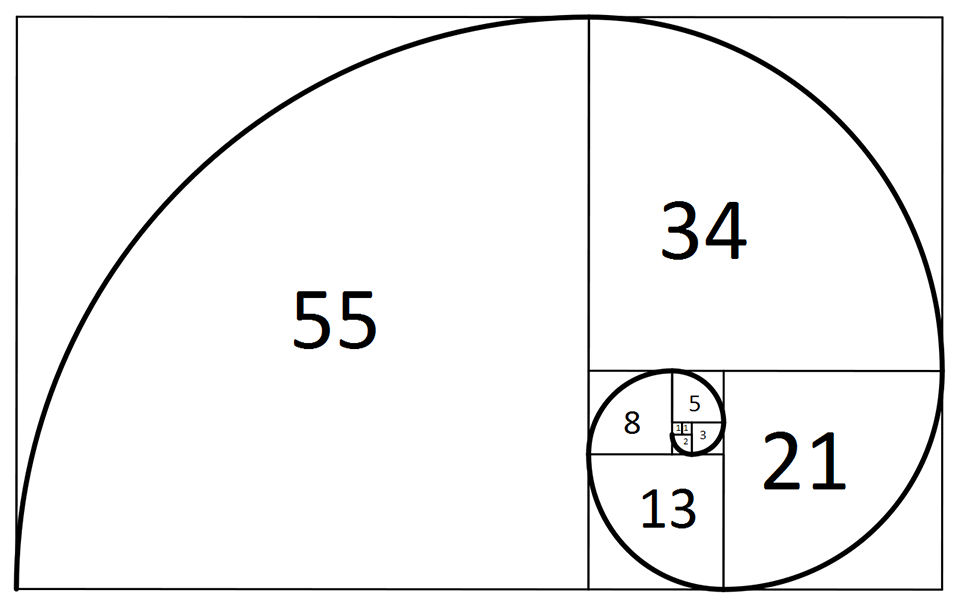
This number, denoted by the Greek symbol Φ [phi], expresses the phenomenon of the “ideal proportion”. We can also use it in photography.
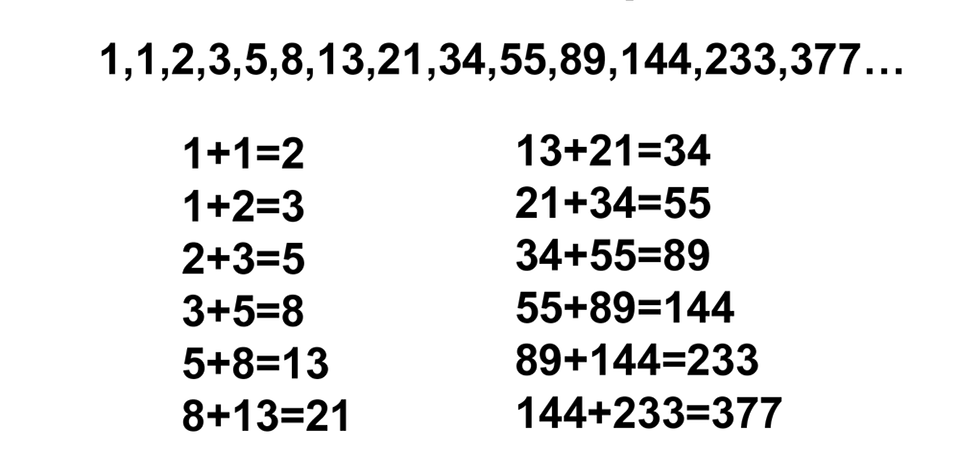
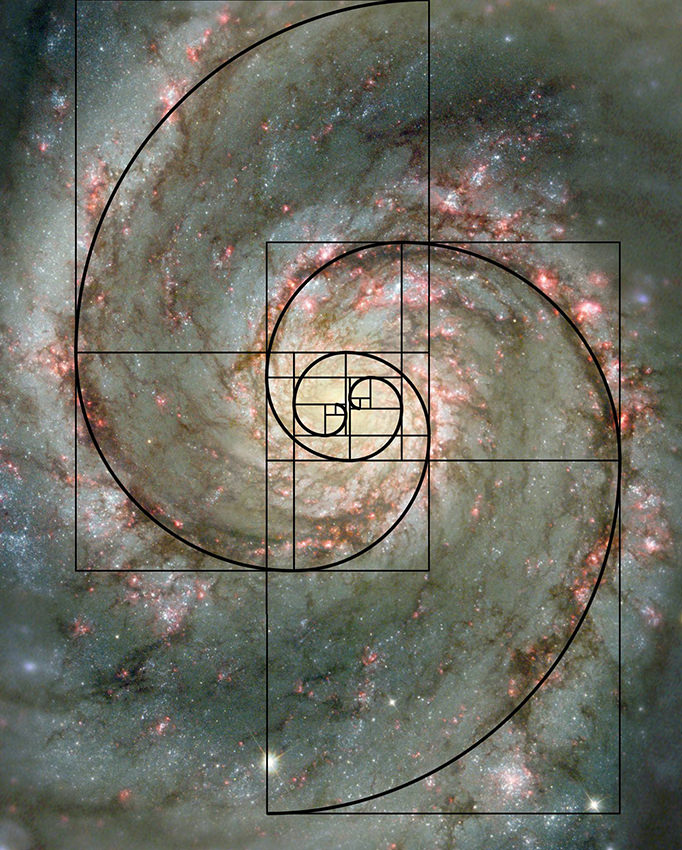
The golden ratio (ratio 1: 1.618033988) can be translated into a spiral shape. The areas of the segments in the spiral are numbers from the so-called Fibonacci sequence.
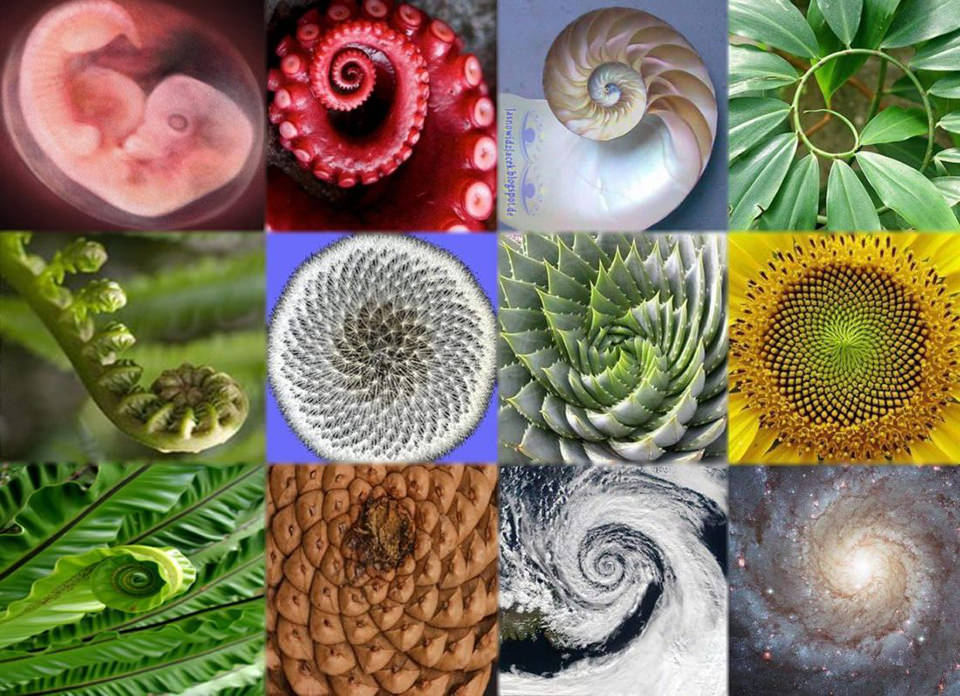
This spiral shape and golden ratio appear in all kinds of unexpected places, such as in the length of your finger bones, our ECG, the growth of rabbit and bee populations, spiral galaxies, nautilus shells, music, the human body, logos designed by design agencies, painting, and we could go on for quite a while.
The great masters of painting, such as Vermeer, Rembrandt and Dali, and famous photographers, such as Cartier-Bresson and Brassai, knew that applying this ratio would give their works greater strength and beauty.
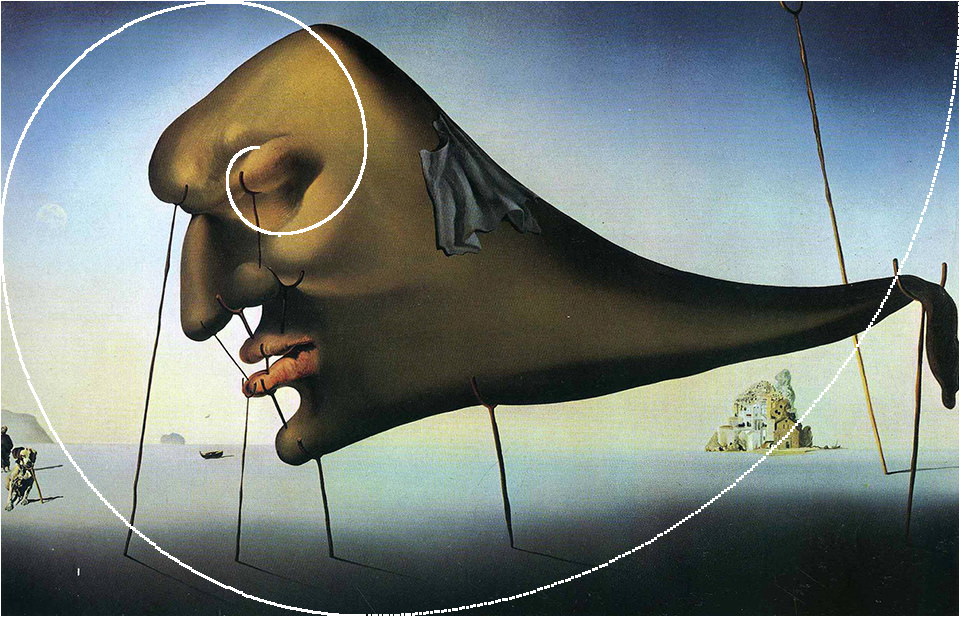
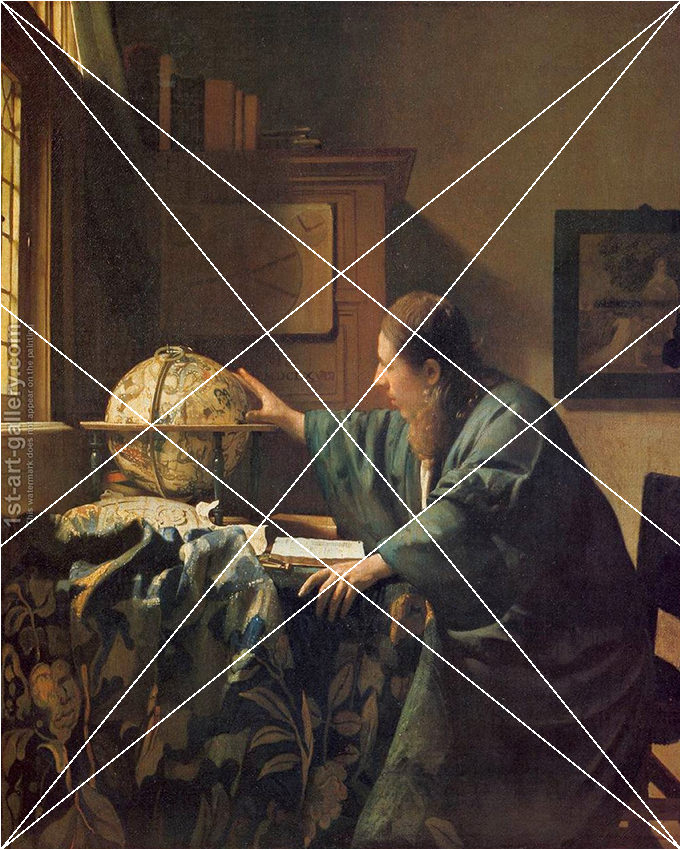
Tip: Powerretouche has a handy Photoshop plug-in called 'Golden Section PR'. It allows you to place all kinds of composition guides over your photos. Unfortunately, Powerretouche is no longer supported on a Mac, although the software can still be bought for 33 euros including VAT.
The Windows version is still being updated and supported. Link: http://powerretouche.com/golden-sections.htm.
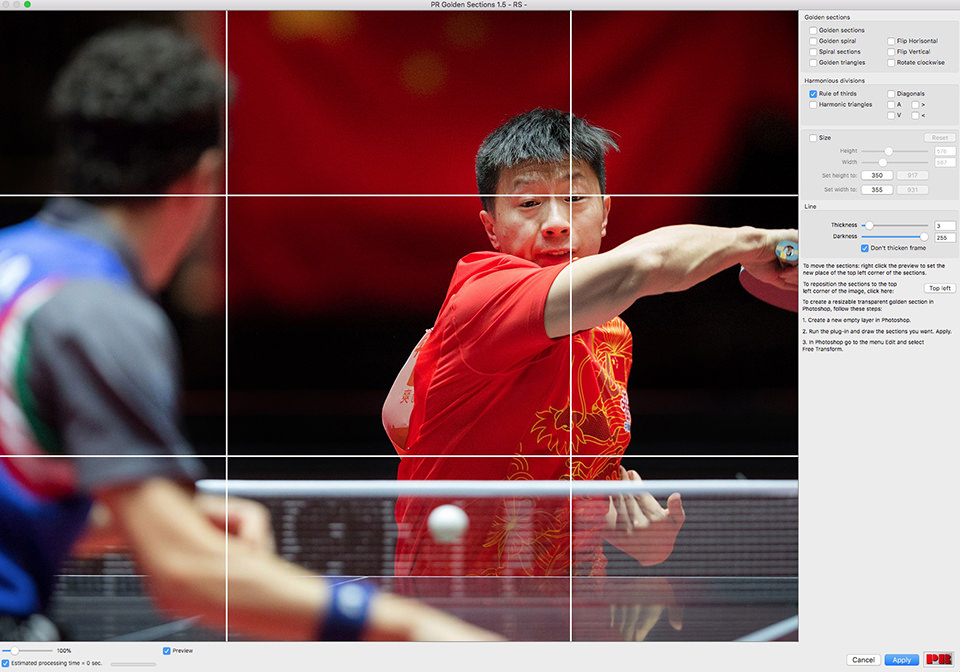
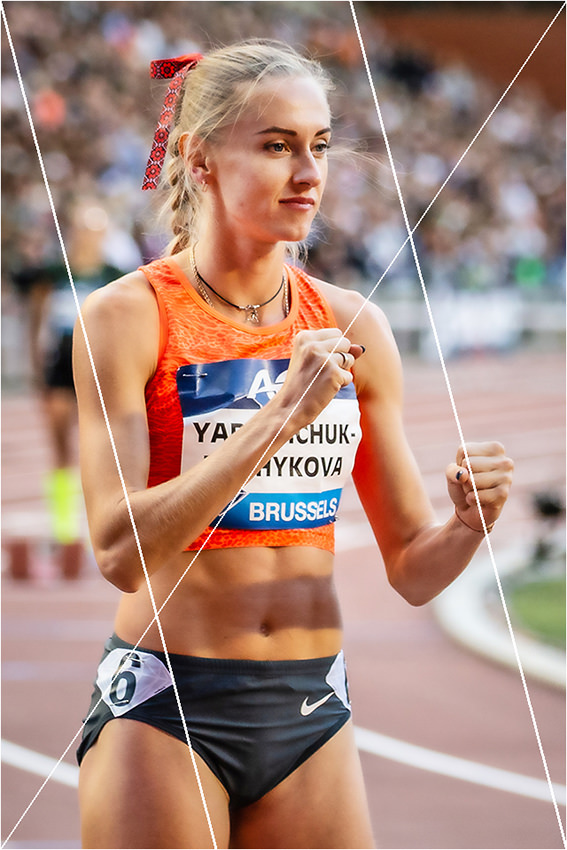
In Lightroom, you can also make a crop guide visible on your photos as an extra layer. This allows you to check whether you have placed the most important element in your photo in the right position. To do this, first select the 'Crop' option under 'Tools'.
You will then find the 'Crop Guide Overlay' option under 'Tools'. This includes options such as 'Golden Ratio' and 'Golden Spiral'. You can cycle through the various available crop guides with the 'O' key. Use
As you have read, there are various composition rules you can use. My advice is simply to try them out, but also let your feelings guide you. These rules are not set in stone. Feel free to experiment and to deviate from these 'rules' if you think it will benefit your photo.
About the author
Huub Keulers is een enthousiasmerende veelzijdige freelance fotograaf woonachtig in Elsloo (Li). Hij is gespecialiseerd in sport-, bedrijfs-, straat-, honden en portretfotografie. Daarnaast is Huub auteur van diverse educatieve fotografieboeken en verzorgt hij allerlei fotoworkshops, masterclasses en lezingen.
You might also like
-
 Composition techniques for landscape photography
by Michelle Peeters
-
 Light from the Old Masters
by Frank Doorhof
-
 Improve old photos automatically
by Elja Trum
-
 Review: Luminar 4 Golden Master version
by Michelle Peeters
-
 Review: 'Photoshop Masters' by Rob de Winter
by Huub Keulers
-
 Sony announces 135mm f/1.8 G Master lens
by Elja Trum
6 comments
-
 Michel Fatan wrote on Tuesday 27 November 2018 at 11:36 | reply
In Nederland heeft Edwin Westhof een studie over dit onderwerp geschreven en de regel van derden naar de prullenbak verwezen en in de plaats de diagonaal methode gepromoot - https://diagonaalmethode.weebly.com/
This comment was written in another language and has not been translated yet.
Groetjes -

 Huub Keulers
wrote on Tuesday 27 November 2018 at 11:53
| reply
Huub Keulers
wrote on Tuesday 27 November 2018 at 11:53
| reply
Beste Michel,
This comment was written in another language and has not been translated yet.
Zinvolle aanvulling. De gouden snede en later de regel van reden heb ik genoemd om als startpunt aan te geven. De diagonaal methode is zeer zeker een mooie en zeer bruikbaar hulpmiddel bij het componeren van je beeld.
Bedankt voor je reactie,
Huub Keulers -
 Richard van Kuyk wrote on Tuesday 27 November 2018 at 18:19 | reply
Het viel me jaren geleden op dat het word composition uit twee worden bestaat, components and position.
This comment was written in another language and has not been translated yet.
Houd dit in gedachten als je een foto componeerd. -
 Jacqueline de Groot wrote on Sunday 2 December 2018 at 11:30 | reply
Gedegen artikel weer, Huub!
This comment was written in another language and has not been translated yet.
Zoals altijd, zou ik haast zeggen.
De harmonieuze driehoeken waren nieuw voor me.
Het grappige was dat ik nog niet wist dat het artikel van jouw hand was, toen ik de sportfoto’s zag. Ik dacht heuh...die zijn van Huub. Gestolen?
Dank en hoop ik tot gauw ziens weer eens! -
Huub Keulers
wrote on Sunday 2 December 2018 at 16:21
| reply
Grappige woordspeling en zeer goede aanvulling Richard! Dank je.
This comment was written in another language and has not been translated yet. -
Huub Keulers
wrote on Sunday 2 December 2018 at 16:22
| reply
Mooi om te lezen dat je mijn stijl herkent Jacqueline
This comment was written in another language and has not been translated yet. Dank je wel voor je mooie reactie. Ja, wordt inderdaad tijd om elkaar weer eens te zien/spreken.
Have your say
Please note: Articles older than a week can only be commented on by signed-in visitors.Would you still like to comment? sign in or create a free account.
Become a better photographer every week
A practical photography tip in your inbox every week.
38,938 photography enthusiasts already receive the tips! More about the weekly mail. Or keep up to date via  Facebook.

Elja Trum
Photofacts; everything to do with photography!
Would you like to take better photos and keep up with what is happening in photography? Photofacts publishes articles that teach you something about photography — from a product announcement to a practical shooting tip or a look at a website. Photofacts covers photography every day and is a hobby project of Elja Trum's that got out of hand. The articles are written by a team of volunteer authors. If you would enjoy writing one or more articles for Photofacts, do get in touch.More about PhotofactsPhotofacts is made possible in part by
