

Editing raw files in Affinity Photo
Monday 1 June 2026, 15:15 by Nando Harmsen | 1,555 views | 1 commentThis article was translated from Dutch with the help of AI. Read the original.
Do you use Affinity by Canva to edit your raw photos? Save hard-drive space by not saving your edit as a separate photo. Linking your edit can save a lot of space.
Affinity by Canva, the free alternative to Photoshop, lets you edit your raw photos. To do this, each photo has to be opened in the programme, edited and saved again.
Every raw photo you edit is saved as a separate AF file by default. This file is unique to Affinity and cannot be read by any other programme. At least, not yet.
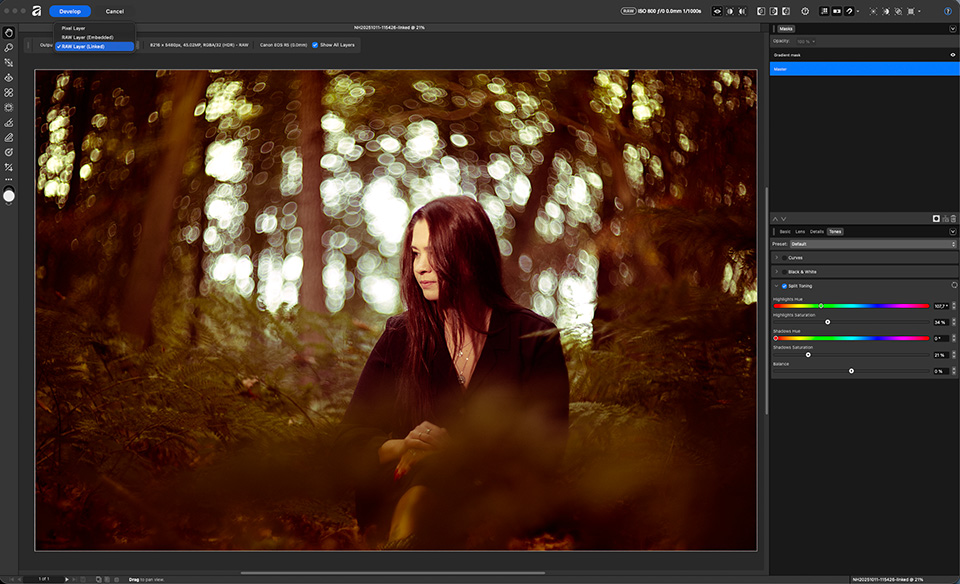
When you open a raw file, you get a raw editor called the Develop studio. There, you can choose to apply the edit as a pixel layer. This makes the edit permanent, and you cannot change anything later.
Instead of a pixel layer, you can save it as a raw layer. More precisely, there are two different raw layers. One is embedded, the other is linked. With both versions, you retain the option to adjust an edit later.
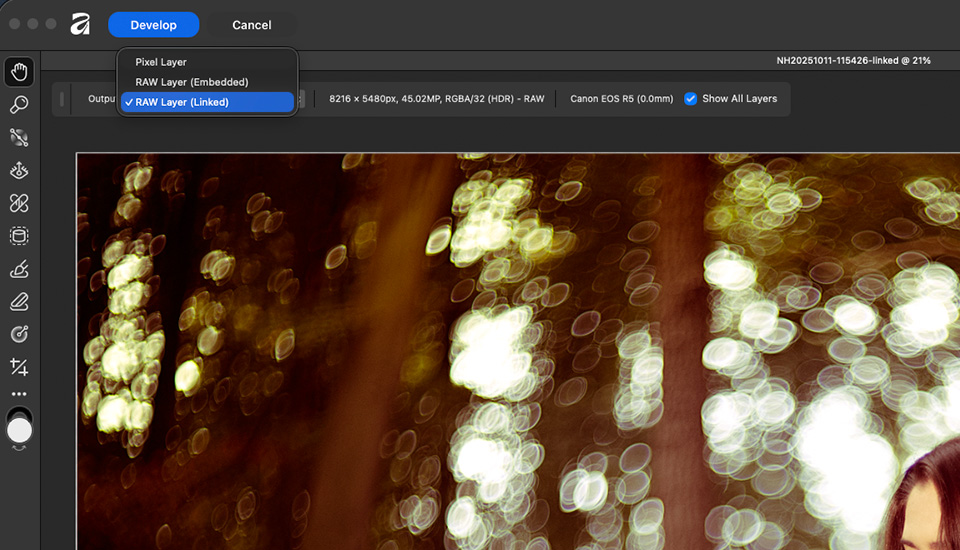
If you choose an embedded raw layer, the original raw file is saved along with it. This means that you save not only the adjustments, but also the raw file itself. The AF file created by Affinity then becomes very large.
To give you an idea, I edited a raw file in the Develop studio and saved it as an embedded raw layer. In addition to the 22 MB raw file, I get an AF file of 329.5 MB.
If I choose a linked raw layer, the required storage space changes enormously. In addition to the 22 MB raw file, I get an AF file of just 887 KB. That is less than 1 MB.
This saves me more than 300 MB of hard-drive space per photo. This soon adds up, because if you save 10 photos as embedded files, that becomes 3,000 MB, or 3 GB. For 100 photos, that is already 30 GB, and 1,000 photos takes no less than 300 GB.
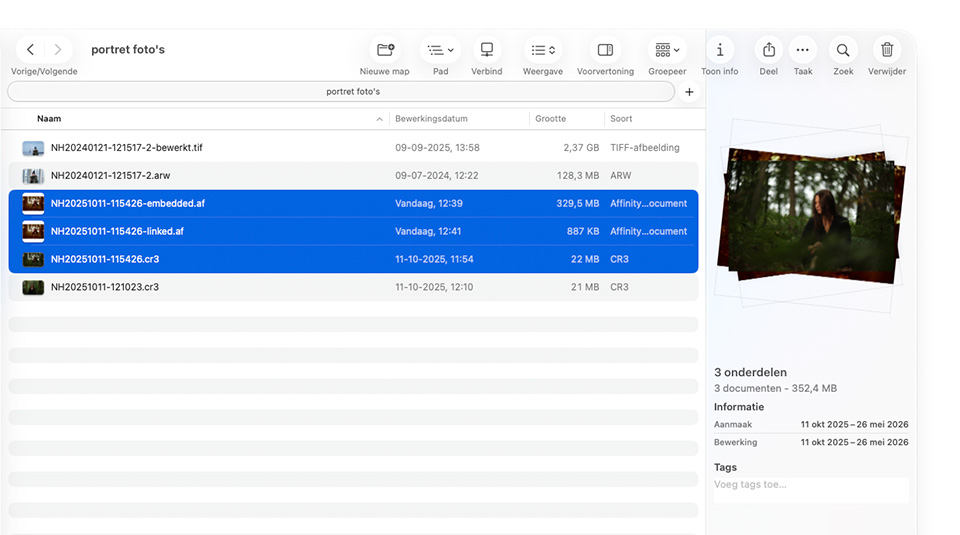
It is important that you keep the AF file linked to the raw file with the raw file. Otherwise, it will obviously not work. An AF file with an embedded raw file does not have to stay with the original raw file.
Do you use Affinity by Canva to edit your raw photos? Are you not using a linked raw layer? Then consider doing so. It can save you a lot of space on your hard drive.
About the author
Nando Harmsen has been photographing for more than 40 years. He specialises in wedding photography and landscape photography. Nando also gives talks, workshops, masterclasses and photo trips, and regularly reviews new and interesting equipment.
You might also like
-
 8 things to consider when switching to Affinity
by Nando Harmsen
-
 Create a collage in Affinity in nine steps
by Nando Harmsen
-
 10 tips to save hard drive space
by Nando Harmsen
-
 Make a raw file 90% smaller with lossy DNG
by Nando Harmsen
-
 Keep an overview: don't make JPEGs of your RAW files
by Nando Harmsen
-
 The difference between file size and resolution
by Nando Harmsen
1 comment
-
 Henk Donkers wrote on Wednesday 3 June 2026 at 11:50 | reply
Thank you Nando. This is very useful information. I have since switched to Affinity because PS has become too expensive for me and I hate the subscription model.
Translated from Dutch.
I don't regret switching yet. Sometimes it takes a bit of searching but Affinity can do pretty much everything PS can do.
I've noticed that more and more media outlets are writing about Affinity. That seems like a good thing to me.
Have your say
Please note: Articles older than a week can only be commented on by signed-in visitors.Would you still like to comment? sign in or create a free account.
Become a better photographer every week
A practical photography tip in your inbox every week.
38,937 photography enthusiasts already receive the tips! More about the weekly mail. Or keep up to date via  Facebook.

Elja Trum
Photofacts; everything to do with photography!
Would you like to take better photos and keep up with what is happening in photography? Photofacts publishes articles that teach you something about photography — from a product announcement to a practical shooting tip or a look at a website. Photofacts covers photography every day and is a hobby project of Elja Trum's that got out of hand. The articles are written by a team of volunteer authors. If you would enjoy writing one or more articles for Photofacts, do get in touch.More about PhotofactsPhotofacts is made possible in part by
