

Photographing with your smartphone through a telescope: iScoping
Monday 25 March 2019, 20:10 by Michelle Peeters | 26,316 views | 0 commentsThis article was translated from Dutch with the help of AI. Read the original.
In the world of digiscoping, smartphones offer useful new possibilities. You can send a photo taken through a telescope with your smartphone to your friends straight away, share it on social media, or use it as proof of your observation.
It is called iScoping: taking photos or filming with a smartphone through a telescope.
On Tuesday 19 March, I visited the final public stargazing evening of the 2018/2019 season at the Dr. A.F. Philips Observatory, at Alberdingk Thijmlaan 3 in Eindhoven. The subject of the evening was the Moon.
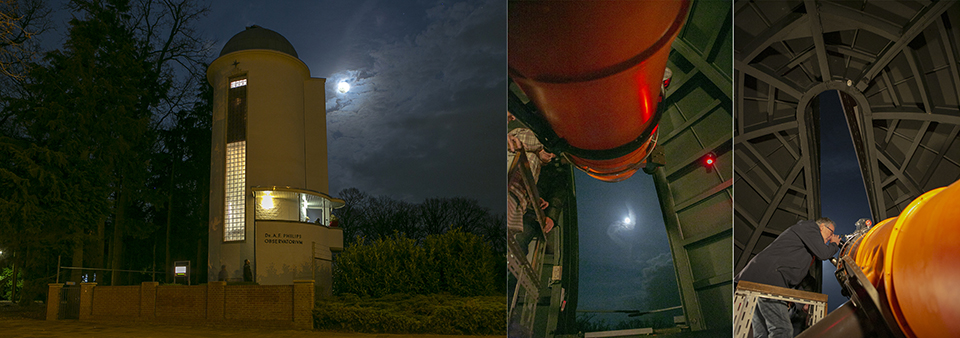
The observatory in Eindhoven has existed since 1938. Under the dome of the observatory is a huge telescope that lets you look deep into space. With your own eyes, you can see galaxies and gas nebulae whose light has sometimes been travelling for millions of years.
At least as fascinating to see are the rings of Saturn, the moons around Jupiter, or the craters on our own Moon. When the sky is clear enough, the observatory dome is opened so you can look through the observatory's large telescope yourself.
Successful photos of the Moon with an iPhone through a telescope
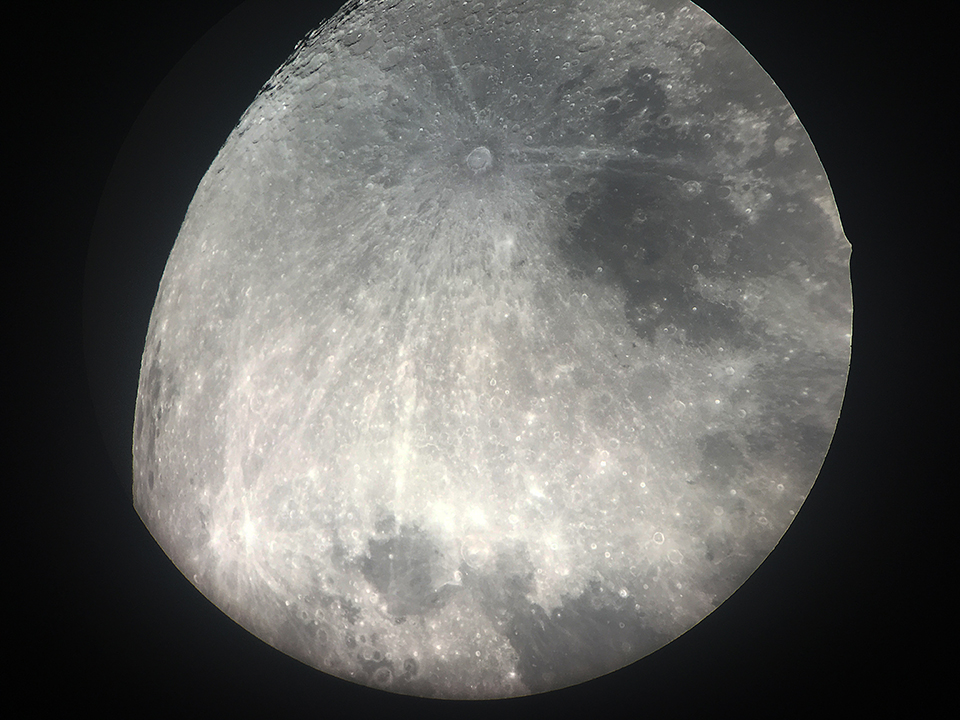
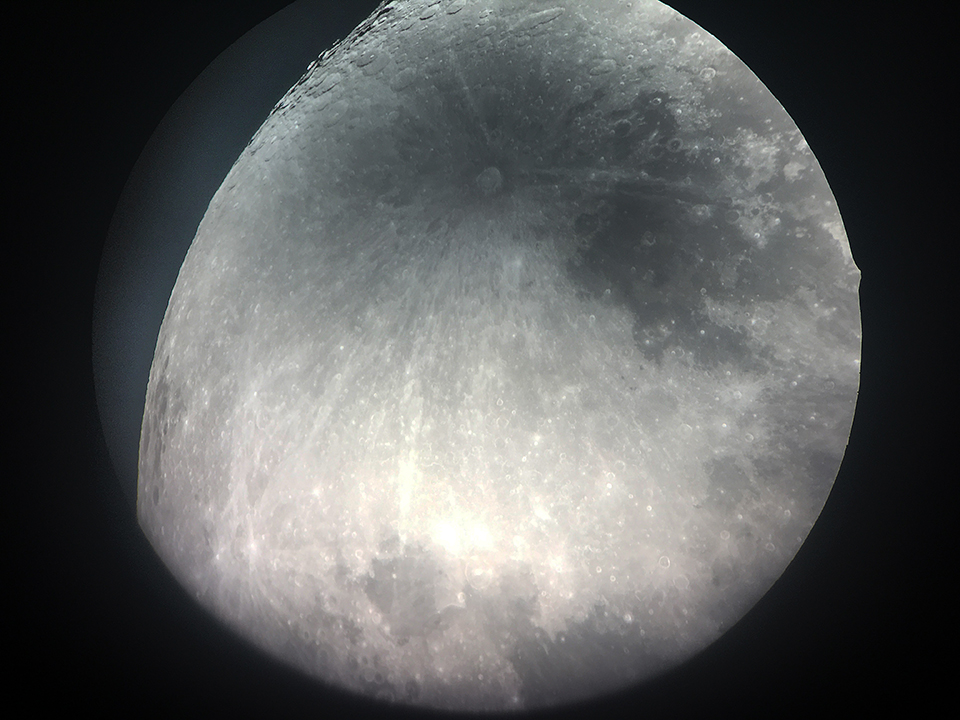
How fantastic is it to use the enormous optical focus of a telescope to take a sharp, close-up photo with a smartphone! Without an adapter, I managed to take sharp photos of the Moon through the telescope.
This is not easy, though, and it takes quite a bit of searching after pressing your smartphone camera lens against the telescope's viewfinder. Once I managed to focus using the touchscreen and adjust the exposure automatically, I succeeded in taking sharp photos.
It is not recommended to hold your smartphone manually behind the eyepiece. The alignment has to be perfect in every direction. The centre of your smartphone's camera must be aimed at the centre of the exit pupil of your telescope or binoculars.
It is certainly not easy to find those two points, let alone hold the smartphone in that position. The smartphone's image plane must also be parallel to the eyepiece. Even so, my photos were basically fine (perhaps more luck than judgement?...). Afterwards, I only added some extra contrast and sharpness in Photoshop.
Unfortunately, I could not use my DSLR without a suitable T2 adapter ring (this is then called digiscoping). I was told this was because it cannot focus at a distance of less than 20 centimetres.
With a DSLR, full-frame or mirrorless camera, you also need to pay extra attention to the tripod and video head. The weight of the camera throws the telescope off balance, which means taking photos is not always easy. A smartphone, on the other hand, is an almost weightless device that everyone usually has to hand.
All in all, that was reason enough for me to look into the possibilities of iScoping and what you need for it, so that you can also capture subjects such as wildlife with a smartphone, for which you would normally need a decent camera and telephoto zoom lens.
Digiscoping or iScoping
Digi- or iScoping is a way of taking photos in which your telescope or binoculars act as a telephoto lens. iScoping, using your smartphone, is ideal because you do not have to carry a separate, heavy camera.
What is more, after capturing the moment, you can share your photos with your friends and/or on social media very easily and straight away.
Another advantage of using a smartphone is that you have now created a serious zoom capability, something smartphones still lack.
Accessories
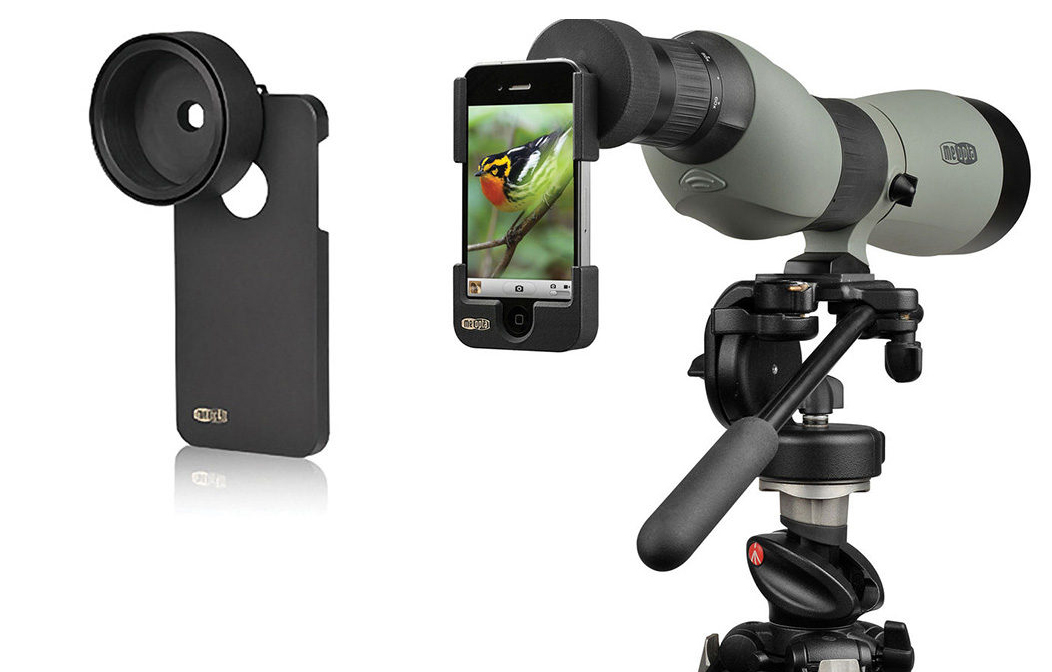
Telescope manufacturers have responded cleverly to this. Special adapters for the iPhone and Samsung are already available. A perfectly fitting adapter is essential for iScoping. It is a case for your smartphone with a matching ring attached, which is clamped onto the telescope's eyepiece.
Manufacturers Kowa, Zeiss and Swarovski Optik are happy to cater to the popular iPhone. There is a perfectly made iPhone holder for almost every iPhone model, with all functions remaining available.
There are adapter rings for different telescopes and binoculars, which in turn fit perfectly around the eyepiece of the binoculars or telescope.
The whole process only takes a few seconds: quickly place the adapter with your smartphone over the eyepiece, zoom in a tiny bit and you can start taking a photo or recording a film.
Bear in mind that not every smartphone is suitable for iScoping! It is better not to buy smartphones with two lenses for this purpose. The centres of the two lenses can never both be placed in the centre of the exit pupil.
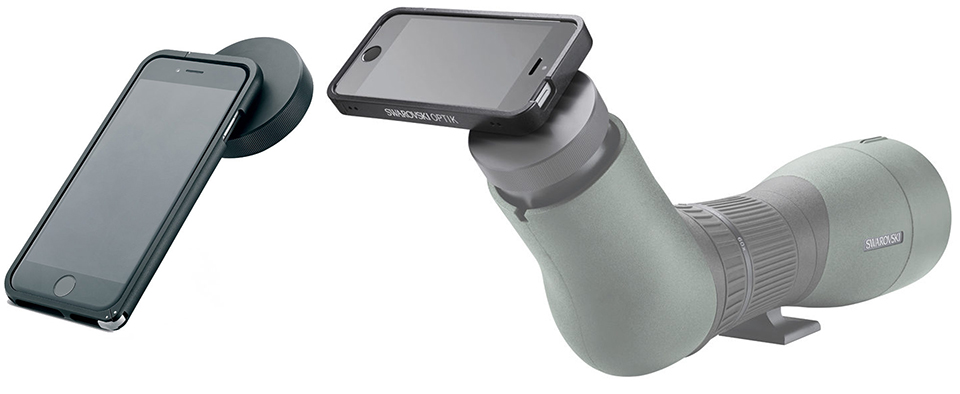
There are various types and sizes for sale: ready-made adapters from several brands, such as Swarovski and Kowa, or separate rings in various sizes that you can stick onto any phone case. If the ring is still a little too loose, you can add some extra tape to the inside with a bit of ingenuity, making the diameter smaller.
Telescope, spotting scope or binoculars?
It is important to do some proper research beforehand into the magnification you need from the telescope. This depends on what you want to use the telescope for. How much detail do you want to study in the night sky? Do you want to see the planets clearly, or do you prefer to see the bigger picture? And is it important for the telescope to be portable because you are going into nature, for example?
A telescope is an optical instrument for observing subjects at a great distance. Because of its high magnification, a telescope is often used for astronomical observations, in other words, looking at the night sky.
Spotting scopes are ideal for birdwatching or digiscoping, but because of their lower magnification they are much less suitable for observing the night sky. As with telescopes, you always need to use spotting scopes from a tripod to keep the image still enough.
If you do not need to view something from a very great distance, binoculars may be more than sufficient. But a telescope can sometimes be more convenient because of its high magnification. A telescope sometimes has the option to zoom in and out. A telescope generally has only one eyepiece.
Here is a fun video showing various uses of the MeoPix iScoping adapter in combination with binoculars or a telescope from Meopta:
Testing and trying it out
It is important to practise with a set like this after buying it. It will be easier with planets than when photographing wildlife. Wildlife obviously does not stay still, you have no autofocus, and bumping into your tripod is out of the question. Make it an enjoyable challenge and enjoy your progress in the field.
About the author
Michelle Peeters is fotografe en oprichter van DeuxBleus Fotografie. Michelle herkent het bijzondere in het gewone en het gewone in het bijzondere. Ze heeft zich nooit willen specialiseren en is daardoor van alle markten thuis.
You might also like
-
 How to photograph the moon
by Michelle Peeters
-
 A tripod for your smartphone
by Nando Harmsen
-
 Photographing the Full Moon creatively
by Nando Harmsen
-
 Is my smartphone replacing my system camera?
by Laura van der Burgt
-
 iPhone X vs Galaxy S9: smartphone cameras compared
by Lars Paymans
-
 Smartphone photography and travel
by Nando Harmsen
0 comments
Be the first to share what you think!
Have your say
Please note: Articles older than a week can only be commented on by signed-in visitors.Would you still like to comment? sign in or create a free account.
Become a better photographer every week
A practical photography tip in your inbox every week.
38,886 photography enthusiasts already receive the tips! More about the weekly mail. Or keep up to date via  Facebook.

Elja Trum
Photofacts; everything to do with photography!
Would you like to take better photos and keep up with what is happening in photography? Photofacts publishes articles that teach you something about photography — from a product announcement to a practical shooting tip or a look at a website. Photofacts covers photography every day and is a hobby project of Elja Trum's that got out of hand. The articles are written by a team of volunteer authors. If you would enjoy writing one or more articles for Photofacts, do get in touch.More about PhotofactsPhotofacts is made possible in part by
