

Easily remove a tattoo with AI in Lightroom Classic
Saturday 12 April 2025, 20:02 by Elja Trum | 3,112 views | 3 commentsThis article was translated from Dutch with the help of AI. Read the original.
Does your model have a tattoo that does not fit the look of your photo? Using Adobe Lightroom Classic and its built-in AI tools, you can easily remove it. Even if it is an extensive tattoo.

Model Meffy, shown in the photo above, has quite a few tattoos on her arms. They did not really fit the style of the shoot I did, where the emphasis was on softness and a retro feel.
In the past, this would have been quite a job, but thanks to the practical AI tools in Lightroom Classic, it is now a piece of cake. I had also asked Meffy during the shoot whether she was happy for me to remove her tattoos during the editing. It is only fair to check first.
In the Develop module, select 'Remove' on the right below the histogram (keyboard shortcut Q). Under Mode, choose the leftmost option, 'Remove'. Make sure that 'Generative AI' is enabled.
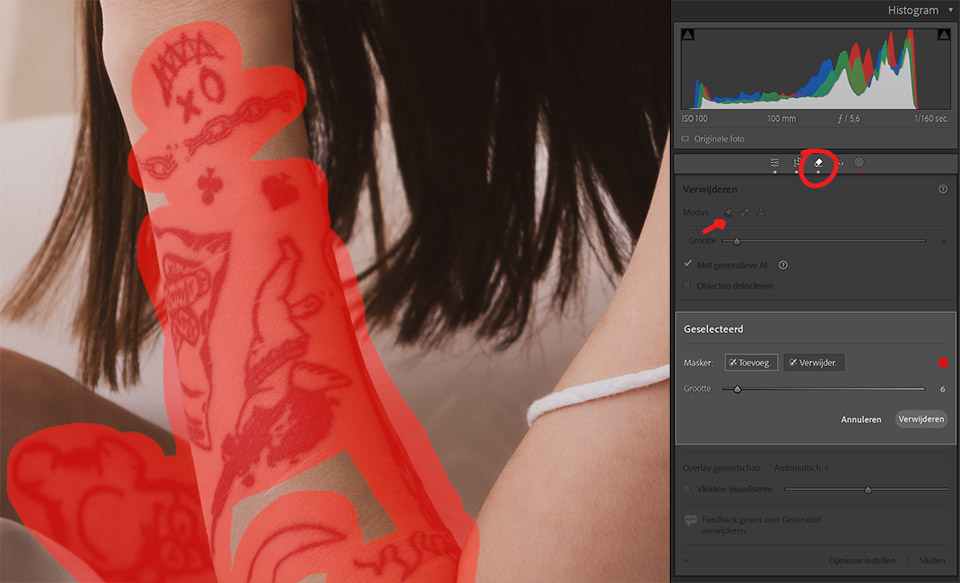
You can now use a brush to mark the areas you want to remove in red. Make the area reasonably wide around the tattoo. It is better to make it a little too wide than too narrow.
It often works well to make it one continuous area rather than several separate sections. Separate sections are processed individually, which can quickly become confusing when there are lots of areas.
All you have to do next is click the 'Remove' button. You need to be patient for a moment, and the tattoo should then be gone.
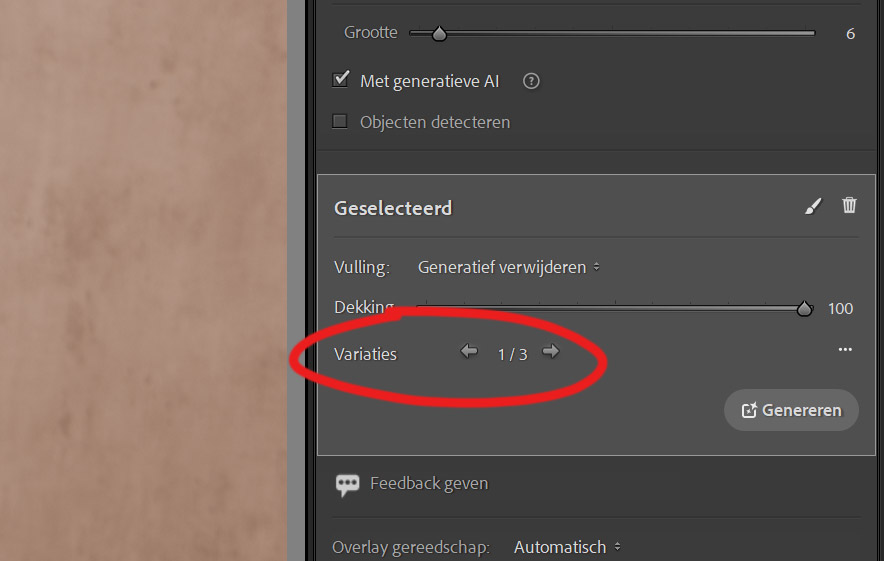
The removal does not always work straight away, but you do get 3 different variations immediately. You can click through them using the arrows and choose the variation you like best.
If none of them are suitable, you can try again with the 'Generate' button, or remove this selection using the bin and try the whole thing again from scratch.

About the author
Elja Trum is the founder of Photofacts and online photography course website Photofacts Academy. He has been writing about photography since 2006. Elja is also the author of (Dutch) books on composition, black-and-white photography, flash photography and portrait photography.
You might also like
-
 Lightroom Classic 8.0 and Lightroom CC 2.0
by Michelle Peeters
-
 New update for Lightroom Classic enables AI noise reduction
by Nando Harmsen
-
 New AI feature for Lightroom and Lightroom Classic
by Nando Harmsen
-
 Adobe updates Lightroom (Classic) with new AI masks
by Elja Trum
-
 5 tips to work faster in Lightroom Classic
by Thijs Schouten

3 comments
-

 Stefan ALEN wrote on Tuesday 15 April 2025 at 14:21
| reply
Stefan ALEN wrote on Tuesday 15 April 2025 at 14:21
| reply
I’ve found that you really can’t have too much uncovered skin in your photo, because even with photos in lingerie it usually backs out. The same goes for Photoshop. I’m starting to get a bit fed up with that puritanical know-it-all attitude. You’re allowed to pay nicely for the extra features such as AI, but they do interfere with how you use it. Soon Word will also start interfering with what you write.... an erotic thriller.... oh no, that’s not allowed with our program.
Translated from Dutch. -
 Elja Trum
wrote on Tuesday 15 April 2025 at 14:30
| reply
Elja Trum
wrote on Tuesday 15 April 2025 at 14:30
| reply
Yes, I regularly have that problem with my photos too.
Translated from Dutch.
In Photoshop I have a little trick for that: copy the photo to a new image, use a black brush to draw 'clothing' over the 'bare' parts (a colored block works too), try the AI edit again, then copy the image back to your original as an extra layer and apply a mask to get the edited part into your original.
Often it works this way. But it is unnecessary hassle because Adobe is so prudish. I get that the idea is that they want to prevent you from undressing someone with the help of AI, but it is set a bit too sensitively. -
Stefan ALEN wrote on Tuesday 15 April 2025 at 14:40
| reply
Thanks, Elja, for your response. I’ve already discovered that trick too. But I still think it’s a shame that you have to take a detour to achieve your goal. AI has its advantages, but if it starts limiting you in what you can do, then it’s really missing the point. Same goes for posts on Instagram: I try to censor everything as well as possible, but every few days I still get a notification that a post has been removed (sometimes one from a year ago), then you have to request a review again, and after a few hours it’s back up again.
Translated from Dutch.
Pfff.....
Have your say
Please note: Articles older than a week can only be commented on by signed-in visitors.Would you still like to comment? sign in or create a free account.
Become a better photographer every week
A practical photography tip in your inbox every week.
38,937 photography enthusiasts already receive the tips! More about the weekly mail. Or keep up to date via  Facebook.

Elja Trum
Photofacts; everything to do with photography!
Would you like to take better photos and keep up with what is happening in photography? Photofacts publishes articles that teach you something about photography — from a product announcement to a practical shooting tip or a look at a website. Photofacts covers photography every day and is a hobby project of Elja Trum's that got out of hand. The articles are written by a team of volunteer authors. If you would enjoy writing one or more articles for Photofacts, do get in touch.More about PhotofactsPhotofacts is made possible in part by
