

5 reasons to use an external recorder when filming
Monday 4 September 2023, 16:16 by Nando Harmsen | 4,019 views | 6 commentsThis article was translated from Dutch with the help of AI. Read the original.
Do you like filming with a DSLR or mirrorless camera? Then you know there can sometimes be limitations. You can put up with them, or look for a solution. An external recorder might be that solution. Here are 5 reasons to use one.
Filming with a DSLR or mirrorless camera doesn't have to be a problem. However, you do have a number of limitations, which can vary depending on the make and model of your camera. You probably know what they are if you use the video features.

There may be a time limit for recordings. Only a limited number of video recording formats may be available. Controlling the exposure can be difficult. You may not have access to log recording. The small LCD screen on your camera can also be difficult to work with.
An external recorder can be a good solution to many of these problems. I spent a long time wondering whether I should buy one for my video recordings. After all, they aren't cheap. Now that I have one, I wouldn't want to be without it.
1. A larger screen for a better view
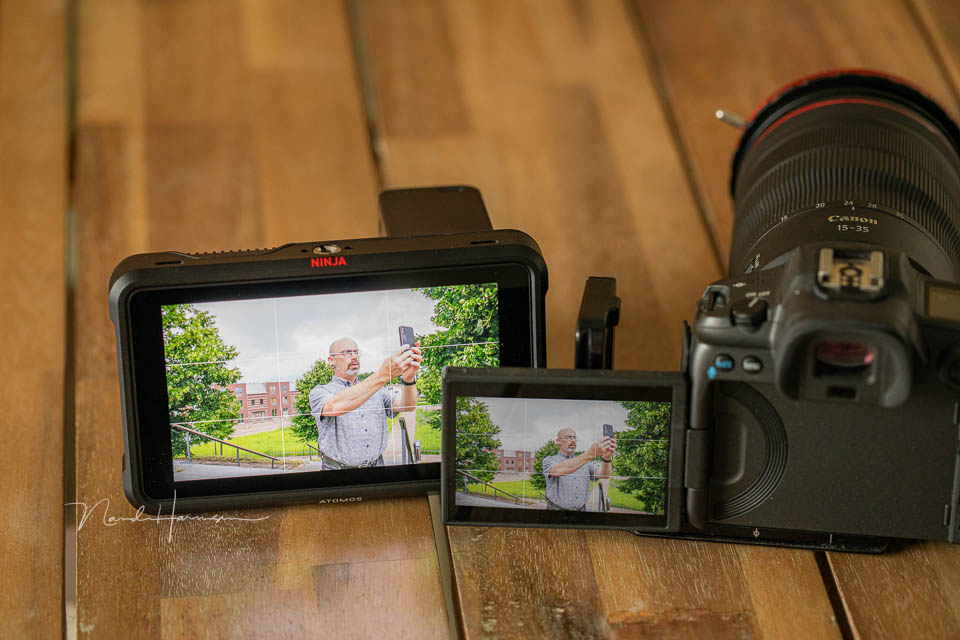
A camera's LCD screen is generally no larger than 3 inches. That works reasonably well for looking back at your photos. But viewing your footage while filming, and keeping an eye on the focus and exposure, is extremely difficult.
A larger screen makes this much easier, and gives you better control as well. A Ninja V, for example, has a 5-inch screen, which is considerably larger. You can go even bigger, but make sure it remains practical.
2. A choice of different recording formats
A camera has a number of recording options. These usually relate to the resolution of the video, and sometimes the quality. But there is more. Think of frame rate and recording in log format, or even raw format.

An external recorder usually offers more options. Not just in frame rates and quality, but also in recording formats. Think of ProRes RAW, for example. This gives you much more flexibility when choosing the best file format for your purpose.
3. More features for controlling exposure, focus and colour
A camera usually only allows you to display a histogram. Colour and focus are also hardly possible to check. Some cameras have more options, but never as many as an external recorder.

Think of an advanced histogram, false colour display, focus peaking, applying a LUT to your log recording, and much more. This way, you can be sure that the recordings you make are perfect.
4. An external hard drive is cheap and easier to use
Video takes up a lot of storage space. A 64GB card won't be enough, and I consider 256GB the absolute minimum. Especially when you want the highest possible quality.

With an external recorder, you can simply use a large 1TB or 2TB SSD. With an adapter, it works perfectly with your recorder. When you have finished recording, you simply connect the hard drive to your computer.
5. No time limit for recordings
One of the biggest annoyances is the time limit for video recordings on a camera. Sometimes there is a good reason for it, because a camera becomes very hot while filming. Half an hour is often the maximum. Although these days, that limit is increasingly being extended.

With an external recorder, you don't have that limit. Want to record continuously for an hour? No problem. Two hours? No problem. You can even record for longer if you want. The only limit is probably the storage capacity or battery.
What am I using?
The recorder I have is an Atomos Ninja V. These are expensive devices, and you need some accessories with them. Think of an arm or a hot shoe adapter to mount the monitor. You also need a battery to power the recorder. And a hard drive to store your footage, of course.

Atomos announced a new version of the Ninja recorder in August 2023. There is now a good chance that the old model will be offered on the second-hand market at an attractive price.
I also bought my Ninja V second-hand. It saved me quite a bit of money and I haven't regretted it for a moment.
About the author
Nando Harmsen has been photographing for more than 40 years. He specialises in wedding photography and landscape photography. Nando also gives talks, workshops, masterclasses and photo trips, and regularly reviews new and interesting equipment.
You might also like
-
 Using an external monitor for photography on a camera
by Nando Harmsen
-
 5 things you need to know when you start filming
by Nando Harmsen
-
 Choosing a light source for your video recordings
by Nando Harmsen
-
 The Forgotten Film Symbol on Your Camera
by Nando Harmsen
-
 5 Tips for Film Noir Photography
by Elja Trum
-
 Wildlife photography and switching to mirrorless
by Evert Doorn
6 comments
-
 Wim Hendriks wrote on Tuesday 5 September 2023 at 10:24 | reply
The story isn't complete if you don't start or end with the editting software that can handle it, sound and of course create a flowing story.
Translated from Dutch. -

-
 Kees Verwaard wrote on Tuesday 5 September 2023 at 11:07 | reply
How do you set up, your camera then or connect it so that it keeps sending a signal to the external recorder for more than half an hour? In my case Canon EOS 6D mark II.
Translated from Dutch.
This is indeed sometimes a problem if you are not paying attention for a moment or are working with 2 cameras during stage performances. -
 Nando
wrote on Thursday 7 September 2023 at 10:09
| reply
Nando
wrote on Thursday 7 September 2023 at 10:09
| reply
The signal from your sensor goes via HDMI to the recorder. Usually, no additional settings on the camera are needed. You don't start a recording with the camera, but on the recorder itself. The camera is the gateway for the image signal.
Translated from Dutch. -
 Paul eos wrote on Tuesday 5 September 2023 at 13:24 | reply
Thanks Nando for bringing up filming again, very interesting explanation.
Translated from Dutch.
Now I've been wondering for a long time" what is LUT " and what can you do with it? -
Nando
wrote on Thursday 7 September 2023 at 10:12
| reply
LUT means Look-Up Table. Simply put; it is a kind of preset that applies an edit to the image signal. For example, you use a LUT to convert an unedited video image recorded in log format, and you can use it for color grading an edited video image.
Translated from Dutch.
Have your say
Please note: Articles older than a week can only be commented on by signed-in visitors.Would you still like to comment? sign in or create a free account.
Become a better photographer every week
A practical photography tip in your inbox every week.
38,981 photography enthusiasts already receive the tips! More about the weekly mail. Or keep up to date via  Facebook.

Elja Trum
Photofacts; everything to do with photography!
Would you like to take better photos and keep up with what is happening in photography? Photofacts publishes articles that teach you something about photography — from a product announcement to a practical shooting tip or a look at a website. Photofacts covers photography every day and is a hobby project of Elja Trum's that got out of hand. The articles are written by a team of volunteer authors. If you would enjoy writing one or more articles for Photofacts, do get in touch.More about PhotofactsPhotofacts is made possible in part by
