

RAW output for the Nikon Z 7 and Z 6
Friday 27 December 2019, 13:26 by Michelle Peeters | 5,532 views | 0 commentsThis article was translated from Dutch with the help of AI. Read the original.
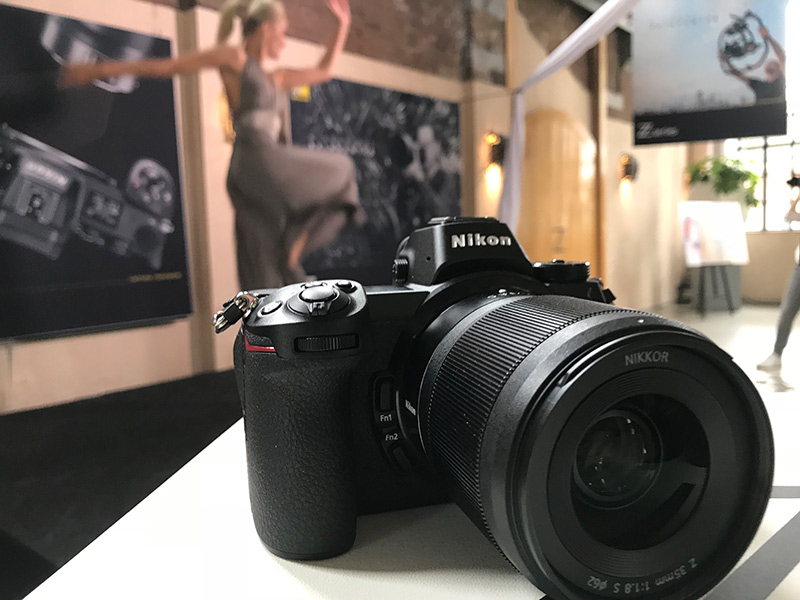
Nikon has announced an update that allows users of Nikon Z 6 and Z 7 full-frame mirrorless cameras to save video footage in RAW format. The upgrade is available from firmware 2.20 and only works with an Atomos external monitor.
Nikon is the first camera manufacturer to enable RAW video output directly from a full-frame mirrorless camera via HDMI.
Users of the Z 7 and Z 6 cameras can output a 12-bit RAW video stream to an external Atomos Ninja V recorder that is part of the Nikon Z 6 Essential Video Kit.
ProRes RAW for video
The video stream is recorded in the ProRes RAW format, which offers greater colour accuracy, with more detail in highlights and shadows.
Videographers can benefit from maximum flexibility during post-processing without slowing down the editing process, which is ideal for HDR workflows.
The update makes it possible to record 4K or full HD footage with 12-bit colour depth via certain models of an Atomos Ninja Inferno V monitor connected to the camera via HDMI.
After you have downloaded the firmware update to version 2.20, support for RAW video output can be installed on the Z 7 and Z 6 cameras at a Nikon service centre. This service is free for all Nikon Z 6 cameras purchased as part of the Z 6 Essential Video Kit.
Enabling RAW output via HDMI means a significant improvement for every videographer. The Z series will continue to meet the changing needs of users and will offer next-generation features in future firmware updates.
Details
- Prepare your Z 7 or Z 6 camera for 12-bit RAW video output. Download firmware update version 2.20 and then take your camera to a Nikon service centre to activate RAW. You may be charged for this. Contact your local Nikon service centre for more information.
Download firmware 2.20 for Z 7
Download firmware 2.20 for Z 6
Find your Nikon service centre; - External Atomos Ninja V recorders may also require a firmware update to be compatible with Nikon RAW video. Visit the Atomos website for more information;
- ProRes RAW is a RAW video format developed by Apple Inc. in 2018;
- If your Z 6 was purchased as part of a Nikon Z 6 Essential Video Kit and support for RAW video output has not already been installed on the camera, your nearest Nikon service centre will install this support free of charge. Proof of purchase is required.
Take a look at more Nikon products at: nikon.nl.
About the author
Michelle Peeters is fotografe en oprichter van DeuxBleus Fotografie. Michelle herkent het bijzondere in het gewone en het gewone in het bijzondere. Ze heeft zich nooit willen specialiseren en is daardoor van alle markten thuis.
You might also like
-
 Nikon announces the Z 6 II and Z 7 II
by Nando Harmsen
-
 Review: Nikon Z 6 full-frame mirrorless camera
by Michelle Peeters
-
 Review: Nikon Z 50
by Michelle Peeters
-
 Nikon announces new flagship, the Z 9
by Nando Harmsen
-
 Everyone photographs in raw, there are no exceptions
by Nando Harmsen
0 comments
Be the first to share what you think!
Have your say
Please note: Articles older than a week can only be commented on by signed-in visitors.Would you still like to comment? sign in or create a free account.
Become a better photographer every week
A practical photography tip in your inbox every week.
39,024 photography enthusiasts already receive the tips! More about the weekly mail. Or keep up to date via  Facebook.

Elja Trum
Photofacts; everything to do with photography!
Would you like to take better photos and keep up with what is happening in photography? Photofacts publishes articles that teach you something about photography — from a product announcement to a practical shooting tip or a look at a website. Photofacts covers photography every day and is a hobby project of Elja Trum's that got out of hand. The articles are written by a team of volunteer authors. If you would enjoy writing one or more articles for Photofacts, do get in touch.More about PhotofactsPhotofacts is made possible in part by
