

5 Things You Should Never Do in Post-Processing
Monday 7 July 2025, 15:15 by Nando Harmsen | 5,933 views | 22 commentsThis article was translated from Dutch with the help of AI. Read the original.
Modern photo editing software lets you do a great deal. You can even generate a photorealistic image from nothing using so-called AI. However, there are edits you should avoid. I have listed five of them.
Photography is half of creating an image. Just like in the past, when we spent hours in the darkroom, we now spend hours doing the same thing on the computer. Just like in the past, a great deal is possible, only it has become much easier to achieve the desired result.
However, there are a number of things you should avoid in post-processing. You simply go too far with the editing. I have listed five of them for you. Note, though, that you should read them with a wink.
1. Street photo with people and removing the people
If you are taking photos in the street, there is a good chance that people will appear in the photo. So don't then use modern AI removal techniques to remove the people again.
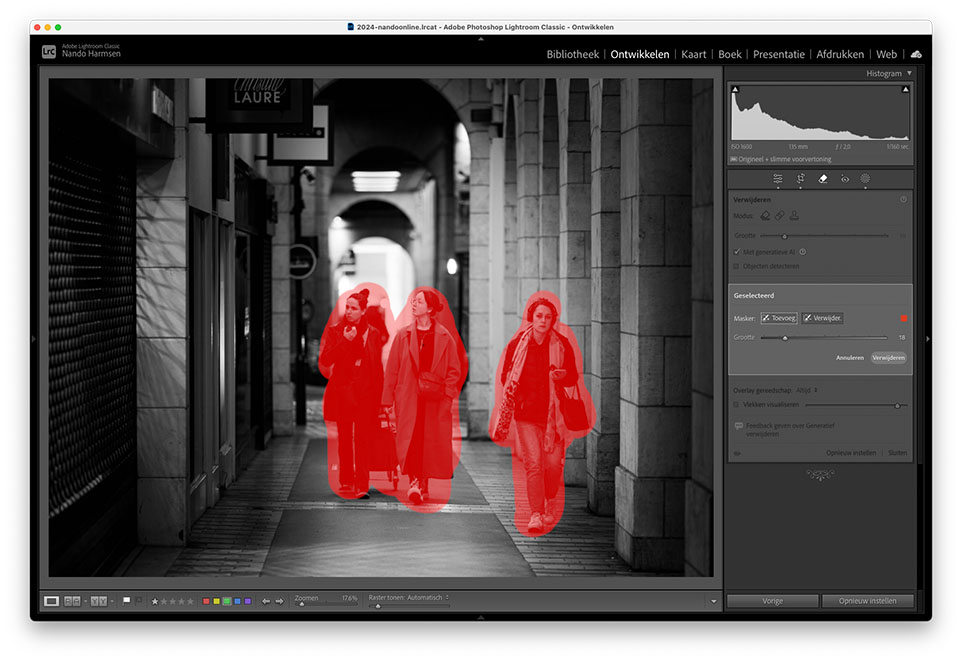
If you don't want people in the photo, look for a moment when there are no people around. Wait a while, or find a place where nobody is.
2. Rembrandt lighting and brightening the shadows
Rembrandt lighting is named after the painter of the same name. The direction of the light creates beautiful shadows on the face, with a small triangle of light next to the nose while the face is covered in shadow.
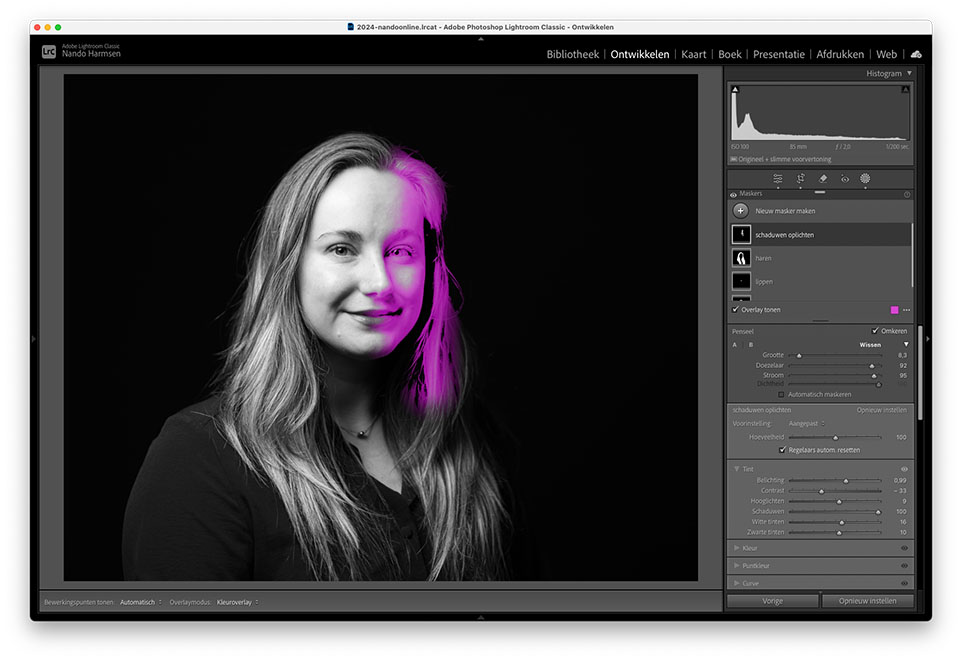
Don't brighten the shadows on the face, because then you might as well not have used Rembrandt lighting. There are plenty of lighting setups to choose from if you don't want any shadows.
2. Misty landscape photo and removing the mist
A landscape in the mist is beautiful to photograph. The haze gives it a soft and mysterious appearance. But be careful not to then use the 'Remove Haze' option in Lightroom to bring out details in the mist.
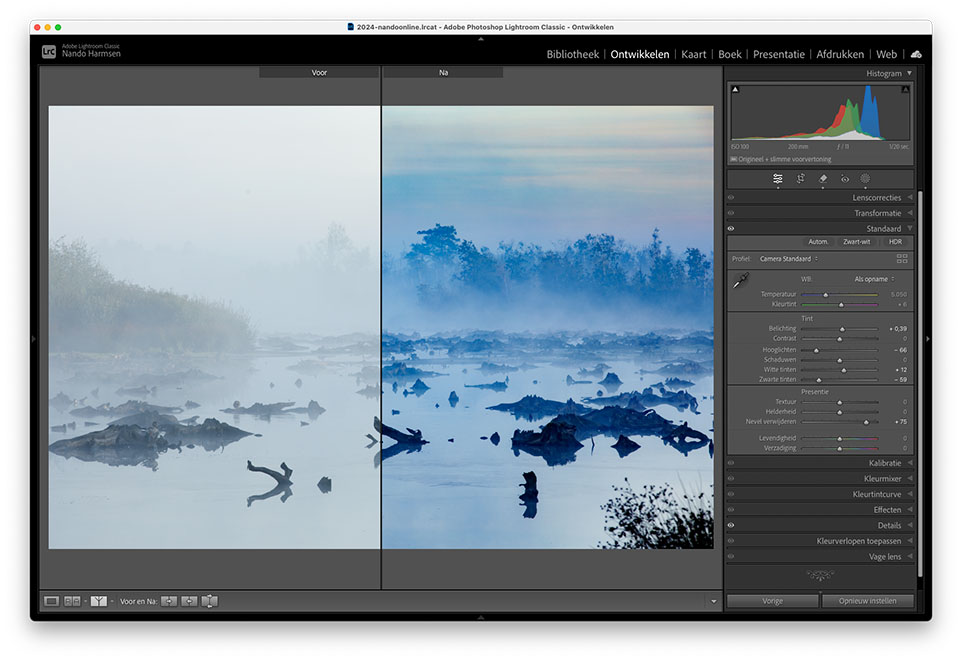
If you don't want mist, go out when there is no mist. There are plenty of those moments, more even than moments with mist.
4. Taking a black-and-white photo and colouring it in Photoshop
Black and white is a timeless form of photography. It is stylish, and with good contrast, a black-and-white photo can be fantastic. So don't then use the modern technique in Photoshop to colour that black-and-white photo.
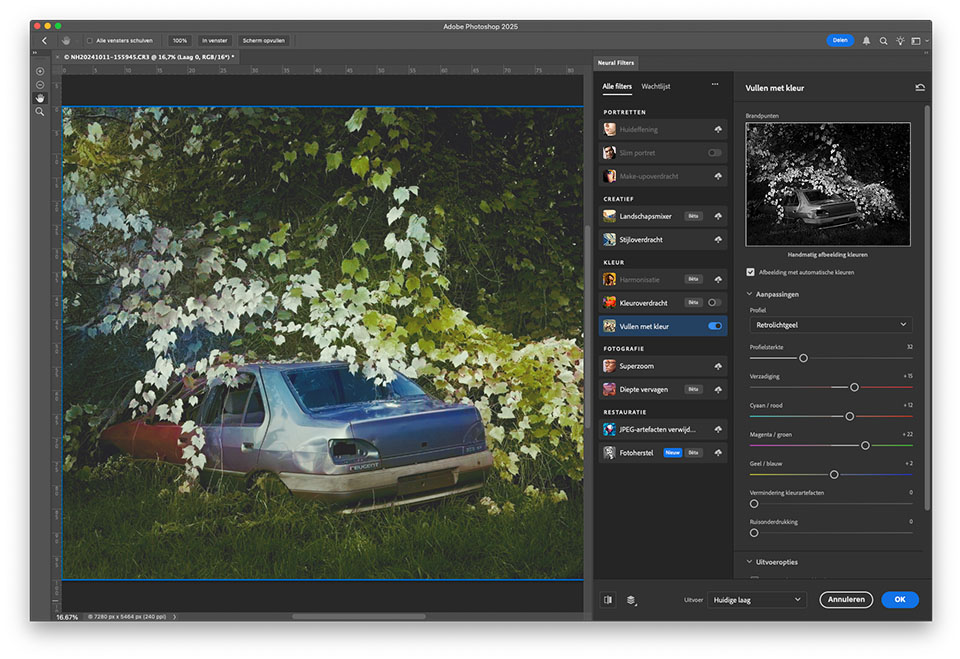
If you want a colour photo, take a colour photo. You should only convert it to black and white if you really want it to be black and white.
5. Zooming in a long way and then expanding the AI canvas
These days, almost all of us use a zoom lens. You can use it to enlarge the subject so that it fills the frame in the photo. If you have done that, don't then expand the canvas in Photoshop using AI.
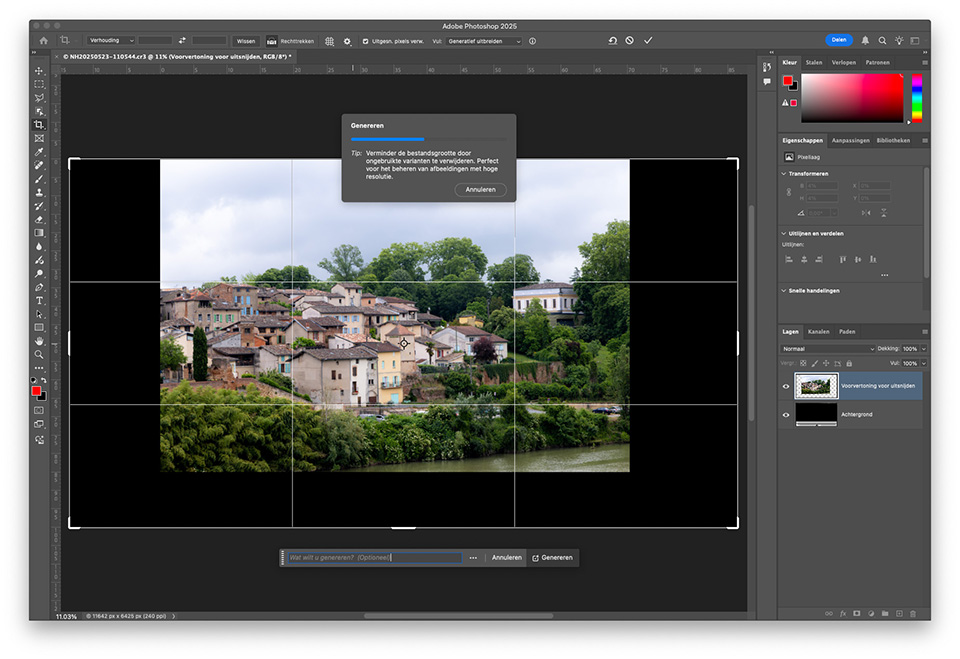
If you want more of the surroundings in the frame, simply zoom in less. That is easier, and also much more realistic. Don't have a wide enough angle? A panorama is also still an option.
Of course, you should read these five things you should never do in post-processing with a wink. Although... There is a grain of truth in them, because sometimes I see edits that fit this description exactly.
Maybe you can think of another edit that you should never do. Remember, with a wink. I am curious which one you can come up with.
About the author
Nando Harmsen has been photographing for more than 40 years. He specialises in wedding photography and landscape photography. Nando also gives talks, workshops, masterclasses and photo trips, and regularly reviews new and interesting equipment.
You might also like
-
 Everything about Generative Fill in Photoshop Beta
by Nando Harmsen
-
 Adobe and the cost of AI generative fill
by Nando Harmsen
-
 Price comparison of software with and without a subscription
by Nando Harmsen
-
What to consider when switching photo editing software
by Nando Harmsen
-
 5 tips for dealing with your model
by Elja Trum
-
 An impression of the DxO PureRAW4 plugin for Lightroom
by Nando Harmsen
22 comments
-
 RAWshooter wrote on Tuesday 8 July 2025 at 10:08 | reply
Or: don't use AI tricks. You do pay for them at Adobe. So why still use that very expensive Lr and Ps? There are lots of tools that do the same for a one-time fee.
Translated from Dutch. -

-
 Donald Willemsen wrote on Tuesday 8 July 2025 at 10:47 | reply
What you shouldn't do in post-processing is blur the background afterwards. That really stands out. You'd be better off choosing a small aperture value or increasing the distance between the subject and the background.
Translated from Dutch.
Speaking of Ai, it will take up an increasingly larger place in post-processing. Whether we should be happy about that? To a certain extent, I think. I mainly use Ai for noise reduction, because I feel that works very well.
But using Ai to generate something in the image that is or isn't there, goes too far in my eyes. -
-

 mousquito wrote on Tuesday 8 July 2025 at 11:05
| reply
mousquito wrote on Tuesday 8 July 2025 at 11:05
| reply
number 4 is definitely true, I always photograph in color, and afterwards I convert them to black and white in post-processing, much easier than the other way around. although I don't convert many to black and white. maybe I should look into it more. But number 1, removing the people, I do sometimes because you want to have a certain building or scene and it's difficult to close off the whole street. But I usually use a longer exposure so the people fade, also not always that easy.
Translated from Dutch.
-
-
 Pieter wrote on Tuesday 8 July 2025 at 11:19 | reply
I generally leave the composition and content untouched. I do straighten the horizon and any other lines if necessary. The latter causes some of the image at the edges to disappear. I have had Photoshop Generative AI fill those empty spaces a number of times. Each time, a very mediocre result when it comes to sharpness. Too diffuse. The "classic" Content-Aware Fill works a lot better.
Translated from Dutch. -
Nando
wrote on Tuesday 8 July 2025 at 11:32
| reply
That's the reason why it's good to photograph a little wider, so that you have the option of straightening the photo.
Translated from Dutch.
Moreover, when you have important objects so close to the edge that they could be cut off, the composition is usually not the best. Usually... -
 BeVe wrote on Tuesday 8 July 2025 at 11:27 | reply
I can only wholeheartedly agree with this. Photographing is something different from painting pictures in a coloring book. I limit my post-processing to things I also did in the darkroom. Everything else you fiddle with or perhaps even ruin in a photo means that the photo is no longer a photo. The result is usually so unnatural that I fail to see what added value it has. Greetings from an "old school" photographer.
Translated from Dutch. -
Pieter wrote on Tuesday 8 July 2025 at 11:47 | reply
Shooting wider is difficult when your back is already against a wall, while you still want to get that beautiful city facade fully in the frame. With a decent wide-angle lens, it sometimes just works, although things do need to be straightened out a bit in post-processing, precisely to avoid distorting reality too much.
Translated from Dutch. -
Nando
wrote on Tuesday 8 July 2025 at 11:54
| reply
That is indeed the case. Sometimes you have limitations.
Translated from Dutch.
I often look at other viewpoints that are more suitable.
If those viewpoints aren't there, consider a panorama. That gives you plenty of room for corrections afterwards. Just make sure you have a good nodal slide, both horizontally and vertically.
That works perfectly.
And sometimes you just have to embrace perspective distortion... -
 Paul wrote on Tuesday 8 July 2025 at 12:13 | reply
Due to digital technology, the possibilities for image editing have become enormously greater compared to analog photography. In my opinion, all tools can be used, although this may stretch the boundaries of photography toward image creation. But it does no harm to use tools sensibly. Use the tool and do not let the tool use you.
Translated from Dutch. -
Donald Willemsen wrote on Tuesday 8 July 2025 at 12:39 | reply
Pieter, a church tower is often difficult to capture from top to bottom in one shot. Especially if you don't have the space (or the right wide-angle lens) to move back. Wide-angle also often causes enormous distortion that is difficult to correct.
Translated from Dutch.
In such a case I use the panorama method. I take 2 to 4 photos and start with the lower part, working my way up until I have the entire tower. Later on the PC I merge the images together. You can use the panorama method for any building. -
 Rob Dikkers wrote on Tuesday 8 July 2025 at 13:17 | reply
Many experienced photographers strive for a photo that is already good “straight out of the camera”. Post-processing is sometimes seen as a form of manipulation that detracts from the original intent. For young photographers, post-processing is often an essential part of their style. They use Lightroom, Photoshop and AI tools to enhance or even transform images. Young people often use post-processing to enhance emotions, remove distracting elements or create a certain atmosphere. The end result matters more than the “authenticity” of the moment.
Translated from Dutch.
So yes, to each their own.
-
-
Nando
wrote on Tuesday 8 July 2025 at 13:56
| reply
It is a goal to get the photo as right as possible in the camera, but good post-processing is always essential. Many experienced photographers know that, including professionals. There are many hobbyists who often think that post-processing affects the authenticity.
Translated from Dutch.
Post-processing a photo is the same as developing and printing the photo in a darkroom.
Of course, there is always the possibility of going too far in post-processing, turning it into manipulation. However, you should not lump the two together. -
Donald Willemsen wrote on Tuesday 8 July 2025 at 14:07 | reply
Completely agree Nando, adding to that: in the analog era, means were also used in the darkroom to enhance emotions. That is not something from recent years.
Translated from Dutch. -
 Ria wrote on Tuesday 8 July 2025 at 20:20 | reply
It’s fantastic that you now have so many more options in LR than when the program started. I’m happy to make use of them, and the photos can be improved considerably as a result. AI for noise reduction and for removing distracting elements is also a great option.
Translated from Dutch. -
 Philippe Demeyere wrote on Wednesday 9 July 2025 at 07:06 | reply
If you want to photograph more widely, make a panorama of it. With two photos you already have enough for a wider photo. I've been doing it that way for years. Look for tutorials on YouTube, for example.
Translated from Dutch. -
 fredkok wrote on Wednesday 9 July 2025 at 08:31
| reply
fredkok wrote on Wednesday 9 July 2025 at 08:31
| reply
The ‘toolbox’ has grown enormously since the darkroom days and is much more accessible. There is plenty of room for all those tools. The key usually lies in being able to use the tool properly, and in most cases that means subtle use. As soon as you start using a slider at its maximum setting, that is often a moment for critical self-reflection.
Translated from Dutch.
The same applies to AI, great for making certain selections much better than before, but you can also do silly things with it. If the fun is making a frog crawl out of someone’s nostril, you’re well served, but whether that’s photography ….? -
-
 jahiba wrote on Wednesday 9 July 2025 at 19:04
| reply
jahiba wrote on Wednesday 9 July 2025 at 19:04
| reply
For photography I call it 'developing' if you seek out or try the extreme it falls into the category 'digital art. I can appreciate both but you have to see them as two forms. Furthermore, I am of the opinion that you should delve into it and know what it can and does. Furthermore, I am of the opinion that you can better embrace it and delve into it, because it really isn't going away anymore but keeps developing further. Regardless of what we all think of it??
Translated from Dutch. -
 Gerard Bruins wrote on Wednesday 9 July 2025 at 21:25 | reply
Colorizing black-and-white photos is really beautiful if you want to create a certain atmosphere. Always photograph in color (RAW) and then convert it to black and white and creatively turn that photo back into a color photo with the colors you want.
Translated from Dutch.
Have your say
Please note: Articles older than a week can only be commented on by signed-in visitors.Would you still like to comment? sign in or create a free account.
Become a better photographer every week
A practical photography tip in your inbox every week.
38,937 photography enthusiasts already receive the tips! More about the weekly mail. Or keep up to date via  Facebook.

Elja Trum
Photofacts; everything to do with photography!
Would you like to take better photos and keep up with what is happening in photography? Photofacts publishes articles that teach you something about photography — from a product announcement to a practical shooting tip or a look at a website. Photofacts covers photography every day and is a hobby project of Elja Trum's that got out of hand. The articles are written by a team of volunteer authors. If you would enjoy writing one or more articles for Photofacts, do get in touch.More about PhotofactsPhotofacts is made possible in part by
