

Make a calibration folder (for your eyes)
Saturday 22 February 2020, 16:08 by Elvira Smit | 5,452 views | 5 commentsThis article was translated from Dutch with the help of AI. Read the original.
A fun winter job: make a calibration folder. That sounds technical, but it isn't. This folder is for your eyes, not for calibrating your monitor.
What use is it? You calibrate your way of seeing. That needs to happen too. For example, just before you start taking photos, or as soon as you start editing them. How do you do that? You can read it below.
What is the point of calibrating?
A decent photographer naturally calibrates their monitor before printing a photo or having it printed (I don't, but that's not what this is about). You calibrate it so that the printer prints your photo with the same colours as on your monitor.
In fact, a similar translation takes place from your brain to your monitor when you edit a photo.
But that can go badly wrong: sometimes I use the sliders in my photo-editing programme as a mixing desk. My excessive adjustments have to hide the mediocre quality of the photo (I only realise this many weeks later).
The difficult thing is that filters are trendy. Everyone goes filter-crazy on Instagram. This makes an image more appealing, but it's the same kind of appeal as loaded chips: later, you regret it. Its shelf life is short.
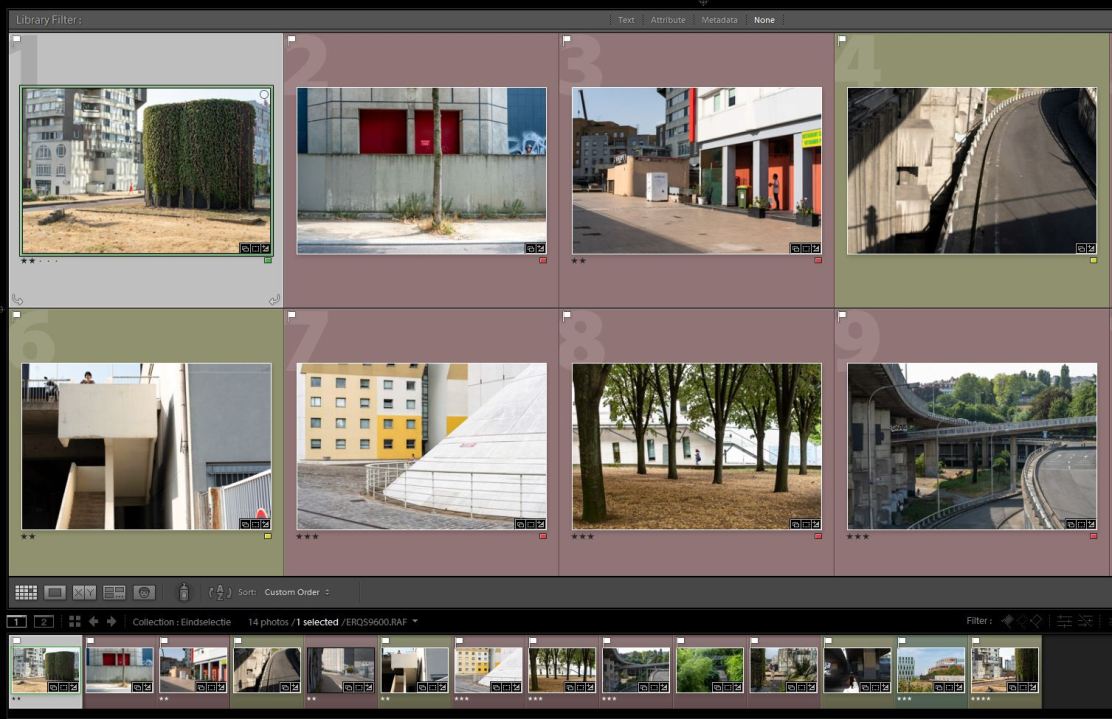
Idea 1: a calibration folder for your editing
To prevent this kind of thing, make a calibration folder. Collect photos that you are happy with the end result of (something you should only judge months later, by the way) in a folder.
Choose photos with the same editing style. Think of at least ten photos. Then, before you start editing, look at the photos in this folder for a few minutes. Let them really sink in. Then start editing. If you edit for hours, I recommend returning to the folder briefly from time to time.
Sometimes you need to make several calibration folders. For example, if you are working on different projects, or if you take very varied photos.
Idea 2: a calibration folder before you start taking photos
There is also something to calibrate at the stage before that, namely your eyes. Do you want to continue in a particular style? Get yourself ready by looking at those photos just before you start taking photos.
Don't have any photos yet, but do have a photographer whose work you really like? Browse through a photo book by that photographer, or search for photos online and put them in a calibration folder.
Finally, another, more analogue calibration method is making a scrapbook. I have one and regularly add to it and browse through it. As a result, my visual language is becoming stronger and stronger.
The moral of this story: be aware that you are constantly influenced by what you see, and use that by calibrating your eyes.
About the author
Ik heb een eigen fotografieblog, Kronkeling. Daar schrijf ik om de week twee artikelen. Over hoe je je blik kunt scherpen, je creativiteit kunt aanwakkeren, en over fotografen die mij inspireren. Geen technische zaken, wél over hoe je leert kijken. En dat blijkt nog een hele klus. Een mooi startpunt zijn de Kronkeltips, die vind je hier.
You might also like
-
 Review of the Eizo ColorEdge CG3100X monitor
by Nando Harmsen
-
 Lens calibration, is it necessary or not?
by Nando Harmsen
-
 Review: Eizo ColorEdge CS2400S 24-inch monitor
by Nando Harmsen
-
 Review: Eizo ColorEdge CS2731 monitor
by Nando Harmsen
-
 Review: Eizo ColorEdge CG 2700S monitor
by Nando Harmsen
-
 Review: Eizo CS2740 ColorEdge 4K monitor
by Elja Trum
5 comments
-

-
 Suzie wrote on Tuesday 25 February 2020 at 22:46 | reply
Never thought of it, but a very good tip to start with!
Translated from Dutch. -
 Ronald Maas wrote on Thursday 27 February 2020 at 14:22 | reply
Great proposal!
Translated from Dutch.
By the way, post-processing is often "over done", causing the result to have the opposite effect. Post-processing for amateur photographers was created to provide software manufacturers with a good income and to partially conceal the amateur's blunders. -

 Elvira Smit
wrote on Thursday 27 February 2020 at 18:30
| reply
Elvira Smit
wrote on Thursday 27 February 2020 at 18:30
| reply
@Paul: Nice to hear!
Translated from Dutch.
@Suzie: Thank you
@Ronald Maas: Interesting fact! Good to keep in mind when 'the amateur' starts post-processing. And of course the best thing is to prevent those blunders beforehand...In any case partly by calibrating your eyes before you start taking photos... -
 jax wrote on Monday 4 April 2022 at 07:25
| reply
jax wrote on Monday 4 April 2022 at 07:25
| reply
@Ronald Maas: I know enough pros who also do post-processing (which "blunders" are they hiding then?) and a great many amateurs who can do fantastic post-processing. I myself use LR, which "blunders" can I partially hide with it? I assume you also post-process your photos?
Translated from Dutch.
Have your say
Please note: Articles older than a week can only be commented on by signed-in visitors.Would you still like to comment? sign in or create a free account.
Become a better photographer every week
A practical photography tip in your inbox every week.
38,982 photography enthusiasts already receive the tips! More about the weekly mail. Or keep up to date via  Facebook.

Elja Trum
Photofacts; everything to do with photography!
Would you like to take better photos and keep up with what is happening in photography? Photofacts publishes articles that teach you something about photography — from a product announcement to a practical shooting tip or a look at a website. Photofacts covers photography every day and is a hobby project of Elja Trum's that got out of hand. The articles are written by a team of volunteer authors. If you would enjoy writing one or more articles for Photofacts, do get in touch.More about PhotofactsPhotofacts is made possible in part by
