

Review/tip: controlling Lightroom with a MIDI controller
Sunday 11 December 2016, 15:15 by Erik van Rosmalen | 9,626 views | 6 commentsThis article was translated from Dutch with the help of AI. Read the original.
Lightroom is ideal for organising the management and workflow of your photos efficiently. If you also want to speed up how you control it, there are solutions: recently, for example, you came across the Loupedeck here and we wrote about Palette: hardware solutions that let you edit faster. Nice, polished solutions, though unfortunately with an equally polished price tag...
Good news: it can be cheaper! With a simple MIDI controller and a free plugin such as MIDI2LR. Elja already wrote an initial article about it in August 2015. I recently started using a MIDI controller with this plugin and am happy to share my experience here.
MIDI
What exactly is MIDI? The abbreviation stands for Musical Instrument Digital Interface, a protocol that has existed for decades and is intended to let electronic musical instruments exchange data in real time. I already knew MIDI, from a previous life in which I played keyboards in bands and used it to make a keyboard communicate with sequencers or modules.
Now that MIDI can also be used over USB, it creates opportunities to connect a controller to your computer in a simple way. And since it is about transmitting commands, you can also use it for other things, such as controlling sliders in photo-editing programmes...
Plugins
What you need, besides your controller, is something that translates MIDI commands into Lightroom actions. There are several plugins. I think the best-known and most widely used is MIDI2LR, a free plugin that recently gained the ability to control buttons as well as faders. There are alternatives too, such as Knobroom, which only works on Mac, or Paddy, a plugin for Windows. I don't know Knobroom, but the main disadvantage of Paddy is that it is not yet available for communicating with Lightroom CC.
Controllers
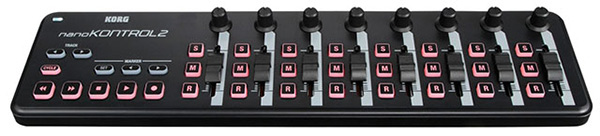
What about the device itself? With Palette or Loupedeck, you can quickly spend hundreds of euros. The good news is that you can find a simple MIDI controller on Marktplaats for a few tens of euros. I chose a Korg Nanokontrol 2, which costs around 44 euros new and which you can find second-hand for half that price with a little patience. For that, you get eight sliders, eight rotary knobs and a good number of standard buttons to programme.
Installation
Installing MIDI2LR and the controller is actually very easy. In Windows 10, the controller automatically installs a suitable driver. MIDI2LR works as a plugin in Lightroom:
- Download the software, unzip the file and put it somewhere logical on your computer;
- Open Lightroom and go via File to Plugin Manager, then add MIDI2LR to your plugins. You do this by clicking the folder with the .lrplugin extension;
- A separate MIDI2LR window opens and connects to your controller;
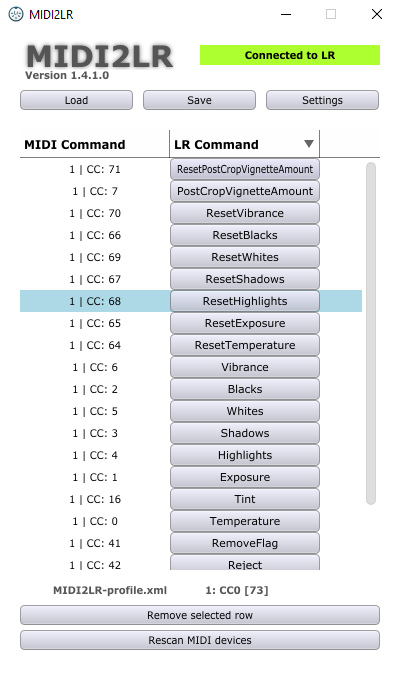
- Every button, rotary knob or fader you now operate appears on screen. From a long list, you can manually choose commands to assign specifically to that control. You save everything in your personal profile.
Troubleshooting
You may run into problems when installing a MIDI controller. What is important in any case is the controller's own setting. There is DAW mode (DAW) and Control Change mode (CC). Switching between the two can be useful specifically for communication between musical equipment. When controlling Lightroom, I had to choose CC with my Korg: the other mode only outputs binary values, 'on' or 'off', so touching a slider does nothing more than overexpose a photo by five stops. Exactly how this works depends on the controller, of course, and you will have to look it up in the manual. As with everything, you will also need to keep an eye on whether controllers are still compatible with your operating system.
Fine-tuning
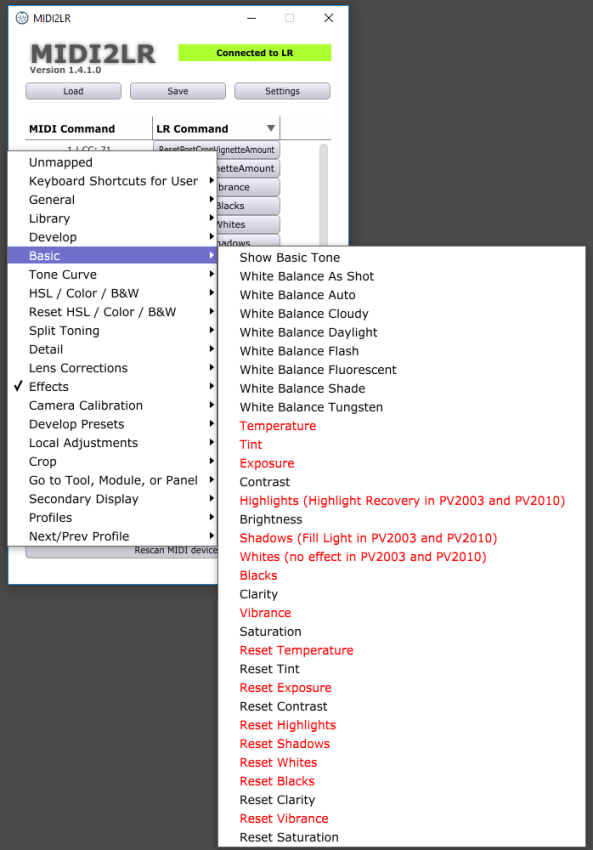
How well hardware control works naturally depends on how precisely you can work. A small slider that can underexpose or overexpose by five stops is hardly easy to operate properly. To reduce that range, older versions of MIDI2LR required you to work with codes in the files yourself. In the current version, there is simply a menu for this. For example, I gave the exposure slider a range of 2 stops. If more correction is needed, you can still do that in software, although you might question how successful the photo still is...
Assigning buttons
Another major improvement in version 1.40 of MIDI2LR is that you can assign buttons as well as sliders. This naturally makes the possibilities much greater. You can assign a function to every button on a controller. And there are many commands available.
Experience
I use a Wacom tablet and pen to control Lightroom. I also use a lot of keyboard shortcuts to work quickly. That works well. The relatively small Korg controller fits easily in front of my keyboard, so it is an addition rather than a replacement for the tablet or keyboard.
Profiles
Of course, you can never do everything with a controller like this. No matter how many buttons and sliders you have, you will always have to make choices. If you don't want to do that, MIDI2LR has a workaround. You can load multiple profiles via the pop-up window, which stays open continuously. This means you could create one controller profile for your Develop module and a separate one for, for example, your Print module. You can then switch between profiles relatively easily.
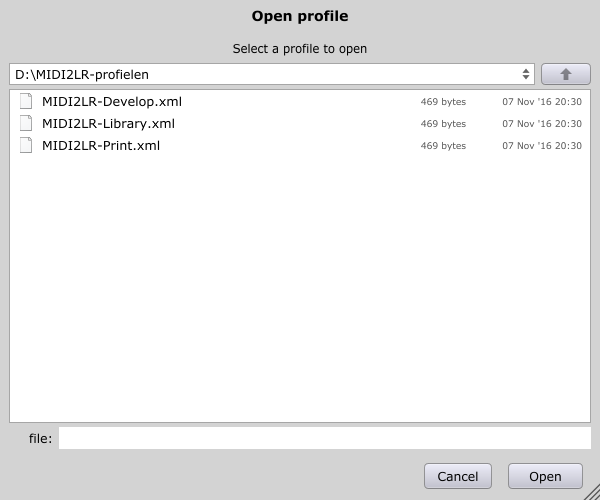
I don't use that option myself: I actually only use the controller for the Develop module, which I find sufficient. It also seems difficult to me, because the 'same' slider then has a different meaning. It will be a matter of getting used to it.
Workflow
Personally, I find it pleasant to work with. The controllers give you extra freedom: for example, to quickly adjust the exposure, you don't have to navigate to the slider with the pen and start drawing. The slider is enough, wherever you are in the menu. So it is a little faster and it also feels more natural to use. I do see it as an addition to my Wacom and keyboard, though.
What could be better? You often read that people would like to see support for motorised sliders. Sliders that automatically move to the correct position when you open a new photo. That sounds luxurious, but it certainly is not: if your slider is currently right at the bottom and you want to edit a photo whose exposure is, for example, set to +0.5, you first have to move it around until your controller 'picks up' the value +0.5. That is not ideal. With a motorised slider, you don't have that problem.
Conclusion
My conclusion? For a reasonable price, a controller like this can certainly offer an improvement or a more comfortable way of working. Everyone will have to experience that for themselves. But for a few tens of euros, it is certainly worth trying. Will it stay? For me, yes, but as an addition rather than a replacement.
About the author
Erik werkt als content specialist. Daarnaast is hij freelance tekstschrijver en fotograaf. Mensen vormen daarbij het hoofdonderwerp: portret- en reportage-fotografie. Volg Erik ook op Instagram!
You might also like
-
 GPU acceleration in Lightroom, does it work?
by Michelle Peeters
-
 How do you get started with Lightroom Classic?
by Nando Harmsen
-
 10 Lightroom tips you should know!
by Michelle Peeters
-
 5 tips to work faster in Lightroom Classic
by Thijs Schouten
-
 4 Lightroom Classic Tips for Experienced Users
by Elja Trum
-
 Lightroom Classic 8.0 and Lightroom CC 2.0
by Michelle Peeters
6 comments
-

-

 ErikvanRosmalen
wrote on Sunday 11 December 2016 at 16:11
| reply
I wouldn't dare say, I know this Korg is very common and cheap, which is why I tried that. But I think you can consult a dynamic list of supported controllers via the developer's page, so who knows, there might be something among them!
Translated from Dutch.
Check here. -
 Rick wrote on Sunday 11 December 2016 at 23:50 | reply
I myself have a motorized controller (behringer bcf2000) and if you seriously want to start using a system like this I strongly advise against a non-motorized controller.
Translated from Dutch.
I also don't think the argument that you first have to slide with a motorized slider is valid, the action you have to perform to reset your manual one for every photo again I find many times more annoying.
Midi2lightroom works perfectly with motorized sliders from the behringer bcf2000, by the way (after trying a whole bunch of times to figure out that I had forgotten something stupid). I bought this one myself for 80 euros on Marktplaats.
However, it has since ended up in the cupboard with me, since I find my keyboard with Wacom more pleasant in my workflow. I completely understand, though, that for someone who hasn't dug themselves into their current workflow, this is a fantastic alternative! -
Rick wrote on Sunday 11 December 2016 at 23:55 | reply
Apologies regarding my reference to the argument, I hadn’t read properly and didn’t quite understand it already, you mean here that it is actually an advantage to have motorized sliders. I read 'is a luxury' instead of 'is not a luxury'. Time to go to bed, sorry!
Translated from Dutch.
(Incidentally, an interesting and clear story otherwise!) -
ErikvanRosmalen
wrote on Monday 12 December 2016 at 07:14
| reply
Hello Rick,
Translated from Dutch.
I was indeed referring specifically to always having to first move things around with a manual controller. So we agree on that indeed. If I myself run into a motorized slider, I will definitely consider switching. Elja also has an answer to his question right away, thanks for that
-
Rick wrote on Monday 12 December 2016 at 13:53 | reply
Hi Erik, Elja,
Translated from Dutch.
If you want, you can test mine and, if you like it, take it over for what I bought it for on Marktplaats. It's just sitting in the cupboard here anyway because I'm too fixated on my own workflow.
Midi2lightroom is actually a great piece of software, I've already had quite a few updates, so they are taking it seriously! (I work with windows myself, by the way)
Have your say
Please note: Articles older than a week can only be commented on by signed-in visitors.Would you still like to comment? sign in or create a free account.
Become a better photographer every week
A practical photography tip in your inbox every week.
38,783 photography enthusiasts already receive the tips! More about the weekly mail. Or keep up to date via  Facebook.

Elja Trum
Photofacts; everything to do with photography!
Would you like to take better photos and keep up with what is happening in photography? Photofacts publishes articles that teach you something about photography — from a product announcement to a practical shooting tip or a look at a website. Photofacts covers photography every day and is a hobby project of Elja Trum's that got out of hand. The articles are written by a team of volunteer authors. If you would enjoy writing one or more articles for Photofacts, do get in touch.More about PhotofactsPhotofacts is made possible in part by
