

Lightroom Classic: Blemishes return after export
Saturday 28 November 2026, 14:41 by Elja Trum | 50 views | 0 commentsThis article was translated from Dutch with the help of AI. Read the original.
Lightroom has gained a useful new feature: with one press of a button, you can remove a lot of blemishes from your model's skin. The only problem is that the blemishes return when I export the photo.
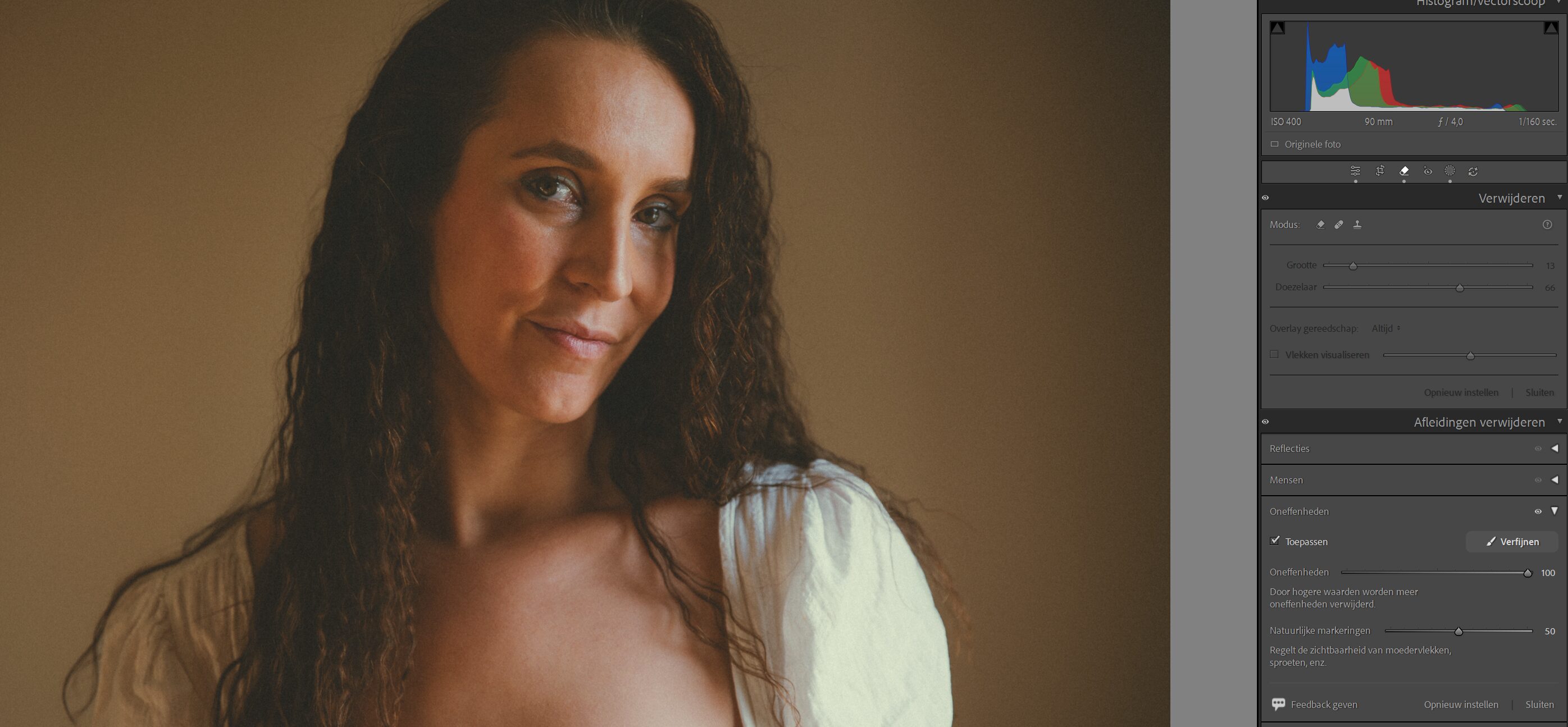
Carlijn - Removing blemishes
I was very happy with this new feature. Removing blemishes is probably the most time-consuming part of editing my photos. So this new feature came at just the right time.
However, while editing my photo, the blemishes returned a few times after applying a preset or a particular adjustment.
I just had to tick the box again and it was fixed straight away. Annoying, but manageable.
But then I looked at my exported photo, and what do you know: all the blemishes removed by the automatic feature had simply returned in the export.

Carlijn - Blemishes return after export
This is the photo after exporting. I exported it straight after taking the first screenshot for this article. I had not touched any other slider. Yet all the automatically removed blemishes had returned straight away.
To try to find the cause, I did some more testing. It seems to differ from photo to photo whether it works or not. With older photos taken with my Canon R5, it seems to work fine at first glance.
So I thought it might be related to the files from my Hasselblad. But when I tried it with another photo from that camera, it suddenly worked.
After some Googling, I updated my graphics card driver to the latest version, enabled and disabled GPU acceleration in Lightroom Classic, and tried again. So far, the problem remains the same.
Am I the only one having this strange experience, or are more people affected by it? A real dampener on the celebrations, at any rate...
About the author
Elja Trum is the founder of Photofacts and online photography course website Photofacts Academy. He has been writing about photography since 2006. Elja is also the author of (Dutch) books on composition, black-and-white photography, flash photography and portrait photography.
You might also like
-
 Lightroom Classic tip: Create smart presets
by Elja Trum
-
 Preset Viewer: see what a preset does
by Dick Holtman
-
 Presets in Lightroom Classic
by Nando Harmsen
-
 Lightroom Classic version 16 released
by Nando Harmsen
-
 Retouching and cloning in Photoshop
by Johan Elzenga

0 comments
Be the first to share what you think!
Become a better photographer every week
A practical photography tip in your inbox every week.
38,685 photography enthusiasts already receive the tips! More about the weekly mail. Or keep up to date via  Facebook.

Elja Trum
Photofacts; everything to do with photography!
Would you like to take better photos and keep up with what is happening in photography? Photofacts publishes articles that teach you something about photography — from a product announcement to a practical shooting tip or a look at a website. Photofacts covers photography every day and is a hobby project of Elja Trum's that got out of hand. The articles are written by a team of volunteer authors. If you would enjoy writing one or more articles for Photofacts, do get in touch.More about Photofacts Photos



Photofacts is made possible in part by
