

Wanneer Lightroom en Photoshop niet meer samenwerken
Tuesday 26 August 2025, 09:09 by Nando Harmsen | 4,481 views | 17 commentsThis article was translated from Dutch with the help of AI. Read the original.
You can transfer a photo from Lightroom to Photoshop. This is very useful for more complex edits. But the latest Lightroom update can sometimes cause problems. The photo does not open in Photoshop. What now?
With the latest Lightroom update, you may run into a problem. The photo no longer opens in Photoshop. This is very inconvenient, or rather, downright frustrating.
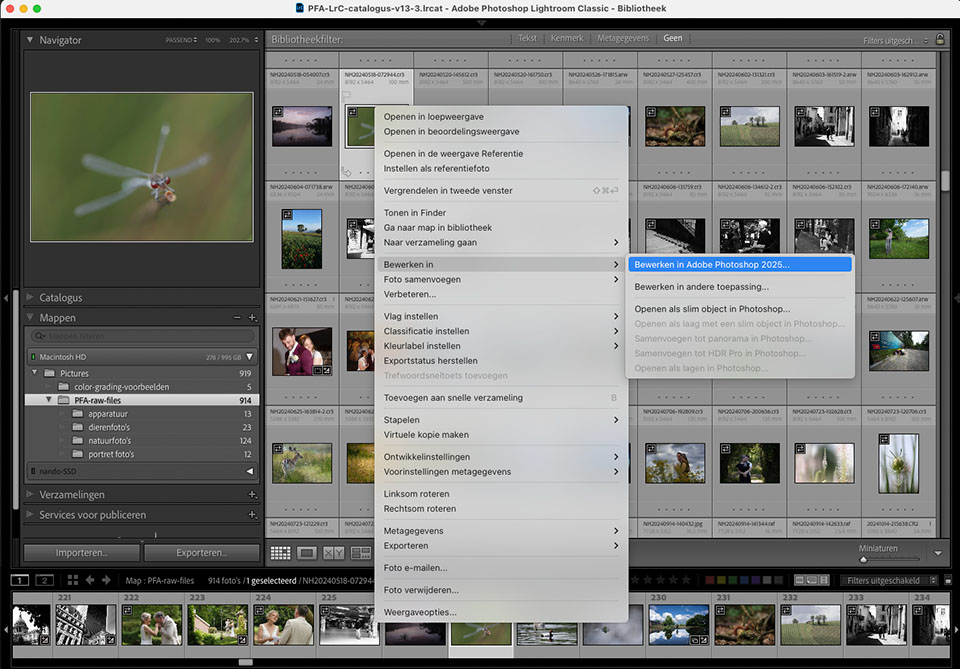
Somehow, something has changed in the way Lightroom handles the location of the photos. We will not try to speculate about why that is. The solution is more important.
The problem lies in the names of the folders on your computer. If there is an apostrophe or another unusual punctuation mark in them, Lightroom refuses to transfer the photo to Photoshop.
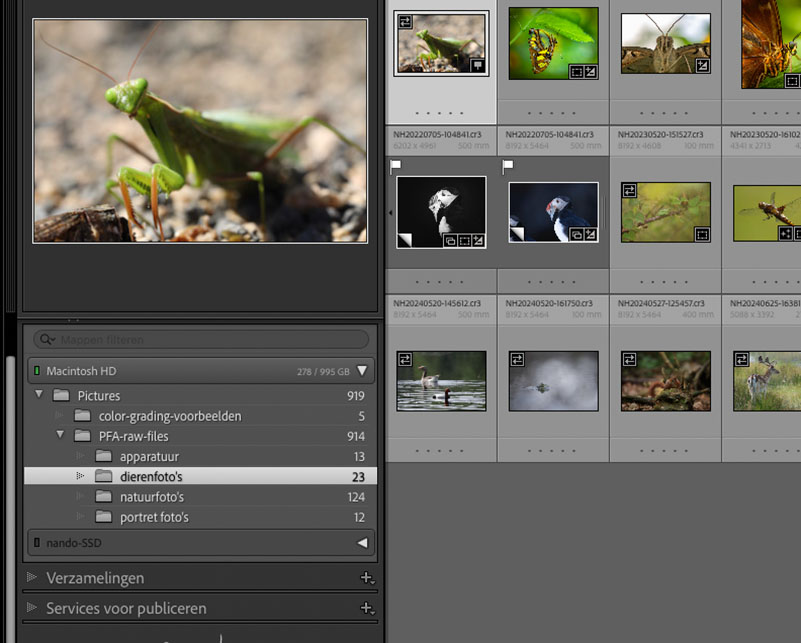
The solution is simple: change the names of the folders if they contain an apostrophe or another unusual punctuation mark. Make sure you do this in all subfolders too. So check this carefully.
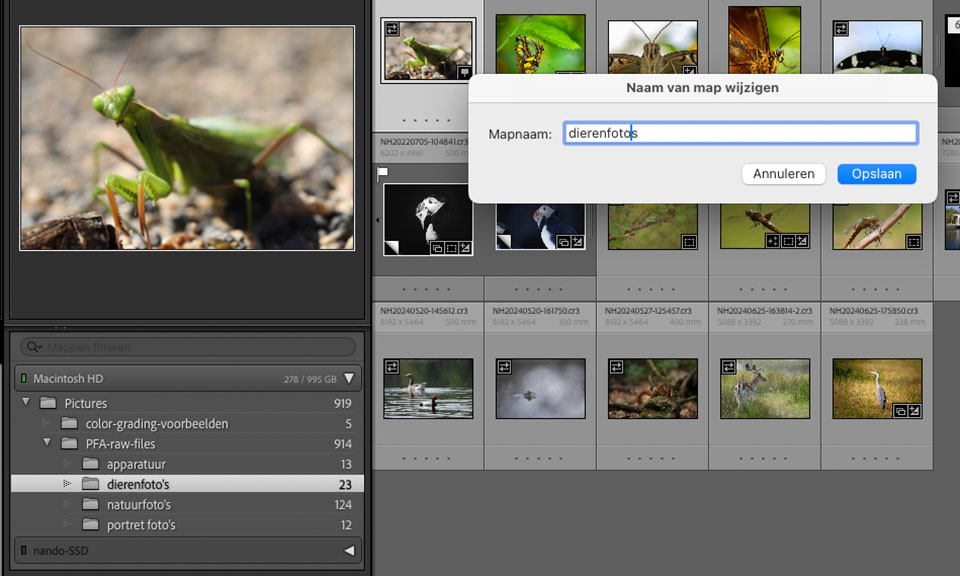
For example, make sure you do not use the word "photo's" in folder names, but use "photos" instead. Also avoid other unusual characters and even spaces. Only underscores _ and hyphens - are 'allowed' to be used.
And most importantly, do this in the folder panel of the Lightroom library. That is the only way to keep the link to the photo in Lightroom. If you do this in Explorer or Finder, Lightroom will lose the photos. You will then have to restore all the folders in Lightroom.
I have not had the problem myself. The reason is that I am not in favour of unusual punctuation marks in folder names. So I never use them. Do you use them? Then consider stopping.
UPDATE
There is a Lightroom update that fixes this bug. If you have not installed it yet, make sure you do.
About the author
Nando Harmsen has been photographing for more than 40 years. He specialises in wedding photography and landscape photography. Nando also gives talks, workshops, masterclasses and photo trips, and regularly reviews new and interesting equipment.
You might also like
-
 Lightroom update with generative AI
by Nando Harmsen
-
 Does Lightroom make Photoshop redundant?
by Nando Harmsen
-
How much do Lightroom and Photoshop subscriptions really cost?
by Nando Harmsen
-
 Saving a JPEG in Photoshop has changed
by Nando Harmsen
-
 Replacing skies in Photoshop is getting easier
by Johan Elzenga
-
 Lightroom Classic 8.0 and Lightroom CC 2.0
by Michelle Peeters
17 comments
-
 Michiels wrote on Tuesday 26 August 2025 at 11:14 | reply
hi, I also have that problem without strange characters in the names. also when I want to open multiple photos for stacking in Photoshop simultaneously it doesn't work....
Translated from Dutch.
Adobe ??? solution please. -
 Ruud van Leeuwen wrote on Tuesday 26 August 2025 at 11:18 | reply
I have been using the Lightroom Photos folder as the main folder for 20 years without any problems, with all imports stored underneath it by year/date. And indeed, I had the described problem after the 14.5 update of Lightroom. By rolling back the update, I was able to solve it for the time being. With Nando's tip, I still managed to get 14.5 working. Thanks!
Translated from Dutch. -
Michiels jozef wrote on Tuesday 26 August 2025 at 11:23 | reply
dear Nando, indeed your solution is correct.
Translated from Dutch.
i have to replace "foto's" with "fotos" in all the folders in the upper structure of Lightroom as well. and then it does work...thanks for the tip ..
regards Jozef -
 Henk wrote on Tuesday 26 August 2025 at 13:58 | reply
I haven't been able to open any photos from CR in PS for ages. But that's been going on for a very long time already ! Is there a solution for that too ? Thank you
Translated from Dutch.
-

-
Henk wrote on Tuesday 26 August 2025 at 14:00 | reply
I have had this problem for a very long time, that photos from CR can no longer be opened( open) in PS, is there a solution for that ?
Translated from Dutch.
Kind regards and thanks ,
Henk -
 Jurgen wrote on Tuesday 26 August 2025 at 14:02 | reply
Received and installed an update from Adobe today: bug seems to be fixed again, at least everything is working as usual for me.
Translated from Dutch. -
 Edith Kommers wrote on Tuesday 26 August 2025 at 16:18 | reply
Good tip, and this indeed worked as a solution after 2 weeks of frustration and reinstalling as Adobe itself suggested as a solution. Thanks Nando!
Translated from Dutch. -
 Ineke van Kempen wrote on Tuesday 26 August 2025 at 18:10 | reply
I don't have any punctuation marks in my folders and yet Photoshop doesn't open from Lightroom. What else could I do?
Translated from Dutch. -
 Nando
wrote on Wednesday 27 August 2025 at 09:14
| reply
Nando
wrote on Wednesday 27 August 2025 at 09:14
| reply
You also need to check the underlying folders, not just the ones shown in Lightroom's folders panel.
Translated from Dutch.
Check whether Photoshop is the most recent version.
If necessary, remove Photoshop, restart the computer, and reinstall it. That can sometimes help too. -
Henk wrote on Tuesday 26 August 2025 at 18:56 | reply
Unfortunately, not even after the update just now. It can't be that difficult if, for example, I edit 1 photo in CR and click on “open”, then PS opens. But no , unfortunately. I thought that might also be due to the Mac, so I also bought a new Mac with an M4 processor, but that didn't help either. I would also like to know how I can make PS use/allocate the memory better for faster processing with this processor and memory(16gb)
Translated from Dutch. -
-
 Gerlof wrote on Tuesday 26 August 2025 at 18:58 | reply
Thanks for the tip!
Translated from Dutch.
I had this problem in Adobe Bridge too. Remove punctuation and it's fixed -
 Kees Jurgens wrote on Tuesday 26 August 2025 at 21:51
| reply
Kees Jurgens wrote on Tuesday 26 August 2025 at 21:51
| reply
In recent weeks I couldn't open any LRc photos in PS, but I could in PS Beta. Today's update 14.5.1 has solved this.
Translated from Dutch.
Thanks for the punctuation tip. -
 Gerard wrote on Wednesday 27 August 2025 at 10:13 | reply
Very happy with this message! I already thought I had accidentally changed something that meant I could no longer make the step from LRC to PS. Opening PS worked, opening an image didn't, but an error message never appeared either...
Translated from Dutch.
While reading your article, an update notification from Creative Cloud came in and for me too the issue is now resolved: I too was working - and until now without any problems - with a main folder 'Foto's'
Sloppy of Adobe that they apparently know about a problem, but don't send a quick message that work on a solution is going to start. "Please be patient" would have prevented a lot of annoyance. -
 Peter wrote on Wednesday 27 August 2025 at 11:10 | reply
I had this problem over the weekend too!
Translated from Dutch.
Today adobe performed updates in Photoshop beta and Lightroom. Suddenly it turns out that the issue has been solved for me.
This was and still is my folder name 28. 20250819 Battaclan Casino Café Mol, and photoshop simply opens my photos again that I send over from lightroom. -
 chantal wrote on Wednesday 27 August 2025 at 15:48 | reply
I had this problem too, I only have one folder and that is the main folder "my photos"
Translated from Dutch.
many thanks Nando
Have your say
Please note: Articles older than a week can only be commented on by signed-in visitors.Would you still like to comment? sign in or create a free account.
Become a better photographer every week
A practical photography tip in your inbox every week.
38,937 photography enthusiasts already receive the tips! More about the weekly mail. Or keep up to date via  Facebook.

Elja Trum
Photofacts; everything to do with photography!
Would you like to take better photos and keep up with what is happening in photography? Photofacts publishes articles that teach you something about photography — from a product announcement to a practical shooting tip or a look at a website. Photofacts covers photography every day and is a hobby project of Elja Trum's that got out of hand. The articles are written by a team of volunteer authors. If you would enjoy writing one or more articles for Photofacts, do get in touch.More about PhotofactsPhotofacts is made possible in part by
