

Handy tool for cleaning up your Lightroom Classic backups
Sunday 28 December 2025, 16:32 by Elja Trum | 5,224 views | 31 commentsThis article was translated from Dutch with the help of AI. Read the original.
Lightroom Classic regularly backs up your catalogue. Handy if something goes wrong. But Lightroom never cleans up those backups. You have to do that yourself, by hand, or with this handy tool!
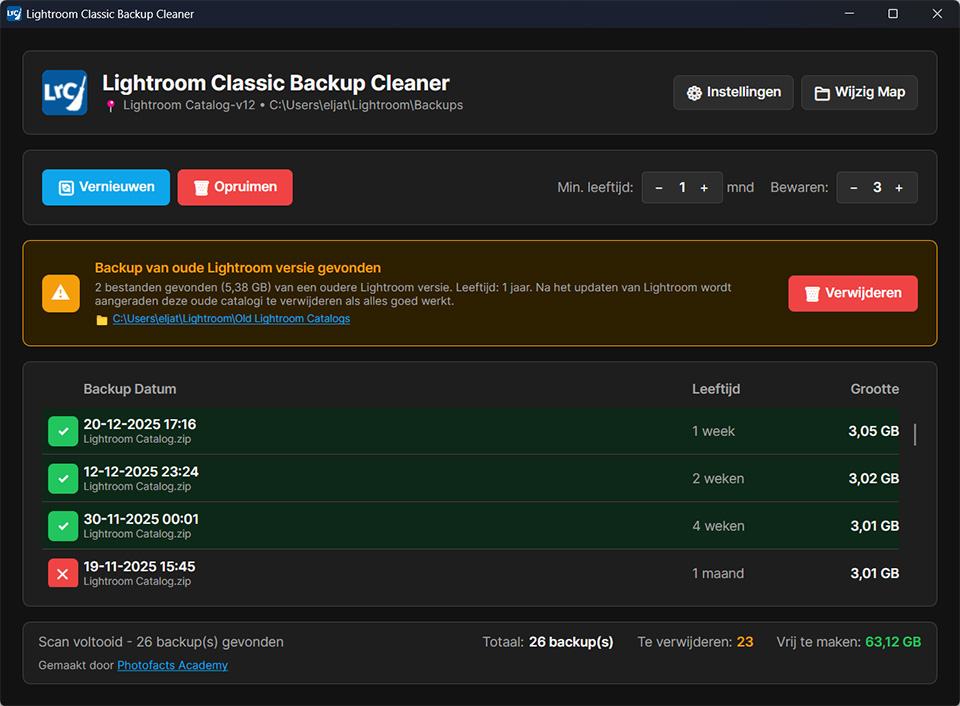
I regularly forget to clean up those backups myself. Each backup made for my catalogue is now 3 gigabytes in size. So that soon adds up. That's why I have now created a free tool that automatically deletes the backups for me.
My Lightroom Classic Backup Cleaner is available for both Windows and Mac OS (Intel or Apple Silicon). You can set how many backups you want to keep. For example, the last five backups. You can also specify that no backups younger than, for example, 3 months may be deleted.
You can quickly delete the backups by starting the tool and clicking 'clean up'. But, even more conveniently, you can also set the app to check for older backups to delete every time your computer starts up. This keeps your computer tidy.
The tool is completely free to download and use, and is also open-source.
Download:
» Lightroom Classic Back-up Cleaner - Windows (x64)
» Lightroom Classic Back-up Cleaner - macOS (Intel)
» Lightroom Classic Back-up Cleaner - macOS (Apple Silicon)
About the author
Elja Trum is the founder of Photofacts and online photography course website Photofacts Academy. He has been writing about photography since 2006. Elja is also the author of (Dutch) books on composition, black-and-white photography, flash photography and portrait photography.
You might also like
-
 5 Tips for Managing Photos in Lightroom Classic (and Other Software)
by Nando Harmsen
-
 What to consider when switching photo editing software
by Nando Harmsen
-
 5 tips to work faster in Lightroom Classic
by Thijs Schouten
-
 4 Lightroom Classic Tips for Experienced Users
by Elja Trum
-
 The pros and cons of a backup camera
by Nando Harmsen
-
 Speed up Lightroom Classic by reinstalling it
by Elja Trum
31 comments
-
 Erik Snoeij wrote on Sunday 28 December 2025 at 20:38 | reply
Great, this tool! Used it right away and created a shortcut on the desktop.
Translated from Dutch. -
 Sjoerd van der Wal wrote on Tuesday 30 December 2025 at 09:38 | reply
Just tested it on an Apple Silicon Mac and it works perfectly. Thanks!
Translated from Dutch. -

-
 Pieter wrote on Tuesday 30 December 2025 at 10:22 | reply
Great and very handy, wiped 2o gb clean off my Mac
Translated from Dutch. . Is it also advisable to delete the Old backup. It says so, but just to be sure, asking anyway. This could save another 3.5 Gb.
 -
 Elja Trum
wrote on Tuesday 30 December 2025 at 11:24
| reply
Elja Trum
wrote on Tuesday 30 December 2025 at 11:24
| reply
Yes, that old backup is your catalog from before Lightroom did a major update and upgraded your catalog as well. Lightroom creates that backup in case something goes wrong during the update.
Translated from Dutch.
If you've already been using your Lightroom Classic for months with the new version and everything works fine, then that old version can simply be deleted. -
 Harry Wolf wrote on Tuesday 30 December 2025 at 11:35 | reply
I'm not very handy with this sort of thing. I downloaded the Windows version and put the zip file in the Program Files folder with the other Lightroom files before opening it. When opening it, I get a warning that an unknown app is trying to do something with my PC. Unfortunately, with that message I don't get the option to run or not run it and can only click don't run.
Translated from Dutch. -
Elja Trum
wrote on Tuesday 30 December 2025 at 13:33
| reply
You do need to extract the program from the .ZIP first. If you open the zip (by double-clicking it), you can then drag the program to another folder (or your desktop).
Translated from Dutch.
In principle, it shouldn't matter where you put it. You should be able to open it by double-clicking the program. In your case, you may be able to run it by right-clicking it and choosing 'run as administrator'. -
 Jo Verdoodt wrote on Tuesday 21 April 2026 at 20:00
| reply
Jo Verdoodt wrote on Tuesday 21 April 2026 at 20:00
| reply
Windows 11 doesn't want me to install the program. Not even as administrator.
Translated from Dutch. -
 Louis wrote on Tuesday 30 December 2025 at 13:13 | reply
great tool ! big thanks
Translated from Dutch. -
 Adri FRIJTERS wrote on Tuesday 30 December 2025 at 15:23 | reply
Too bad that the virus scanner is triggered and actually doesn't want you to use the tool.
Translated from Dutch. -
info@wimwilmers.nl wrote on Tuesday 30 December 2025 at 16:42 | reply
my pc also indicates that it is a suspicious tool unfortunately
Translated from Dutch. -
Elja Trum
wrote on Tuesday 30 December 2025 at 17:34
| reply
A computer will quickly do that when it has been downloaded from the internet. So that doesn't say very much, but it is indeed wise to be careful.
Translated from Dutch.
In this case I can tell you that it is safe to install. But then you'll have to take my word for it.
The source code is freely available, so if you know a bit about it you can check it yourself. -
Harry Wolf wrote on Tuesday 30 December 2025 at 17:17 | reply
Thank you, it worked. Now I just need to see how much I want to throw away.
Translated from Dutch. -
Rita Bruynooghe wrote on Tuesday 30 December 2025 at 17:26 | reply
Great! Managed to free up 40 G
Translated from Dutch. -
 Michaël wrote on Tuesday 30 December 2025 at 18:09 | reply
Super useful. Can free up a lot of GBs. Thanks!!
Translated from Dutch. -
 arnold elfring wrote on Tuesday 30 December 2025 at 21:33 | reply
I managed to do it too and it works fine thanks
Translated from Dutch. -
arnold elfring wrote on Tuesday 30 December 2025 at 21:36 | reply
works great
Translated from Dutch. -
guest wrote on Wednesday 31 December 2025 at 00:12 | reply
Often you first need to click 'More Information' (or words to that effect), then you get an option 'Run Anyway'.
Translated from Dutch. -
guest wrote on Wednesday 31 December 2025 at 00:21 | reply
Great tool! Works well. Still, one comment: for the 'Automatically Clean Up Daily' option (if enabled), it would be useful if the tool automatically hid itself in the 'System Tray' and kept running when you close the Window. That is not the case now, at least for me.
Translated from Dutch. -
-
 Peter Van den Broek wrote on Wednesday 31 December 2025 at 08:53 | reply
Hello Elja,
Translated from Dutch.
sounds great.
Only...how do I know which Mac OS I have: Intel or Apple Silicon?
I just have MacOS Sequoia listed.
Thanks in advance for your reply.
Peter -
-
 Pierre Pinkse wrote on Thursday 1 January 2026 at 13:47 | reply
It's a shame the program doesn't work for me. Windows version. Installation works. But when I want to clean up, everything freezes. I can't tick the settings either. Back to doing it manually then. Shame. Apparently it works for others.
Translated from Dutch. -
-
guest wrote on Friday 2 January 2026 at 16:38 | reply
Thank you!
Translated from Dutch. -
 Edward
wrote on Wednesday 14 January 2026 at 06:43
| reply
Edward
wrote on Wednesday 14 January 2026 at 06:43
| reply
I have been running the program for quite a number of days and it does work in itself. However, every morning it crashes on a Mac PC. So then I have to restart it and it works fine.
Translated from Dutch.
I can send Elja the crash info if necessary. I work on a powerful Mac Studio with the latest version of the operating system. -
-
-
-
-
 pedrobis wrote on Wednesday 29 April 2026 at 12:46
| reply
pedrobis wrote on Wednesday 29 April 2026 at 12:46
| reply
Hello Elja, nice tool. I installed it in WIN11 but now I’m wondering where this application is located. I can’t find it among the installed apps. Still annoying when you want to open the application to make an adjustment in the settings.
Translated from Dutch.
Have your say
Please note: Articles older than a week can only be commented on by signed-in visitors.Would you still like to comment? sign in or create a free account.
Become a better photographer every week
A practical photography tip in your inbox every week.
38,937 photography enthusiasts already receive the tips! More about the weekly mail. Or keep up to date via  Facebook.

Elja Trum
Photofacts; everything to do with photography!
Would you like to take better photos and keep up with what is happening in photography? Photofacts publishes articles that teach you something about photography — from a product announcement to a practical shooting tip or a look at a website. Photofacts covers photography every day and is a hobby project of Elja Trum's that got out of hand. The articles are written by a team of volunteer authors. If you would enjoy writing one or more articles for Photofacts, do get in touch.More about PhotofactsPhotofacts is made possible in part by
