

Editing photos without Lightroom or Photoshop
Saturday 4 January 2020, 14:14 by Nando Harmsen | 9,960 views | 23 commentsThis article was translated from Dutch with the help of AI. Read the original.
Anyone who shoots in Raw will need to convert their images to the usable Jpeg format after editing them. There are various Raw converters available, which let you edit your images to suit your preferences.
One of the most commonly used pieces of software for raw images is Lightroom. It uses Adobe Camera Raw, or ACR for short. Photoshop uses it too.
If you want to edit your raw images with Adobe Camera Raw without using Lightroom, you can also do this from Photoshop. The disadvantage is that you have to open Photoshop first. Once it is open, you can drag a selection of raw images from Explorer into it.
Of course, you can also open the raw images in Photoshop through 'file-open'. Whichever method you use, it can be a good idea to make a selection first, before opening them in Photoshop.
There is, however, a much easier way. For this, you use Adobe Bridge, a programme that is often overlooked. I see Bridge as a kind of predecessor to Lightroom, but without the extensive library structure.
In Bridge, you can display the raw images directly. You can even view or change file information. And you can make a selection of raw images that you want to edit further in a very convenient way.
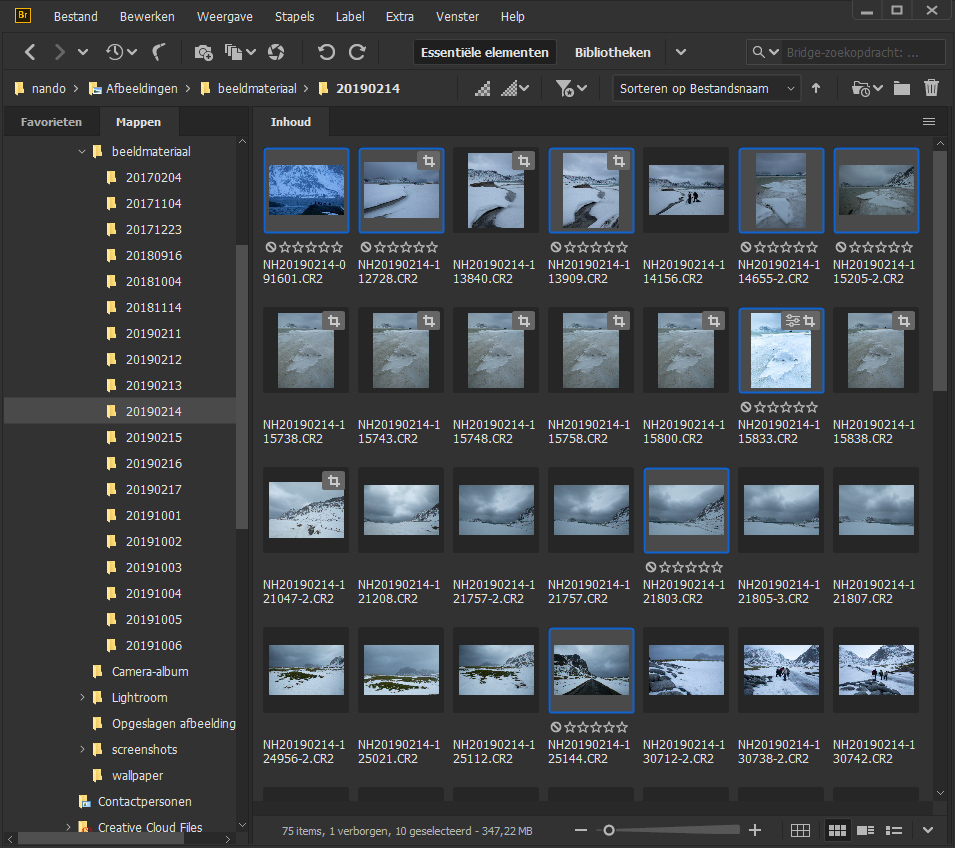
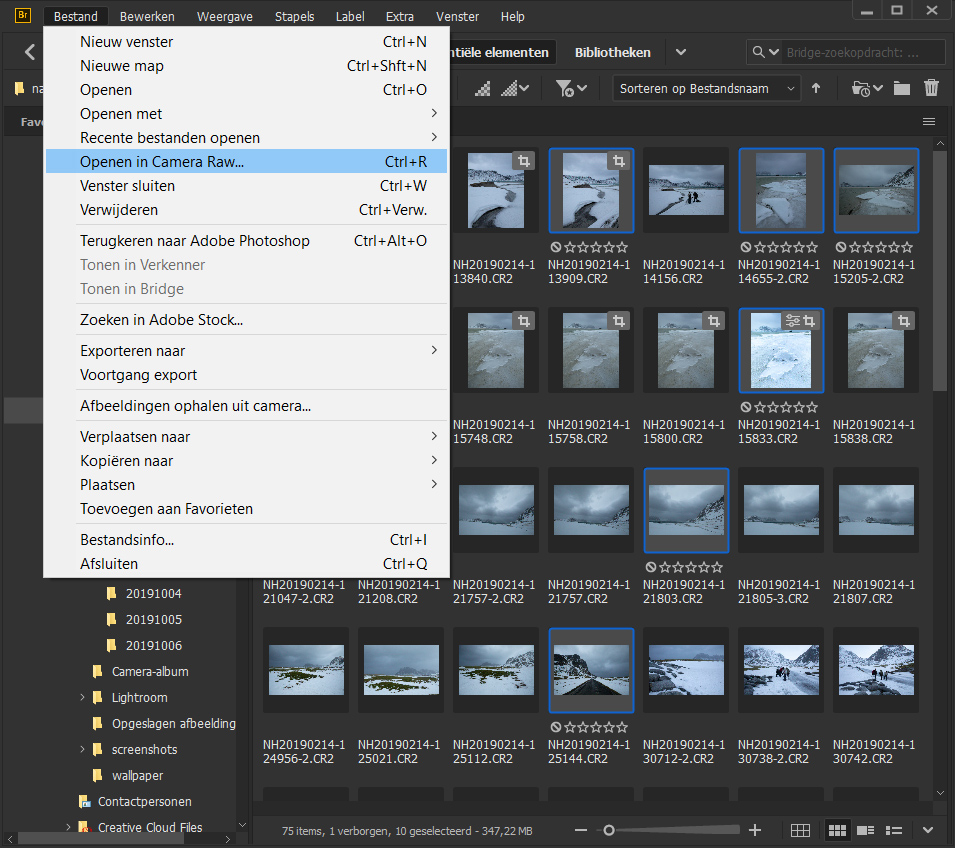
Once you have made a selection of raw images in Bridge, you can open them all in ACR at the same time. You can do this by right-clicking and choosing 'Open in Camera Raw'. You can then edit this selection one image at a time until everything is to your liking.
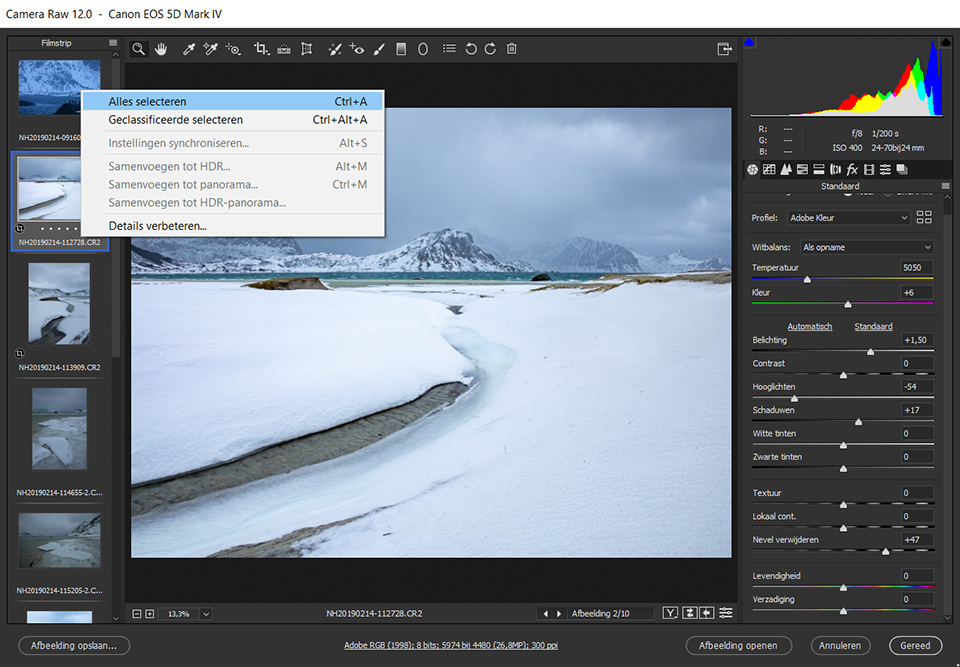
After you have made all the desired edits, you can save these images as a JPEG file, or any other file format you prefer.
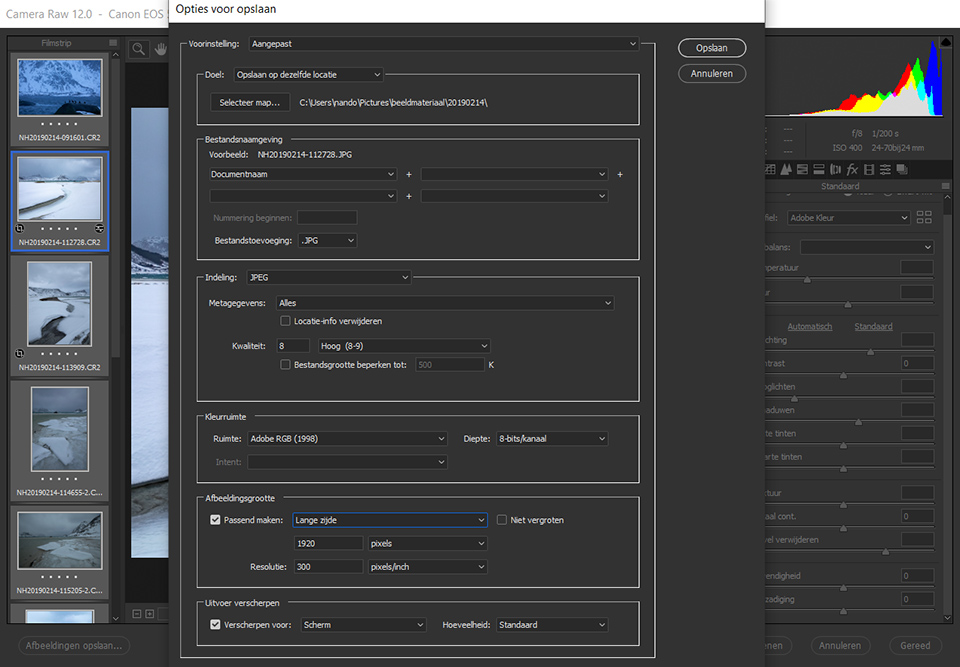
To do this, select all the desired images that are open in Adobe Camera Raw, then click the 'Save Images...' button at the bottom left of the window. You will then get a dialogue box where you can enter all the necessary and desired information.
The great thing is that all the edits are saved. It makes no difference whether you have created Jpeg files from them or not. Click the 'Done' button, and all the edits will remain saved until the next time you open the file.
So, don't fancy using Lightroom, but still want to use Adobe Camera Raw? Working from Bridge could be the answer.
Discover more about Adobe Bridge and Camera RAW?
Would you like to learn more about Adobe Bridge and Camera Raw? At Photofacts Academy, we have a Basic Adobe Bridge and Camera RAW course in which Piet Van den Eynde introduces you to these programmes.
Are you looking for more professional tips? Then take a look at the course Camera RAW for advanced users, in which Piet reveals all the secrets of this programme.
About the author
Nando Harmsen has been photographing for more than 40 years. He specialises in wedding photography and landscape photography. Nando also gives talks, workshops, masterclasses and photo trips, and regularly reviews new and interesting equipment.
You might also like
-
 Which is better to use? Lightroom or Photoshop?
by Nando Harmsen
-
 Wanneer Lightroom en Photoshop niet meer samenwerken
by Nando Harmsen
-
 Replacing skies in Photoshop is getting easier
by Johan Elzenga
-
 The new Lightroom Classic updates
by Nando Harmsen
-
 Does Lightroom make Photoshop redundant?
by Nando Harmsen

23 comments
-
 Robbert wrote on Sunday 5 January 2020 at 13:50 | reply
Hi Nando
Translated from Dutch.
Interesting article. I don't expect to suddenly replace Lr+Ps with Br+ACR. But it does get me thinking. For me, Lr+Ps contains four functionalities:
-1- Digital Asset Management (DAM). Think of metadata and file management;
-2- RAW converter. Something that converts the sensor data into something that can be used by an image editor;
-3- Non destructive editor. What is usually called the RAW editor and
-4- External editor. The ability to call up another, usually destructive, editor in the RAW editor for the finishing touch.
With Br+ACR I can do the first three things. Unfortunately, ACR is not an extensive RAW editor. But can Br+ACR work with a third party RAW editor such as Luminar 4, Capture One, On1, Dark Table ?
Regards, Robbert -
 Mac wrote on Monday 6 January 2020 at 11:39 | reply
I just don't really understand what the advantage would be of using Adobe Bridge instead of Lightroom.
Translated from Dutch.
Because with LR you basically have Bridge and ACR in one. -
Robbert wrote on Monday 6 January 2020 at 17:34 | reply
Hi Mac
Translated from Dutch.
The advantages could be:
-1- LR isn't free
-2- You can use another (better / cheaper) editor
-3- You use software that you buy unlike software that you subscribe to and
-4- I like deviating from the beaten path and investigating what else is possible
Regards, Robbert -
Mac wrote on Monday 6 January 2020 at 18:15 | reply
@Robbert, none of the 4 points answers the question I asked.
Translated from Dutch.
And then, why would you use Bridge+ACR, and then another raw editor, seems like even more hassle to me. -
Robbert wrote on Monday 6 January 2020 at 19:38 | reply
Hi Mac
Translated from Dutch.
My mistake, you wrote Bridge but I read ACR.
I'm looking for an alternative to Lr+Ps. With the combination Br+ACR I can get quite a long way. But then I still need a good editor.
I can also turn it around. Luminar 4 is supposedly a good editor, but a bad DAM. Maybe I can combine Luminar 4 with Br+ACR.
DxO is supposedly a good RAW converter, just like dcraw. Can they work together with Br ?
All things I wondered about prompted by Nando's article. Is it a hassle to figure it all out and set it up ? Definitely. But that's part of the challenge. And while figuring it out I learn all kinds of fun things along the way. Maybe my photos will look better too.
Regards, Robbert -

 Nando
wrote on Tuesday 7 January 2020 at 09:52
| reply
Nando
wrote on Tuesday 7 January 2020 at 09:52
| reply
Hello Robbert,
Translated from Dutch.
You write in your response that ACR is not an extensive raw editor, but it actually is.
With Lightroom, an entire library structure and management system has been built around it. After all, Lightroom uses ACR as its raw editor, but with its own shell around it so that the buttons, sliders and other things are in a slightly different place, and work somewhat differently.
As far as I know, ACR only does not work with third-party software in this way.
If you are looking for an alternative to LR + PS, I would certainly take a look at Luminar 4, which has its own raw converter.
Regards
Nando -
Nando
wrote on Tuesday 7 January 2020 at 09:55
| reply
Hello Mac,
Translated from Dutch.
You ask why you would want to do this, instead of Lightroom. That choice can be a very personal one. I sometimes do this when I need to edit a photo, or a series of photos, where I don't want to place the photos in a Lightroom catalog.
But this can also be a method for people who don't enjoy working with Lightroom.
It is an alternative workflow.
Kind regards
Nando -
Mac wrote on Tuesday 7 January 2020 at 10:01 | reply
@Robbert,
Translated from Dutch.
Luminar's poor DAM isn't too bad, I think. Yes, LR is a bit easier, but Luminar works well. I'm still learning it, though. And there are some things it can do better than LR and some things LR can do better (I got it for free with the purchase of a book)
You could also take a look at On1 photo raw. It works well too (I just don't know what it does in DAM, I only use it as a plug-in for some edits from LR for now) -
Mac wrote on Tuesday 7 January 2020 at 10:05 | reply
@nando,
Translated from Dutch.
But what is its added value then, because you don't have to keep the photos in the LR catalog. You import the photos quickly. have you edited them, then you immediately delete the photos from the catalog.
Then you work in 1 program instead of 2 that essentially do the same thing as LR on its own -
Nando
wrote on Tuesday 7 January 2020 at 10:16
| reply
Mac,
Translated from Dutch.
as I already said, the reason is something very personal. For you there is clearly no reason to do this outside Lightroom.
For me; importing, editing, exporting and deleting again, is more work than just opening, editing and saving. -
RAWshooter wrote on Tuesday 7 January 2020 at 10:26 | reply
Lr was originally intended for people who couldn't handle folders and files. That is quite outdated. Lr's database also has disadvantages, in terms of management and use. Bridge manages your photos at their physical location, and that works better and more directly for many people. ACR's software is virtually identical to Lr's Develop module. There is a lot to be said for a combination of Bridge (of which ACR is part) and an external editor, instead of Lr. But as far as I know, Bridge isn't free, at most as a trial version.
Translated from Dutch. -
 Roelof wrote on Tuesday 7 January 2020 at 10:53 | reply
Unfortunately, I can't get this to work with ARW files from the Sony a7iii camera, or does anyone have a tip?
Translated from Dutch. -
Roelof wrote on Tuesday 7 January 2020 at 10:57 | reply
Bridge 2020 is currently free, https://prodesigntools.com/free-adobe-bridge-cc.html so take advantage of it
Translated from Dutch. -
-
 Martha wrote on Tuesday 7 January 2020 at 11:04 | reply
I would like to know if you can also buy/subscribe to just Bridge. I would like to install this on my MacBook Pro. On my other computer IMac I have Photoshop CS5(also bridge), but it cannot be installed on my new MacBook. Regards Martha
Translated from Dutch. -
Roelof wrote on Tuesday 7 January 2020 at 12:00 | reply
Hey Martha, see the message on the link, you can download Bridge for free
Translated from Dutch. -
 Jeannet wrote on Tuesday 7 January 2020 at 13:03 | reply
The disadvantage of Bridge is that you think your photo isn't sharp, but when you open it in Camera Raw, it usually turns out not to be so bad.
Translated from Dutch. -
 ronmaarschalkerweerd wrote on Tuesday 7 January 2020 at 14:42 | reply
Hi Nando,
Translated from Dutch.
The Bridge / ACR workflow is a fine workflow. I'm not someone who does his entire RAW in the converter but then in Photoshop. In Bridge I have a Basic that I throw over all RAW images as a favorite. After this I open the RAW images in ACR where I have saved presets of "Exposure-Fill Light-Black and Noise", this makes quick processing possible. The Basic is set with standard Fill light 40, Linear curve and no contrast, which gives you a flat image but with a large range. By giving the images "Done" in ACR, it remains an adjusted RAW file in Bridge. By pulling the screen somewhat to the side you can pick up all the RAWs and throw them onto a droplet that takes care of contrast etc.
I still start from Version 2 within ACR, which is equivalent to the former 2012. The linkmichels at Adobe have changed this to Version. The latest version contains "Recovery", which I detest, it flattens the highlights. -
Roelof wrote on Tuesday 7 January 2020 at 15:49 | reply
Dear Jeanet, that is much better in the new version of 2020
Translated from Dutch. -
Martha wrote on Tuesday 7 January 2020 at 16:15 | reply
I can't find the link to download Bridge.
Translated from Dutch.
Regards, Martha -
Roelof wrote on Tuesday 7 January 2020 at 17:51 | reply
https://prodesigntools.com/free-adobe-bridge-cc.html
Translated from Dutch. -
-
 Nand wrote on Sunday 12 January 2020 at 18:01
| reply
Nand wrote on Sunday 12 January 2020 at 18:01
| reply
Could indeed download Bridge. Camera Raw installed separately. Doesn't work though. Keeps asking for a license.
Translated from Dutch.
Have your say
Please note: Articles older than a week can only be commented on by signed-in visitors.Would you still like to comment? sign in or create a free account.
Become a better photographer every week
A practical photography tip in your inbox every week.
38,981 photography enthusiasts already receive the tips! More about the weekly mail. Or keep up to date via  Facebook.

Elja Trum
Photofacts; everything to do with photography!
Would you like to take better photos and keep up with what is happening in photography? Photofacts publishes articles that teach you something about photography — from a product announcement to a practical shooting tip or a look at a website. Photofacts covers photography every day and is a hobby project of Elja Trum's that got out of hand. The articles are written by a team of volunteer authors. If you would enjoy writing one or more articles for Photofacts, do get in touch.More about PhotofactsPhotofacts is made possible in part by
