

Does Lightroom make Photoshop redundant?
Monday 27 October 2025, 22:11 by Nando Harmsen | 4,445 views | 24 commentsThis article was translated from Dutch with the help of AI. Read the original.
Lightroom is ideal for simple photo edits. When things get more complicated, there is Photoshop. The line seems to be becoming less clear. Do you still need Photoshop to edit your photos?
There was a time when Lightroom was only suitable for making simple edits to your photos. White balance, exposure, and the distribution of tonal values across the histogram were easy to change.
You had sharpening, curves, and colour balance adjustments. When the edit became more complex and you wanted to make local adjustments, switching to Photoshop was necessary. That time seems to be largely over.
With all its new features, Lightroom seems to be making the use of Photoshop almost redundant. We have masks at our disposal and all kinds of smart methods for removing distracting elements. Panorama and HDR are also available.
This seems to have made editing in Photoshop redundant. When is it still useful to use Photoshop? I have listed a few situations.
1. Complex removals
The ability to remove distracting objects from an image has increased considerably in Lightroom. In general, it works very well, but not always. Especially when the objects you want to remove are large, the result is not always good.
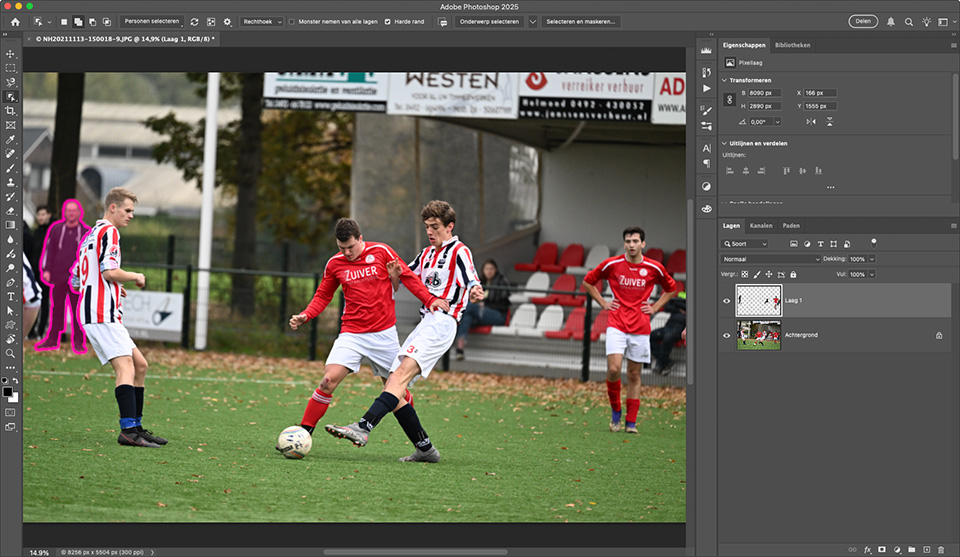
When removing large objects becomes complex, Photoshop can offer many more options. Both smart and manual removals or changes are very extensive and precise.
2. Removing a lot of spots
To continue with removing objects, sensor spots are distracting marks you do not want. Removing a few dozen spots is easy enough in Lightroom. The more spots there are, the slower editing that photo becomes.
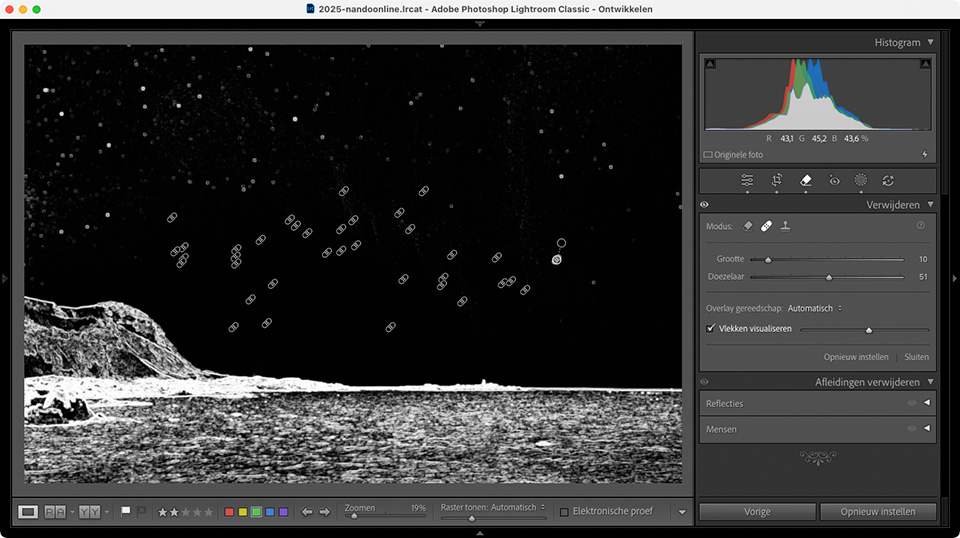
Lightroom saves a removal as an instruction: "A circle with that diameter and feathering should be applied there and replaced with the circle and feathering from that spot." The more of these instructions there are, the slower it becomes.
Photoshop works at pixel level. The pixels are actually changed, or, in the case of a layer, it is a layer containing new pixels. There are no instructions, so editing the photo does not become slower.
3. Simple focus stacking
Focus stacking is combining several photos in which the point of focus is different in each photo. This allows you to achieve an infinitely large depth of field, regardless of the aperture.
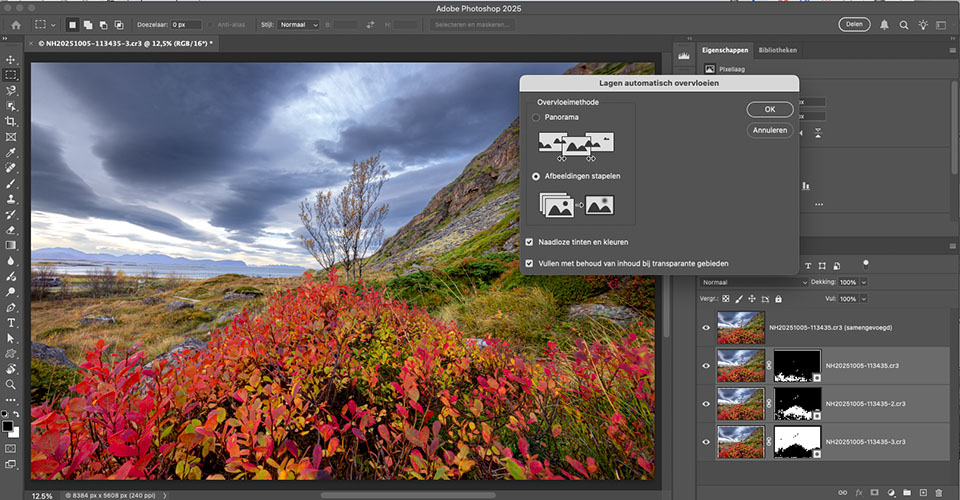
Combining several photos for focus stacking is not possible in Lightroom. So you have to turn to Photoshop. For more complex focus stacking, such as with macro photography, other dedicated software may be a better choice.
4. Perspective corrections
Lightroom has some simple perspective corrections. This allows you to carry out some standard corrections and lens corrections effectively. When the corrections become more complex or irregular, it is no longer possible in Lightroom.
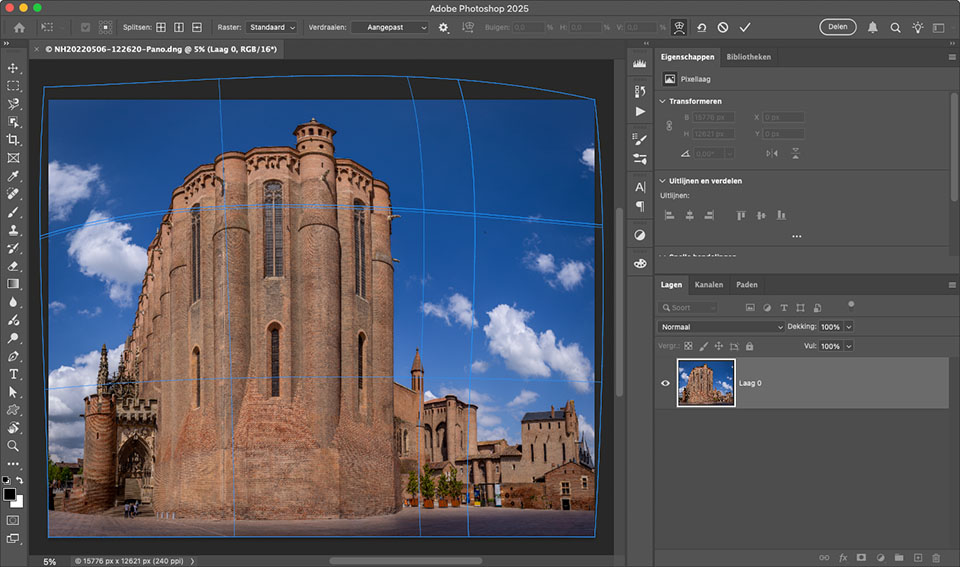
Photoshop offers a wider range of standard perspective corrections, and it can also correct perspective locally. It also offers countless ways to distort an image in any way you want.
5. Creating star trails
Star trails are very specific. They involve stacking several photos with a blending mode that only allows the lightest pixels from the other photos to show through. Lightroom offers no options for this.
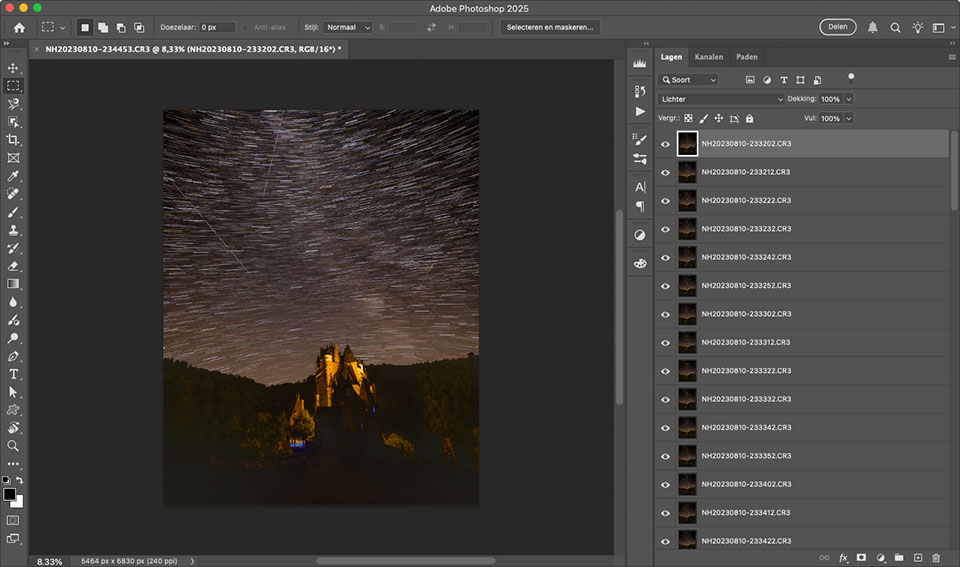
With Photoshop, you can place any number of photos on top of each other and blend them together. With the 'Lighten' blending option, it is easy to create star trails.
6. What other ones are there?
There are more photo edits that are not possible in Lightroom and require Photoshop. Think of replacing a background or stacking photos to remove noise.
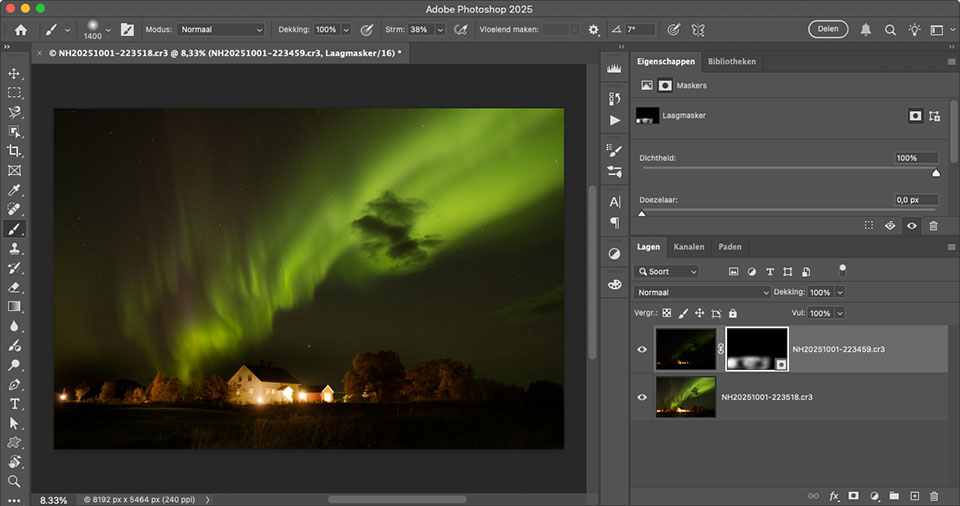
Perhaps you know of some other edits that are not possible in Lightroom and for which Photoshop is still needed? If you know of any, let us know in a comment below this post.
About the author
Nando Harmsen has been photographing for more than 40 years. He specialises in wedding photography and landscape photography. Nando also gives talks, workshops, masterclasses and photo trips, and regularly reviews new and interesting equipment.
You might also like
-
 Wanneer Lightroom en Photoshop niet meer samenwerken
by Nando Harmsen
-
 Replacing skies in Photoshop is getting easier
by Johan Elzenga
-
 5 tips to work faster in Lightroom Classic
by Thijs Schouten
-
 Photoshop tip: use the export function
by Nando Harmsen
-
 Which is better to use? Lightroom or Photoshop?
by Nando Harmsen
-
 Lightroom Classic 8.0 and Lightroom CC 2.0
by Michelle Peeters
24 comments
-
 guest wrote on Tuesday 28 October 2025 at 10:39 | reply
Sky editing is better in Photoshop, different skies
Translated from Dutch. -
 Pixeldude Raoul wrote on Tuesday 28 October 2025 at 11:20 | reply
I've never needed Photoshop and I never will use it either ... waaaaaay too expensive a subscription.
Translated from Dutch.
I have been using Lightroom, Affinity, Luminar AI, Luminar Neo, Topaz Sharpen AI and several other older and free programs for years. Lightroom is more than sufficient for pretty much everything, except the catalog. I've run into problems there several times that turned out to be impossible to solve. Now? I just use the 'file explorer' to look up certain photos. It's a matter of naming them in a suitable way. -

 kok.f@ziggo.nl wrote on Tuesday 28 October 2025 at 11:21
| reply
kok.f@ziggo.nl wrote on Tuesday 28 October 2025 at 11:21
| reply
What I actually expect is that PS and LR will eventually merge into one program. Both use ACR as a basis, so putting everything into one should be possible. It would then be a very large program. At the moment I find it rather distracting that PS works best/easiest for one thing and LR for the other.
Translated from Dutch. -
 Raphael De Vos wrote on Tuesday 28 October 2025 at 12:21 | reply
IMPORTANT BUT NOT MENTIONED: What Lightroom cannot do at all and Photoshop can is everything concerning TEXT. For me, after LR editing, PS editing remains INDISPENSABLE!!!
Translated from Dutch. -

-
 Paul eos wrote on Tuesday 28 October 2025 at 12:30 | reply
Personally, I think Photoshop goes way too far, if you show a beautiful photo these days, you’re sure to hear "edited with Photoshop, right". Especially now with AI, it reduces the photographer to a bungler and craftsmanship has disappeared completely.
Translated from Dutch. -
-
Pixeldude Raoul wrote on Tuesday 28 October 2025 at 12:52 | reply
In Photoshop, as far as I’m concerned, you can only continue to (badly) 'fiddle' with an already good photo edited with LR. But ... I can and will never know: I don't use PS and never will.
Translated from Dutch. -
-
 Henk Donkers wrote on Tuesday 28 October 2025 at 17:17 | reply
Nando, I think it is a very good question you are asking. I only turned the question around and came to the conclusion that I don't need LR. I do it very simply: on one screen I use the free program Faststone to manage my photos. A small program that can do a great deal in terms of management. From Faststone I can easily switch to Photoshop on the other screen. With this combination I can do everything that LR and PS together can do. Ideal for me.
Translated from Dutch. -
-
 dehantschutter johan wrote on Tuesday 28 October 2025 at 18:53 | reply
In PS you can remove annoying halos by setting the blending mode to darken on a new layer and cloning away the distracting white edge. Prevention is of course better.
Translated from Dutch. -
-
 jax wrote on Wednesday 29 October 2025 at 08:00
| reply
jax wrote on Wednesday 29 October 2025 at 08:00
| reply
So if you don't use Photoshop you're not a good photographer???
Translated from Dutch. -
-
Raphael De Vos wrote on Wednesday 29 October 2025 at 10:30 | reply
If you consider yourself a good painter, but you don't use paint, then I do have my reservations about the end result you achieved.
Translated from Dutch. -
Pixeldude wrote on Thursday 30 October 2025 at 09:50 | reply
For those 'things' that can't be done in Lightroom, I use other (much cheaper) programs that can do them.
Translated from Dutch.
Adobe is far too focused on making greater profits through their rather expensive subscription system. What PS can do, other programs can do too, ... and a lot cheaper. I already find the LR subscription 'too' expensive but I think it's a good program, so I keep that subscription, but then exclusively 'that' one from Adobe. -
-
Pixeldude wrote on Thursday 30 October 2025 at 10:07 | reply
Then I can only hope from the bottom of my heart that this isn't a publicity stunt for PS.
Translated from Dutch. -
Raphaël De Vos wrote on Thursday 30 October 2025 at 12:17 | reply
That text does not belong to photo editing is nevertheless rather simplistic. For the layout of a beautiful photo book, elegant text is just as important as a beautiful frame around your photo, and for me belongs just as much to art as the correct composition of your photo. Wanting to separate all that from each other is a curse for the assessment of a work of art. Raphaël De Vos
Translated from Dutch. -
Nando
wrote on Thursday 30 October 2025 at 12:25
| reply
No, indeed. I don't call adding text photo editing.
Translated from Dutch.
I don't call that photo manipulation either.
That is designing a book with your photos. That is something you don't do in Lightroom anyway, but in Photoshop or InDesign.
Photo editing is purely editing a photo from raw image material (Raw file, or jpeg if you want) into a presentable image. -
Mac wrote on Friday 31 October 2025 at 08:53 | reply
The only thing I use LR for nowadays is making panoramas. For the rest I actually do everything in DXO photolab. (and that one can't stich panoramas)
Translated from Dutch.
Do I need a bit more editing, then I still have Affinity photo.
But since the abbonoments form of adobe, I don't have any new LR anymore, only the last old one without abbonoment. -
Raphaël De Vos wrote on Friday 31 October 2025 at 14:44 | reply
This answer seems a bit strange to me, because I believe Lightroom also has a separate section for designing photo albums. So in other words, is Lightroom then also not recommended at all for designing a photo book, considering that the vast majority of photo books are nevertheless provided with commentary, in my opinion, however limited that commentary may be.
Translated from Dutch. -
Nando
wrote on Friday 31 October 2025 at 14:59
| reply
Lightroom can create albums, but it is limited to the most basic layout and captions. No text in photos, or nice formatting. That's Photoshop.
Translated from Dutch.
That also applies to websites, which can be made with the help of Lightroom, and presentations.
You should take a look at it sometime to really get an idea of what these functions entail. Only then will you understand what I mean.
Have your say
Please note: Articles older than a week can only be commented on by signed-in visitors.Would you still like to comment? sign in or create a free account.
Become a better photographer every week
A practical photography tip in your inbox every week.
38,937 photography enthusiasts already receive the tips! More about the weekly mail. Or keep up to date via  Facebook.

Elja Trum
Photofacts; everything to do with photography!
Would you like to take better photos and keep up with what is happening in photography? Photofacts publishes articles that teach you something about photography — from a product announcement to a practical shooting tip or a look at a website. Photofacts covers photography every day and is a hobby project of Elja Trum's that got out of hand. The articles are written by a team of volunteer authors. If you would enjoy writing one or more articles for Photofacts, do get in touch.More about PhotofactsPhotofacts is made possible in part by
