

Selective editing in Lightroom
Thursday 13 December 2018, 11:15 by Michelle Peeters | 9,777 views | 3 commentsThis article was translated from Dutch with the help of AI. Read the original.
If you only want to edit part of your photo, you can do that in Lightroom too. You use the adjustment brush for this. Click the brush button, just below the histogram, and choose an effect.
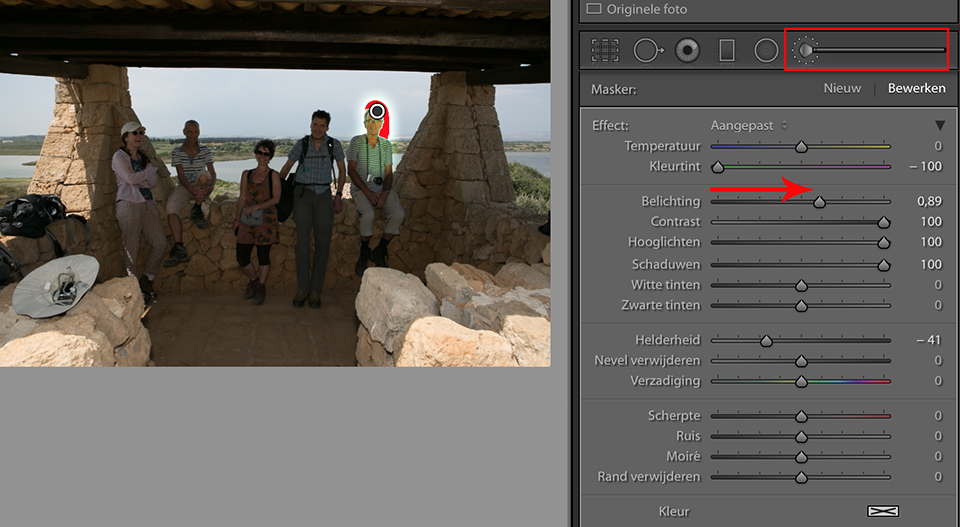
For example, drag the Exposure slider to the right to brighten the photo a little. Adjust the Size and Feather of the brush, then paint the effect onto your photo. Click Custom to choose a ready-made adjustment brush.
In the backlit shot above, I painted one of the faces a little lighter with the adjustment brush, very roughly. You will need to zoom in quite a bit, make the brush a little smaller and set the feathering a little higher for a natural result.
Want to learn more about Lightroom?
Follow one of Piet van den Eynde's Lightroom courses on Photofacts Academy. The Lightroom Workflow Tips & Tricks course is a very useful one to start with.
You can follow these courses for two weeks with a free trial membership.
Dit artikel is voor het laatst bijgewerkt op 13 december 2018.
De eerste publicatiedatum is zaterdag 23 juni 2018, 12:48.
About the author
Michelle Peeters is fotografe en oprichter van DeuxBleus Fotografie. Michelle herkent het bijzondere in het gewone en het gewone in het bijzondere. Ze heeft zich nooit willen specialiseren en is daardoor van alle markten thuis.
You might also like
-
 5 tips to work faster in Lightroom Classic
by Thijs Schouten
-
 Lightroom tip: turn off assisted selection
by Nando Harmsen
-
 Lightroom gets powerful masking capabilities
by Elja Trum
-
 Removing blemishes in Lightroom
by Michelle Peeters
-
 How do I select my photos in Lightroom?
by Elvira Smit
-
 GPU acceleration in Lightroom, does it work?
by Michelle Peeters
3 comments
-

-
 Paul wrote on Wednesday 27 June 2018 at 07:15 | reply
If you want to make a rough selection, then the circle is definitely recommended. But if you want to outline a selection precisely, working with the brush is much better.
Translated from Dutch. -
 guest wrote on Wednesday 27 June 2018 at 08:44 | reply
You can't work accurately in Lightroom at all. Except when a subject is very simple, with clear transitions.
Translated from Dutch.
Have your say
Please note: Articles older than a week can only be commented on by signed-in visitors.Would you still like to comment? sign in or create a free account.
Become a better photographer every week
A practical photography tip in your inbox every week.
38,886 photography enthusiasts already receive the tips! More about the weekly mail. Or keep up to date via  Facebook.

Elja Trum
Photofacts; everything to do with photography!
Would you like to take better photos and keep up with what is happening in photography? Photofacts publishes articles that teach you something about photography — from a product announcement to a practical shooting tip or a look at a website. Photofacts covers photography every day and is a hobby project of Elja Trum's that got out of hand. The articles are written by a team of volunteer authors. If you would enjoy writing one or more articles for Photofacts, do get in touch.More about PhotofactsPhotofacts is made possible in part by
