

7 gear tips for filming with your DSLR
Monday 23 January 2017, 20:02 by Elja Trum | 12,343 views | 8 commentsThis article was translated from Dutch with the help of AI. Read the original.
You can now film with any modern digital DSLR. The result can quickly look professional. In this article, we give you 7 accessory tips to help you get even more from your videos.
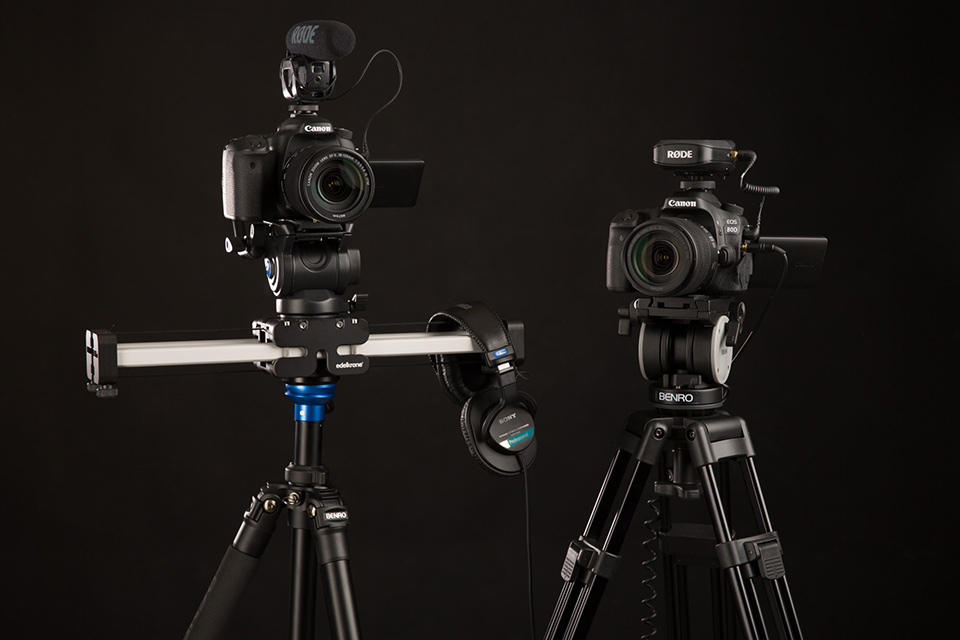
For Photofacts Academy, we make new course videos every month. We record them ourselves and try to make them just a little better each time. That also means regularly buying new equipment. Below are the accessories I am very pleased with.
1. Benro video tripod kit
A good tripod is important for creating stable footage. The head you put on the tripod is even more important. You really need a video head, which is quite different from the head you use for photography.
With a video head, you can pan smoothly and move the camera up and down. This lets you follow your subject smoothly from a tripod.
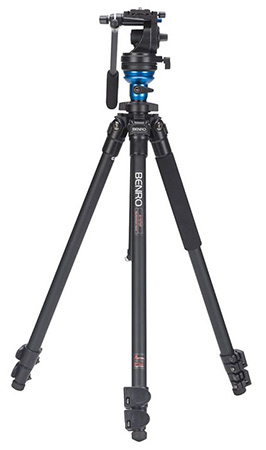
Make sure you choose a tripod that is not too heavy, but still stands firmly. It is useful if you can quickly adjust the tripod's height, which is easier with clamp locks than with twist locks, and make sure the tripod can reach a sufficient height.
A spirit level on your video head is essential, although they probably do not sell any without one. I chose the Benro Video Statief Kit + Videokop A2573FS4 (279 euros). A good price-to-quality ratio.
2. Rode Wireless Film Maker Kit
Sound is incredibly important in a video. The sound recorded by your camera itself is barely usable. In our videos, it is especially important that you can understand the instructor clearly. For this, we use the Rode Wireless Film Maker Kit (279 euros).
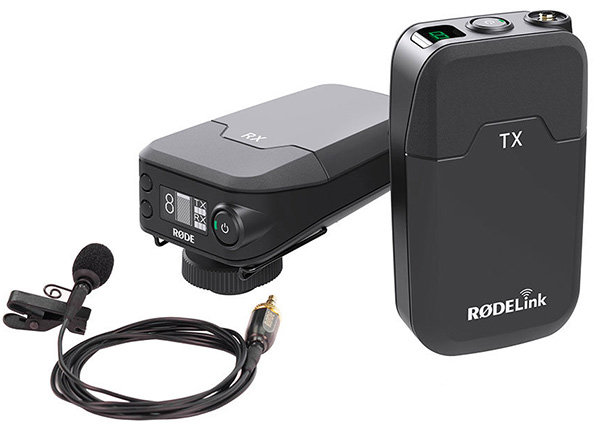
This is a relatively affordable wireless lavalier microphone that you can clip to the instructor's shirt. This lets the instructor move freely, while their voice is recorded perfectly clearly.
We actually started with a Rode VideoMic Pro (155 euros). It is also very useful and significantly improves the sound. A great option if you do not want to equip someone with a lavalier microphone every time.
We still use this microphone on the second camera as a backup for the sound.
3. Sony MDR-7506 headphones
I have already mentioned that sound is very important. It is extremely useful to know during a recording whether the sound is good or not. That is why we use Sony MDR-7506 headphones (100 euros).
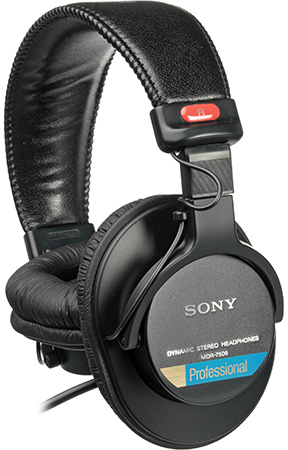
In principle, you can use any headphones, of course, but the advantage of these Sony headphones is that they offer excellent sound quality and have large, comfortable ear cups that block out outside noise well. This means you can still hear whether the sound is good when there is more ambient noise.
The Sony headphones also fold up, so they take up little space during transport. The very long cable is useful too. This means you can still walk a few metres away from the camera during recordings without having to take off the headphones.
We use, among other things, a Canon EOS 80D (1,437 euros including a very useful 18-135mm lens). The 80D's advantage is that it has both an audio input and a headphone output. This lets you record the sound from the Rode Wireless Film Kit on the 80D's audio track while monitoring the sound directly. Ideal.
4. Falcon Eyes continuous lights
As a photographer, you know how important light is. The same applies to video, of course. Unfortunately, you cannot use all the flash equipment you have already collected. Fortunately, continuous lighting does not have to be expensive.
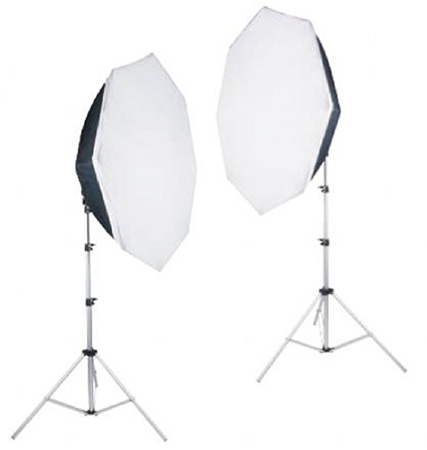
I chose the Falcon Eyes LHD-B628. I could no longer find this exact version, but I did find this handy set (285 euros). It comes with a complete set of two tripods, lamps and octaboxes.
The difference between the set I have and this set is that this one has 4 lamps with one unit, while I have a version with 6 lamps. To be honest, I think 4 daylight lamps per set provide enough light.
5. LanParte Handheld Gimbal HHG-01 Stabilizer
You cannot shoot all footage effectively from a tripod. It can also sometimes make things look a little static. That is why we also use a gimbal to shoot handheld video, allowing us to create smooth movement in the footage.
For this, we use an iPhone 7 and the LanParte Handheld Gimbal HHG-01 Stabilizer. This is an affordable and flexible set for easily creating smooth footage with plenty of movement. The LanParte HHG-01 costs 299 euros.
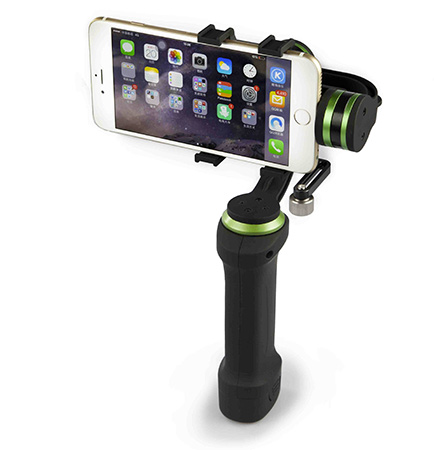
The standard iPhone app gives you very little control over the result. It is therefore a good idea to install an alternative filming app. For example, FiLMiC Pro. This app also lets you configure the frame rate, white balance and several other settings. This means you can match the footage much more closely to that from your DSLR.
This is especially important when combining footage from multiple cameras. Make sure you set this up properly during the recordings, as it saves a lot of hassle when editing the videos.
Would you prefer a gimbal for your DSLR? The Zhiyun Crane gimbal (689 euros) is the cheapest solution I know of and may be a useful option.
6. Clapperboard
When you work with multiple cameras or audio tracks, it is useful to have a clapperboard (8.95 euros). This lets you quickly synchronise the videos afterwards. By keeping the clapperboard in view at the start of each recording, you can also immediately see in every thumbnail which recording it is. Very useful when editing.
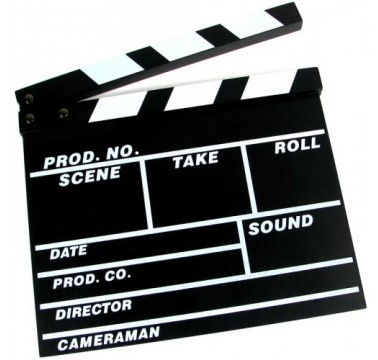
We use the chalkboard version ourselves, which works perfectly well, but they are also available as a whiteboard version, and digital versions are even available.
7. Edelkrone Slider
Our latest addition is an Edelkrone SliderPlus. With a slider, you can create footage with subtle movement in it. The great advantage of the SliderPlus is that it is relatively compact, while still offering a longer range than the slider itself.
We chose the SliderPlus Medium including soft case and spare parts (549.97 euros). In the end, it is important not to use the slider for every shot. Otherwise, a video quickly becomes tiring to watch. It is a great addition to your other footage, though.
Your film accessory tip?
>Do you have any equipment that helps you create better videos?
Let us know in the comments!
About the author
Elja Trum is the founder of Photofacts and online photography course website Photofacts Academy. He has been writing about photography since 2006. Elja is also the author of (Dutch) books on composition, black-and-white photography, flash photography and portrait photography.
You might also like
-
 Digitise your film with Pixl-latr
by Michelle Peeters
-
 6 Reasons to Stick with a DSLR and One Reason Not To
by Nando Harmsen
-
 DSLR lenses are still perfect
by Nando Harmsen
-
 The Forgotten Film Symbol on Your Camera
by Nando Harmsen
-
 Learn to film better with your iPhone
by Michelle Peeters
-
 5 things you need to know when you start filming
by Nando Harmsen
8 comments
-
 Wim Hendriks wrote on Tuesday 24 January 2017 at 11:46 | reply
What is really nice is adding a C log to your Canon DSLR camera, you then have many more possibilities to add effects to your film.
Translated from Dutch.
Scarlett (silver blacks and a soft film-like texture but vivid, rich colour)
Chrome (moody desaturated cinema look for drama, horror, sci-fi)
Mono-Adams (high contrast black and white, adding drama to landscape and cityscape scenes)
Monochrome (low contrast black and white, for portraits and a classic 1960’s Italian cinema style).
It is not an official profile Canon package, but works fantastically with DaVinciResolve 12.5. -
 Jurgen Vandenberghe wrote on Tuesday 24 January 2017 at 13:47 | reply
I’m missing 2, in my opinion, important tools for filming with a DSLR:
Translated from Dutch.
1. A follow focus. One of the great advantages of filming with a DSLR is that you can create very cinematic images with a shallow depth of field. With the follow focus you can shift focus very easily and smoothly (focusing from foreground to background and/or vice versa), which is much more difficult with the focus ring on your lens.
There are very complicated and expensive systems, but an attachment ring (like this) can also work very well.
2. A field monitor (external screen) or viewfinder (attachment for your LCD screen). The LCD screen of a DSLR is not sufficient to have a good view of focusing, framing, etc. I have both systems, and I am very satisfied with both. -

-
Jurgen Vandenberghe wrote on Tuesday 24 January 2017 at 14:58 | reply
@Elja: the viewfinder I use is this one.
Translated from Dutch.
The field monitor apparently can't be found anywhere anymore, but is comparable in price and size to this one.
This comes with a hotshoe adapter, but this is not recommended, the weight of that screen (especially with battery) is too great, which means there is a chance that the hotshoe will break off.
By the way, in "static" filming situations (in studio, fixed camera position, power supply, ...) I use a regular 21" screen with HDMI connection as a monitor.
By the way, I forgot to mention in my first comment: a very good summary and clear info in the article itself ! -
 dirk wrote on Tuesday 24 January 2017 at 15:25 | reply
Is a Nikon D3100 still a good camera??
Translated from Dutch.
Thank you. I often have a lot of problems with sharpness when using AF -
 Dick de Roos wrote on Tuesday 24 January 2017 at 15:44 | reply
Good article.
Translated from Dutch.
But the points given here also apply to (for example) a mirrorless camera. -
 Jan wrote on Tuesday 24 January 2017 at 16:38 | reply
Although I sometimes make short films with a DSLR as an experienced filmmaker, they are not really suitable as a movie camera. Ergonomically, it is already a disaster: you miss a viewfinder: the AF focusing is too slow, making a pan impossible. Filming handheld or from the shoulder is not doable. It is clear that a DSLR was not built for this, even though you see more and more people making videos with one, and then the camera is loaded with so many accessories that it looks like a Christmas tree.
Translated from Dutch.
When you want to film seriously, get a real video camera that is fully equipped for it. -
 guest wrote on Wednesday 25 January 2017 at 11:57 | reply
Hi Jan,I don't share that opinion with you, nowadays cameras have built-in stabilizers and are ergonomic, all new cameras certainly.
Translated from Dutch.
With a video camera it is ALSO recommended either on a tripod or to attach a stabilizer,but that's beside the point.
By the way when filming I remove all the automatic toys and switch to manual,wonderful feeling of being directly involved...with.

Have your say
Please note: Articles older than a week can only be commented on by signed-in visitors.Would you still like to comment? sign in or create a free account.
Become a better photographer every week
A practical photography tip in your inbox every week.
38,783 photography enthusiasts already receive the tips! More about the weekly mail. Or keep up to date via  Facebook.

Elja Trum
Photofacts; everything to do with photography!
Would you like to take better photos and keep up with what is happening in photography? Photofacts publishes articles that teach you something about photography — from a product announcement to a practical shooting tip or a look at a website. Photofacts covers photography every day and is a hobby project of Elja Trum's that got out of hand. The articles are written by a team of volunteer authors. If you would enjoy writing one or more articles for Photofacts, do get in touch.More about PhotofactsPhotofacts is made possible in part by
