

Workflow for the ideal camera settings
Thursday 9 July 2020, 09:55 by Michelle Peeters | 37,847 views | 30 commentsThis article was translated from Dutch with the help of AI. Read the original.
A system or workflow that automatically leads you to the right camera settings (aperture, shutter speed, ISO) for a particular photo situation sounds too good to be true. Yet it is possible, as I will try to show in this article.
I will not explain in great detail here what shutter speed, aperture and ISO do. You can read about this in a number of articles that we have already written about them here. The cheat sheet below actually shows you the whole story in a nutshell.
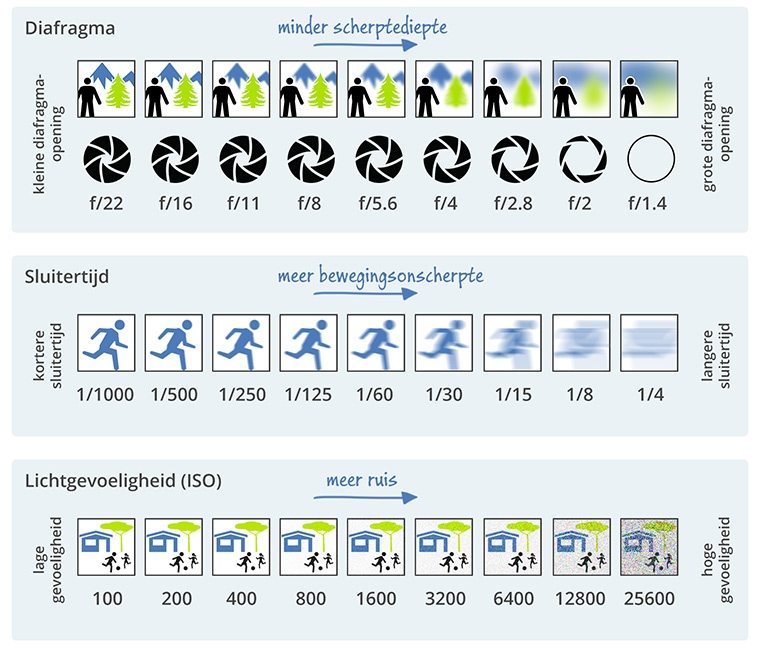
In this article, I will only explain the workflow that lets you always choose the right shutter speed, ISO and aperture, in every photography situation you can imagine. Aperture, shutter speed and ISO are the most important camera settings in photography, and to control these 3 settings you really need a deep intuition of how they work.
The most important question you should constantly ask yourself is: how bright or light will your photo be? One of the aspects of exposure is the brightness of the outside world, in other words the ambient light.
Sometimes you can change the ambient light by adding light with a flash, or you can filter or dim it by using neutral density filters. But usually you will have to deal with the light that is already there, the existing or ambient light. So what can you do to set the camera itself differently to capture more or less light?
The exposure triangle
Just a short explanation of the exposure triangle. The final exposure in the photo of a scene is determined by the interaction between aperture, shutter speed and ISO sensitivity, as you can see in the cheat sheets above and below.
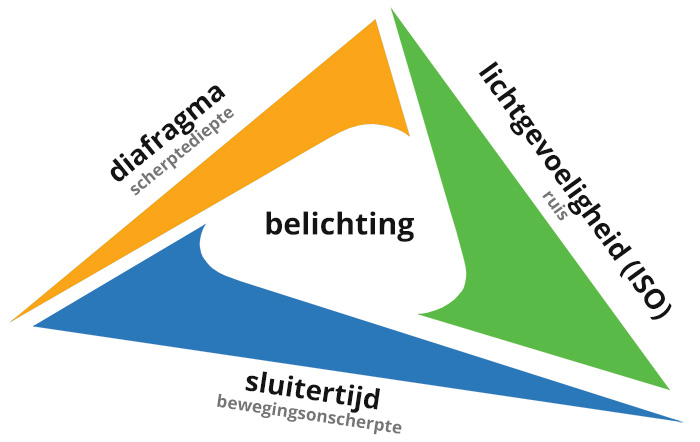
The duration of your exposure is the shutter speed. Shutter speed also affects how much movement you capture. You may need 1/30 second, 1/50 second or an even faster shutter speed when you are hand-holding your camera.
Every camera has an aperture that lets light in to make your photo lighter or darker. The aperture you choose also changes the depth of field. Depth of field is how much of your photo is sharp from front to back. The larger the aperture, the smaller the number, the more blurred the background will be.
Workflow / step-by-step plan
There are three ways to capture more light: ambient light, shutter speed, aperture. If your photo is still too dark, you can increase your camera's ISO.
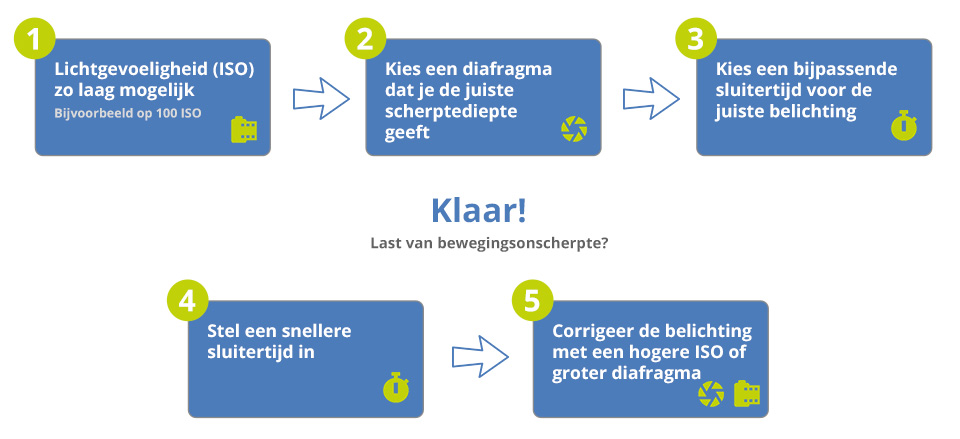
The best way to understand the system or workflow, see the diagram below, is to look at a few example photos, where the steps, 1 to 5, in the diagram can be followed each time.
Example photo 1: aperture only, low ISO
The example photo below shows a tree frog. The camera settings I used were: ISO 100, aperture f/4, shutter speed: 1/250. This may look like a difficult photo to take, but the settings were actually very simple.
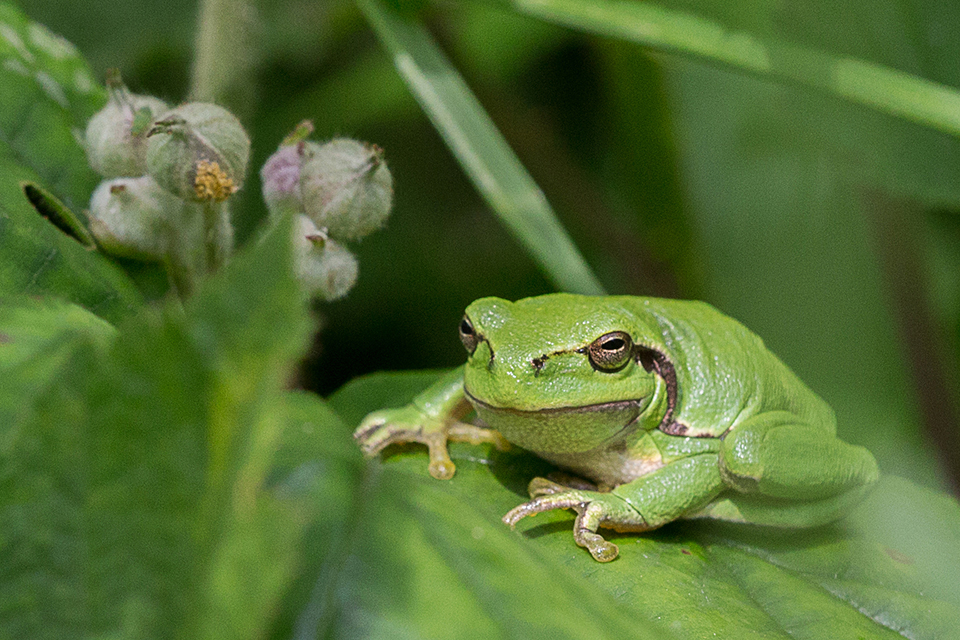
I always start by setting the ISO value (1). I always set it to the lowest possible value, which is 100. I do this because you do not actually capture more light by increasing the ISO. You get 'cleaner' photos with less noise by setting a low ISO and making your photos brighter with aperture and shutter speed instead.
The next step is aperture (2), the most important camera setting because it affects the depth of field. Depth of field has a huge creative impact on the appearance of your photo. Here I wanted to isolate the frog with a lovely blurred background.
So I used the largest possible aperture on my lens, the largest opening means the most background blur. With this lens, the largest aperture happened to be f/4. So the next step was to choose the right shutter speed (3) that gave me the right brightness. Here, that turned out to be 1/250 second.
And in this case that was ideal because it was fast enough to eliminate any motion blur. If the frog had jumped away, the photo at 1/250 would have been blurred. But it just sat there calmly, so my photo is completely sharp. This was an easy photo because I got exactly the settings I wanted.
Example photo 2: faster shutter speed
Below you can see a slightly different but more complicated example. I took this butterfly photo at 1/400, aperture f/4, ISO 280. Again, I started by setting the ISO value (1), first to the lowest possible value of 100. I wanted a blurred background again, so I set the aperture (2) to f/4 once more.
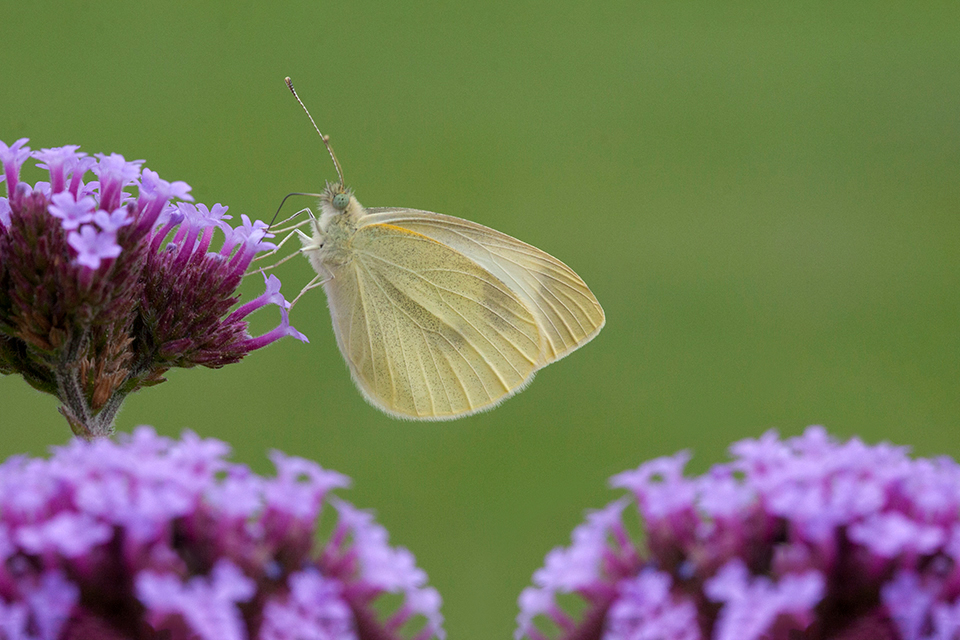
Here I would have got the correct exposure at a shutter speed (3) of 1/150. So why did I not use that shutter speed? Motion blur! The butterfly was sitting on a flower moving in the wind. And close-up photography already magnifies every camera shake.
So to get a sharp photo here, I had to use a faster shutter speed (4), namely 1/400. And this is also where the system comes into play. It is actually a kind of puzzle. I have set ISO, aperture and shutter speed, and now I need the bottom of the diagram.
So, back to aperture. I would rather not change my aperture here because I am happy with my shallow depth of field. So I keep it at f/4. That brings me back to ISO. My photo is too dark with the settings I have now, so I have no choice but to increase the ISO (5).
That is not ideal, and it is true that there is a little more noise in this photo when you zoom right in, but this is still much better than capturing motion blur or the wrong depth of field, which would ruin your photo.
Example photo 3: slower shutter speed
Here is another photo, this time a cityscape, Matera in Italy. I did the same thing as before: ISO 100 (1) to start with. And then the depth of field (2). That was not really a problem here, because whatever you do, you can hardly achieve that shallow depth of field when everything is so far away.
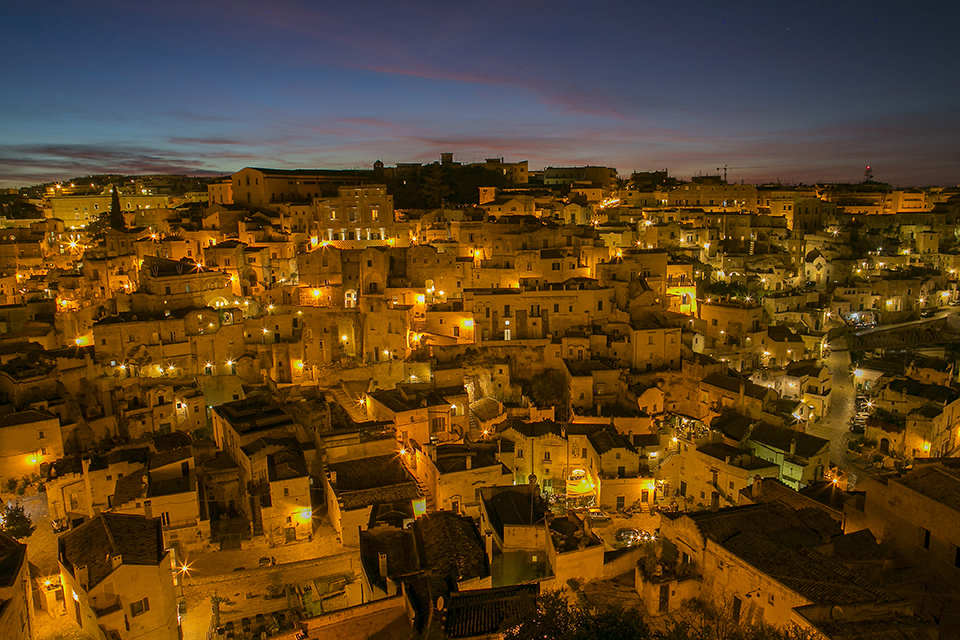
So I simply set an average aperture (2), f/11. That is a good balance because medium apertures usually produce an even sharper image than the smallest aperture, f/32 for example.
The depth of field was not a problem in this case, because everything is far away anyway and I was photographing with a wide-angle lens. In such a situation, you might as well choose an average aperture. Next it was time for the shutter speed (3).
As you can see, the sun had just gone down when I took this photo. And to get the right brightness in the exposure, I needed a fairly slow shutter speed, 1.6 seconds in this case.
If I had held my camera to take this photo, it would have been quite blurred up close, because I cannot keep my hands completely steady for 1.6 seconds. But I used a tripod, which gives you so much more flexibility with slow shutter speeds.
So the photo at 1.6 seconds is incredibly sharp. You may notice that the clouds in the background are slightly blurred because they moved during the exposure. It does not really bother me because they are not the main subject, but this is what you get when your shutter speed becomes a little slower.
Example photo 4: increase the ISO
Next, a wildlife photo that was more complicated to take. You may already be able to see some of the difficulties in the photo by looking at it for a moment. The weather was not very bright, the subjects were moving quite quickly and I wanted a lot of depth of field to get all three puffins reasonably sharp..
I also did not want overly blurred backgrounds here. I really wanted to be able to make out the lighthouse in the distance to some extent.
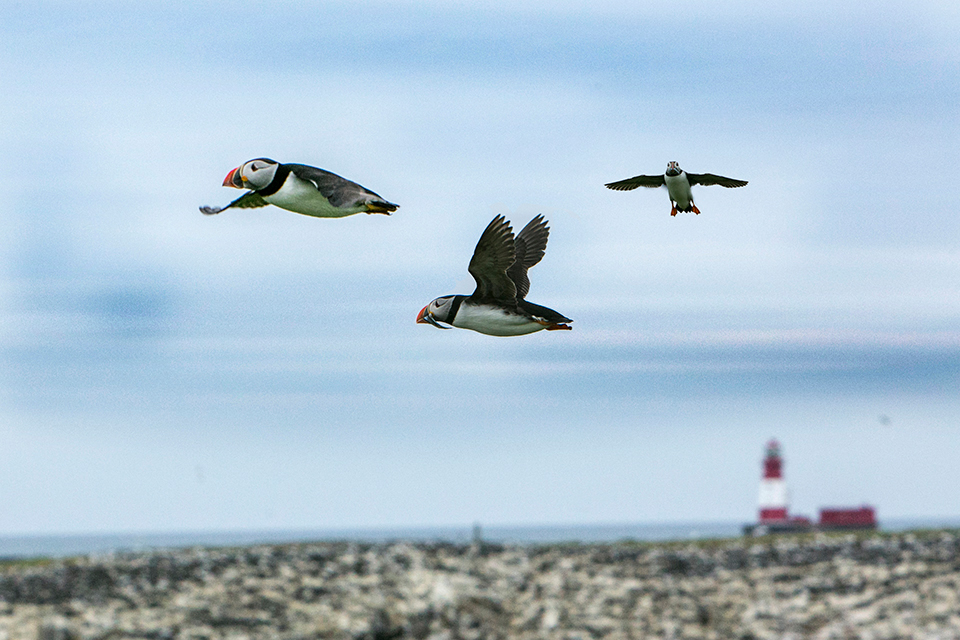
So let us go through the process again. I started with ISO 100 (1) again, and then set the aperture (2) to whatever I needed to get the right depth of field. Unfortunately, I needed a lot of depth of field here, in a way. I set f/16. Why is that such a shame?
An f/16 aperture is very small. This small opening gave me a lot of depth of field, but let very little light through. And then on to the shutter speed (3). To get the right brightness, I needed a shutter speed of 1/50. But that simply was not going to work. The birds were flying far too fast.
In fact, they were flying so fast that I would have needed a shutter speed of 1/2000. And even that is not fast enough, as you can see motion blur on one of the birds' wings when you zoom in. But 1/500 was the absolute slowest exposure I could have here.
If you then go back through the diagram, I could not really change the aperture (2) because I genuinely needed this depth of field, so I left it at f/16. And then ISO (5) was the only thing left. I had no choice here but to increase the ISO (5) to 3200, otherwise my photo would simply have been too dark.
I could have taken a really dark photo and brightened it afterwards in Photoshop, but this would not improve the image quality. It is better to increase the ISO (5). And these then became my final camera settings: ISO 3200, aperture f/16, shutter speed 1/2000.
When you zoom in, you can certainly see some grainy and discoloured areas in the photo. That is an unavoidable consequence that I will have to live with. The only way to solve this problem is to use a slower shutter speed (4) or a larger aperture (5). Both would have had consequences that I did not want to accept in this case.
Example photo 5: high ISO and large aperture
The final example to round things off is the photo below of the Milky Way. These kinds of photos are not easy to take, and many people want to know how to do it. We go through the same process again, starting with the ISO setting (1) at 100.
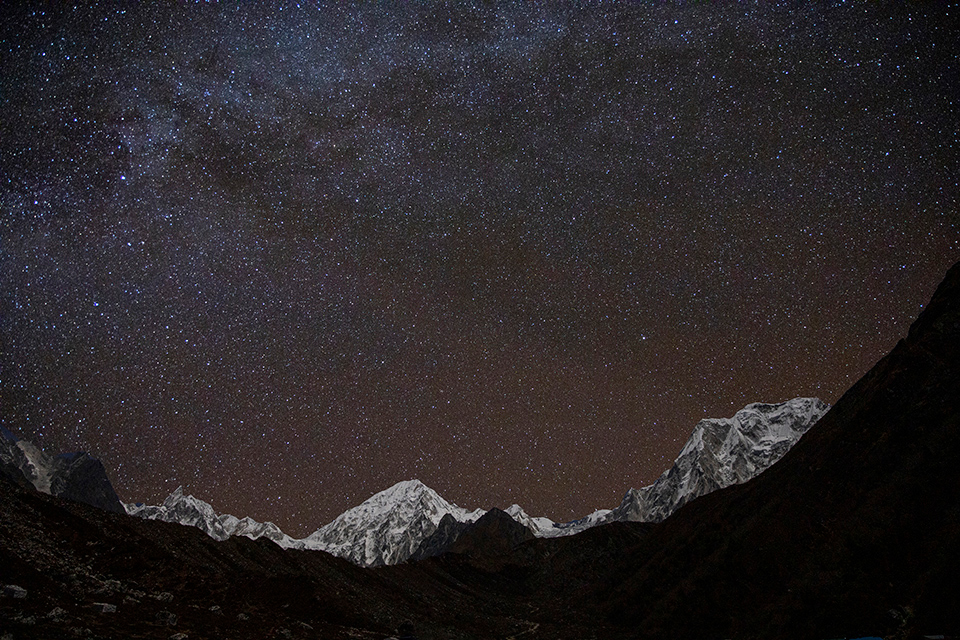
Next, go to aperture (2). Everything here is some distance from my camera, so perhaps an average or even small aperture would work. Say f/8. And then it is time for the shutter speed (3) again. One thing that is important when photographing the Milky Way is that the stars move across the sky.
It is not something you can observe with the naked eye, but with your camera everything exposed for longer than 20 seconds becomes blurred. This also depends on your lens and the direction in which you are looking. In any case, take some test photos! The absolute longest exposure time I could get away with was 25 seconds.
With these settings, however, your photo looks completely black. So let us go through the process again. I skip the aperture (2) again because I really want that depth of field, although this is less relevant in astrophotography because of the distance, but I will come back to that later.
So it is time to raise my ISO (5). But it seems that I would need an ISO of 25,600 to get a photo that is bright enough.
That is hardly a recipe for good image quality, but what is left? There is hardly any ambient light here, and I have maximised my shutter speed. A flash certainly would not light up the stars because they are stars... So the only thing left is to use a larger aperture, so that I can capture more light.
I use the largest aperture on my lens: f/2.8. I do not like doing this for landscape photography because you lose depth of field. But it was my only option. So the final settings were f/2.8, 25 seconds, and I get a well-exposed photo at ISO 3200 instead of 25,600.
It is still a fairly high ISO, and I can certainly see some grain and noise when I zoom in. You can also see some areas that are blurred because of the wide-open aperture setting. And there is no solution for that.
But if you look at the photo as a whole, it is sharp. I had to compromise on ISO (5) and depth of field (5), and that is not ideal, but it does not ruin the photo either.
Workflow in brief
To finish, I will summarise the workflow with the actual steps once more. Start with ISO (1). Set the base ISO to the lowest value on your camera. For most cameras, that is ISO 100. Then move on to aperture (2) and choose the value that gives you the right depth of field.
Whether you want a shallow or deep depth of field, you determine this with your aperture. Then move on to the shutter speed (3). Set the value that gives you the correct exposure, purely and simply. This depends on the ambient light, but often you will be finished after this step. Except when this shutter speed gives you motion blur.
If you do not want motion blur, you need to use a faster shutter speed (4). Your photo will often become too dark now. The final step is to get that brightness back.
You can simply change the ambient light if you have control over it, but normally it comes down to using a higher ISO (5) or possibly a larger aperture (5). Both settings in step 5 involve a compromise.
I personally always start by changing the ISO (5) because I am very particular about my depth of field and would prefer to keep the same aperture. But as I have shown with the Milky Way photo, that is simply not always possible. So this is your workflow, in 5 steps to an ideal exposure for most photography situations!
In practice, it goes much faster than it seems here. If you only photograph one type of subject, you can probably use the same ISO and aperture values for a whole series of photos.
You can even let your camera determine the shutter speed automatically to achieve the correct exposure. You do this by setting your camera to semi-automatic mode, in this case aperture priority.
And that makes this workflow almost too complicated. But at least you now have the basics. Shutter speed, aperture and ISO are more important than other settings in photography. And this is a system that certainly will not let you down and will make you use your camera settings more consciously, so you can get exactly the photo you had in mind!
Dit artikel is voor het laatst bijgewerkt op 9 juli 2020.
De eerste publicatiedatum is maandag 9 maart 2020, 23:32.
About the author
Michelle Peeters is fotografe en oprichter van DeuxBleus Fotografie. Michelle herkent het bijzondere in het gewone en het gewone in het bijzondere. Ze heeft zich nooit willen specialiseren en is daardoor van alle markten thuis.
You might also like
-
 Workflow tips for Lightroom Classic in 7 steps
by Nando Harmsen
-
 Never focus again, not even automatically
by Nando Harmsen
-
 Shoot raw? Throw away the exported JPEG
by Nando Harmsen
-
 The ideal choice for primes
by Nando Harmsen
-
 How do you get started with Lightroom Classic?
by Nando Harmsen
-
 6 Tips for Importing Photos into Lightroom
by Nando Harmsen
30 comments
-
 Karin Bussink wrote on Tuesday 10 March 2020 at 12:36 | reply
Thank you Michelle for this super clear explanation with very good examples. Very useful to revisit this theory, and another challenge for me to get started with. To begin with photographing the Milky Way. My new Canon RP with RF 24-105mm is now on its way with the delivery driver. This will be one of the first challenges for this camera. Unfortunately no F2.8 but we'll solve that!
Translated from Dutch. -

 Michelle Peeters wrote on Tuesday 10 March 2020 at 12:39
| reply
Michelle Peeters wrote on Tuesday 10 March 2020 at 12:39
| reply
@Karin: thank you and nice to hear! I took the Canon RP with RF 24-105mm with me to Nepal and I was able to photograph the Milky Way really well with it! I would have liked to have a bit more wide angle and f/2.8 is of course also really nice to have, but it is still quite doable. A very nice (travel-)camera! Good luck with your challenges!
Translated from Dutch. -
 Leny wrote on Tuesday 10 March 2020 at 12:51 | reply
I've also had the RP with 24-240 for a few months now. I'm having trouble focusing sharply on one point, do you have that too
Translated from Dutch. -
Michelle Peeters wrote on Tuesday 10 March 2020 at 12:53
| reply
@Leny: yeah, I had that occasionally too (it then refused to focus). I missed some important moments because of it. But I know that's down to my old lens that I had screwed onto it (with the supplied extension ring).
Translated from Dutch. -
 anna wrote on Tuesday 10 March 2020 at 12:58 | reply
Thank you. Nice to see everything lined up again.
Translated from Dutch. -
 Janneke Nijenhuis wrote on Tuesday 10 March 2020 at 15:18 | reply
What a great explanation, many thanks for this. As a beginning photographer, I immediately printed it out and put it in my camera bag. What I often have trouble with is taking good photos of people at an evening party. But I’m going to get to work with your suggestions.
Translated from Dutch. -
Michelle Peeters wrote on Tuesday 10 March 2020 at 15:20
| reply
@Janneke: thank you! In indoor situations (for example at a party) you can hardly avoid using an on-camera flash. And that’s a whole different story... There will also be a good course about it on Photofacts Academy soon!
Translated from Dutch. -
 Bernard Veerman wrote on Tuesday 10 March 2020 at 16:12 | reply
Hello Michelle. Always useful to go through it again. But I'm missing a few important details. Did you use a Full Frame or a Crop, and what focal length was the lens. All of this in relation to depth of field.
Translated from Dutch. -
Michelle Peeters wrote on Tuesday 10 March 2020 at 16:17
| reply
@Bernard: I use a full-frame camera with different lenses and therefore also focal lengths. It is true that focal length also affects your depth of field. I did say something about that in the photo of Madera (the city overview). The farther away your subject is and the more wide-angle you have, the greater your depth of field. And at that point the aperture is less important for this. With a macro lens, on the other hand, you have very little depth of field, and with a telephoto zoom also considerably less than with a wide-angle lens. So in that respect the diagram is indeed not complete, no...
Translated from Dutch. -
 Niqué wrote on Tuesday 10 March 2020 at 16:29 | reply
Good explanation, I can work with that. Only... once I've chosen the ISO and aperture, there has to be a matching shutter speed. But how do I know which one that is? I can choose a shutter speed that suits the subject, but that probably means the exposure triangle is out of balance.
Translated from Dutch.
-
Michelle Peeters wrote on Tuesday 10 March 2020 at 16:38
| reply
@Niqué: if you set the camera to semi-automatic mode (aperture priority, so A or Av), the camera will choose a matching shutter speed itself to achieve a neutral exposure. If that is too slow for the subject you want to photograph, you need to increase the ISO value and then measure the light again.
Translated from Dutch. -
 guest wrote on Tuesday 10 March 2020 at 16:47 | reply
Michelle, thanks for your quick answer. I thought that in this article you had your camera set to M mode. Or do you just switch it to A for a moment to see which shutter speed it indicates?
Translated from Dutch. -
 bob wrote on Tuesday 10 March 2020 at 18:07 | reply
Great to read a refresher on the triangle again, I myself work with the Nikon D7500 and sometimes run into noise because I often do bird photography with the 70- 300 mm. where I often set the ISO to automatic to still get a nice photo. I usually leave the shutter speed at 100 and also generally set the aperture to F8. this still produced some nice pictures. always nice to read.
Translated from Dutch. -
Michelle Peeters wrote on Tuesday 10 March 2020 at 18:25
| reply
@guest: I indeed often use the semi-automatic mode for convenience. But you can also read the exposure in M mode (you then make sure the meter ends up at 0 or neutral).
Translated from Dutch.
@Bob: auto ISO is indeed very useful and if you shoot in RAW, the noise can often also be reduced quite well in post-processing. A shutter speed of 1/100 for bird photography seems a bit slow to me! I myself am often quickly at 1/1000 to avoid motion blur (of the subject). -
 Paulussie wrote on Tuesday 10 March 2020 at 18:55
| reply
Paulussie wrote on Tuesday 10 March 2020 at 18:55
| reply
Nice article, also for and old hand in photography.
Translated from Dutch.
Only with the last example I had question marks. Depth of field is absolutely not an issue with this photo, mountains and stars are all at infinity, so whether you use 2.8 or 11, the effect remains the same, especially because it is also a wide angle. -
Michelle Peeters wrote on Tuesday 10 March 2020 at 19:03
| reply
@Paulussie: that is indeed completely correct! And when doing astrophotography I also always end up at f/2.8 because that way you can keep the ISO value somewhat low. When doing astrophotography you may only expose for about 20 to max 30 seconds because otherwise your stars will turn into streaks.
Translated from Dutch. -
 Ad de Rooij wrote on Wednesday 11 March 2020 at 11:24 | reply
Hi Michelle,
Translated from Dutch.
Fantastic explanation.Precisely the steps you need to imprint on yourself every time you take a photo to come home with a good result. Compliments -
guest wrote on Wednesday 11 March 2020 at 11:35 | reply
Dear
Translated from Dutch.
With this good explanation,I learned something again.
Regards, G.Osten -
 chris schults wrote on Thursday 12 March 2020 at 13:51 | reply
Basically a good story, clear and useful. Just 1 comment regarding ISO. Modern cameras can really handle much higher ISO without noise appearing in the image. So don't be afraid to go to, for example, ISO 400.
Translated from Dutch. -
Michelle Peeters wrote on Thursday 12 March 2020 at 15:18
| reply
@Chris: you can always see noise though, even with expensive full-frame cameras. Just zoom in closely on, for example, a star photo!
Translated from Dutch. -
Chris schults wrote on Thursday 12 March 2020 at 19:26 | reply
I think you’re making a minor mistake here. The price of a camera doesn’t say everything. A crop camera with 24 MP has the same pixel density as a full-frame camera with 36MP. So also the same amount of noise at the same quality. The sensors have improved.
Translated from Dutch.
The total exposure is more important. Suppose you use 400 ISO for a certain photo, which you then have to brighten in post-processing, you’ll get more noise than if you had taken the same photo at, for example, 1600 ISO. -
Michelle Peeters wrote on Thursday 12 March 2020 at 19:40
| reply
@Chris: It does have to do with the quality of the sensor. A camera with a high 'total dynamic range' (the distance between white and black) will almost always give you images without blown highlights and/or blocked-up shadows. If your camera also has a high 'usable dynamic range', then no noise will appear during post-processing either when you lighten the shadows. That's what it's all about!
Translated from Dutch.
Cameras with a very good dynamic range: Canon 1 Dx, Canon 5D Mark III, Canon 6D, Nikon D3200, D3300, Nikon D7100, Sony A77, Sony A7r, Olympus OM-D E-M5, E-M1, Panasonic GH4, Panasonic GM5, D5300, D5200, Samsung NX1, Samsung NX30
The absolute top in dynamic range: Nikon D810, D800E, D750, D4s, Fujifilm X-E1 -
bob wrote on Friday 13 March 2020 at 15:26 | reply
You forgot the Nikon D7500, which can compete with the D500
Translated from Dutch. -
Michelle Peeters wrote on Friday 13 March 2020 at 16:21
| reply
Ok, thanks Bob!
Translated from Dutch. -
 Petra Jansen wrote on Friday 13 March 2020 at 16:28 | reply
@Chris: what Michelle is referring to is the so-called ISO-invariant (ISO-less) sensor. It differs a bit per brand how far that works, but in theory it works as follows (briefly explained). Suppose that in a certain amount of light you would need ISO1600 for a properly exposed photo, then you could set the ISO value to 100 and leave the other settings unchanged (do shoot in RAW). The result is an underexposed photo. In post-processing you can then make it lighter again and the result (noise level) is identical to when you would have shot at ISO1600. The advantage of this latter method, however, is that you may not have to make the entire photo lighter, only the parts that are underexposed. Of course, you still have to apply noise reduction to those.
Translated from Dutch.
Not all brands use ISO-invariant sensors, you have to look up for each camera model to what extent the sensor is ISO-less (I don't think brands themselves provide very much information about that either, but there are articles about it on English-language websites).
I photograph with Fuji myself; the X-E1 mentioned by Michelle is quite an old model, there are many newer Fuji cameras on the market by now, with much better noise performance as well (the X-T4, for example, will be coming soon). With the newer models you can set the ISO value quite high without the noise becoming disturbing. Incidentally, you also can't simply compare the ISO values of different cameras with each other, because there are different ISO standards.
And newer cameras simply perform much better in that area than older models, I think the state of technology has more influence than just the size of the sensor.
With Fuji, at least, it is the case that the lowest ISO value on many camera models is not even 100 but starts at 200, which has to do with dynamic range and the aforementioned ISO invariance. -
Michelle Peeters wrote on Friday 13 March 2020 at 17:17
| reply
Thanks Petra, interesting info! I’m going to dive into that..
Translated from Dutch. -
Michelle Peeters wrote on Friday 13 March 2020 at 17:49
| reply
@Petra: even an ISO-invariant (ISOless) sensor like that says nothing about the quality (so the amount of noise), only that you can still change the ISO setting afterwards. The quality and size of the sensor really are the determining factors here. With a full-frame sensor you have less trouble with noise at high ISO values than with a crop sensor. The number of available Megapixels is not relevant in this case, but their size is:
Translated from Dutch.
Because a full-frame camera has a large sensor, the pixels are larger. Each pixel captures light while taking the photo. The larger the pixel, the more light falls on it and the less the image needs to be amplified (high ISO value). The latter causes noise, and so you limit that with a full-frame camera. -
chris schults wrote on Friday 13 March 2020 at 20:16 | reply
@Michelle the same mistake again imo. An FF sensor is larger okay, but a 36mp FF sensor has the same pixel density as a 24mp crop sensor. So the pixels are the same size. It's different when you compare a 24mp FF sensor with a 24mp crop sensor, then your theory does hold. But you can also see that manufacturers are still playing into the pixel myth. So cramming more and more pixels onto a sensor. Whereas the ordinary photographer, who generally doesn't print larger than an A4 at 300 dpi, has enough with approx. 3500x2500 pixels. =9 mp. If you then have a 24mp sensor, you have more than enough to crop or zoom in.
Translated from Dutch. -
chris schults wrote on Friday 13 March 2020 at 20:22 | reply
@petra this isn't only on Photofacts but also on other info.
Translated from Dutch.
So never underexpose to avoid high sensitivities and think that you can correct that in post-processing. The amount of noise will be visibly higher in an underexposed, brightened shot at ISO 400 than in a correctly exposed shot at ISO 1600.
See http://www.photofacts.nl/fotografie/rubriek/tips_en_truuks/12-tips-om-ruis-te-voorkomen.asp -
Michelle Peeters wrote on Friday 13 March 2020 at 20:35
| reply
I maintain that it is about the quality of the sensor: the 'total dynamic range' (the distance between white and black) and a high 'usable dynamic range' (the latter then relates to those iso-invariant (isoless) sensors. A combination of those two gives a very good dynamic range and therefore little to no noise at high to very high ISO settings.
Translated from Dutch.
Have your say
Please note: Articles older than a week can only be commented on by signed-in visitors.Would you still like to comment? sign in or create a free account.
Become a better photographer every week
A practical photography tip in your inbox every week.
39,024 photography enthusiasts already receive the tips! More about the weekly mail. Or keep up to date via  Facebook.

Elja Trum
Photofacts; everything to do with photography!
Would you like to take better photos and keep up with what is happening in photography? Photofacts publishes articles that teach you something about photography — from a product announcement to a practical shooting tip or a look at a website. Photofacts covers photography every day and is a hobby project of Elja Trum's that got out of hand. The articles are written by a team of volunteer authors. If you would enjoy writing one or more articles for Photofacts, do get in touch.More about PhotofactsPhotofacts is made possible in part by
