

Shoot raw? Throw away the exported JPEG
Friday 30 May 2025, 22:44 by Nando Harmsen | 4,231 views | 3 commentsThis article was translated from Dutch with the help of AI. Read the original.
Do you use Lightroom or a similar programme? Do you shoot raw? Then you do not need to keep a JPEG after editing. Delete all JPEG files when you no longer need them.
Throwing away JPEG photos sounds unwise, but let me explain the idea behind it. The aim is to improve the efficiency and findability of your photos. And to prevent too many of the same images on your computer.
This is how I work. I shoot exclusively in raw image format and use Lightroom Classic as my photo database. This means that all the photos I take are imported into the programme and catalogued.
The latter means a logical organisation by subject, type, or kind of photo. This is done through a consistent organisation of the raw images on the hard drive, collections in Lightroom Classic, and of course the use of keywords.
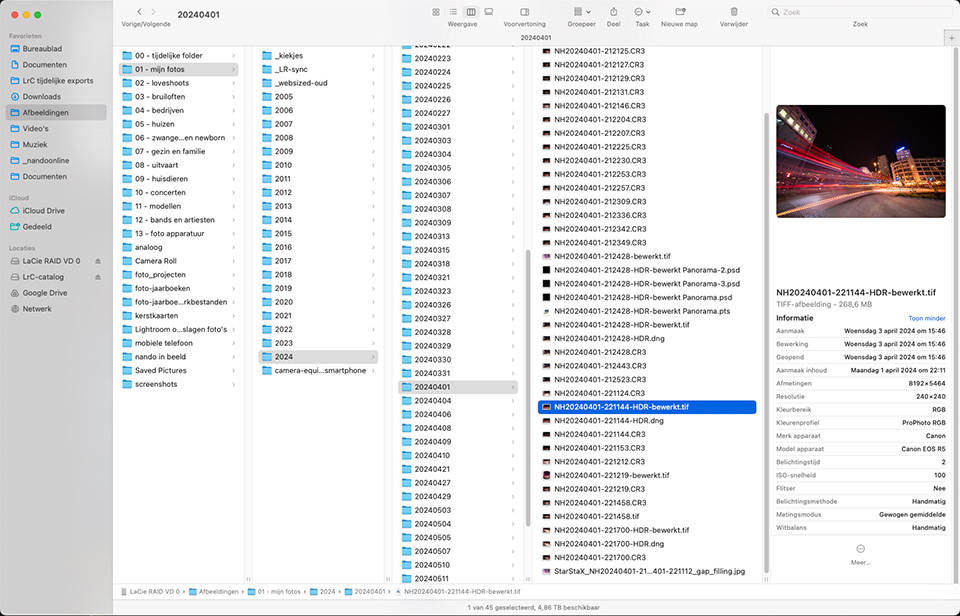
Using this system, every photo can be found effortlessly through Lightroom Classic. That is the main purpose of this programme. The condition is that you are consistent in following your workflow when importing your photos.
You can then select and edit the raw files until the photos are to your liking. Once that is done, you are finished. There is no need to export to JPEG until you need the photos. For example, for use on social media, for a client, or for another purpose.
If a JPEG is needed, you export to JPEG at that point. NEVER add this export to your catalogue, unless you have a very good reason. If you do, the photo will appear twice in the Lightroom catalogue: as a raw file and as a JPEG.
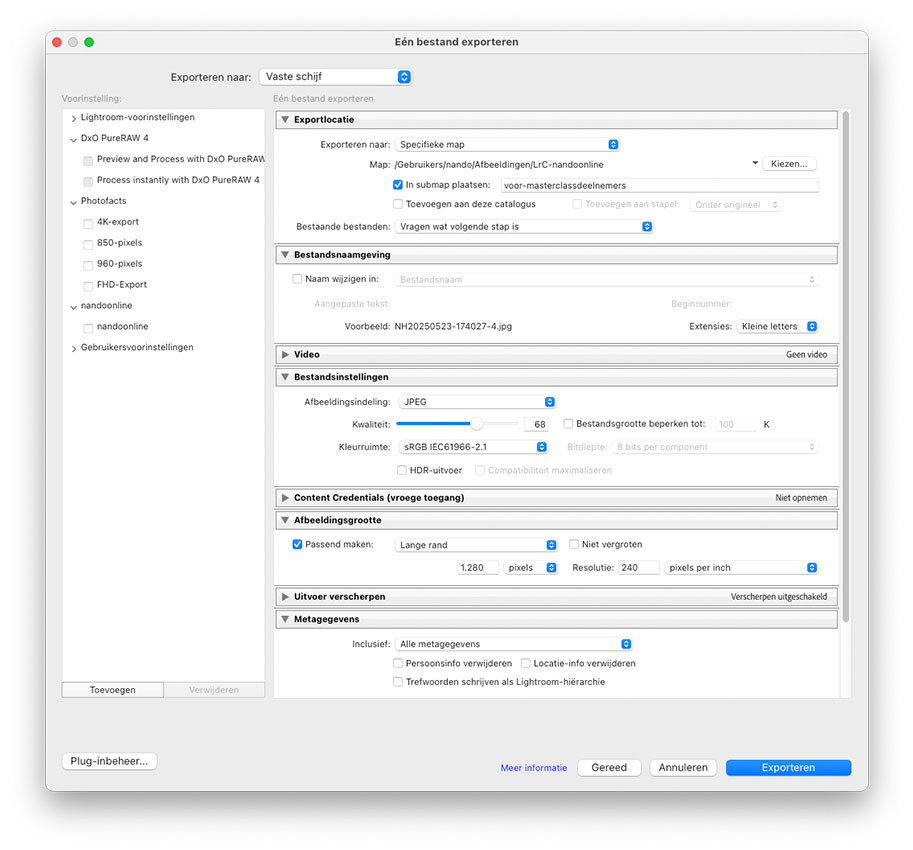
Make sure you export in the format you are going to use. Choose the dimensions in pixels, a print resolution if desired, and sRGB for JPEGs. Export to a temporary folder on your hard drive so you always know where they end up.
You can then use the JPEG images for the purpose you have in mind. Send them, use them to design an album, email them to friends, or put them on social media. Once you have done that, you can delete the JPEG images. They have served their purpose.
Why delete them? Because you no longer need them. The next time you want to use the same photos, it will be in a different format or at a different resolution. It is better and easier to export them again from the original edited raw file.
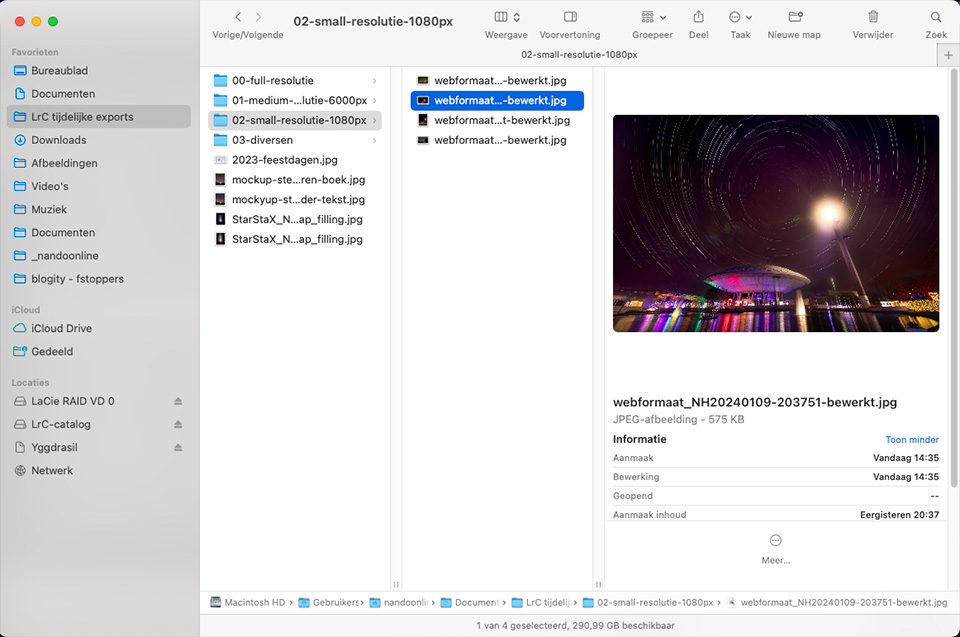
If you need to use the photos again, you can find them in the Lightroom catalogue. Collections and keywords make this quick and easy. It is infinitely more efficient than searching through folders full of hundreds or thousands of exported JPEG images on your hard drive.
By doing everything from Lightroom and exporting the images when you need them, you ensure that you use a single system. Keeping a separate folder alongside it with all the exported JPEG images only makes things messy and confusing.
I have used Lightroom Classic as an example. But this principle works in the same way for all other software that also uses a catalogue.
About the author
Nando Harmsen has been photographing for more than 40 years. He specialises in wedding photography and landscape photography. Nando also gives talks, workshops, masterclasses and photo trips, and regularly reviews new and interesting equipment.
You might also like
-
 My 10-step Lightroom Classic workflow
by Nando Harmsen
-
 Keep an overview: don't make JPEGs of your RAW files
by Nando Harmsen
-
6 Tips for Importing Photos into Lightroom
by Nando Harmsen
-
 Is there a reason to save both raw and jpeg?
by Nando Harmsen
-
 Workflow tips for Lightroom Classic in 7 steps
by Nando Harmsen
-
File names are not important in Lightroom
by Nando Harmsen
3 comments
-

 mousquito wrote on Tuesday 3 June 2025 at 10:37
| reply
mousquito wrote on Tuesday 3 June 2025 at 10:37
| reply
as far as I'm concerned, you're preaching to the converted, in other words I do this too. I only export the photos I need at that moment and once a month I clean up the temporary folder. It is indeed the case that I sometimes first export the photos in a smaller resolution to then send them to the "client", who then gives their opinion and says which ones are used for which purpose, I then only receive the numbers with comments. Then they will really be exported. That's also why I have to see which ones I throw away when cleaning up. Have I already received feedback or not,... so there are still subfolders to be found in my temp folder. My "clients" are family or my hobby club, sometimes myself too
Translated from Dutch.
-
 Henk Kuipers wrote on Tuesday 3 June 2025 at 12:15 | reply
Nice to see a kind of confirmation of the workflow that has also come about for me over the past few years. I work in a similar way myself.
Translated from Dutch.
The folder structure is somewhat different though (yyyy-mm-dd <photo event name> and instead of Lightroom I use DarkTable (I'm just not a Windows fan).
I increasingly export to jpg in screen format (16:9) because more and more photos are viewed on screens (especially during the review within the photo club). I also try to take this into account as much as possible when taking the photos.
This way of working has also suited me very well up to now. -
 Tim Groeneveld wrote on Wednesday 4 June 2025 at 16:30 | reply
I haven't had many jpgs on my hard drive for years. I export high-res jpegs directly to the site where I deliver my assignments. That site has a plugin for this in Lightroom. If I need specific photos, for example to make an album, I download them from that site. They have been marked there by the client. I download them to a temporary folder that I empty every now and then.
Translated from Dutch.
If I need other jpgs for other purposes, I can quickly export them again.
Have your say
Please note: Articles older than a week can only be commented on by signed-in visitors.Would you still like to comment? sign in or create a free account.
Become a better photographer every week
A practical photography tip in your inbox every week.
38,937 photography enthusiasts already receive the tips! More about the weekly mail. Or keep up to date via  Facebook.

Elja Trum
Photofacts; everything to do with photography!
Would you like to take better photos and keep up with what is happening in photography? Photofacts publishes articles that teach you something about photography — from a product announcement to a practical shooting tip or a look at a website. Photofacts covers photography every day and is a hobby project of Elja Trum's that got out of hand. The articles are written by a team of volunteer authors. If you would enjoy writing one or more articles for Photofacts, do get in touch.More about PhotofactsPhotofacts is made possible in part by
