

How do you protect your copyright?
Monday 29 January 2018, 15:51 by Liesbeth van Asselt | 25,474 views | 36 commentsThis article was translated from Dutch with the help of AI. Read the original.
There are several methods to prevent photo theft. One method works better than another. I will describe the most commonly used methods below.
Janoux Cremer is currently doing an internship at Stapfoto. I asked her to write a blog about copyright. Below you will find her tips on how to protect your photos from being used without your permission, or, if you prefer, from misuse.
Copyright stamp/watermark
A copyright stamp or watermark is a logo or text that photographers place on their photos to show who took the photo.
A copyright stamp is usually placed on a part of the photo that is not very interesting, for example in the bottom left or right corner. The disadvantage is that people with bad intentions can easily crop this off the photo.
To prevent this, you can also place the watermark in the middle of the photo. This is often where the most important part of your photo is shown. Of course, this does not make your photo look any better.
You therefore have to choose between taking a risk or placing a photo with a clearly visible, unattractive watermark on Facebook, for example.
Adding a watermark is simple. You can do it in Photoshop, but there are also other programmes for this, such as www.watermark.ws. In Photoshop, you do it as follows:
- Open an image and create a new empty transparent layer;
- Go to the toolbar and choose Custom Shapes;
- In the options bar, choose Fill with Pixels. ↑
- If you move to the right in the options bar, you will find the copyright symbol under Shape. Make sure your foreground colour is black;
- Now move your mouse to your image and you can add the symbol. Hold down the Shift key to keep the proportions;
- Select the Horizontal Type tool. Now type the remaining copyright information, such as your name or your company name;
- Merge the two layers you have just created. In the Layers palette, select the top layer and choose Layer, Merge; Down;
- Now turn off your background layer so that it becomes invisible. Do this by clicking the eye in front of it;
- Use the Rectangular Marquee tool to draw a selection around the copyright stamp;
- Then go to Edit -> Define Brush Preset, give your watermark a name and save it;
- Your watermark is now saved in the Brushes palette, at the very bottom.
You can now place it on any photo. It is useful to create a new layer first. You can then adjust the opacity. You can also give the copyright stamp a different colour and adjust its size. Below you can see the stamp in two different ways.
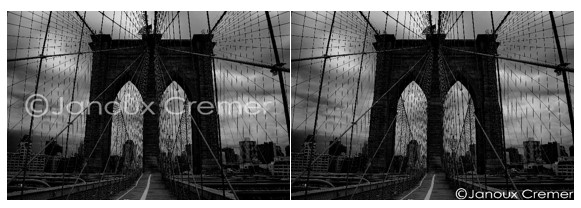
Invisible watermark
If the idea above does not really appeal to you, you can also choose an invisible watermark. With a free programme called IIC Publisher, you can hide your details in your photos. Entering your details works as follows:
1. Open an image: File -> Open image
2. Choose Cards -> Copyright card
3. You can now enter the copyright information, your details, your website and email address, if applicable.
4. Then tick 'include this card'.
5. Click OK and save the photo with File -> Save image with cards as
Photo thieves cannot see that copyright information has been added to the photo. But if you, as the photographer, open the photo in the programme, you can show that the photo was taken by you and not by the photo thief.
File information
If you want to leave your photo as it is, without adding anything, you can add your own details in Photoshop and Bridge, among others. These are also known as IPTC or metadata.
In Photoshop, go to File -> File Info. You can then enter your details in various tabs, Standard and IPTC, for example. The most important ones are copyright status, copyright notice and the URL of copyright information. Enter the following:
1. Copyright status: protected by copyright
2. Copyright notice: your name and email address
3. URL of copyright information: your website (optional)
By adding your email address under "notice", people can contact you to ask permission to use your photo.
In Bridge, you can create a template of this information, so that you can add it to your photos each time. Go to Tools -> Create Metadata Template. You can now add the details here. The most important ones are, of course, the copyright details.

To add this to your other photos, you have to save the template. You can give it a name, so that you can easily find out which one to use.
To add it to your photos, go to Tools -> Append Metadata. Your created template is now listed and can be added to your photos.
When a user opens your photo in an image-editing programme, a © appears before the title. They can find your name in the metadata.
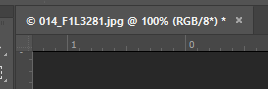
It is not the most effective method to use. A photo thief with bad intentions can easily change your details…..
Low resolution
Another way to protect your photos is to use a low resolution. If you only want to use your photo as a preview on a website, you do not need a high resolution.
A size of 1200x800 with a resolution of 72 pixels per inch (ppi) is usually enough for a photo on the internet. At a resolution of 72 ppi, you cannot print or enlarge the photo, because it will then become grainy and unusable.
Of course, the photo can still be distributed on the internet this way. The photo thief can share the photo on their own website and say that they took it.
Right-click protection
Another way to prevent people from taking your photos is to block the right mouse button. Photo thieves can then not download the photo. If they right-click on the photo, they get a notification (see image)
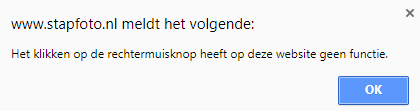
You do need some knowledge of HTML to add this kind of code. But you can of course also ask your web developer to do it.
Splitting photos
Splitting a photo can also prevent theft. With this method, you split your photo into several pieces. You can put the pieces back together later.
If someone then tries to download the photo, they only download a small part of it. You can split a photo into pieces in Photoshop, but there are also other programmes for this, such as TileMage Image Splitter.
With this programme, you can choose how many pieces you want to split your photo into. Of course, I tried the programme myself. I recommend that everyone reads the manual first, otherwise you will not see the wood for the trees.
Once I had done that, I had quickly chopped a photo into 64 pieces. Nobody can be bothered to piece 64 parts of a photo back together....
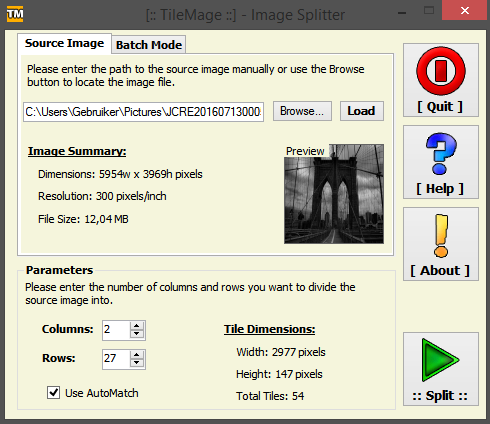
The photo thief will then quickly look for another image. Of course, they can still take a screenshot. That is a disadvantage of this method. But this applies to all methods where you do not put the copyright on the photo itself.
Transparent GIF
With a transparent GIF placed over your photo, the photo thief does not download the real image, but an empty file. To do this, first create a small transparent file of, for example, 8 by 8 pixels.
Save this in GIF format. Then use HTML code to indicate that the GIF file should be placed over every photo. You can also ask your web developer to do this.
A thief is then unable to save the real image. But, just as with right-click protection and splitting, a photo thief can still take a screenshot.
Protecting with a password
If you want your photos to be visible only to certain groups, such as your family and friends, you can protect a web page with a password.
There are websites where you can upload photos and choose between public or private. One example is the Zoom Gallery.
Here you can upload your photos and indicate who is allowed to see them. If you choose private, you get a link to the photo you uploaded. You can then forward this link to family and friends.
The Zoom Gallery does show your uploaded photos as thumbnails on the website. But when someone clicks on the photo, it says that it is a protected image. This prevents unknown people from taking your photo, while still allowing you to show the photos to an audience of your choice.
Flash galleries
Instead of displaying your photos on your website in the usual way, you can also use Flash galleries. This is an animation saved as an SWF file, in which the images can be viewed.
It is then difficult for a photo thief to extract individual photos from such an animation.
You can create Flash galleries with Lightroom or Photoshop (Elements), for example. They are secure and run smoothly.
There are disadvantages to using Flash galleries, though. It takes longer to load a Flash gallery, which means that people are more likely to stop browsing your website. Because of the long loading time, your website will also rank lower on Google and therefore be less easy to find.
A plug-in is also needed to view Flash. Not everyone has one, and not everyone wants to download one. Mobile phones also often cannot display a Flash gallery, even though an enormous number of people browse the internet on their mobiles.
How do you know as a photographer that your photo has been stolen?
To find out whether your photos are being used by others, you can search for your own photo on the internet. You can do this in several ways.
The first option is simple and quick, using Google.
1. Go to Google Images.
2. There is a camera icon in the search bar. Click on it.
3. You will then get two options: paste image URL or upload an image.
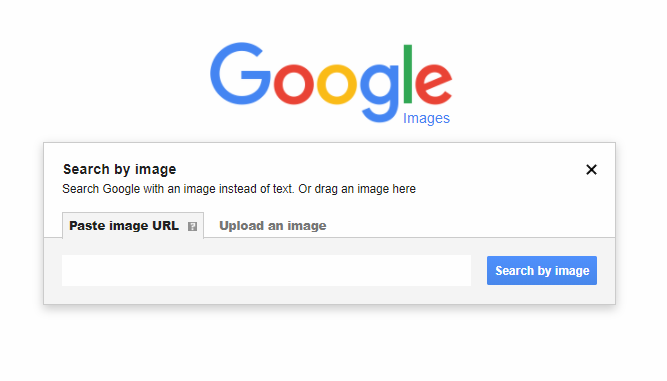
4. Then choose upload an image -> choose file.
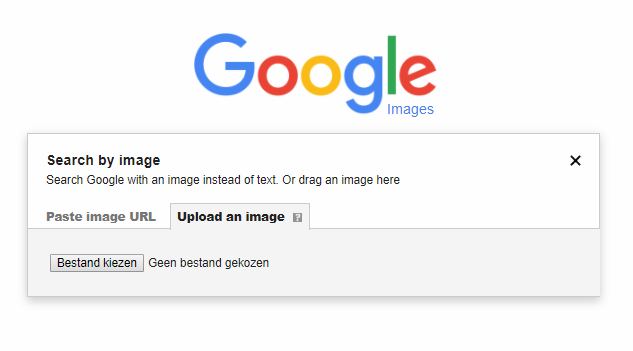
5. Now look for the photo you want to know whether it is being used somewhere.
6. Google will now search for similar images.
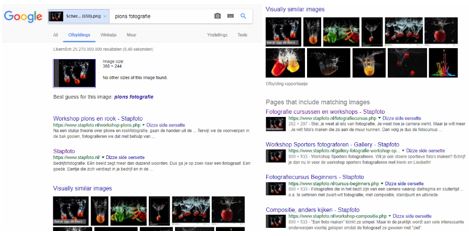
At the top, you will see the photo you searched for. Below that are the similar images and links where the photo was found.
You can now see whether the image appears on another site without permission. If not, there is nothing to worry about. If it does, you have to consider whether you want to take action, and if so, how.
Besides Google, there are also other websites where you can search for your photos, such as TinEye. On this website, you can also choose to open an image or add a URL.
When I did this with the photo of the splashing tomatoes that I also used in Google Images, I got no results. Not even the website www.stapfoto.nl belonging to Liesbeth, where the photo really is displayed.
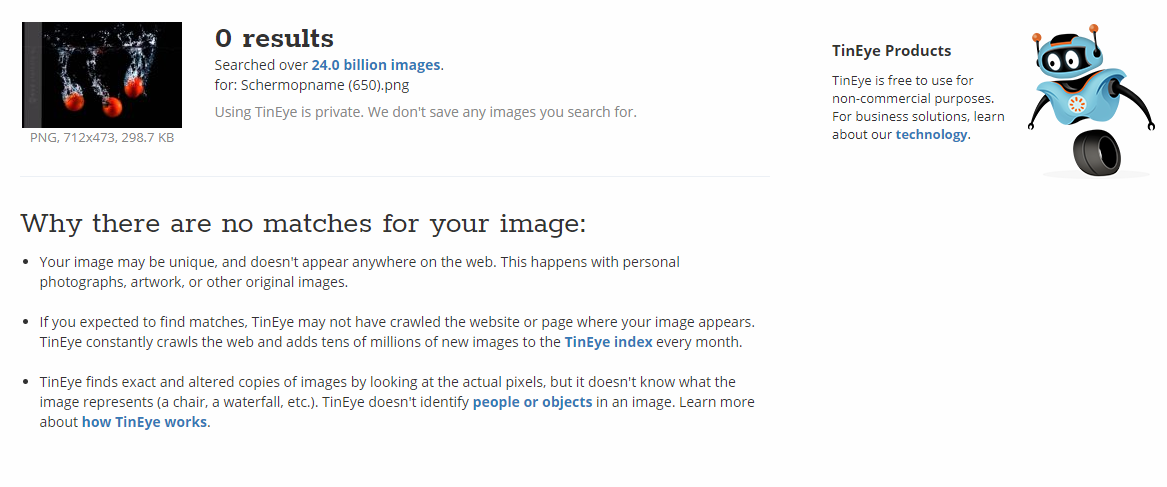
Of course, I tried it with many more photos. Some photos on the Stapfoto website were found, while others were not. Conclusion: searching in Google works better!
What should you do in case of misuse?
If you have discovered that your photo is being used without permission, you must collect evidence. Without evidence, you have no case. So take a screenshot of the web page where you see your photo, including the date.
Once you have found evidence, it is useful to consider what you want to achieve. Do you only want to make sure that the photo is removed, do you want the photo thief to pay you the usual fee for the photo, or do you want to impose a fine so that the person does not make the same mistake again?
If you choose to send an invoice including a fine, the total amount is usually three times the usual fee. An informative video about this is the one featuring the rijdende rechter.
Contact the photo thief. Preferably by telephone first. This often works better than email. Do confirm the telephone conversation by email afterwards. If it leads to a conflict, you will at least have written evidence. Include a response deadline in the email.
No response? Then send a reminder. Still no response? Then, for example, send a warning that you are going to hand the matter over.
Do you get a response? Then you can try to reach a solution that is acceptable to both parties. But ultimately, the photographer is the one with the right to speak and can therefore decide what should happen.
When do you have copyright on your photo as a photographer?
A short while ago, a judge issued a ruling about copyright on a photo. The person who took a photo does not always have the copyright!
The photo that was taken must have an "own, original character and the personal stamp of the maker". This means that the work may not be a copy of someone else's work. As a photographer, you must make creative choices. For example, you can play with the lighting, sharpness and compositing.
Copyright expires 70 years after your death. Heirs can no longer invoke it after that.
About the author
Liesbeth fotografeert met haar bedrijf stapfoto.nl voor websites van bedrijven. Daarnaast verzorgt ze al sinds 2004 (vooral creatieve) workshops zoals lightpainting, flitsen in de natuur, fine art, frozen flowers, paintsplash, infrarood, icm en multi exposure. Daarnaast is er een Stapfoto vakgroep voor de meer gevorderde fotografen.
You might also like
-
 It is impossible to protect photos online
by Nando Harmsen
-
 5 tips for school photography
by Carolien Tesselhof
-
 An Ode to Holiday Snapshots
by Michiel Heijmans
-
 Is school photography really bulk portrait photography?
by Michelle Peeters
-
 Where do you place the light for portrait photography?
by Liesbeth van Asselt
-
 Google adds copyright information
by Michelle Peeters
36 comments
-
 Mac wrote on Monday 29 January 2018 at 18:22 | reply
In many cameras you can already have your copyright information saved in the metadata.
Translated from Dutch.
I have set all my cameras (pentax) that way. -

 patrick180 wrote on Monday 29 January 2018 at 18:42
| reply
Nicely done but the Google principle is nonsense. Because if you change the file name completely, it can no longer be found via Google.
Translated from Dutch. -
 hypofocus
wrote on Monday 29 January 2018 at 18:52
| reply
An invoice including a penalty is not the right way.
Translated from Dutch.
There is no agreement, after all, so you cannot send an invoice either. It concerns compensation for damages (which is therefore also exempt from VAT). And you cannot impose a "fine" either, only the court can do that.
You can determine the amount of the compensation yourself in line with your usual rates, and you can also ask for an additional amount for the lack of attribution and mutilation of the photo. -
 Liesbeth van Asselt
wrote on Monday 29 January 2018 at 19:14
| reply
Yep, nice addition Mac
Translated from Dutch. -
 Elja Trum
wrote on Monday 29 January 2018 at 19:36
| reply
@Patrick; Google is already quite a bit smarter than just searching based on the filename. Just try it with a photo you have online. Throw it into Google with a completely different filename and there's a very good chance it'll still find it anyway.
Translated from Dutch. -
hypofocus
wrote on Monday 29 January 2018 at 19:44
| reply
@Elja: That's right, Google always did that very well.
Translated from Dutch.
That's how I always searched for my photos too.
But lately I've noticed that it can suddenly find significantly fewer photos than in the past, even though I know some of them are still online. It just no longer shows them in the search results. -
patrick180 wrote on Tuesday 30 January 2018 at 08:42
| reply
@ Elja Trum
Translated from Dutch.
I have done that more often before and yet you miss a lot of photos because the structure has changed.
But the fact remains that the problem lies with society, unfortunately it does not know how to appreciate other people's property.
In addition, you also notice that people have absolutely no idea that it simply isn't allowed. they think hey it's on the internet so I can use it.
Unfortunately, as one of the biggest Darts Photographers, I suffer a lot from this and you keep hearing the story yeah but it's online right etc etc.
@ hypofocus
As far as sending an invoice is concerned, you are indeed allowed to do this provided it is very clearly stated on your own website.
I have already sent several penalty invoices and had them paid neatly. And if people did not pay, there was the threat of my lawyer and then they still went ahead and paid. because of course one has no desire for a lawsuit that would then end up being many times higher in terms of the amount. -
 Charlotte Meindersma wrote on Tuesday 30 January 2018 at 10:58 | reply
Do keep in mind that you are actually not allowed to charge a 'penalty', but only actual compensation for damages, so you need to properly substantiate what your actual damage is.
Translated from Dutch.
Also, you should not charge VAT. After all, there is no 'added value' involved.
It is wise to first determine your goal: what do you want to achieve? Perhaps an alternative solution with more assignments for both parties would actually be a better solution. -
 Donald Willemsen
wrote on Tuesday 30 January 2018 at 11:01
| reply
Often the name and address of the photo thief cannot be found out. Just try to collect money then. Suppose the thief is somewhere in China. Do you really think you can get compensation? It will cost you more than it brings in.
Translated from Dutch.
A photo cannot be adequately protected with the above-mentioned means. All protection is easy to remove, and everything can also be removed/changed in the exif. If you put the photos on Facebook, Facebook becomes the owner of the photo and claims the right to use the photo commercially or make it available to third parties.
The best protection is not putting anything on the internet. The 2nd best method is to remove a number of pixels from the photo at pixel level in a certain pattern. This is not noticeable as such and you always have proof that you hold the copyrights. -
 Johan
wrote on Tuesday 30 January 2018 at 11:11
| reply
People talk about 'right-click protection', but this is nonsense, it only stops people who don't know anything about the internet. You don't want to protect your photos from hobbyists who want to use your photo as a desktop background. People who are a little more experienced know countless ways to still download such a photo from your website.
Translated from Dutch. -
Elja Trum
wrote on Tuesday 30 January 2018 at 11:30
| reply
@Johan; You're right, this is only protection against some of the visitors. Of course, it could still solve part of your problem.
Translated from Dutch.
When an image is shown on a screen, it is always possible to take a screen capture. Personally, I think disabling the right mouse button is a form of pestering visitors. So don't do it. There are other functionalities under the right mouse button too. -
 Kees wrote on Tuesday 30 January 2018 at 11:50 | reply
@Patrick: Google searches based on the content of the photo, not the filename. It has nothing to do with it.
Translated from Dutch. -
 R K wrote on Tuesday 30 January 2018 at 11:50 | reply
It is not advisable to start working with Flash galleries now. Adobe has announced that it will pull the plug on Adobe Flash in 2020, and is encouraging everyone with a website full of Flash content to transfer everything to an alternative format.
Translated from Dutch.
The various browsers have also already started phasing out support for Flash. -
Liesbeth van Asselt
wrote on Tuesday 30 January 2018 at 11:55
| reply
Coincidence or not, yesterday I was with a prospect who showed me his Facebook page. With all kinds of well-known photos on it. Not shared, but used in his own posts.... He genuinely didn't know that wasn't allowed. How downloaded from the internet? Right-click, save as...
Translated from Dutch.
Everyone has to find their own way with this. I just keep putting logos on my photos that I don't want others to use. And yes, that's ugly and of course they can remove them too, but that does take a bit more effort. And indeed: I also remove some pixels and add metadata (which can, incidentally, also be removed again). When putting a large logo on the photo, it usually goes well on my own website.
The only problem is that you don't put a logo on photos you deliver for a client's website and e.g. poster, and you don't remove any pixels. That's where it often goes wrong in my case. Photos are taken from my client's website. -
 Arthur Wittendorp
wrote on Tuesday 30 January 2018 at 15:59
| reply
Unfortunately, last weekend I discovered that travel photos I took in Cuba were used by a Belgian 'photographer' on his website to organise photo trips to Cuba. The watermark I used had been 'neatly' cropped out.
Translated from Dutch.
I am curious to see how (and whether) this 'photographer' responds to my settlement proposal. -
Donald Willemsen
wrote on Tuesday 30 January 2018 at 17:58
| reply
@Arthur, send the thief a hefty bill as compensation.
Translated from Dutch. -
 Marijn Pater wrote on Tuesday 30 January 2018 at 19:31 | reply
Super cool article. Exactly at the right moment too. I do have a little point. If you want to protect photos on your site, someone can still look up the photo in the html and download it that way, so you bypass the right-click and the transparent photo.
Translated from Dutch. -
 Roelof Rump wrote on Tuesday 30 January 2018 at 20:38 | reply
With every email I send there is a link to the terms and conditions, I have attached a court ruling to those terms and conditions indicating that not paying is not an option.
Translated from Dutch.
(I’m not that strict about it when it concerns a small organization or private individual, but I do always want my name to be mentioned. See the terms and conditions:
Terms and conditions
Roelof -
 Walter Frisart wrote on Tuesday 30 January 2018 at 22:36 | reply
I still think it's a bit of a rearguard action. Of course it's not right, but I don't do more than include a logo. I'd rather be busy with the next assignment and then be alert to the agreements that go with it.
Translated from Dutch. -
Arthur Wittendorp
wrote on Wednesday 31 January 2018 at 10:19
| reply
@Donald,
Translated from Dutch.
I sent him an email explaining why and how much damage I have suffered. In it, I made a settlement offer to compensate me for my damage. To date, I have not received a response from the photographer in question. He has taken my photos offline, though. (So he did receive and read my email)
I suspect he expects to get away with just taking the photos offline and not responding (or paying). In the meantime, I have instructed a (Belgian) lawyer to initiate legal proceedings should he not accept my settlement offer. -
Donald Willemsen
wrote on Wednesday 31 January 2018 at 13:06
| reply
@Arthur, take a look at Graphicsdetective. This company from Mechelen tracks down misuse and obtains the compensation for you for a percentage of the proceeds. On the site you can read how they work. Maybe it could be useful to you.
Translated from Dutch. -
guest wrote on Wednesday 31 January 2018 at 13:20 | reply
I use a combination of a huge copyright across the entire width of the photo, running through the crucial parts, and a DPI of 72. Not that my images are so amazing, but it does work. You make the image completely unusable for misuse. It also becomes too much hassle to remove the copyright from a file that you cannot even print properly. I do that in LR in the print as file tab. You can also easily determine the transparency, size, orientation and position of the copyright there. That works fine for me.
Translated from Dutch. -
Johan
wrote on Wednesday 31 January 2018 at 13:39
| reply
@Guest; that is indeed an option, only... why would you even put your photos online then if you first ruin them yourself? Just like putting nude photos on facebook and then putting squares or scribbles over intimate parts... In my opinion, photos are ruined by overly excessive copyright texts, or clearly too low a resolution.
Translated from Dutch. -
 rene van loen wrote on Wednesday 31 January 2018 at 16:37 | reply
Good to give this some attention here. I once wrote a page about copyright myself that provides some more legal information. Perhaps nice to add it here.
Translated from Dutch. -
Roelof Rump wrote on Wednesday 31 January 2018 at 22:19 | reply
Rene van Loen:
Translated from Dutch.
Nice and compact information
wanted to copy and save it, but that wasn't possible, this page is also protected -
-
 Bernard wrote on Thursday 1 February 2018 at 09:19
| reply
There is hardly anything you can do about private use (misuse). A copyright notice doesn't deter them either, it is simply cropped off. Commercially, it can be tackled if the downloader uses your photo to promote their own business and/or products. But how do you prove then that it would photo is? First of all, do indeed place a copyright notice to alert the downloader that it is not their photo. Secondly, reduce the photo you upload to, for example, 75%. If it comes to a dispute you can always prove that it is your photo, because... you can reduce a photo but not enlarge it. If you don't agree with someone else's use, then you have to take action. I myself have experienced that photos are downloaded with the "oh, I didn't know" excuse, but also that people pay for them. It was quite a shock to me when I came across one of my photos on a calendar.
Translated from Dutch. -
Liesbeth van Asselt
wrote on Thursday 1 February 2018 at 11:46
| reply
What do you mean, Roelof? Right-clicking to save the article works just fine for me? And I can also just select and do Copy Paste.....
Translated from Dutch. -
Donald Willemsen
wrote on Thursday 1 February 2018 at 11:59
| reply
Conclusion: There are many ways to try to protect your photos against misuse. Many ways do not prevent misuse. However, there is one way that does work, and that is through the wallet of the abuser. So let them misuse your photos all they want, because then they will at least earn you something too.
Translated from Dutch. -
guest wrote on Thursday 1 February 2018 at 21:28 | reply
I would go much further with the DPI. Save the photo at only 2 DPI. You can't see anything of it on the internet.
Translated from Dutch. -
 Michelle Peeters wrote on Tuesday 6 February 2018 at 12:12
| reply
I just read your article about methods to prevent photo theft. In the article, IIC Publisher is mentioned for an invisible watermark.
Translated from Dutch.
This link no longer works, however. You first end up on the freedownloadmanager.org site, where you are then supposed to be linked to IIC publisher. However, clicking on this download takes you back to Imageinfocards, where there is a blog about something completely different, but no IIC publisher to be found, or at least not anymore.
Maybe you know another download link?
I did find one at Softwareinformer.com, but that is normally not the most reliable site, although on virustotal only 1 scanner flags it.
Maybe a better tip for adding both text and a watermark to photos, also free and you can do many photos at once. That program is called: Faststone Foto Resizer and as mentioned, it does more than just resizing, so you can also add a watermark and/or copyright text to photos with it, and it can also be made invisible.
Richard Geerts -
Liesbeth van Asselt
wrote on Tuesday 6 February 2018 at 13:00
| reply
Thank you for your response Richard! Annoying that IIC no longer works, as you can see my intern was still able to download and use it a few weeks ago.... Just tried it myself: indeed no longer works. What you end up on now doesn't look very trustworthy ;-/. Thx for your tip about Faststone! Know it by name, never used it. I'll have a look.
Translated from Dutch. -
 Richard wrote on Tuesday 6 February 2018 at 15:48
| reply
You're welcome.
Translated from Dutch.
Just one more small comment. It turns out that a configuration error is breaking the https (ssl) on your page. People then see an exclamation mark instead of a green padlock.
This appears to be caused by:
"http://www.photofacts.nl/fotografie/images/smileys/smile.gif"
So if you also changed the link to the smileys to https, it should be fine.
-
Liesbeth van Asselt
wrote on Tuesday 6 February 2018 at 16:21
| reply
Uhhh?? which website? I have three: www.stapfoto.nl, www.stapfoto-academie.nl and www.webrendement.nl. Or do you mean the Photofacts site where I am a guest blogger?
Translated from Dutch. -
Richard wrote on Tuesday 6 February 2018 at 16:52
| reply
Oh sorry, the link I posted is from Photofacts, I thought it was yours too, sorry.
Translated from Dutch. -
Liesbeth van Asselt
wrote on Tuesday 6 February 2018 at 17:38
| reply
Aaahhh
Translated from Dutch.. @Elja could you take a look at this? -
Have your say
Please note: Articles older than a week can only be commented on by signed-in visitors.Would you still like to comment? sign in or create a free account.
Become a better photographer every week
A practical photography tip in your inbox every week.
38,836 photography enthusiasts already receive the tips! More about the weekly mail. Or keep up to date via  Facebook.

Elja Trum
Photofacts; everything to do with photography!
Would you like to take better photos and keep up with what is happening in photography? Photofacts publishes articles that teach you something about photography — from a product announcement to a practical shooting tip or a look at a website. Photofacts covers photography every day and is a hobby project of Elja Trum's that got out of hand. The articles are written by a team of volunteer authors. If you would enjoy writing one or more articles for Photofacts, do get in touch.More about PhotofactsPhotofacts is made possible in part by
