

There is a major update for Affinity Photo
Saturday 14 August 2021, 22:22 by Nando Harmsen | 6,461 views | 11 commentsThis article was translated from Dutch with the help of AI. Read the original.
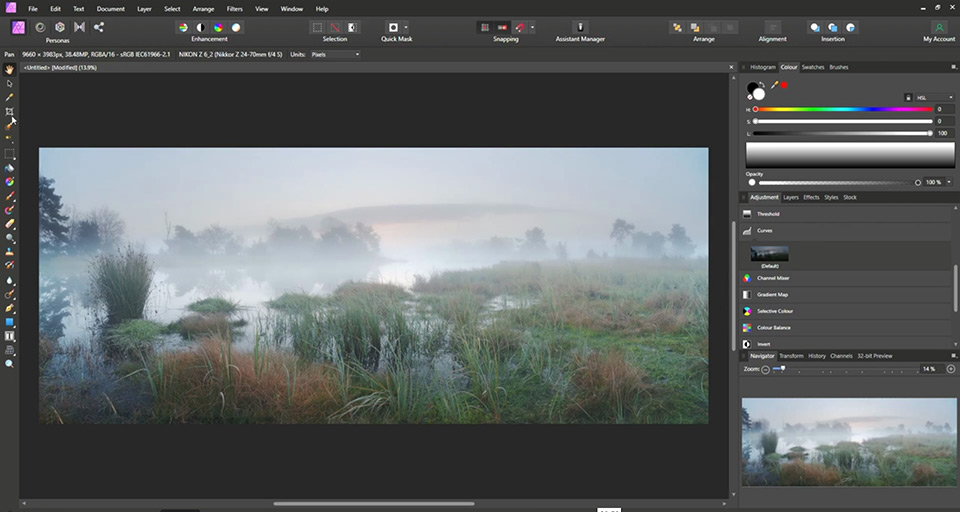
Affinity Photo is the best alternative to Adobe Photoshop. With the latest update to version 1.10, the developers have improved the programme's speed. Affinity Photo's features now run even better, faster and more smoothly.
With the new 1.10 update for Affinity Photo, Serif announced that a significant speed increase has been achieved. Superpowered performance, as they describe it, thanks to a completely new build of the programme.
They published the following announcement on YouTube.
The speed increase achieved with this update includes working with large files and many layers. The panorama function has also become faster, although Serif does not say how much faster the programme has become.
Lens correction for Canon, Tamron and Sigma lenses has been improved, and there is support for new raw files.
The update also adds support for Fujifilm's X-Trans files.
Are you an astrophotographer? There are improvements for working with FITS files too. These can now be opened directly in the Photo Persona, and stacks with different filters can be edited.
Portrait photographers get the option of a median blur method in the Frequency Separation filter, allowing you to edit your model's skin even better.
The new update is a free upgrade for all Affinity Photo users, so that is a nice bonus. Especially since this software already costs so little. You can find more information on the Affinity Photo website
About the author
Nando Harmsen has been photographing for more than 40 years. He specialises in wedding photography and landscape photography. Nando also gives talks, workshops, masterclasses and photo trips, and regularly reviews new and interesting equipment.
You might also like
-
 Affinity acquired by Canva
by Elja Trum
-
 Editing raw files in Affinity Photo
by Nando Harmsen
-
 8 things to consider when switching to Affinity
by Nando Harmsen
-
 The New Photoshop 2020 Updates
by Nando Harmsen
-
 The new Lightroom update now offers super-resolution
by Nando Harmsen

11 comments
-
 Freddy Van Erp wrote on Tuesday 17 August 2021 at 11:04 | reply
What is bothering me is that it is nice that once again there is no Dutch-language version available. It is difficult enough already to master all the possibilities of this program. You shouldn't serve that up in countries like France or Germany. They have their version in their language!
Translated from Dutch. -
 Ton wrote on Tuesday 17 August 2021 at 11:11 | reply
Seems like a nice program but I'm still hesitating because it's in English and I don't have a good command of that language.
Translated from Dutch. -
 guest wrote on Tuesday 17 August 2021 at 11:21 | reply
Hello, Affinity is indeed a worthy alternative to Photoshop.
Translated from Dutch.
Adobe isn't that stupid though, because you can't get a (cheaper) subscription plan with just Lightroom...
Do you think Luminar AI is a worthy alternative to Lightroom ?
I want to get rid of that subscription formula. It's way too expensive for an amateur photographer like me. -
guest wrote on Tuesday 17 August 2021 at 11:27 | reply
Affinity is indeed more than a worthy alternative to Photoshop.
Translated from Dutch.
Is Luminar AI this for Lightroom?
I want to get rid of that (expensive for an amateur photographer like me) subscription model from Adobe.
Adobe does not have a (cheaper) plan for Lightroom without Photoshop either.... -
 Paul wrote on Tuesday 17 August 2021 at 12:57 | reply
Bought the program directly after Affinity was first announced back then. And my daughter bought it too.
Translated from Dutch.
She actually does everything with it (professionally, wedding photography, etc.). Even after all this time, I still can't make head nor tail of it. I can open and view an image. Sometimes I manage to edit something in it by accident, but I never get the results I expect. And then I have to export.... Why not simply, like PS, save as? I have already brought this up with the helpdesk, but received no response.
There are really still some points for improvement in this otherwise nicely made program. -
 Wim wrote on Tuesday 17 August 2021 at 14:19 | reply
I also got rid of Adobe. Affinity Photo is indeed a very good replacement for Photoshop. To replace Lightroom, I purchased Capture One 21. not the cheapest but it's a one-time purchase and certainly a good replacement for Lightroom, if not even better than..
Translated from Dutch. -

 Nando
wrote on Tuesday 24 August 2021 at 10:05
| reply
Nando
wrote on Tuesday 24 August 2021 at 10:05
| reply
@Ton and Freddy;
Translated from Dutch.
It is indeed difficult if you are not completely fluent in English. Still, it is a matter of just getting started. The beginning may be a bit more difficult, but eventually it becomes second nature. Maybe keep a cheat sheet with the translations next to you? -
-
Paulussie wrote on Tuesday 24 August 2021 at 11:06
| reply
Judging by the number of reactions, and their content, affinity isn't really alive among the readers.
Translated from Dutch.
I myself am very disappointed with it, the possibilities are there, But the accessibility is hopeless, after something like two years I've still never figured out how to do certain things (things that do seem possible in the program).
Of course I've already been working with PS for 21 years, so familiarity plays a big role.
Following this piece, I decided to try again, but I don't have a good feeling about it. -
Nando
wrote on Tuesday 24 August 2021 at 13:12
| reply
@Paulussie:
Translated from Dutch.
There are many (English-language) tutorials to be found about using the program. Basically it is something different from Photoshop, but if you delve into it a little, it is no more difficult than Photoshop.
I do understand that after 21 years of PS it is quite a switch. I just wonder why you would want to switch after so much time. -
Paulussie wrote on Tuesday 24 August 2021 at 13:19
| reply
Switching because PS is so horribly expensive, and has a lot of functions that I do pay for, but don't need.
Translated from Dutch.
And English-language tutorials, nice, but usually no consequences, and enormously time-consuming.
It may not be more difficult than PS, but it is less logical in many places. Take, for example, the prominent place of liquify, why is it there? A photographer never needs that, right? And why make saving so difficult? I always have to export, in OS simply save as and indicate a folder, done.
A number of reasons why it isn't really catching on
Have your say
Please note: Articles older than a week can only be commented on by signed-in visitors.Would you still like to comment? sign in or create a free account.
Become a better photographer every week
A practical photography tip in your inbox every week.
38,982 photography enthusiasts already receive the tips! More about the weekly mail. Or keep up to date via  Facebook.

Elja Trum
Photofacts; everything to do with photography!
Would you like to take better photos and keep up with what is happening in photography? Photofacts publishes articles that teach you something about photography — from a product announcement to a practical shooting tip or a look at a website. Photofacts covers photography every day and is a hobby project of Elja Trum's that got out of hand. The articles are written by a team of volunteer authors. If you would enjoy writing one or more articles for Photofacts, do get in touch.More about PhotofactsPhotofacts is made possible in part by
