

When is a RAW file proof of ownership?
Monday 29 October 2018, 20:10 by Michelle Peeters | 17,197 views | 16 commentsThis article was translated from Dutch with the help of AI. Read the original.
One of our readers, José Aarts, asked a very good question that I initially had no answer to. I looked into it thoroughly, and this could be important for many photographers if you ever need evidence that your photo has been stolen. The question is as follows:
A RAW file is seen as proof of ownership when you have taken a photo. Someone told me that a DNG file can be created by anyone and therefore might not be genuine proof of ownership, but he did not know what the legal situation actually is. Do you have any idea how this works?
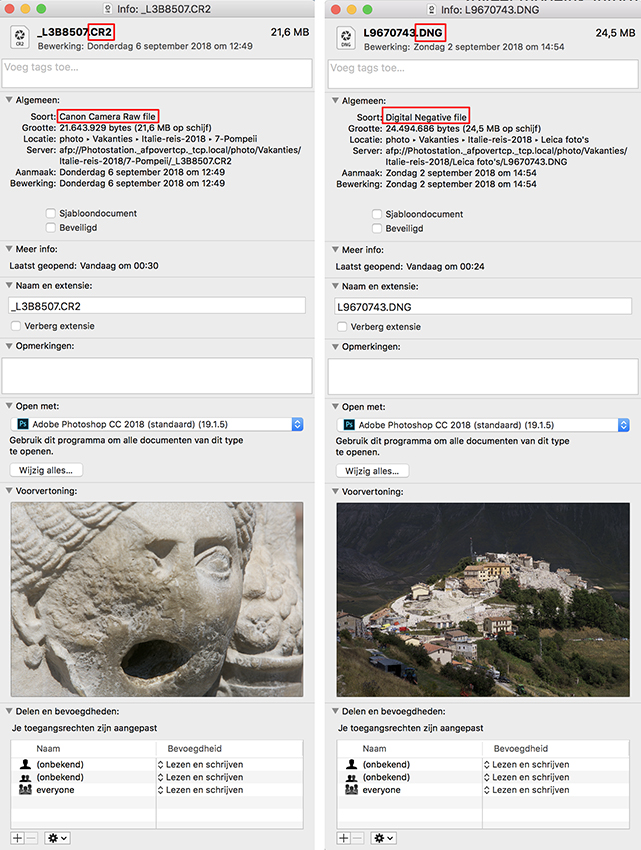
Every photographer has their own opinion on using DNG or RAW, but it is important to know the main differences between the two, along with their advantages and disadvantages. In this article, I will try to provide as much information as possible about both formats.
What is RAW?
RAW images, also called “digital negatives”, are genuinely ‘unprocessed’, which means they are almost unprocessed data that comes directly from the camera sensor.
Unlike JPEG files, which can easily be opened, viewed and printed by most image viewing and editing programmes, RAW is a proprietary format linked to the camera manufacturer and sensor, and is therefore not supported by all software products.
RAW files retain most of the information in an image and generally contain more colours and dynamic range than other formats.
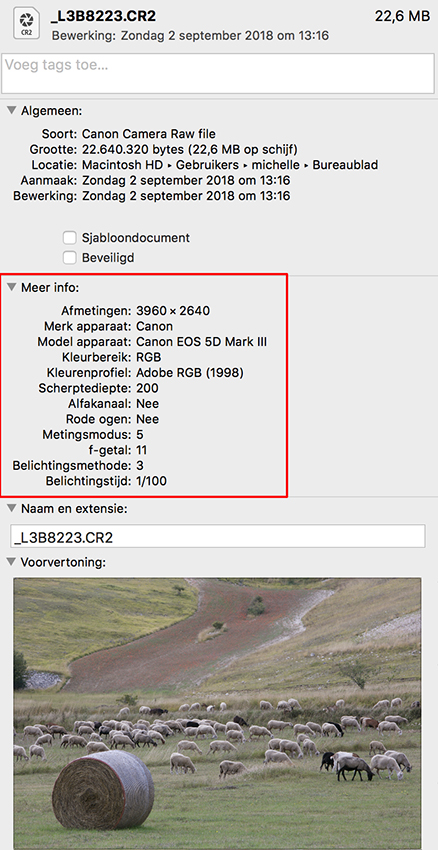
In addition to basic exposure information, a RAW file also stores other camera-specific data such as the focus point, picture control, and so on.
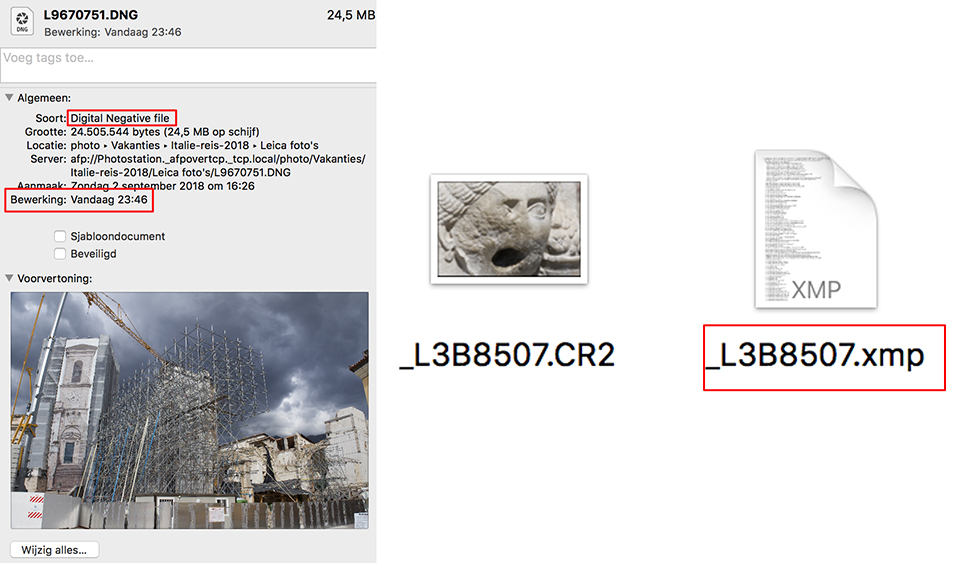
Because RAW files cannot be changed by third-party software, your settings have to be stored in a separate (XMP) file, which means slightly more storage and more demanding file management.
What is DNG?
DNG is also considered a RAW image file. It is Adobe’s proprietary image format, created to store image data in a generic, highly compatible format, unlike RAW files with specific formats based on the manufacturer and camera type.
Although DNG was invented by Adobe and is supported in all Adobe applications, other camera manufacturers such as Leica, Hasselblad and Pentax have adopted this standard and use it in their cameras as their native and supported RAW file format.
Once a RAW file has been converted to DNG, it works with any software that can handle the DNG format. Changes to your photo can be saved directly in a DNG file, without having to save them in a separate XMP file.
DNG files can even store complete original RAW files, and these RAW files can later be extracted manually if necessary. Adobe offers many ways to convert RAW images automatically to DNG format in programmes such as Lightroom or Photoshop.
Because all changes are written to the DNG file, you have to back up the complete DNG file every time you make changes. That is a disadvantage!
Metadata
A common argument for DNG is its universal and royalty-free nature. Because DNG is royalty-free and universal, there will always be programmes that support DNG.
RAW files can become outdated and consequently lose support. For example, CR-2 files from the old Canon EOS 10D may eventually no longer be supported by Canon’s RAW converter.
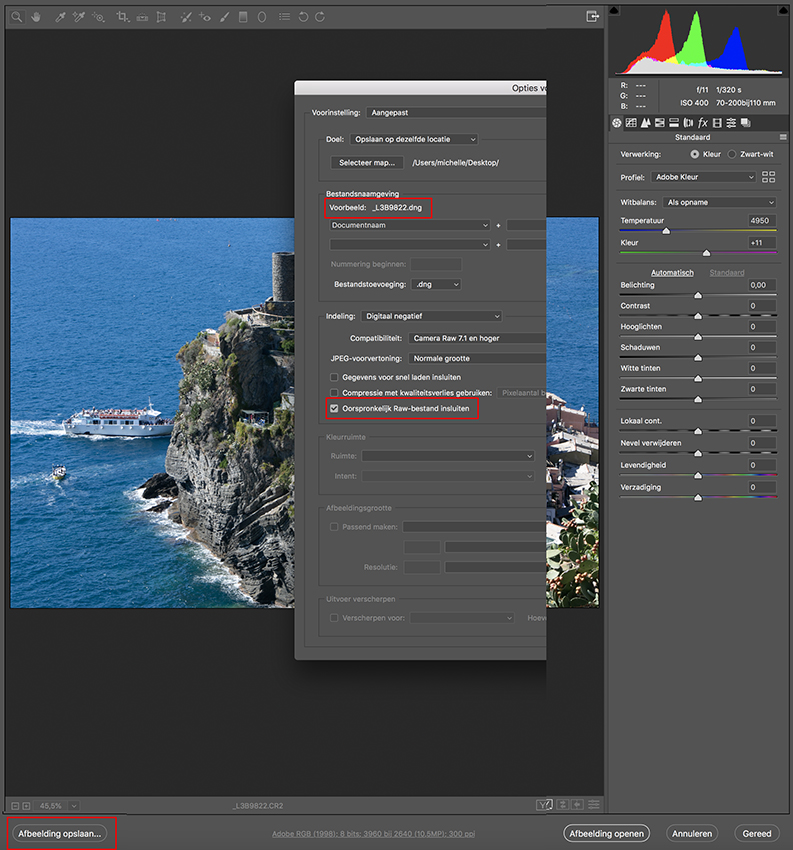
With DNG, RAW files can also no longer be stored separately as XMP files, but are stored in the metadata. They can therefore never be accidentally deleted or lost when you move the RAW files.
Sending a DNG file is more convenient than sending a RAW file. A DNG file is compressed, without data loss, and is therefore smaller than a RAW file.
RAW file as proof of ownership
I had never heard that a RAW file is considered proof of ownership. But I can imagine that you could use it as evidence that you took the photo, if it has been used, sold or published without your permission, for example.
A DNG file can also be a RAW file generated by the camera. The RAW format used varies considerably between camera types.
The DNG file format developed by Adobe was initially intended to create unity among the confusing number of RAW files.
It remains a mystery why every camera manufacturer develops its own RAW file. Usually, they are a type of TIFF file with some proprietary information added.
The DNG file format has since been expanded. The number of possible uses has increased considerably, but this has also made the standardisation somewhat less consistent. Not all DNG files are the same.
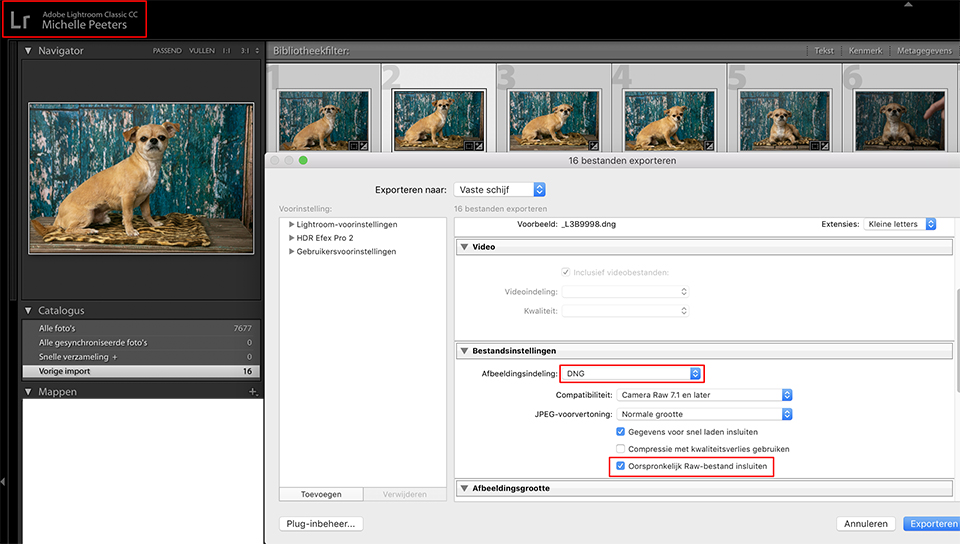
The differences are found in the DNG files. They are all still opened effortlessly by Adobe software, and most types are also opened by many other programmes, although you cannot be certain of that.
When you encounter a DNG file, you may now be dealing with the following types:
• A camera RAW file converted to DNG
• DNG as a RAW file directly from a camera
• A JPEG file saved as DNG
• A DNG file created as a result of editing
• A compressed DNG file
DNG from RAW
This is what you could call the original version: the RAW file from a digital camera converted into a DNG file. It is still simply the complete RAW file, only now packaged as DNG.
Sometimes it is slightly smaller than the original file. Whether this is the case depends on the quality of the lossless compression used.
The difference from the original RAW file is that the additional information and edits are no longer stored in a separate .xmp file, but have simply been given a place inside the DNG file.
DNG from the camera
There are a few brands, Leica and Ricoh/Pentax, whose cameras already create DNG files. With Leica it is the only option, while with Pentax you can choose.
The advantage is that a new model can therefore be used automatically with Adobe software, even though an update with better support through adjustments to the default settings will usually follow.
But apart from the fact that these DNG files come directly from the camera, they are DNG files as you would expect according to the original idea.
JPEG as DNG
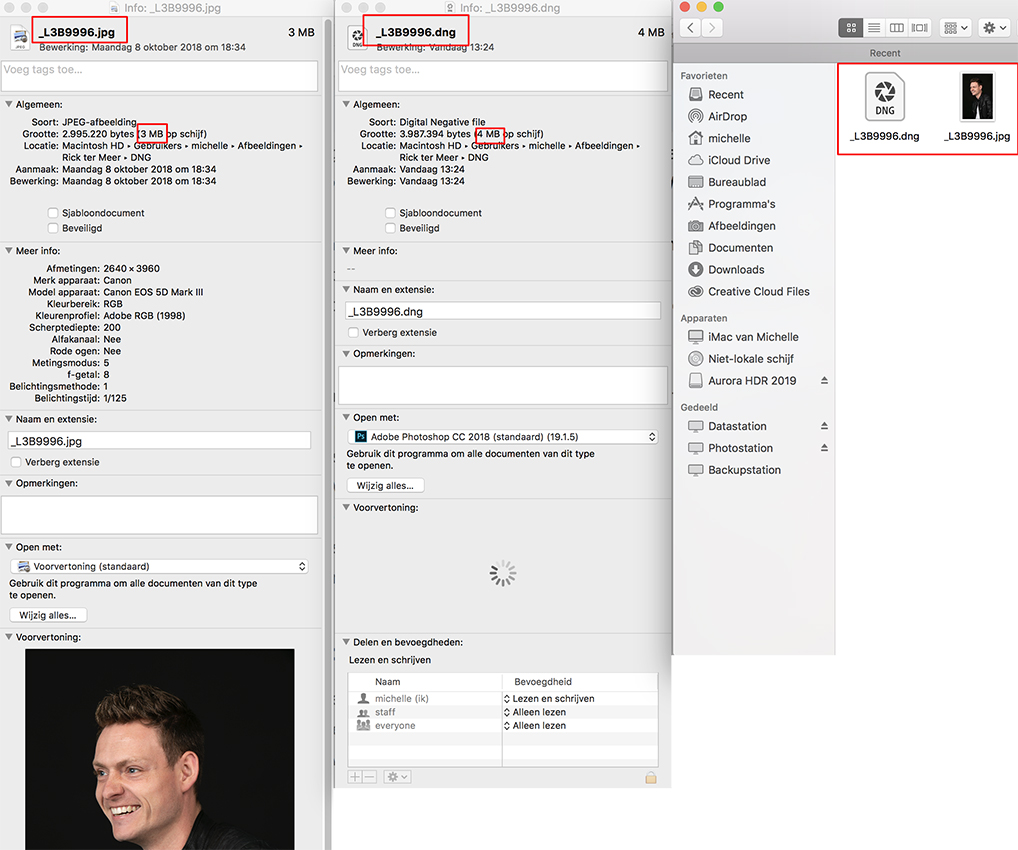
It is now also possible to save a JPEG file as a DNG file. This does not make it a RAW file, of course. It remains a JPEG file. You can easily see this yourself by looking at the option to adjust the white balance.
You can still do that, but you no longer get absolute values in the form of a colour temperature. Only a deviation from the starting point is available.
When you try to recover extra information from the highlights or shadows in such a file, you will find that this does not work. That information simply is not present in the 8-bit JPEG file.
You now have more options with DNG. You can, for example, merge files. You then get a 16-bit RGB file, so it is no longer a genuine RAW file.
DNG file a worthy proof of ownership?
Unprocessed image data is generally considered tamper-proof.
That means that if you produce a CR2 or NEF file, or whatever, people generally accept that it is an unprocessed image, and it is reasonable proof of ownership if you are the only person who can produce one.
But with the DNG format, you can save edited images as DNG, and you can even save a JPEG or TIFF as DNG. Of course, you can see things in the metadata, but that is weaker and easier to tamper with.
So what would be the value of DNG versus original unprocessed RAW files that come directly from the camera as evidence or for forensic purposes? How strong would the credibility of DNG be?
And here is the answer: You can only use DNG files as proof of ownership if DNG is the camera’s native RAW format.
It is possible to embed the original RAW file in a DNG file, extract it and submit it as proof of authenticity. But how do you find out whether the original RAW file is embedded, and how can you extract it?
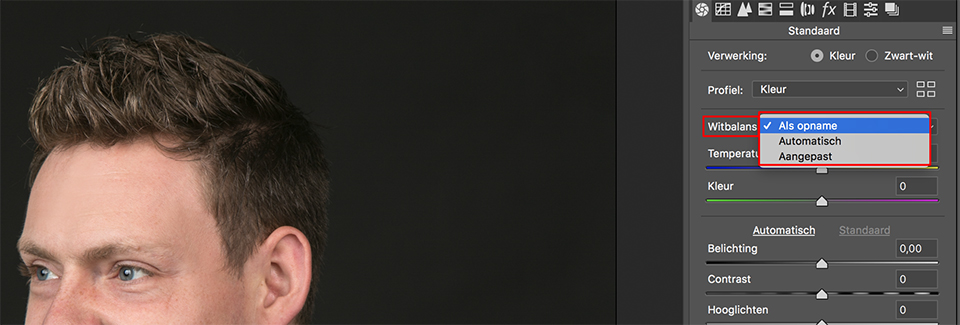
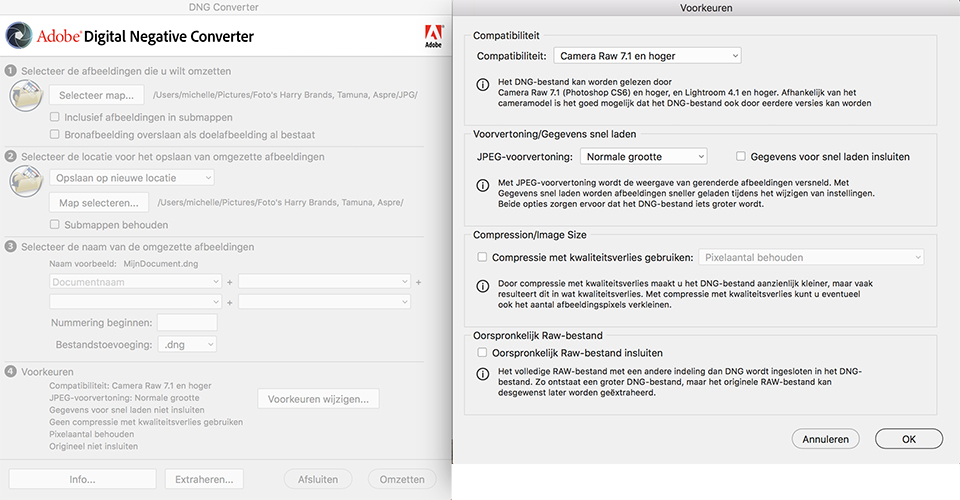
First of all, the ‘Embed original RAW file’ option in Adobe DNG preferences must be ticked when converting to DNG. Then open the DNG Converter and click Extract to extract the original RAW file from the DNG.
For converting camera RAW files to DNG, Adobe offers the free Adobe DNG Converter (Windows | Mac OS), which can easily convert unprocessed files from many popular cameras.
But how do you prove it?
But how can you prove that a photo was taken by you and is therefore your property? There are several methods to consider, including showing an original RAW file, as discussed above. If it is a DNG file, it must be possible to extract the embedded camera RAW file.
But there are more options that can help show that a photo really was taken by you. These tips can certainly be useful if your photo has been used unfairly and without permission:
- If you sell an image, provide it as a hi-res JPG. If you shot in RAW, never give away your unprocessed file. This unprocessed file will certainly prove that you are the owner, because the person you sold the JPG to cannot have it.
Photos are also usually not taken in isolation, so having copies of the complete series should also be proof of ownership; - You should embed copyright information in the EXIF data, although this can easily be removed. You should do it anyway;
- Another good option is to post a version of your photo on an independent photo site or social media site that records the timestamps and possibly the location where the photo was taken;
- For portraits of people, you can keep a signed and dated model release. Your models are often willing to confirm that you are the photographer if there is a dispute;
- You can add a watermark, possibly an invisible one, to your photos. However, these can also be removed easily;
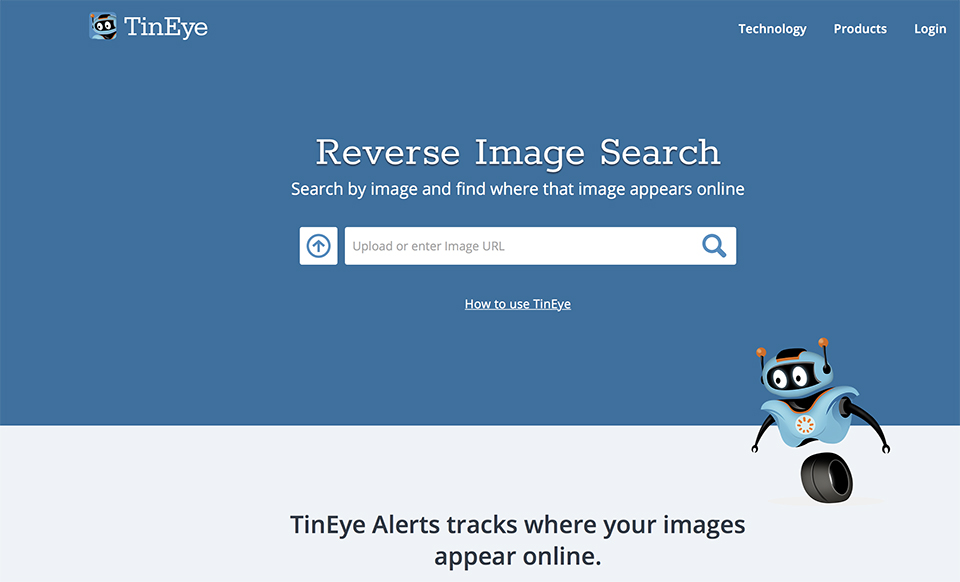
- With TinEye, or another image search tool, you can assume that if there is a version with a wider framing, it is the original. I am not talking about the number of megapixels, but the framing itself: sometimes people crop parts of photos.
Conclusion
If you want to sell images and prevent others from infringing your copyright, use any trick you like: use watermarks, both visible and invisible, keep the original RAW file, remove the EXIF data, crop your photos, and regularly search for your own photos in TinEye.
An original unprocessed camera file is therefore very valuable. If you possess it, you own it. It does not matter whether it is a copy or not, because the only way to obtain an original camera file is from the original owner.
You give up your rights as soon as you give this file to a second party.
About the author
Michelle Peeters is fotografe en oprichter van DeuxBleus Fotografie. Michelle herkent het bijzondere in het gewone en het gewone in het bijzondere. Ze heeft zich nooit willen specialiseren en is daardoor van alle markten thuis.
You might also like
-
 Make a raw file 90% smaller with lossy DNG
by Nando Harmsen
-
 The difference between file size and resolution
by Nando Harmsen
-
 Is there a reason to save both raw and jpeg?
by Nando Harmsen
-
 Is there a quality difference between raw and compressed raw?
by Nando Harmsen
-
 Keep an overview: don't make JPEGs of your RAW files
by Nando Harmsen
-
 Everyone photographs in raw, there are no exceptions
by Nando Harmsen
16 comments
-

 Piet van Kroonenburg
wrote on Monday 29 October 2018 at 20:54
| reply
Piet van Kroonenburg
wrote on Monday 29 October 2018 at 20:54
| reply
All in all, that has become quite a story, Michelle. And certainly good for professionals to know and take into account. For me as an amateur photographer, it is less important, even though a photo has occasionally been 'used'. Because I do not have to earn my living with photography, that is collateral damage to me and I regard it more as a compliment that people apparently appreciate my photo. But for a professional, things are - rightly so - completely different.
Translated from Dutch.
What I do wonder about is that the dng format still exists and I wonder how many professional photographers use this format. When Adobe introduced it to the market, I looked into it but did not go along with it. Over the years, opinions have become rather divided about the (lesser) quality that a dng file would deliver compared to a raw file. That is partly why I was under the impression that dng had by now quietly died. In any case, it never reached the level of use that Adobe would have liked so much.
The tip (#1 from your list) to provide a customer with a high-quality JPEG is a good one. You should never, ever hand over raw files.
I make a tiff from a raw file as an archive copy (in addition to the raw) and when I make photos available to third parties, I do so in jpeg and let the quality depend on what one wants. A picture on a social medium does not have to be large, but for, say, a 30x40cm print, that is a different matter. -
Piet van Kroonenburg
wrote on Monday 29 October 2018 at 20:58
| reply
Small addition:
Translated from Dutch.
In the conclusion you say 'delete the EXIF data...' but that doesn't seem like a good idea to me. My camera automatically records the author's name there. Maybe a typo...! and should it be 'DO NOT delete the EXIF data'. -
 Michelle Peeters wrote on Monday 29 October 2018 at 20:59
| reply
Michelle Peeters wrote on Monday 29 October 2018 at 20:59
| reply
@Piet: it’s not pleasant for non-professionals either when your photo is used without permission and without attribution. Good to protect yourself against that as much as possible! My Leica mirrorless camera also produces .DNG raw files. Apparently, those can be used as ‘real’ evidence! I’ve never archived all my RAW files as DNG either.
Translated from Dutch. -
Michelle Peeters wrote on Monday 29 October 2018 at 21:04
| reply
@Piet: you can edit the EXIF data afterwards on Windows and Mac. Therefore, you might as well remove them since they cannot be used as evidence.
Translated from Dutch. -
Piet van Kroonenburg
wrote on Monday 29 October 2018 at 21:58
| reply
@Michelle: 1: unauthorized use of a photo: annoying, yes, you're absolutely right about that, but I don't otherwise suffer any (financial) disadvantage from it. In the case of the professional sector, you're essentially talking about theft; that's my nuance, but your point is clear.
Translated from Dutch.
2: EXIF: thanks for adding that, I understand your underlying thought. -
 Roland Van der Meeren wrote on Tuesday 30 October 2018 at 16:38 | reply
@Michelle @Piet: If the camera uses RAW, they also have a camera-specific extension: Nikon is NEF. That is at least already proof that you photographed with NIKON. If you look at the raw file with Affinity, you can see all the information at the top right under EXIF ALL, including the number of the Nikon Body (for the D750, not for my D200). That is proof! I only use DNG myself because my PS-5 camera raw module no longer supports the Nikon D750. Hence my switch to Affinity as well.
Translated from Dutch. -
Michelle Peeters wrote on Tuesday 30 October 2018 at 16:41
| reply
@Roland: but a number of other cameras (including my Leica mirrorless camera) do use the DNG format as their raw format. That's where the problem lies. Because you can also create a DNG file! And apparently you can modify Exif information...
Translated from Dutch. -
 guest wrote on Tuesday 30 October 2018 at 16:50 | reply
@ Piet. I understand your point of view about the unlawful use of your photo. But I see it a little differently. I am also an amateur but have taken five years of evening classes and bought thousands of euros worth of equipment and then I don't just let my photos be used without asking. That's my opinion on it. Gino
Translated from Dutch. -
Michelle Peeters wrote on Tuesday 30 October 2018 at 16:51
| reply
@Gast: I agree with you on that too. You may not need to earn money from your photos, but if someone else does so with your photo without asking and without crediting you, nobody's happy about that!
Translated from Dutch. -
Roland Van der Meeren wrote on Tuesday 30 October 2018 at 20:15 | reply
@Michelle Michelle I don't see my camera number listed in Windows. Then it can't be removed either.Maybe the specific DNG formats from Leica contain different information. DNG can indeed also contain RAW information. DNG for my Nikon, for example, does not carry over the jpg settings. I would check that in Affinity.
Translated from Dutch. -
Michelle Peeters wrote on Tuesday 30 October 2018 at 20:21
| reply
@Roland: Nikon has its own RAW format, right? NEF, I think. You can embed a NEF raw file in a DNG file. In that case it is of course a 'real' proof of ownership. You can also view and remove Exif info with the online tool VerExif.
Translated from Dutch. -
 Jozef De Groof wrote on Tuesday 30 October 2018 at 21:56 | reply
I always photograph with Pentax K1 in DNG, it is not a small file at all, around 50 MB, there is no compression at all and more data than some NEF files
Translated from Dutch. -
 hypofocus
wrote on Wednesday 31 October 2018 at 10:38
| reply
hypofocus
wrote on Wednesday 31 October 2018 at 10:38
| reply
The easiest and clearest way to show that you took the photos, in my opinion, is the fact that as a photographer I can show the entire series from that day. Not just 1 single shot.
Translated from Dutch.
In my case, it virtually never happens that I only take 1 or a handful of photos. There is always a series of at least 20 images.
If someone has taken the photo from somewhere and used it unlawfully, that person can never show more than 1 photo from the series. I, as the photographer, can show the entire series.
In copyright disputes, I have never had to provide a RAW file to prove that I was right or to prove that I am the photographer.
It would actually be strange too, because far from everyone shoots with RAW files. -
Michelle Peeters wrote on Wednesday 31 October 2018 at 11:13
| reply
@Hypofocus: I honestly don't think that if you can show that you made an entire series of the subject, you can cite that as proof that you are therefore also the creator of that one photo (long sentence..).
Translated from Dutch. -
hypofocus
wrote on Thursday 1 November 2018 at 11:00
| reply
@Michelle Peeters:
Translated from Dutch.
But a RAW file doesn't prove that either...
No one can tell from a photo file that YOU were the one who pressed the button. They can't see it with a RAW file and they can't see it with an entire series either.
If the other party only has 1 jpg and you have a RAW file, then it is more plausible that you are the photographer.
And if the other party only has 1 jpg, and you have the complete series at full resolution, then it is also more plausible that you are the photographer.
My experience is that the person who uses a photo wrongfully usually doesn't "claim" to be the photographer themselves. And then it is actually no longer an issue to prove that I myself was the photographer. The entire discussion concerning the wrongful use of a photo is (in my experience) 9 times out of 10 more about the other party coming up with all kinds of excuses as to why they should not be liable. I have actually never experienced them questioning me as the creator of a photo.
And if they do, then you are still in a strong position without a RAW file (besides; not every photographer shoots in RAW). If the other party only has that one (often smaller) photo, and you as the photographer can show the entire series from your archive, you are at least as strong. In principle, it also makes sense that no one else has that complete series except the photographer themselves.
Maybe you use multiple images from 1 series online. But there are often still quite a number of images that you never share with anyone else and that therefore will never end up in the possession of anyone other than the photographer.
But who pressed the button is actually never provable anyway. -
Michelle Peeters wrote on Thursday 1 November 2018 at 11:36
| reply
@Hypofocus: that is indeed correct! And the discussion will indeed more often be about liability than about who took the photo. And if you don't shoot in Raw, then of course it ends right there.
Translated from Dutch.
I do remember the story (I just can't find it anywhere anymore) about a situation concerning the disputed ownership of a photo. The owner won the lawsuit because he had the original Raw file and could also show it. Unlike the opponent.
Have your say
Please note: Articles older than a week can only be commented on by signed-in visitors.Would you still like to comment? sign in or create a free account.
Become a better photographer every week
A practical photography tip in your inbox every week.
38,937 photography enthusiasts already receive the tips! More about the weekly mail. Or keep up to date via  Facebook.

Elja Trum
Photofacts; everything to do with photography!
Would you like to take better photos and keep up with what is happening in photography? Photofacts publishes articles that teach you something about photography — from a product announcement to a practical shooting tip or a look at a website. Photofacts covers photography every day and is a hobby project of Elja Trum's that got out of hand. The articles are written by a team of volunteer authors. If you would enjoy writing one or more articles for Photofacts, do get in touch.More about PhotofactsPhotofacts is made possible in part by
