

How do resolution, dpi and ppi actually work?
Monday 23 November 2020, 20:02 by Nando Harmsen | 11,920 views | 17 commentsThis article was translated from Dutch with the help of AI. Read the original.
As a photographer, you have probably come across vague terms such as DPI and PPI. For example, when entering a photography competition. But what are they, and what do you need them for? Find out in this article.
There is often quite a lot of confusion about the use of resolution, dpi and ppi. We mainly come across these terms when submitting a photo for a competition, or when a photo is going to be used for printing.
The annoying thing is that things are often requested that make no sense at all, or that even contradict each other.
It is difficult to get a clear idea of how it actually works. Asking for a photo with the dimensions in pixels and also a dpi value makes no sense at all. Yet I often see this come up. I have written this article to make everything clear.
Inches and centimetres
Before I explain this, I should first mention that, as with so many things in photography, many English terms are used. This also applies to the 'i' in the term dpi and ppi. The 'i' stands for the English unit of distance, inch.
So you speak of dots per inch, or pixels per inch. This can make things difficult, since we prefer to use the metric system with centimetres.
This means that you sometimes have to convert the number from inches to centimetres. You do this by multiplying inches by 2.54, or dividing centimetres by 2.54. In other words, 1 inch is equal to 2.54 centimetres.
Oh yes, while we are talking about the English term, the word dot in dots per inch means a dot.
Analogue resolution: dots per inch (dpi)
The term dpi means dots per inch. This is a term that has nothing to do with digital technology, and everything to do with analogue printing techniques. A print is a collection of dots, after all.
You can see this clearly when looking at a newspaper photo, which consists of very few dots per inch.
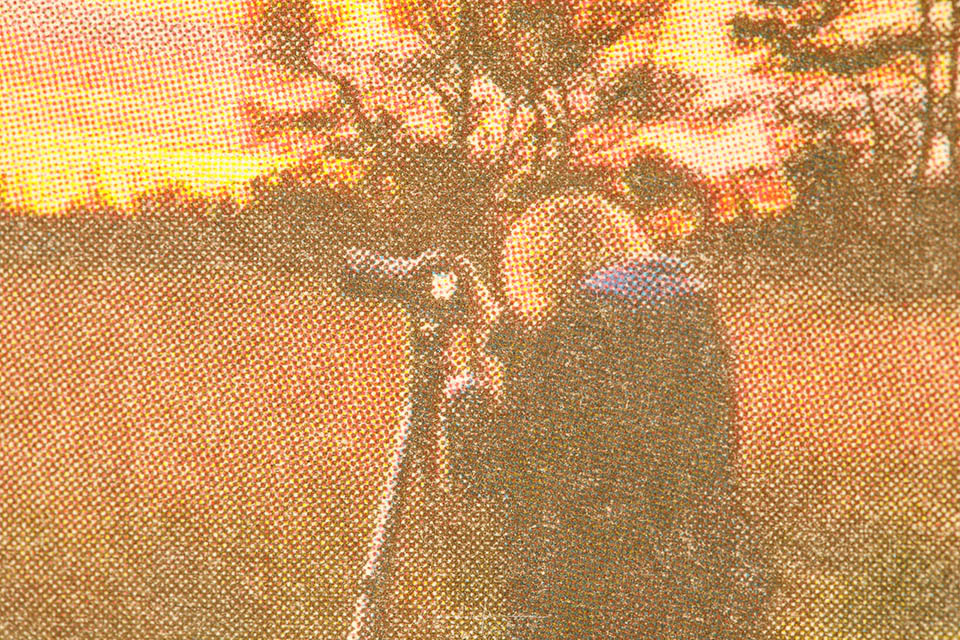
The more dots are printed per inch, the higher the resolution of your print. For very high-quality printing, 300 dpi is often used.
This means that the photo consists of 300 dots per inch. Converted to centimetres, that is 118 dots. Do the maths.
Digital resolution: pixels per inch (ppi)
The term ppi therefore means pixels per inch, and indicates the resolution of a digital screen, monitor or sensor. This term has nothing to do with analogue prints, so it should not really be confused with dpi.
Ppi works in the same way as dpi, incidentally. The more pixels there are per inch, the higher the resolution. The digital sensor in our camera is perhaps the clearest example, because as photographers we hear and read a lot about it. The more pixels there are on the sensor, the higher the resolution.
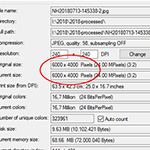
To use some figures, a 24-megapixel camera has 6,000 by 4,000 pixels (6000 x 4000 = 24,000,000 pixels). If this is a full-frame camera, the sensor has dimensions of 36 x 24mm, or 3.6 x 2.4 centimetres. Converted to inches, this is: 1.42 x 0.95 inches (do the maths).
Now that we know how many pixels are on the sensor, and how large the sensor is in inches, we can calculate the ppi of the 24-megapixel full-frame sensor: 4225 ppi x 4210 ppi. That is quite a lot, don't you think? We have little use for this information, though.
.jpg "Nando camera resolution(1)")
It becomes more interesting when we do the same with a computer monitor. Suppose you have a 24-inch full HD monitor with 1920 x 1080 pixels.
This means that your screen has an image diagonal of 24 inches, which corresponds to an image size of approximately 53 x 30 centimetres, or 20.8 x 11.8 inches. The resolution is then approximately 92 ppi.
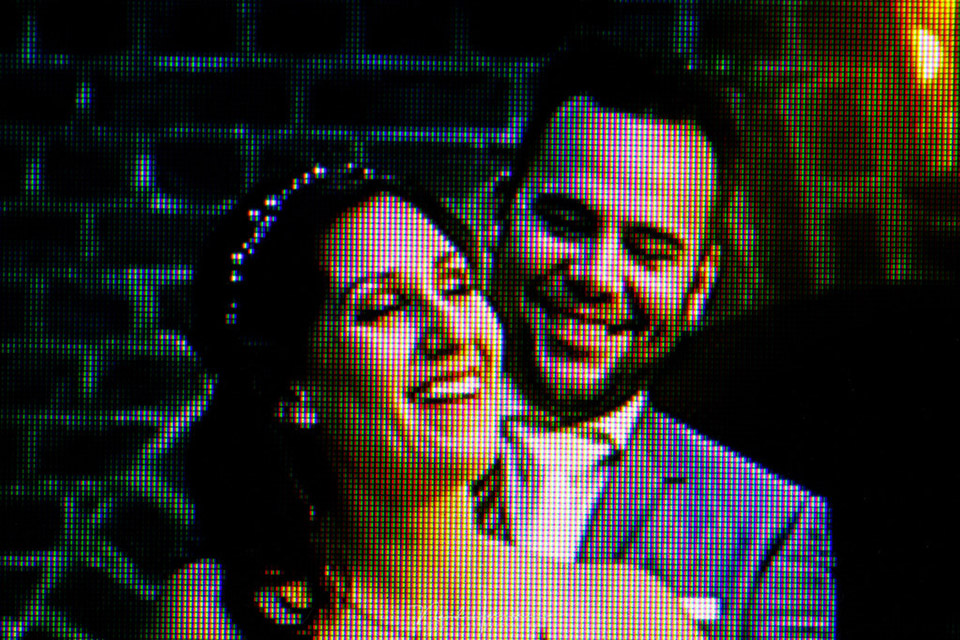
If you now take a 24-inch monitor with a 4K resolution (3840 x 2160 pixels), you have a resolution of no less than 184 ppi. In other words, you see more detail in your image. On the other hand, if you have a 32-inch full HD monitor, you are left with only 69 ppi.
Source for screen dimensions (I did not calculate this myself): Screen size conversion table
Practical use of ppi
What use are all those figures? It is confusing and difficult, and it is not clear what you can do with them. In my opinion, as photographers we have no use for the term ppi or screen resolutions.
The only thing that matters to us as photographers is the number of pixels when it comes to digital use.
Regardless of the physical dimensions of any screen, the number of pixels is the only thing that matters. A photo for a full HD screen needs 1920 x 1080 pixels to fill the screen. No more and no less.
A photo for a 4K screen needs 3840 x 2160 pixels, no more and no less. It makes no difference whether your screen is 50 centimetres wide or a metre wide.
If you use a photo for the internet, somewhere between 900 pixels and 2000 pixels wide is usually enough. It does not matter how many ppi it has. The only thing that matters is the number of pixels, because that determines how much of your screen the image will occupy.

So what about dpi?
For digital use, the term ppi therefore makes no difference to your photo, because it is a measurement for the monitor. The term dpi does not matter either, because it is for analogue purposes. Dpi only plays a role when you want to use a photo for printing.
If you want to have a photo printed at 10 x 15 centimetres, it is important to know at what resolution it will be printed. This determines how many pixels your image needs to have.
If the resolution is 300 dpi, which is 118 dpcm (dots per centimetre), your photo will need to be 1180 x 1770 pixels.
If your photo is intended for, say, a newspaper and they ask for 50 dpi, you need a photo with far fewer pixels, and therefore a lower resolution. At 50 dpi (20 dpcm), the same photo would only need 200 x 300 pixels.
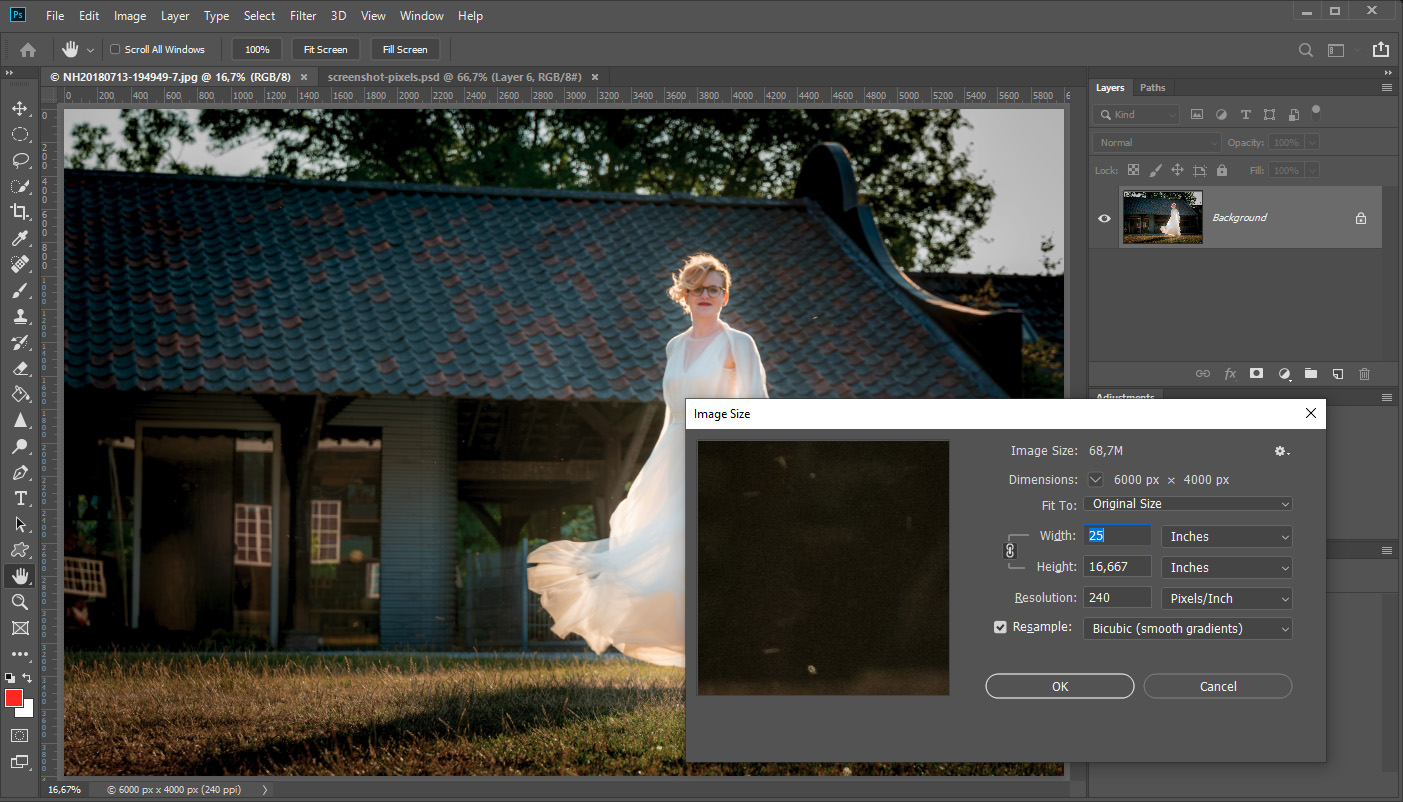
You can often set this in your software when exporting, or when changing the size, where you have to enter the number of centimetres along with the dpi setting. Or a ppi setting, because the two are often confused.
Everything in a nutshell
Only when your photo is printed does specifying the dpi and the dimensions determine the number of pixels in your photo.
If you use a photo for the internet, only the dimensions of the photo in pixels matter, and resolution, dpi or ppi, does not matter at all.
Bear in mind that dpi and ppi are often used interchangeably. Since a real print uses one pixel per dot in dots per inch, it is reasonably safe to use the two interchangeably.
I hope this essay has made the use of these confusing terms clearer.
About the author
Nando Harmsen has been photographing for more than 40 years. He specialises in wedding photography and landscape photography. Nando also gives talks, workshops, masterclasses and photo trips, and regularly reviews new and interesting equipment.
You might also like
-
 Everything you need to know about resolution
by Nando Harmsen
-
 How to check your resolution for a maximum print?
by Michelle Peeters
-
 The difference between file size and resolution
by Nando Harmsen
-
The downside of a camera with lots of pixels
by Nando Harmsen
-
 Does lower resolution mean less noise in the dark?
by Elja Trum
17 comments
-
 Robert wrote on Tuesday 24 November 2020 at 10:39 | reply
It was even easy to follow for me Nando I am dyslexic, with your explanation here. Great. Sporty regards Robert
Translated from Dutch. -
 Lilian Eshuis wrote on Tuesday 24 November 2020 at 11:24 | reply
Really nice, this explanation for printing, thank you.
Translated from Dutch.
I have a question: is scanning a photo at 330dpi sufficient for 4K monitors? Or is a higher scan resolution needed after all? I like restoring old photos and am still working with an older 3-in-1 printer. -
 Jan R. Smit wrote on Tuesday 24 November 2020 at 12:13 | reply
Regarding printing, it really is something different from what is stated here. A printer (inkjet such as Canon or Epson) converts pixels into drops of ink. Basically, that is 4 drops per pixel.
Translated from Dutch.
Printers are set up to expect a given number of pixels per inch as input. This can be set in the driver, for example 300 PPI (pixels per inch).
If the file to be printed is not 300 PPI at the specified print size, the driver will first convert it to 300 PPI anyway, before converting this again into drops of ink, in this example to 300x4 = 1200 dpi (drops per inch).
Incidentally, this conversion by the printer driver to the set PPI happens rather crudely, using the "neirest neighbour" method.
-
 Jonny wrote on Tuesday 24 November 2020 at 12:28 | reply
Finally, an explanation that makes the distinction between ppi and dpi.
Translated from Dutch.
Now I have to say that I don't completely agree.
Ppi is used to determine the size of your print and not dpi.
1772 x 1181 ppi at 300 ppi gives a photo of 15 x 10 cm and this can then be printed on your printer or in a photo lab at, for example, 1500dpi.
This means, converted 1500/300, that you have 5 dots per pixel.
A photo lab therefore only asks you to provide the image in the correct resolution expressed in ppi. -
 Hans van Sterkenburg wrote on Tuesday 24 November 2020 at 13:51 | reply
Hi Nando,
Translated from Dutch.
6000-4000 is 3 to 2
4225-4110 is almost 1 to 1
A typo?
Regards,
Hans. -

-
-
 Jp wrote on Tuesday 24 November 2020 at 14:53 | reply
Nando
Translated from Dutch.
Beautifully described, thanks for that. Regards jp -
Hans van Sterkenburg wrote on Tuesday 24 November 2020 at 17:55 | reply
Nando, it decreases in width and increases in height?
Translated from Dutch. -
 Nando
wrote on Wednesday 25 November 2020 at 10:09
| reply
Nando
wrote on Wednesday 25 November 2020 at 10:09
| reply
@Hans van Sterkenburg:
Translated from Dutch.
No, the number of pixels per inch in the width is less than the number of pixels per inch in the height. It has nothing to do with an increase or decrease.
Let me explain it again:
The sensor is 0.95 inches high, and there are 4000 pixels in that height. If you calculate that back to the number per inch, that is 4000/0.95 = 4210 pixels
The sensor is 1.42 inches wide, and there are 6000 pixels in that width. You can also calculate that back to the amount per inch. 6000/1.42 = 4225 pixels
Do you understand it now? -
Jan R. Smit wrote on Wednesday 25 November 2020 at 10:35 | reply
The calculation regarding sensor DPI is not correct: 36mm > (36/25.4)=1.417 inch, 24mm > (24/25.4)=0.945 inch, in both cases with a 6000x4000pixels the PPI is 4233 (4233.33).
Translated from Dutch.
This cannot be any different because the pixels (sensels or photosensitive elements) of a sensor are square (except for a single separate type of sensor).
Furthermore, it is of no value, because with your 6000x4000 pixel photo you want to do nice things that are essentially larger than the size of your sensor.
-
Hans van Sterkenburg wrote on Wednesday 25 November 2020 at 18:36 | reply
Dear Nando, thanks for your explanation! One more question. The sensor is 24mp. 4210x4225 = 17.8 mp? What am I not understanding correctly? Regards Hans.
Translated from Dutch.
Something else: I am reading the book Catching Light for the 2nd time. Informative and well written. -
-
-
Jan R. Smit wrote on Thursday 26 November 2020 at 10:06 | reply
Regarding displaying your digital image with fewer pixels than your original image. So for example: your original image is 6000x4000 pixels, and for whatever reason you want to reduce it in resolution to 1500x1000pixels.
Translated from Dutch.
Realize then that: a/ a lot of resolution is lost (1.5/24 = 1/16 = 0.06 ,ergo only 6% of the original remains) , and in addition b/ the character of your image becomes 'harder' . ( there are fewer pixels to display the gradients properly, so it hardens the contrast).
My advice is therefore: keep your original image in its resolution, this is your 'mother file' and is the best cq most valuable thing you have. If for reasons you want to publish or provide an image in a lower resolution, make a copy of your mother file, reduce that copy to the desired number of pixels and adjust that image if necessary before publishing or sending it. -
 Linda wrote on Friday 11 December 2020 at 17:59
| reply
Linda wrote on Friday 11 December 2020 at 17:59
| reply
Hi Nando,
Translated from Dutch.
Great article!
i would like to print an image in poster size on plexiglass, size 70 x 100.
How can I calculate for myself whether my shot is suitable for this for good quality? photo details: 3024 x 4032 pixels, DPI: 72 pixels/inch. File size: 2.5 MB. Thanks in advance. rgds, Linda -
Nando
wrote on Tuesday 15 December 2020 at 09:51
| reply
@Linda;
Translated from Dutch.
As you may be able to see from the article, that DPI term in the file description is not important. the file size does not matter either. What matters is the size in pixels: 3024 x 4032 px. With that, it is possible to calculate how large you can print with that file. You then need to know at how many DPI the printing service will print the photo.
In general, a print service will tell you whether the file is large enough when you place an order.
Have your say
Please note: Articles older than a week can only be commented on by signed-in visitors.Would you still like to comment? sign in or create a free account.
Become a better photographer every week
A practical photography tip in your inbox every week.
38,938 photography enthusiasts already receive the tips! More about the weekly mail. Or keep up to date via  Facebook.

Elja Trum
Photofacts; everything to do with photography!
Would you like to take better photos and keep up with what is happening in photography? Photofacts publishes articles that teach you something about photography — from a product announcement to a practical shooting tip or a look at a website. Photofacts covers photography every day and is a hobby project of Elja Trum's that got out of hand. The articles are written by a team of volunteer authors. If you would enjoy writing one or more articles for Photofacts, do get in touch.More about PhotofactsPhotofacts is made possible in part by
