

10 tips for photographers who prefer shooting JPEG
Monday 27 July 2020, 20:10 by Nando Harmsen | 12,860 views | 39 commentsThis article was translated from Dutch with the help of AI. Read the original.
From the moment I started shooting in RAW, I never wanted to go back. It gives you so many more options that shooting JPEG feels very restrictive to me.
But shooting in JPEG can also produce beautiful results. It is just less forgiving.
Despite the advice, or strong emphasis, that you should shoot in RAW, I am convinced that it should never be a must. Although I may not always understand why you would not use RAW, I respect the conscious choice to shoot in JPEG.
With this article, I am not trying to persuade you as a JPEG photographer to switch to RAW files. I do not want to talk about the advantages of RAW files, or why you should choose them. Instead, I want to give you 10 tips to make your JPEG photos even better.
Tip 1: Use your camera's HDR function, or graduated filters
There are situations where the dynamic range of what you are photographing is too great for your camera. You then get blown-out whites or blocked-up blacks. Sometimes that is not a problem at all, and it is fine to leave things this way. You do not always need everything to be correctly exposed.
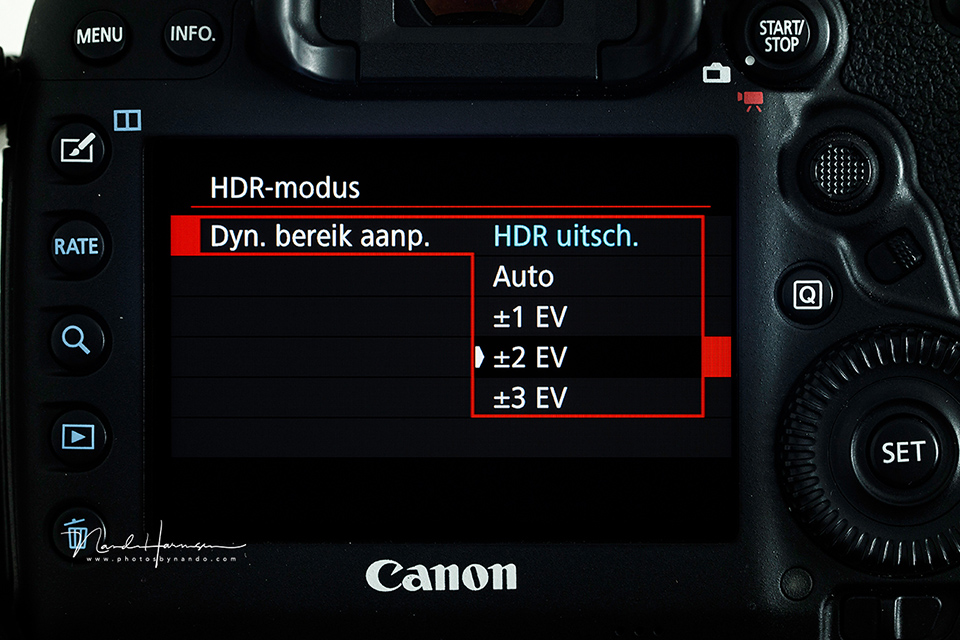
If you do want to prevent white and black areas in the image, look at your camera's HDR function. The camera will take several photos with different exposures, which are then combined in the camera into an image with a greater dynamic range.
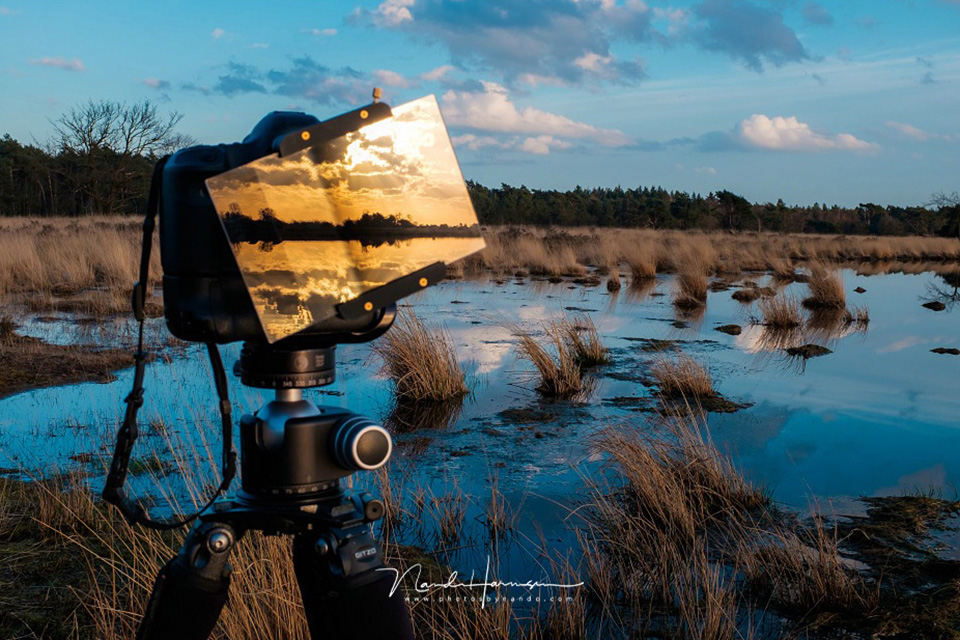
You can also use one or more graduated filters. These allow you to reduce the brightness in part of the image, making the differences in brightness smaller and balancing the exposure in the photo.
Tip 2: Set your white balance manually
During my masterclass in the Auvergne, I had a participant who only shot in JPEG. When he photographed a violet flower, the flower turned out blue.
He could not get this right. Until I advised him to choose a cooler white balance. Not auto white balance, but a manually set white balance. That worked.
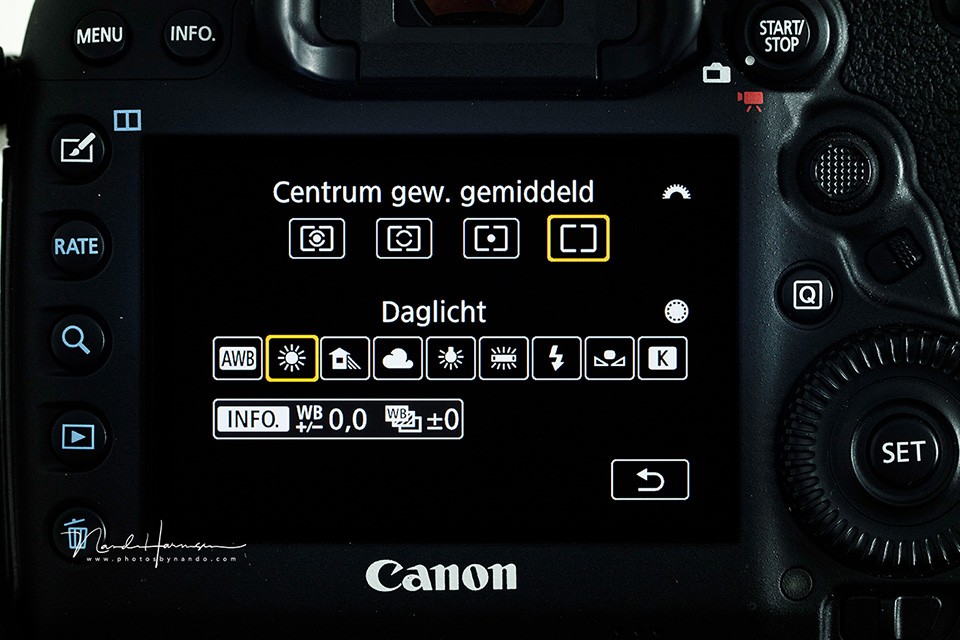
Auto white balance is sufficient in many cases, but if your colour is not right, try setting a different white balance. This gives you more control over the colour in your image.
Tip 3: Change contrast, saturation and colour
Almost all cameras offer the option to change contrast, colour and colour saturation. This allows you to give your photo exactly the look you want. Experiment with these settings and find one that feels right and personal to you.
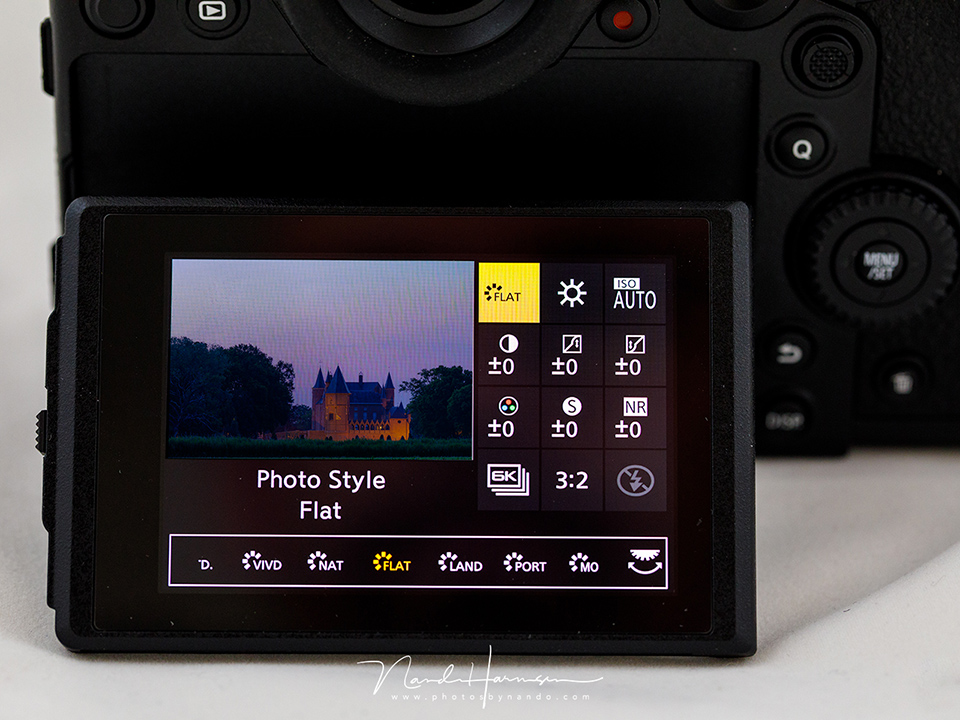
Also combine this with your white balance, as explained in tip 2. It gives you complete control over the look of your photo. This is also something you should keep experimenting with, because every situation is different.
Tip 4: Create your own custom setting
There are many presets built into the camera by the manufacturer. Think of the 'landscape', 'portrait' and 'neutral' presets. Presets such as the well-known 'Acros', 'Velvia' and 'Astia' on Fujifilm cameras are also useful.
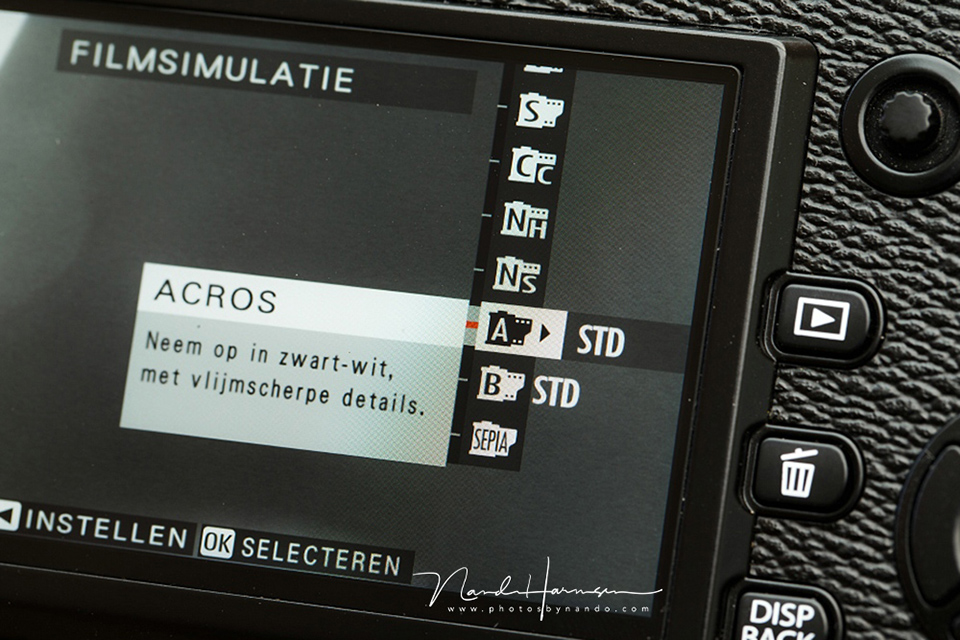
These settings give your photos a distinct look. You can even use them as a starting point for your own custom preset. This makes the look of your photo even more personal.
Tip 5: Do not use Exposure to the Right
You may have heard of Exposure to the Right (EttR), which means exposing the photo so that the histogram is as far to the right as possible. Do not use this for your JPEG photography!
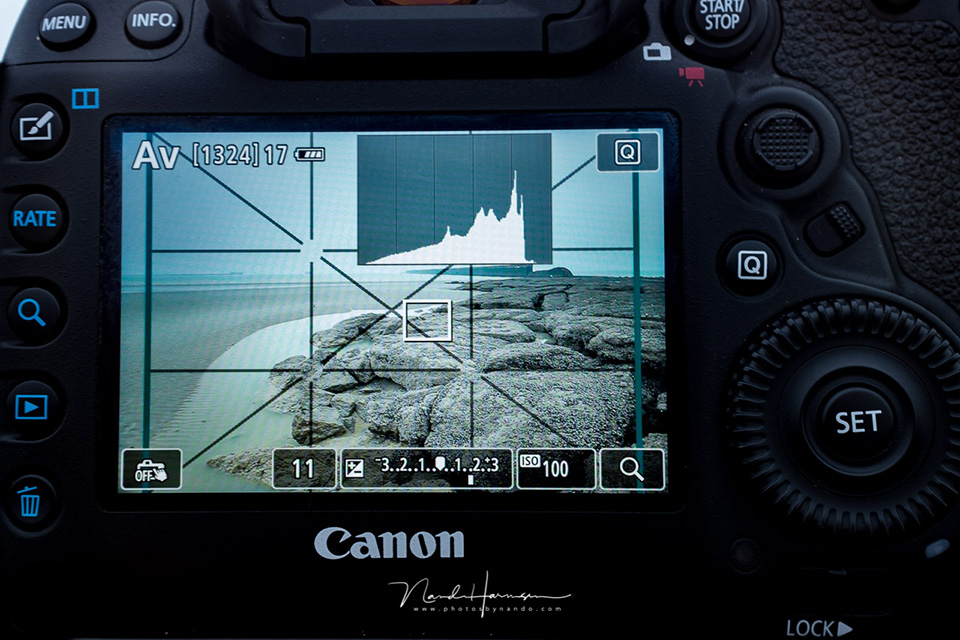
Using EttR makes your photo very light, perhaps even washed out in colour. This technique is exclusively for photographers who process their photos afterwards. If you shoot in JPEG, make sure you have a good histogram, with a nice distribution between light and dark.
Tip 6: Set an expanded dynamic range
Many cameras now offer an expanded dynamic range setting. This may be called highlight priority, or something similar. Fujifilm calls it DR100, DR200 and DR400.
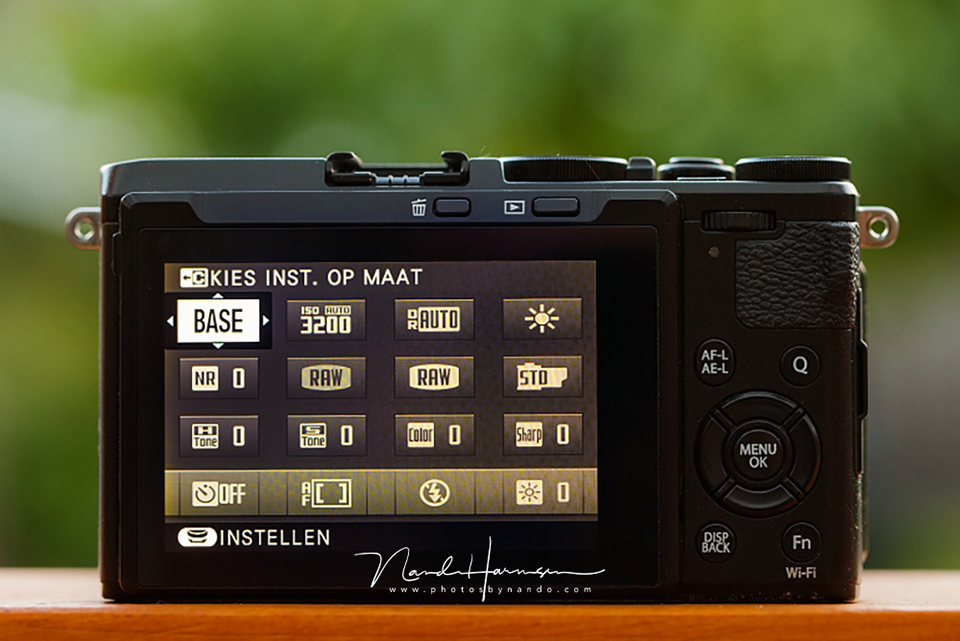
This setting makes blown-out whites less likely. It will not always be possible to prevent them completely, hence tip 1, but it can certainly help. Do bear in mind that with this setting, you can no longer use the lowest ISO value.
Tip 7: Use the built-in lens correction
There are almost no lenses that are perfect. They all have some lens faults. Think of vignetting and chromatic aberration, which produce purple or green lines around areas of high contrast. Distortion from wide-angle or telephoto lenses can also occur.
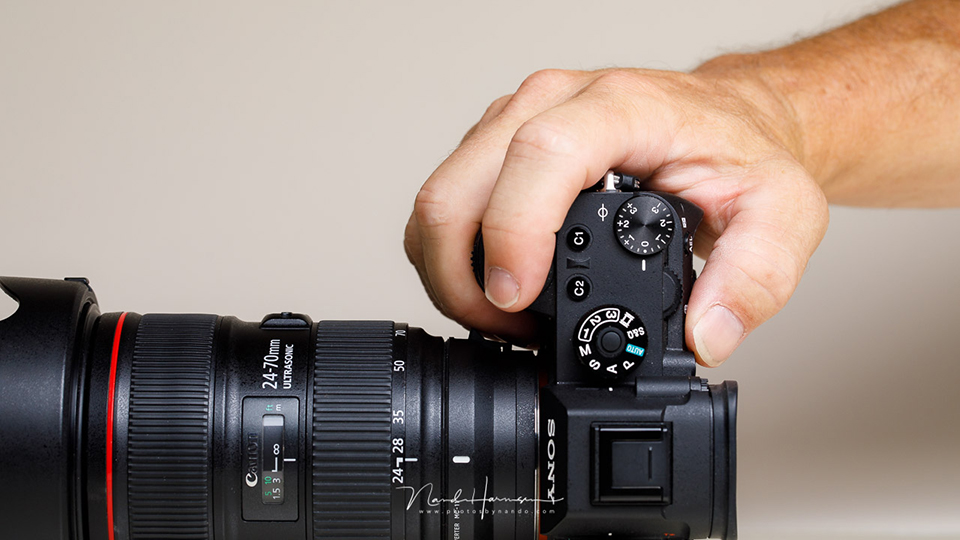
Most cameras offer built-in lens correction, which corrects these lens faults, or some of them. Keep it switched on wherever possible.
But be careful with lenses from other brands. I know, for example, that the lens correction for a Sigma 85mm ART lens on a Canon EOS 5D Mark III causes very unpleasant effects. Always check this.
Tip 8: Choose sRGB, not AdobeRGB
You can set a camera to the sRGB or AdobeRGB colour space. The latter allows more colours to be displayed. So it seems like the best choice, but it is not.
Almost everywhere you use your photos, the standard is the sRGB colour space. AdobeRGB may not be supported, which can make your colours look different. That is not what you want.
Print labs also often require sRGB as the colour space. AdobeRGB will cause colour deviations there too. So always choose sRGB, so you are never faced with surprises and your fans see the photos in the correct colours.
Tip 9: Set the fine JPEG quality
It is important to have the best-quality photos. Many cameras can save JPEGs at different quality levels. Always choose the best quality, fine-JPEG or similar.
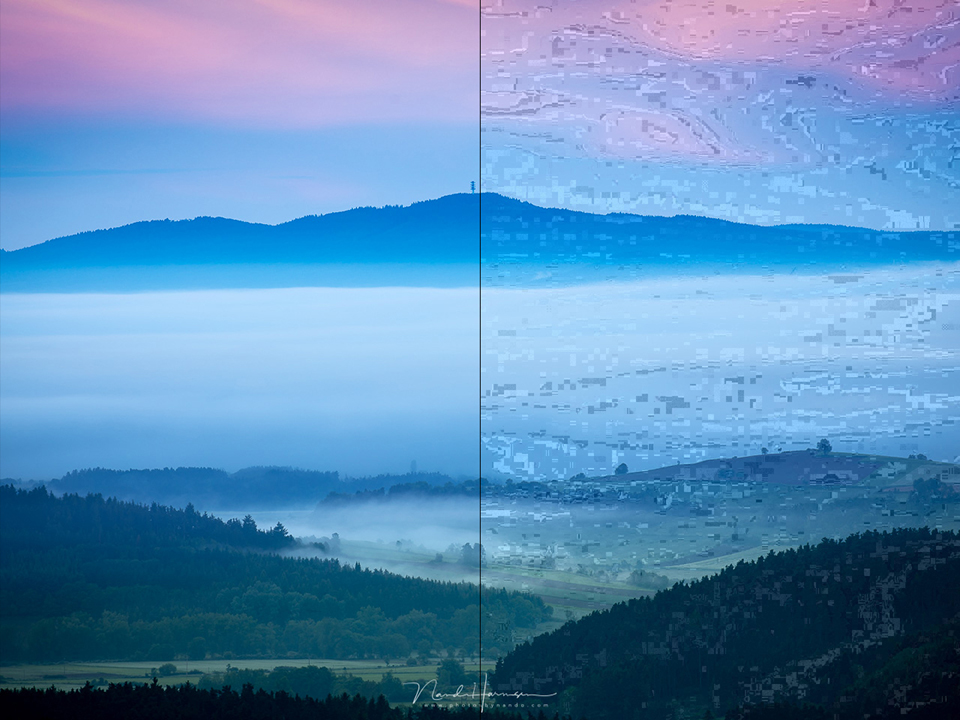
The best JPEG quality does produce the largest files, but it prevents you from getting poor quality. Especially if you are going to print your photos later, you do not want all kinds of strange artefacts to be visible.
Tip 10: Be prepared for fast action
Because JPEG gives you little opportunity to change or adjust things afterwards, you need to make sure the photo is exactly right in the camera. Think of all the points I mentioned above.
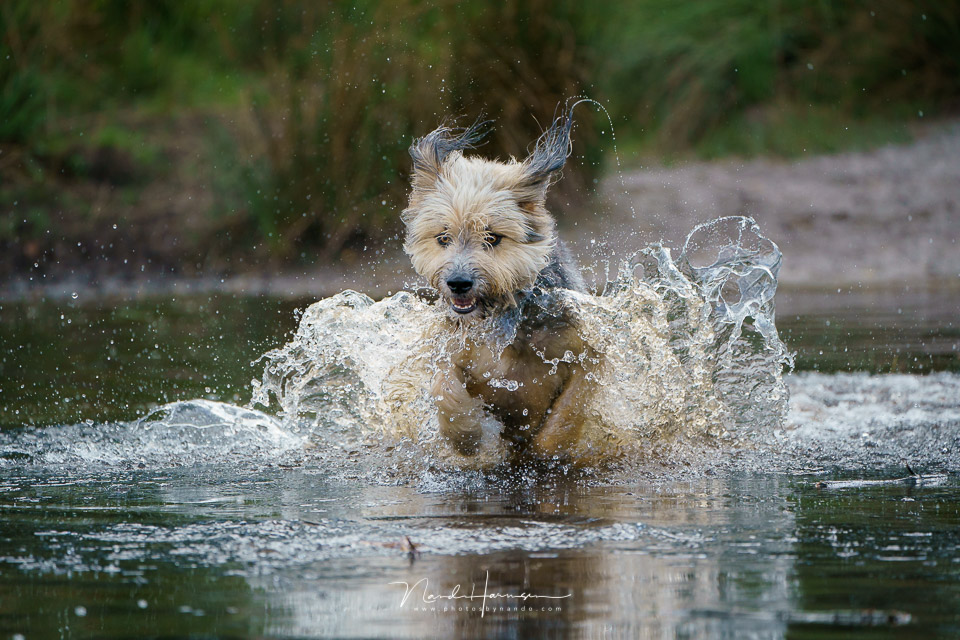
If you are going to photograph action, make sure you have set everything correctly beforehand. Not just the exposure, but also your presets, colours, white balance, dynamic range and anything else that may apply. Then you can be sure your photos will be good.
Processing in the camera
What you are actually doing as a JPEG photographer is editing your photo in the camera itself. You use the software in the camera to process the raw image signal from your sensor into your desired final result. How well this works depends on the camera you use.
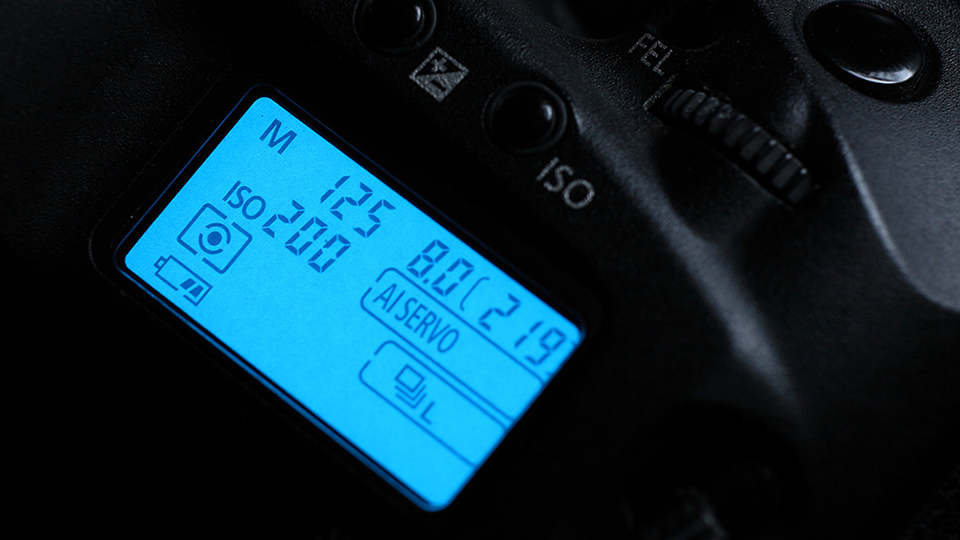
In fact, as a JPEG photographer you are not post-processing, but pre-processing, because you need to have all the settings perfect before you take the photo. Also remember that if you do not post-process or pre-process your photo, you are completely dependent on what the manufacturer intended. And that is not always perfect.
In other words, no photo straight out of the camera is 'natural'. It is up to you as a photographer to optimise it. As a JPEG photographer, you can also do this perfectly to a certain extent, especially with the help of the tips I have given.
Once again, this article is not intended to persuade you to shoot in RAW, but to help you make your JPEG images as good as possible.
Are you a JPEG photographer or a RAW photographer? If you shoot in JPEG, is there a particular reason? Let us know in a comment why you only shoot in JPEG?
About the author
Nando Harmsen has been photographing for more than 40 years. He specialises in wedding photography and landscape photography. Nando also gives talks, workshops, masterclasses and photo trips, and regularly reviews new and interesting equipment.
You might also like
-
 Is there a reason to save both raw and jpeg?
by Nando Harmsen
-
 Everyone photographs in raw, there are no exceptions
by Nando Harmsen
-
 Keep an overview: don't make JPEGs of your RAW files
by Nando Harmsen
-
 How to handle JPEGs and prevent quality loss
by Nando Harmsen
-
 Make the Most of Your Camera as a JPEG Photographer
by Nando Harmsen
-
 Saving a JPEG in Photoshop has changed
by Nando Harmsen
39 comments
-
 RAWshooter wrote on Tuesday 28 July 2020 at 10:45 | reply
The tip about manual white balance is more or less the worst one you can give a jpg photographer. White balance can hardly be adjusted anymore with a jpg. And automatic WB is almost always spot on in digital cameras.
Translated from Dutch. -

 Nando
wrote on Tuesday 28 July 2020 at 11:14
| reply
Nando
wrote on Tuesday 28 July 2020 at 11:14
| reply
@RAWShooter;
Translated from Dutch.
I understand your opinion, but precisely what you are saying is the reason why a JPEG photographer can influence the look of his photo with the white balance. The JPEG photographer cannot do that afterwards, so the JPEG photographer has to do this on the spot.
So, if the result is not to your liking, adjust the white balance and take the photo again. This is precisely important for the JPEG photographer, and hardly of any importance to the RAWshooter. -
 Fuji shooter wrote on Tuesday 28 July 2020 at 11:29 | reply
For some time now I've switched to Fuji cameras and by now mainly photograph in JPEG. The film simulations and possibilities to create 'in camera' recipes deliver fanatastic results SOOC. Read the RAW/JPEG discusssion in this article : https://fujixweekly.com/2020/07/26/raw-vs-jpeg-the-debate-needs-to-end/
Translated from Dutch. -
 Donald Willemsen
wrote on Tuesday 28 July 2020 at 11:46
| reply
Donald Willemsen
wrote on Tuesday 28 July 2020 at 11:46
| reply
I think shooting in jpeg makes sense for photojournalists and for hobby photographers who don't want to spend time on post-processing on a PC or don't want to spend money on good editing software. A photojournalist must be able to send their photo ready-made to a newspaper or magazine and possibly also want to post it on social media. A hobby photographer, who only engages in photography during their holiday, may find the ready-made jpegs from the camera good enough to show them at a family gathering or have a photo book made from them. To each their own choice. It is indeed the case that if you want to have a JPEG according to your taste, you need to know your camera well and set it optimally according to the situation at the moment. That requires weighing things up and adjusting the settings each time. A lot of work if you want to do it well, and by then the bird has often already flown. With RAW you can still correct and optimise a lot afterwards. But as mentioned: Sometimes you can't avoid shooting only in JPEG. In such a case I might rather choose to shoot in JPEG and RAW.
Translated from Dutch. -
 Edith wrote on Tuesday 28 July 2020 at 11:46 | reply
on the advice of the photographer from the photo club, I always have my white balance set to cloudy. Is this actually not good?
Translated from Dutch.
I photograph in Jpeg, have often tried photographing in RAW but I find the Lightroom program so complicated that I have a hard time with it. -
Donald Willemsen
wrote on Tuesday 28 July 2020 at 12:23
| reply
@Edith, Photofacts Academy has an excellent course for Lightroom. If you are a member of Photofacts Academy, you can watch it again as often as you like. That is how I also learned a thing or two.
Translated from Dutch. -
 Fons BItter wrote on Tuesday 28 July 2020 at 12:52 | reply
The only question that hasn't been answered:
Translated from Dutch.
Why does that photographer want to photograph in Jpeg so 'badly'?
What advantage does that "WANT" offer? -
 Willy Maas wrote on Tuesday 28 July 2020 at 13:16 | reply
I understand that you have more options for post-processing with RAW images, but that doesn't mean you can't edit JPEGs at all. I always edit my JPEG images, but I don't have to put as much work into them as I do with a RAW image.
Translated from Dutch. -
Nando
wrote on Tuesday 28 July 2020 at 13:26
| reply
@Edith:
Translated from Dutch.
A good piece of advice. I always have the white balance set to daylight (5000-5200K) myself. But that's knowing that I can still change it in post-processing.
Just be careful when shooting JPEG. You can keep the white balance at a fixed value, but always check whether the photo is right, and take a new one if the white balance isn't right.
@Fons:
The article isn't about why the photographer wants to shoot in JPEG. It only gives tips for the photographer who wants to shoot in JPEG.
Only that person can say why someone wants to shoot in JPEG. The choice is often very personal. -
Nando
wrote on Tuesday 28 July 2020 at 13:29
| reply
@ Willy:
Translated from Dutch.
It is an illusion that editing a JPEG takes more work than a RAW image. This makes no difference.
You can indeed still adjust a JPEG, but not as far as a RAW image. You quickly run into a decline in quality. But you're right, you can still fine-tune a JPEG to a certain extent -
 Bougie wrote on Tuesday 28 July 2020 at 15:39 | reply
If Photoshop is used, there is another great option: use the RAW filter. It offers countless possibilities!
Translated from Dutch. -
Nando
wrote on Tuesday 28 July 2020 at 15:54
| reply
@Bougie:
Translated from Dutch.
This is indeed a great option in post-processing. However, keep in mind that with an 8-bit JPEG file, you can't get more information out of it with the RAW filter either than what is already in there. You still have the same limitations. -
 William wrote on Tuesday 28 July 2020 at 16:47 | reply
RAW versus JPG is indeed a choice. Any photographer who wants more quality can only be advised to always shoot in RAW. After all, you can always export a JPG (or an sRGB, a TIFF) in PS. Overall, shooting in RAW has infinitely more advantages than JPG, ergo it is for that reason the best choice! Don't let anyone confuse you!
Translated from Dutch. -
 Roland wrote on Tuesday 28 July 2020 at 19:00 | reply
I have been photographing for 55 years and during those years I earned half of my income from photography. Mainly event photography. Since I come from old ANalogue photography, I make sure my shots are right straight away. I do regularly use bracketing. Think proactively. Greetings from Belgium
Translated from Dutch. -
 Paulussie wrote on Tuesday 28 July 2020 at 20:50
| reply
Paulussie wrote on Tuesday 28 July 2020 at 20:50
| reply
Good piece. It also clearly shows that photographing in JPG requires just as much work as shooting in RAW. The only thing is that you have to do the work first, on location, and often in a hurry, whereas when you shoot RAW you can calmly get the best out of it. That doesn't alter the fact that with RAW you still have to pay attention to large contrasts. The range is greater, but not infinite, film was better at that.
Translated from Dutch.
Having said that: old amateurs will still remember it from the early days of digital: JPG is like slide film, RAW a negative. Same problem, contrasts that were too large or an incorrect colour balance could no longer be corrected in slides, but could with negatives. -
Nando
wrote on Wednesday 29 July 2020 at 09:16
| reply
@William:
Translated from Dutch.
From your response, I gather that you claim that shooting in RAW produces a better quality image than JPEG?
I dare to dispute that. I don't expect you will see a difference, although I have to admit that this can vary from camera to camera.
The big difference is that with RAW you don't use your camera's RAW converter, but one on your computer. That gives you the opportunity to correct mistakes in the settings afterwards.
But you are right in this respect: you can make maximum use of your camera's dynamic range, something that is less easy with JPEG. Unless you use some of my tips. Because that already gives you more leeway. You just have to set it up in advance. -
-
Paul wrote on Wednesday 29 July 2020 at 11:22 | reply
@ Nando: that's not my comparison, that's what I read in a photography magazine at the time.
Translated from Dutch.
As for your other comment, the dynamic range of JPG is never what the camera can do, because it's only 8 bit, not only less colour depth, but also enormously limited dynamic range. think of it as an MP3 compared to a SACD..... -
 Footootje wrote on Wednesday 29 July 2020 at 13:05 | reply
until now I always worked in JPEG, With in the back of my mind that RAW is much more cumbersome due to post-processing and that RAW takes up a lot of space on your card. the adventure beckons now !
Translated from Dutch. -
Nando
wrote on Wednesday 29 July 2020 at 13:19
| reply
@Paul:
Translated from Dutch.
The photo you create when post-processing your RAW is also that 8-bit JPEG file. The only difference is that you do it yourself on your PC, while the camera does it internally. That camera also has to process that raw sensor data.
You simply have much more influence over that processing on a computer than with the limited adjustment options of a camera. But if you read point 6, you will see that you can also make use of the sensor's dynamic range in the camera by changing a setting.
In short, shooting in JPEG means making use of the post-processing IN the camera, with the (limited) settings available to you there, and shooting in RAW means making use of the post-processing OUTSIDE the camera, with more possibilities. But in both cases you end up with your 8-bit JPEG file, or, to use your own analogy, the MP3 file. -
Paulussie wrote on Wednesday 29 July 2020 at 14:44
| reply
Nando, no, post-processing on the PC already starts with 12 or ( in my case ) 14 bit, all the Nikons I have used offer those two possibilities. The editing program then converts them to 16-bit TIFFs.
Translated from Dutch.
If I then, for whatever reason, want JPGs, then it indeed becomes 8 bit.
So, to get an optimum with a possible print, this has an advantage, but to view them on a TV screen it makes no difference, those are (as far as I know)not exactly richly endowed. -
 Pieter wrote on Wednesday 29 July 2020 at 16:44 | reply
I am a beginner photographer and only shoot in jepg. This is because I first want to become thoroughly familiar with my camera, a Panasonic G9. Now and then I see an Expodisc white balance tool pop up. Does it make sense to purchase and use one, or are the standard white balance settings on the G9 sufficient as long as I shoot in jepg.
Translated from Dutch. -
 ronmaarschalkerweerd wrote on Wednesday 29 July 2020 at 17:05 | reply
Funny that I’m seeing this here now. I won’t mention the image guru here but he would preferably say "Fuck RAW" sorry for the language. One advantage I find myself is that jpeg is very close to the image the camera manufacturer intends. Good luck getting that with, for example, CaptureOne, as soon as it’s loaded it has nothing more to do with the image that comes out of your camera because they think they have to make I don’t know how many profiles for the conversion plus quite a few more changes that I won’t mention here. Today’s cameras have a pretty decent dynamic range, so if you shoot for your highlights in jpeg, in Photoshop using Apply Image Screen in a separate layer and then using Blend-if to bring back highlights from the underlying layer is a good option. You can repeat this too.
Translated from Dutch. -
Donald Willemsen
wrote on Wednesday 29 July 2020 at 17:50
| reply
@ronmaarschalkerweerd, quote: 'One advantage I personally find is that jpeg is very close to the image that the camera manufacturer intends.', end quote. Don't you think it's more important that the image is close to how YOU intended it instead of letting the manufacturer decide? You lose a large part of your own input in the process. I won't say that a JPG straight out of the camera is bad, but I still want to have more to say about what the image should look like to me. After all, I am the photographer. My vision and creativity also help determine the image. I respect your choice and opinion, but I still wanted to give you something to think about. So I won't say: F*ck RAW either.
Translated from Dutch. -
Paulussie wrote on Wednesday 29 July 2020 at 18:05
| reply
@ronmaarschalkerweerd,
Translated from Dutch.
I only know Captur one by name,. If I open my RAW (NEF) in LR or PS, basically nothing changes, until I do that.
With Nikon's own software, the camera settings come along, such as white balance and noise reduction, but no changes in the image. (and possibly lens correction)
Maybe an option for you to switch software? -
Nando
wrote on Thursday 30 July 2020 at 09:20
| reply
@Pieter:
Translated from Dutch.
an expodisk gives you the ability to remove any color cast from a photo. The only use this tool has is if you want to achieve perfect color accuracy in a controlled environment. That is not necessary in 99 out of 100 cases -
Nando
wrote on Thursday 30 July 2020 at 09:27
| reply
@Ronmaarschalkerweerd:
Translated from Dutch.
"Modern cameras have a very decent dynamic range..." you say. That is absolutely correct. But this range can only be found in the 12-bit or 14-bit raw files.
The 8-bit JPEG file no longer has that dynamic range. So you can perform the processing as you call it better and more effectively, with better image quality, from a raw file. Only then do you have sufficient image information to use that dynamic range.
I only wonder why you then continue photographing in JPEG when editing your image. Just because of the camera profile that the manufacturer uses in its camera? First, you can simply adopt that in your software, and second, with your processing you are already doing violence to the manufacturer's camera profile. -
Roland wrote on Thursday 30 July 2020 at 10:24 | reply
I suspect that not a single one of the most iconic photos of the last 100 years was taken in RAW.Of course if you have to shoot photos for a TOP GLOSSY MAGAZINE or a 20m² billboard it could be useful to work in RAW. And one last point: a beautiful or interesting photo taken in somewhat lower quality is still relevant. All other less good shots TRASH.
Translated from Dutch. -
guest wrote on Thursday 30 July 2020 at 11:59 | reply
@Ronald.
Translated from Dutch.
what you say is right, most iconic photos were shot on negative film.e.g. Andel Adams. Because they were shot on negative film, he could adjust them so immensely.
if he had done them in jpg ( if that even existed) he couldn't have done that. JPG immediately cuts away 1/2 of the image information, that's why, if you want to edit afterwards, it's better to use RAW. those 4 or 6 extra bits work wonders. Even if it's only for your family album. -
Fuji shooter wrote on Thursday 30 July 2020 at 12:15 | reply
If you have to recover a lot of information from your RAW file in post-processing, then you simply didn't set up your camera properly when taking the photo.
Translated from Dutch.
Shooting in RAW gives you a lot of room for correction, but it can also make you a lazy photographer. Totally fine, if you prefer working with your PC rather than with your camera.
My preference is JPEG straight out of the camera, and a RAW file in my second slot as a backup for 'emergencies'. -
Nando
wrote on Thursday 30 July 2020 at 12:29
| reply
@Fuji shooter:
Translated from Dutch.
"... then you simply didn't set your camera properly when taking the photo." That opinion is rather simplistic, and I dare say outright that it isn't true.
RAW gives you the opportunity to pour your own sauce over the photo, to apply your signature editing to it. You have decided to use the sauce Fujifilm has prepared for you.
Of course RAW gives you more leeway, which is why you also put RAW on your second card, in case you haven't set your settings properly, right?.
So it's nonsense to portray the RAW photographer as a lazy photographer, or as a photographer who doesn't set their camera properly. You don't need such an opinion to justify your choice for JPEG either. That choice was probably well-considered, and there is nothing wrong with that. -
Paulussie wrote on Thursday 30 July 2020 at 13:32
| reply
@fujishoter:
Translated from Dutch.
I have to agree with Nando. Shooting RAW because you're too lazy to set up your camera properly is not the way to do it.
But letting your expensive camera with dozens of possibilities only spit out little JPGs is also a waste. As Nando already points out, with the extra information in RAW you can work out your own ideas, see my example in the earlier post about Andel. He really didn't put his negative in the enlarger and print it straight as it was. That is what the camera does with JPGs -
 Frans van der Kolff wrote on Thursday 30 July 2020 at 14:01 | reply
An interesting article, one that for once does not assume that photographing in jpeg is always the inferior choice. I see a great many opinions on the internet. But I have never yet found a proper test on the internet in which identical images are post-processed both in raw and in jpeg by independent raw and jpeg experts, and from which the advantages and disadvantages of both methods could therefore become apparent. With such a test, using image material, you could see what exactly the differences are when post-processing a jpeg or raw shot. That seems much more telling to me than the many descriptions on the internet, which are all de facto personal interpretations. I would say: let experts give it their best shot and let the resulting images speak for themselves. A real challenge for Photofacts.nl!
Translated from Dutch. -
Donald Willemsen
wrote on Thursday 30 July 2020 at 14:33
| reply
@Fujishooter, I agree with Nando too. Moreover, RAW offers many more color nuances that are almost completely compressed away in a JPG. It is precisely those small color nuances that you can still use well in a RAW file to make your photo special. This way, details can still be recovered even in the darkest areas. With a JPG, you have often already lost them due to compression. You also have to set the camera properly with RAW. The idea that you don't have to do that with RAW is complete nonsense. Every correct camera setting is a pure gain during post-processing. In addition, Nando's 'sauce' (they are also used in the analog darkroom) is just as important. It makes you recognizable as a photographer. Your own style is precisely the most important thing. Take the famous analog photographer Paul Huf, for example. He is so recognizable because he developed his own style that made him famous. Stefan Vanfleteren is also someone with his own style. That own style is the 'sauce' Nando is talking about.
Translated from Dutch. -
Nando
wrote on Thursday 30 July 2020 at 15:21
| reply
@Frans van der Kolff:
Translated from Dutch.
It is indeed good to compare an edited RAW image with a JPEG, to see whether one has an advantage over the other. And those tests do exist, if you search well enough - which can sometimes be very difficult.
It turns out that the difference in quality can depend very heavily on which camera is used. Not all manufacturers get the most out of creating a JPEG from their sensor data. There are also those who do this better than what you could do yourself, without putting in a huge amount of effort.
An example can be found at https://www.dpreview.com/reviews/fujifilm-x-t4-review/6 where the RAW and JPEG from the Fujifilm X-T4 can be compared under controlled conditions. They do this there with every review of every camera. -
Roland wrote on Thursday 30 July 2020 at 17:26 | reply
We can all meet up together sometime at a little church with a garden. At the same hour on the same day of course. Who will win ? the artist photographer or the technical photographer?
Translated from Dutch. -
 Greet Riesebos wrote on Sunday 2 August 2020 at 21:38 | reply
I take an incredible number of photos and edit them a little afterwards. I photograph in JPEG and if I were to take all of them in Raw, I would have a lot more work than I do now and I already spend entire evenings behind the computer with my JPEG photos. It also takes up a lot more space on the SD card and computer. I do it as a hobby and spend 3 to 4 times a week in nature to capture everything that moves. I really dread photographing in Raw.
Translated from Dutch. -
Paulussie wrote on Sunday 2 August 2020 at 23:05
| reply
@Greet.
Translated from Dutch.
It’s not the case that post-processing a RAW file is more work than a JPG, with the program intended for my Nikon (NXd) it’s actually less work. (Obviously after you’ve practiced with it a bit).
The files are indeed a bit larger, but memory costs almost nothing. My D500 writes more than 500 photos in RAW on a 16 gig card, I don’t use that up in a day, I connect an external 2Tb drive to my PC, where I write the RAW files away as an archive, I can store several years on it, and it costs only about €70.......
And then I edit from those copies, usually a matter of moving a few sliders, for overly bright skies, or too dark shadows, and occasionally adjusting the white balance. The latter doesn’t even work if you shoot in JPG, then it really becomes a lot of work.
I’d say: give it a try! -
 Slimpie wrote on Saturday 8 August 2020 at 09:39
| reply
Slimpie wrote on Saturday 8 August 2020 at 09:39
| reply
My approach is as follows: I set up my Panasonic GX9 so that I get the best possible photo quality.
Translated from Dutch.
Then I set it to save JPEG and RAW. If the JPEG does not meet my expectations, I can always edit the RAW version afterwards in the camera or in Lightroom. This also gives me more options if I want to quickly share photos via social media.
Have your say
Please note: Articles older than a week can only be commented on by signed-in visitors.Would you still like to comment? sign in or create a free account.
Become a better photographer every week
A practical photography tip in your inbox every week.
39,024 photography enthusiasts already receive the tips! More about the weekly mail. Or keep up to date via  Facebook.

Elja Trum
Photofacts; everything to do with photography!
Would you like to take better photos and keep up with what is happening in photography? Photofacts publishes articles that teach you something about photography — from a product announcement to a practical shooting tip or a look at a website. Photofacts covers photography every day and is a hobby project of Elja Trum's that got out of hand. The articles are written by a team of volunteer authors. If you would enjoy writing one or more articles for Photofacts, do get in touch.More about PhotofactsPhotofacts is made possible in part by
